
You've lived this moment:
- Google Ads says 142 leads. GA4 says 118. HubSpot says 97.
- The client call derails into "Which number is right?" instead of what to do next.
- You can't point to quotable jobs or revenue, only CPL and a pile of form fills.
If that feels familiar, you're not alone, and you're not doing anything "wrong." This is what happens when every system counts leads differently.
But there's a fix. With it, reporting gets clearer, client trust grows, and conversations shift from squabbles to strategy.
This guide gives you two wins:
- A manual way to create one lead number you trust (with quotable jobs + revenue attached)
- An automated version of the same workflow in Part 2, so you don't have to rebuild every month (with Quote Value + Sales Value)
Why your numbers don't match (and why it keeps happening)
When tools disagree, it's not because you're "bad at reporting." It's because each tool measures a different slice of reality:
- Ad platforms count conversions their way
- Analytics tools count events/sessions their way
- CRMs count contacts/deals their way
So every month you stitch together conflicting dashboards just to land on one lead number… and still can't confidently speak to which marketing drives quotable jobs and revenue.
That's why reporting feels tense. You're forced to reconcile systems that were never designed to agree.
The fix isn't more dashboards though. It's a single consistent lead record that can hold:
- Where the lead came from (source/campaign)
- What it was worth (quotable jobs) → Quote Value
- What it became (revenue) → Sales Value
With everything in one place, reporting gets clearer. You're no longer defending numbers. You're confidently showing which marketing leads to quotable jobs and revenue.
Next, you'll build a simple Lead Ledger that ends the "whose numbers are right?" debate and gives you a clean path to report quotable jobs and revenue.
Part 1: The Manual Fix
Note: You can absolutely do this manually. Many teams do. But it requires work and discipline. Part 2 is more scalable.
Step 1: Define your "single source of truth" rules (~15 minutes)
Open a doc and lock these definitions:
- What counts as a lead?
Calls? Forms? Chats? List them. - What counts as a qualified lead?
Pick the first point where a lead has real money potential (examples: "Quoted," "Proposal sent," "Opportunity created"). - What counts as revenue?
Closed-won only (most teams), or collected revenue if you need stricter accounting.
Gut check: If your definitions change every month, you'll always feel like you're presenting numbers you're not 100% sure of.
Step 2: Build a "Lead Ledger" (your one table to rule them all)
Create a spreadsheet with one row per lead, regardless of where it came from.
Lead Ledger template (copy/paste headers)
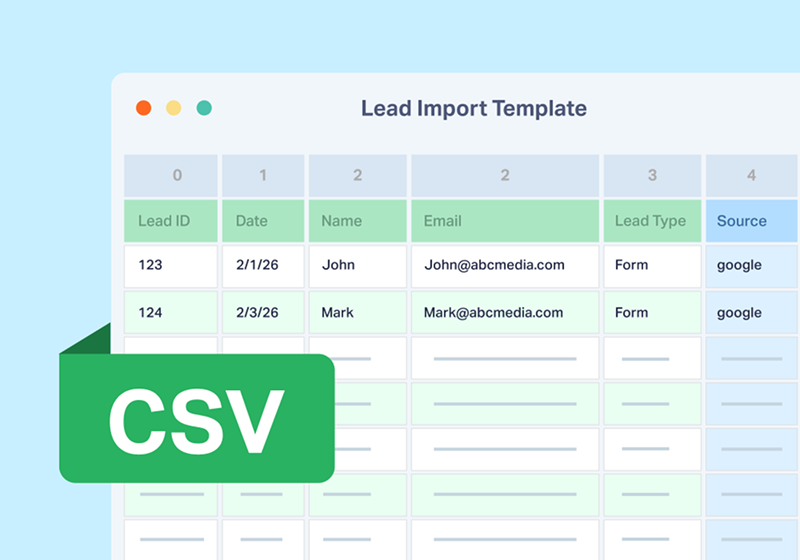
How to populate it (manual)
- Export leads from each system you use (ads/analytics/CRM/call logs/forms)
- Reformat lead data to match a single template
- Deduplicate using phone/email + a reasonable time window
- Map CRM stages to your pipeline definition (from Step 1)
Step 3: Add the missing piece: quotable jobs + revenue values
This is the bridge from "CPL/form fills" to "quotable jobs/revenue."
Quote Value = Quotable Jobs (fast signal)
Assign an estimated value as soon as a lead becomes quotable/qualified:
- Use average deal size by service line
- Use a fixed value per product/service category
- Use a lookup table ("Service A = $X, Service B = $Y")
Now you can report: Quotable jobs by campaign/source.
Sales Value = Revenue (final signal)
When the deal closes, add the closed-won amount back to the original lead row.
Now you can report: Revenue won by campaign/source, and prove it with real leads behind the number. Instead of a mysterious total, you can point to the exact people in your ledger, show where each one is in the journey (Qualified → Quoted → Closed), and show the pipeline/revenue attached to each record.
Plus, you can filter by source, medium, campaign, and landing page to see total Quote and Sales Value associated with each.
That's what turns a "form fills" conversation into a revenue conversation, and it's why your next call feels calmer: no more conflicting platforms giving slightly different answers, just one source of truth you can defend.
Disclaimer: Why it still feels shaky
Your Lead Ledger gives you proof, but only as long as it stays perfectly updated. In real life, you're juggling campaigns, lead types, and a dozen other priorities. One missed step (a duplicate not merged, a Quote Value not logged, a closed deal not tied back) and your "source of truth" quietly turns into "close enough."
Then the dreaded question comes back on the next call: "Okay… but which number is right?" And you're back to defending data instead of confidently reporting pipeline and revenue.
If you want the same proof without the upkeep, Part 2 shows how to turn this Lead Ledger into an automated system-of-record, so every lead is captured, valued, and report-ready by default.
Part 2: The Scalable Fix (How WhatConverts Solves This Exact Issue)
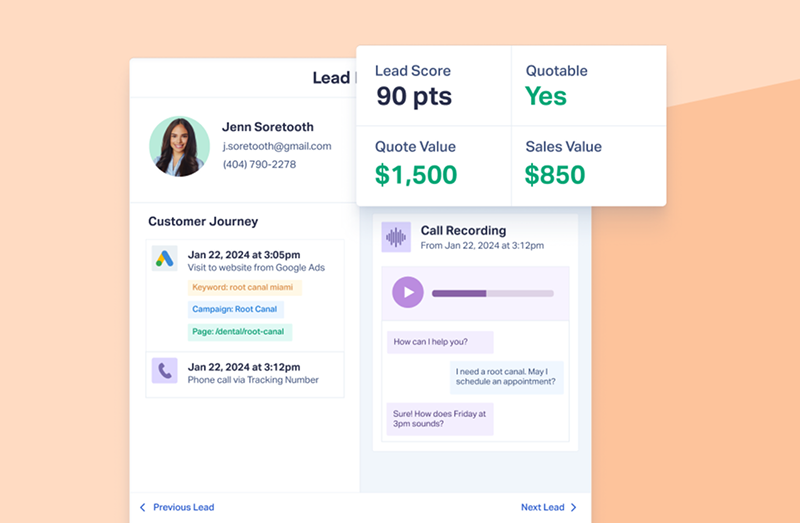
What changes with WhatConverts: instead of multiple systems fighting each other, you get a single lead record that holds source + quotable jobs value + revenue value.
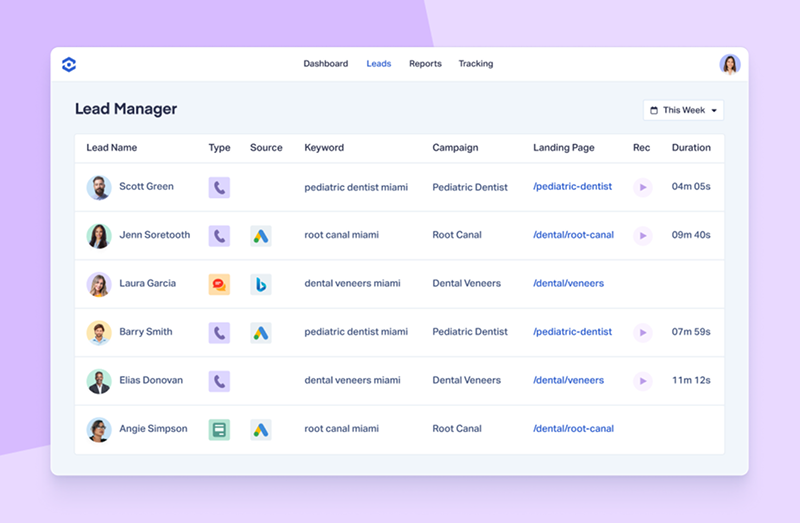
Step 1: Centralize leads into one Lead Manager (so counts stop fighting)
In WhatConverts, your leads live in one place, and you can view everything consistently.
Step 2: Add Quote Value + Sales Value (so quotable jobs & revenue are reportable)
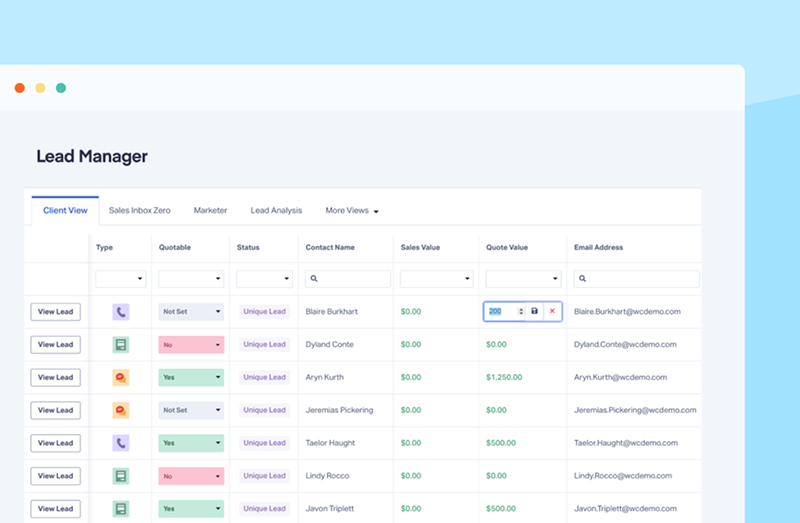
Option A: Add values manually (fastest path)
How to do it (high-level):
- Go to Leads
- Update Quote/Sales value on the lead (either from the list or inside the lead)
Option B: Backfill values in bulk (if you have CRM exports)
If you already have closed-won values in a CRM or accounting tool export (any CSV will work), update existing leads via import/update.
Option C: Automatically assign Quote Value with Lead Intelligence rules (most scalable)
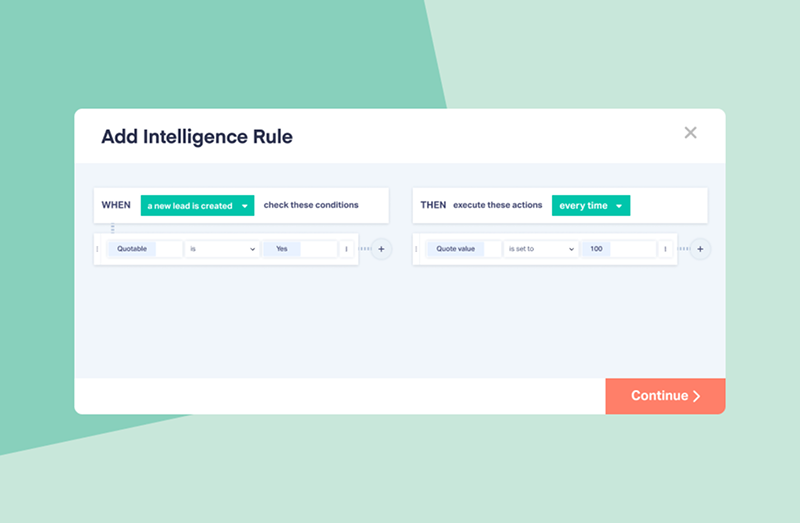
If your biggest pain is consistency ("did we value this lead yet?"), Lead Intelligence rules let you apply Quote Value automatically using IF/THEN logic, so quotable jobs reporting stays clean without someone manually touching every lead.
Examples of when this is a game-changer:
- Different services have different typical values (Repair vs Replacement)
- Certain lead types should be valued immediately (calls over X seconds, forms that include a service dropdown)
- Certain signals should trigger higher/lower values (landing page, form field, keyword, or key phrases in a call)
How to set it up (high-level):
- Go to Lead Intelligence → click + Add Intelligence Rule
- Choose IF conditions that indicate the service/intent (e.g., form field value, lead type, landing page, keyword, customer journey signals)
- Choose the THEN action: Set Quote Value (and optionally set "Quotable = Yes")
- Save the rule and test with a handful of recent leads to confirm values are applying correctly
Step 3: Make Sales Value flow automatically (so revenue reporting doesn't rely on someone updating a sheet)
This is where scalable reporting is won or lost.
Practical flow:
- Lead is captured in WhatConverts (with source/campaign)
- Lead syncs/exists in your CRM for sales workflow
- When a deal closes, the closed amount is sent back and stored on the lead as Sales Value
Step 4: Get stakeholder-ready answers fast (stock reports first, custom if needed)
Once Quote Value and Sales Value exist on leads, you can answer:
- Which campaigns and channels created quotable jobs? (Quote Value)
- Which campaigns and channels created revenue? (Sales Value)
Option A (recommended): Use stock reports (fastest path)
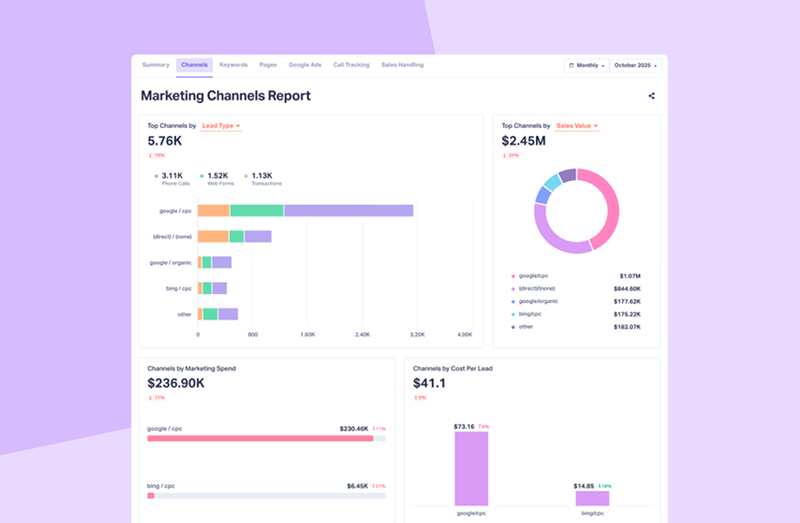
We built stock reports for the most common questions teams ask, so you don't have to learn Report Builder just to get answers.
- Marketing Channels Report: see value by channel at a glance (perfect for "what's driving quotable jobs and revenue?")
- Google Ads Report: see performance/value specifically for Google Ads (ideal for paid teams and agency reporting)
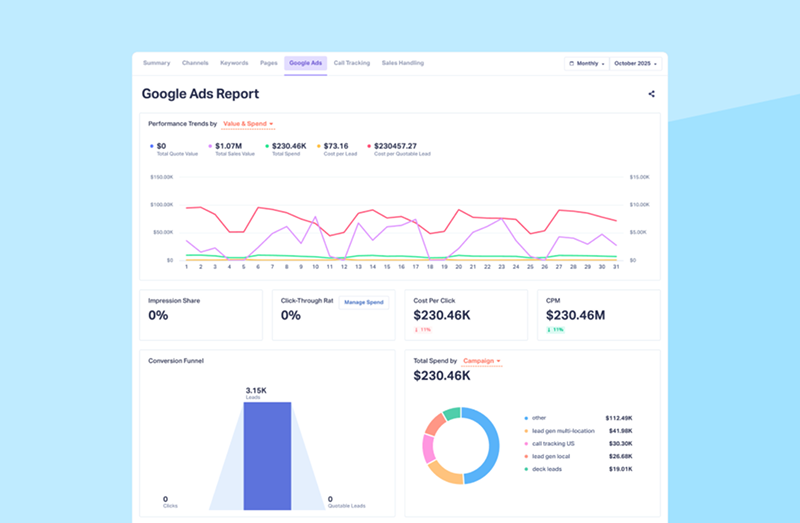
Note: If you're trying to calm reporting chaos quickly, start here. Once your Google Ads Account is integrated, these are ready the moment Quote Value and Sales Value exist on leads.
Option B (optional): Custom build a report in Report Builder
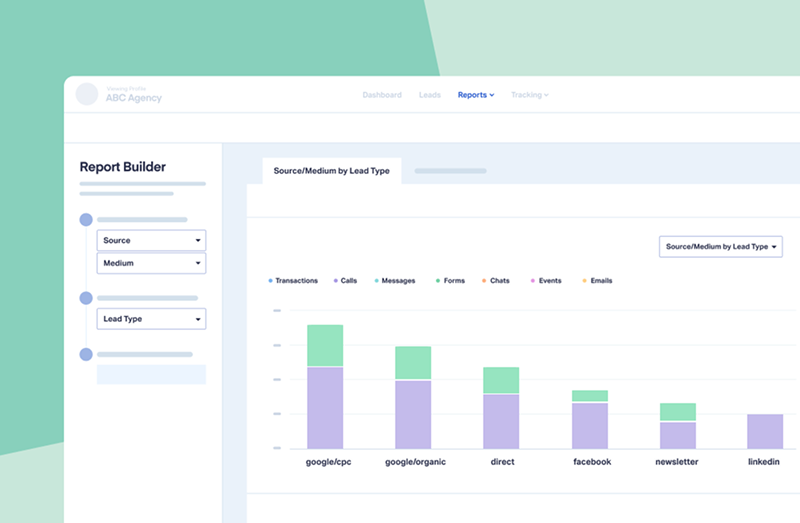
If you need something specific (custom groupings, filtering, or a unique stakeholder view), use Report Builder.
How to do it (high-level):
- Open Report Builder
- Select dimensions like Source/Campaign
- Add metrics: Quote Value and Sales Value
- Save the report
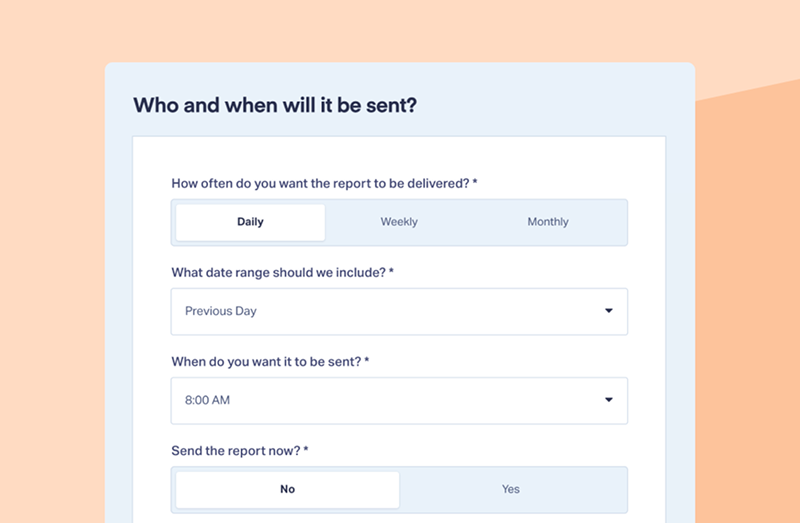
Step 5: Schedule it (so Monday reporting panic stops)
How to do it (high-level):
- Go to Reports → Scheduled Reports
- Click Add Scheduled Report
- Choose report type + frequency + recipients
Real Example From One of Your Peers
Constellation Marketing (a law firm marketing agency) had a long-term client suddenly questioning their value after a consulting group used CRM data to claim a website chatbot "deserved credit." Their dashboards could imply success, but couldn't prove what leadership actually cared about: which leads became customers and how much revenue came from marketing.
After implementing WhatConverts as their single source of truth, Constellation could drill into individual leads to show exactly who they were, where they came from (down to keyword/landing page), and what happened next by cross-referencing lead records with CRM sales data. That's how they answered the brutal questions in real time ("Are these spam?" "How do we know they became customers?") with evidence, not opinions.
As Constellation put it, WhatConverts gave them and the client "peace of mind"… because "we can prove it." They went on to prove their marketing drove 70% of the client's earned revenue (over $500,000), delivered an impressive 9X ROI, and helped turn skepticism into a 150% budget increase.
Your Next Step
You don't need another month of "close enough" reporting. If this mismatch is creating stress, these two buttons are the fastest way to get back to confident, provable numbers.
Option 1: Start a free trial and have a pipeline/revenue-ready report tomorrow
If you want to walk into your next call with a single source of truth (and real leads behind the numbers), do this today:
Today's 30–60 minute setup:
- Centralize leads in one Lead Manager
- Add Quote Value + Sales Value to a handful of recent leads
- Build one report: Pipeline (Quote Value) + Revenue (Sales Value) by campaign/source
- Schedule it so it's ready before your next meeting
Option 2: Book a demo this week and let us help you set it up the right way
If you want this solved fast (and want to avoid guesswork), book a demo and we'll:
- Map your exact sources (Ads + GA4 + forms + CRM)
- Confirm your lead/pipeline/revenue definitions
- Show the Quote Value + Sales Value flow in your context
- Help you build the exact report your stakeholders keep asking for
You'll leave the call with a clear setup plan, and a path to stop defending discrepancies.
Schedule a DemoGrow your business with WhatConverts
Call Tracking plans start at just $30 per month after your free trial. See Pricing







