


 Amanda Pell
Your cost per lead is $42.
The dashboard looks great. Leadership's happy. The client approves the invoice.
Then sales calls: "Where are the actual prospects?"
Because low CPL means nothing when the leads aren't qualified.
You optimized for efficiency. You drove down cost. And you accidentally trained your campaigns to chase garbage—spam forms, tire-kickers, people who were never going to buy.
This is the qualification blind spot, and it's why cost per qualified lead (CPQL) is the metric that actually drives growth.
The good news: once you understand how CPQL works (and how to track it), you can stop optimizing for cheap noise and start optimizing for real opportunities.
Note: Not a WhatConverts user yet? Start your free 14-day trial of WhatConverts today or book a demo with a product expert to see how we help prove and grow your ROI.
The Problem: CPL Counts the Wrong Thing
Cost per lead measures how cheaply you capture conversions. It doesn't measure whether those conversions matter.
A B2B software company runs ads generating 200 leads at $50 CPL. Total spend: $10,000. Looks efficient.
Sales qualifies them:
- 140 are outside the target market
- 35 are students researching for school projects
- 15 are competitors gathering intel
- 10 are actual prospects
Your real cost per lead isn't $50. It's $1,000.
You didn't get 200 leads. You got 10 leads and 190 time-wasters that clog the pipeline and kill sales velocity.
This happens because ad platforms optimize for whatever signal you give them. Tell Google "get conversions," and it chases the easiest, cheapest conversions available—qualified or not.
Related Reading: Why Your Ad Platform Can’t Optimize for Revenue
Why Most Marketers Track CPL Instead
Tracking cost per qualified lead requires knowing which leads qualify. And most teams can't connect those dots.
The data lives in pieces:
- Google Ads shows conversions and cost
- The CRM shows which leads sales marked "qualified"
- Nobody connects marketing source to qualification outcome
So marketers default to CPL: not because it’s the best metric, but because it’s the only one they can reliably calculate.
The problem is that every optimization decision made off CPL quietly reinforces the same behavior: platforms learn to find more leads that look cheap, not leads that are actually worth pursuing.
But optimizing for cheap leads when you can't see which ones qualify is like judging a sales team by how many calls they make instead of how many deals they close.
Related Reading: Send Quote Value with Google Ad Conversions
How to Calculate Cost Per Qualified Lead
The formula is simple:
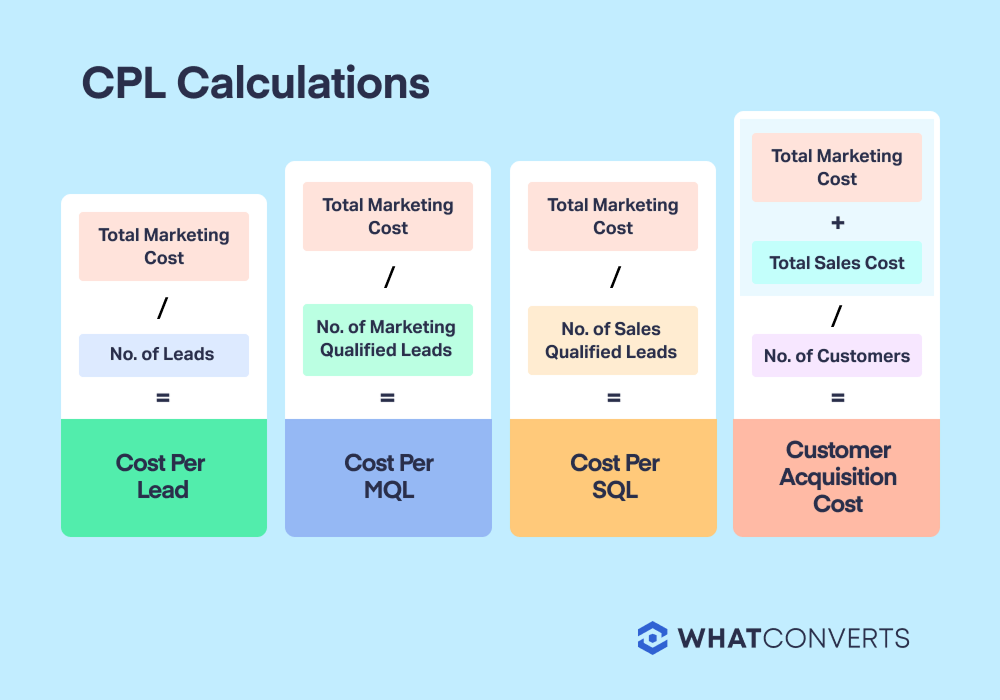
Cost Per Qualified Lead = Total Marketing Spend ÷ Number of Qualified Leads
If you spent $10,000 and got 10 qualified leads, your CPQL is $1,000.
The challenge isn't the math. It's getting the qualification data connected to the marketing source. Until that connection exists, CPQL stays theoretical—and optimization stays stuck at the CPL level.
Most teams run this calculation manually:
- Pull conversion data from ad platforms
- Export qualified lead lists from the CRM
- Match them by email, phone, or timestamp
- Calculate CPQL per campaign
It works. But it's slow, error-prone, and most teams only do it quarterly (if at all).
CPQL Formula Variants
Different businesses qualify leads at different stages. Your CPQL calculation should match when you actually know a lead is valuable.
- Cost per MQL (Marketing Qualified Lead): Measures leads that meet your initial criteria—right industry, company size, job title. Use this when marketing owns qualification.
- Cost per SQL (Sales Qualified Lead): Measures leads sales accepts into active pipeline. Use this when sales vets every lead before working it.
- Cost per Customer, or Customer Acquisition Cost (CAC): Measures leads that actually closed. This is the ultimate qualification metric, but takes longer to calculate due to sales cycle length.
Pick the metric that aligns with when you know a lead is worth pursuing. For most B2B companies, that's SQL. For high-volume lead gen, it's MQL.
Counting qualified leads requires agreement between marketing and sales on what "qualified" actually means. Most teams struggle because each department uses different criteria.
How Marketers Count MQLs
Marketing typically qualifies leads using demographic and behavioral signals before handing them to sales.
Common MQL criteria include company size, industry, job title, budget indicators, and engagement level. A SaaS company might count someone as an MQL when they work at a 50+ person company, hold a director-level title, and requested a demo.
The problem: marketing can only see what the lead submitted or clicked. They can't hear the actual conversation. So MQL counts often include leads that look qualified on paper but aren't actually ready to buy.
How Sales Counts SQLs
Sales qualifies leads by having actual conversations and asking discovery questions.
SQL criteria dig deeper than forms can capture: does the prospect have budget allocated, authority to make the purchase, a genuine need for the solution, and a timeline to buy? Sales reps spot tire-kickers, competitors, and students that slipped through marketing's filters.
This is why SQL counts are always lower than MQL counts—and why optimizing for SQL is more valuable than optimizing for MQL. Sales knows which leads are actually worth working.
Related Reading: Google Ads Says a Call Is a Conversion—Sales Might Disagree
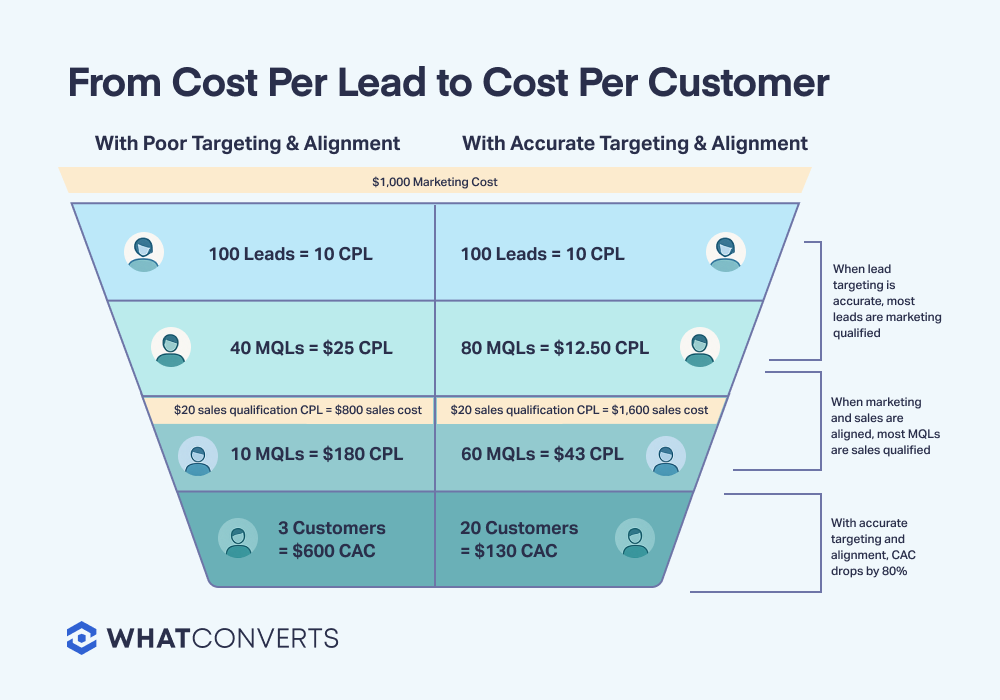
How to Lower CPQL with Accurate Lead Targeting
Once you know your real CPQL, lowering it becomes a targeting problem, not a bidding problem.
Exclude sources that generate unqualified leads. If students keep filling out your forms, exclude .edu domains or add qualification questions that filter them out. If competitor intel shows up in your call recordings, tighten your audience targeting.
Feed qualification data back to ad platforms. When you sync qualified conversions to Google Ads and Meta, Smart Bidding learns which audience signals predict qualification. The algorithm starts bidding higher for qualified prospects and lower for junk.
Double down on campaigns with low CPQL. If Campaign B delivers qualified leads at $118 while Campaign A costs $650, shift budget toward B. Obvious in hindsight, impossible to see when you only track CPL.
The goal isn't cheaper leads. It's more qualified leads for the same spend.
The System That Makes CPQL Automatic
WhatConverts tracks every lead back to its marketing source and captures qualification status automatically.
Mark leads as qualified in one click. WhatConverts collects all of the information you need to qualify a lead, so sales qualifies or disqualifies leads directly in the platform. No CRM export. No spreadsheet matching.
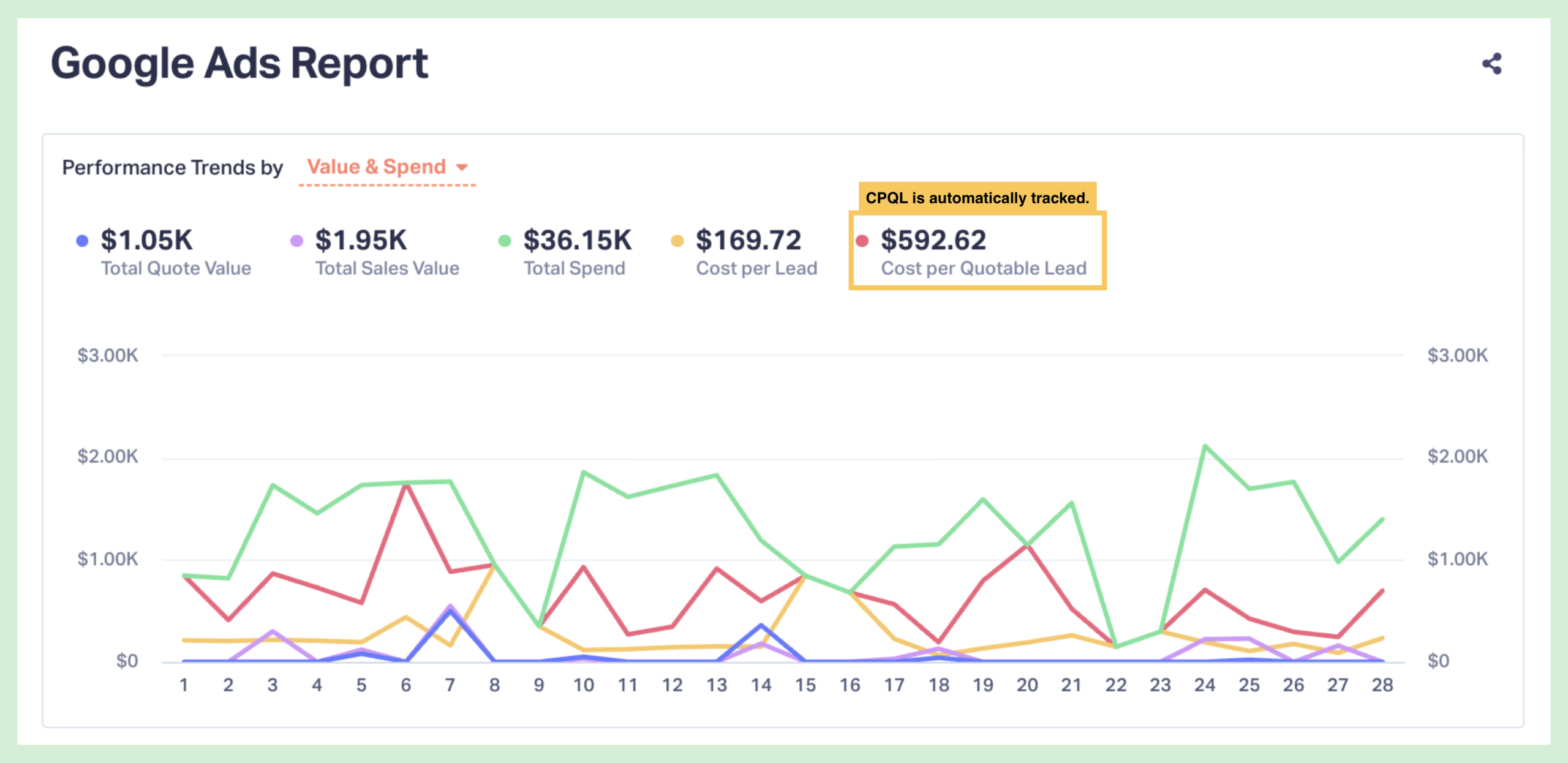
See CPQL by campaign instantly. Filter your reports to "qualified leads only" and see which campaigns drive prospects versus junk—in real time. The Google Ads report also calculates CPQL automatically as a performance trend.
Feed qualification data back to ad platforms. WhatConverts syncs qualified conversions to Google Ads and Meta, teaching Smart Bidding which leads matter.
The result: CPQL becomes your default metric instead of a quarterly project.
What Happens When You Optimize for CPQL
A home services agency tracked 150 leads at $65 CPL from Google Ads. Strong volume, acceptable cost.
When they started tracking CPQL, the picture flipped:
- Campaign A: 80 leads, 8 qualified → $650 CPQL
- Campaign B: 40 leads, 22 qualified → $118 CPQL
- Campaign C: 30 leads, 2 qualified → $975 CPQL
Campaign A looked best by CPL. Campaign B was actually 5X more efficient.
They reallocated budget toward Campaign B, adjusted targeting on A, and killed C entirely. Qualified lead volume doubled without increasing spend.
That's what happens when you measure what matters.
From Volume to Value
Here's the system that makes CPQL your operating metric:
- Capture every lead with full source attribution—calls, forms, chats tied to campaign and keyword
- Qualify leads as they come in—one-click qualification that updates in real time
- Calculate CPQL automatically by campaign—no manual matching or spreadsheet work
- Optimize toward qualified conversions—shift budget to campaigns that drive prospects, not spam
- Feed qualification signals back to ad platforms—train Smart Bidding to chase qualified leads
When you know which leads qualify, budget allocation becomes obvious. Stop funding campaigns that generate cheap junk. Double down on the ones that drive pipeline.
Ready to stop optimizing for volume and start optimizing for value?
Start your free 14-day trial of WhatConverts today or book a demo with a product expert to see how we help prove and grow your ROI.
Get a FREE presentation of WhatConverts
One of our marketing experts will give you a full presentation of how WhatConverts can help you grow your business.
Schedule a DemoGrow your business with WhatConverts







