


 Amanda Pell
Your campaigns run 24/7. The budget burns evenly, hour after hour.
Meanwhile, 40% of your spend disappears into late-night conversions that never close—and you have no idea because your dashboard only shows when leads convert, not when valuable leads convert.
Without dayparting analysis, you're funding the hours that convert the most but close the least—and ad platforms can't tell the difference.
This article exposes how time-based spending patterns stay invisible in standard reports, why platforms optimize for the wrong hours, and how to identify which time windows actually drive revenue versus which ones just burn budget on conversions that never close.
Note: Not a WhatConverts user yet? Start your free 14-day trial of WhatConverts today or book a demo with a product expert to see how we help prove and grow your ROI.
When 24/7 Spend Becomes a Silent Leak
Here's how the low-value timing pattern hides:
A home services company spends $12,000 monthly on Google Ads. Conversions look solid—68 calls and 42 form fills spread throughout the day and night.
Google's conversion reports show the timing breakdown, and it looks healthy: steady traffic morning through evening, with a solid chunk overnight when people search during insomnia or emergencies.
Everything seems fine until someone checks which leads actually became customers.
When they map qualified leads (not just conversions) to time of day, the truth surfaces:
| Time Range | Conversions | Qualified Conversions | Qualification Rate |
| 9am - 5pm | 52 | 38 | 73% |
| 5pm - 11pm | 35 | 18 | 51% |
| 11pm - 3am | 23 | 2 | 9% |
The overnight hours drove 21% of total conversions but only 4% of qualified leads.
Cost per qualified lead after midnight was $520. Cost per qualified lead during business hours was $95.
But the campaign kept running 24/7 at even spend because Google's dashboard said conversions were happening—it just couldn't say which conversions mattered.
Read More: How to: Learn Exactly When Your Google Ads Should Run
Why Platforms Can't See the Value Gap
Google Ads, Meta, and every other ad platform track when people convert. They don't track when valuable people convert because they can't see what happens after the conversion.
Which means:
- Conversion timing looks fine. Midnight shows 8 conversions. Noon shows 12 conversions. Both seem productive.
- CPL looks consistent. $110 per lead at 2am, $105 per lead at 2pm. Feels even.
- Optimization has no quality signal. Smart Bidding sees "conversions happening overnight" and keeps budget flowing there.
The platform thinks it's working. Meanwhile, your actual business outcomes tell a completely different story.
An HVAC company discovered their 11pm-3am Facebook ads generated high form volume—people searching "emergency furnace repair" at midnight. But 80% were price shoppers who ghosted once they got daytime quotes. The late-night CPL was $75. The cost per job booked? $940.
During business hours, their cost per booked job was $180.
The platform had no way of knowing this. It just saw conversions and kept the spend flowing evenly.
What Google Ads Time Reports Actually Show You
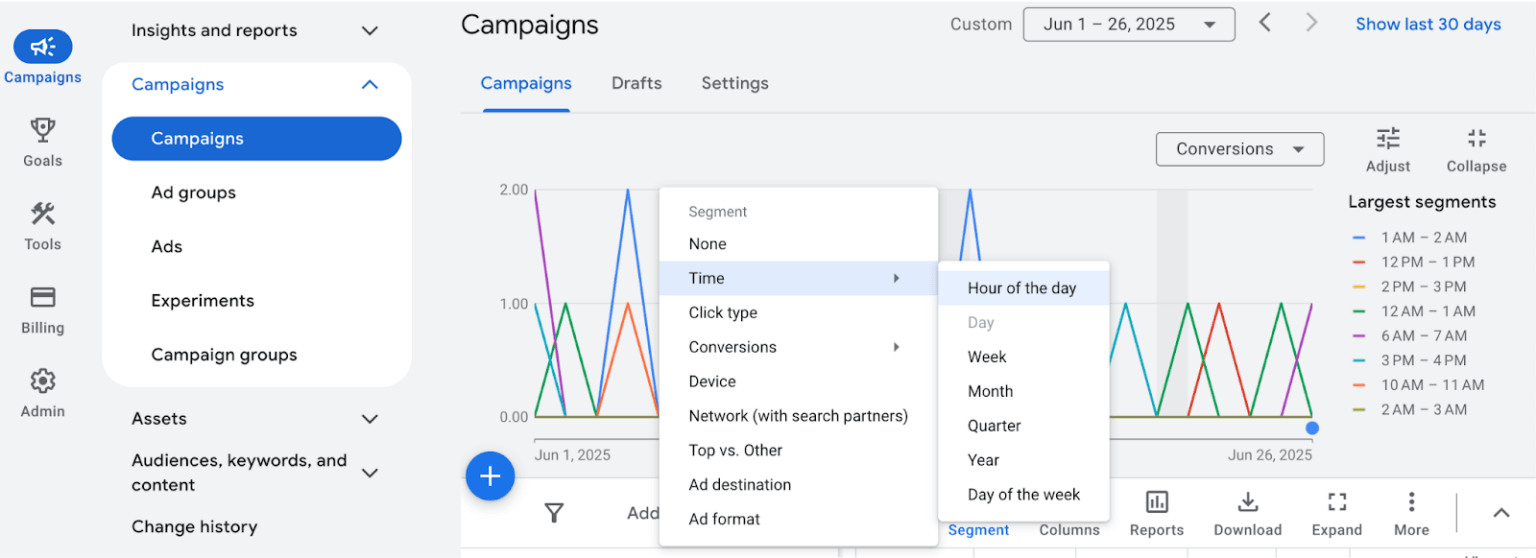
Google Ads does have time-of-day reporting—but it only reveals half the story.
Source: WholeWhale.com
When you segment by "Hour of day" in your campaign view, you see a line chart showing when conversions happen. You can spot peaks and valleys in conversion volume throughout the day.
But here's what's missing: which of those conversions actually mattered.
Google's hour-of-day report shows you got 8 conversions at 2am and 12 conversions at 2pm. Both look productive. The interface doesn't distinguish between a midnight price shopper who ghosts and a noon prospect who books a $5,000 job.
The data table shows conversions by hour, but every conversion counts the same—qualified lead or time-waster, closed deal or dead end. There's no column for "conversions that became customers" or "revenue by time block."
You can see when people convert. You can't see when valuable people convert.
Which means when you set bid adjustments or create ad schedules based on Google's time reports, you're optimizing for conversion volume, not conversion value. You might be bidding up on midnight hours that generate lots of leads but zero revenue—and never know it.
The Manual Approach to Finding Value Timing
Agencies can uncover time-based value gaps, but it requires serious manual work:
- Export lead data with timestamps. Pull every conversion with exact date and time from your tracking systems.
- Match leads to outcomes. Cross-reference conversion timestamps with your CRM or sales records to see which leads qualified, which closed, and what revenue they generated.
- Build time-of-day analysis in spreadsheets. Group leads into hourly or time-block buckets and calculate qualification rates and revenue by time window.
- Manually adjust dayparting schedules. Use your findings to set bid adjustments or pause ads during low-value hours.
- Re-analyze monthly. Repeat the entire process to catch seasonal shifts or campaign changes.
This works. But it takes hours per client per month, and most agencies don't have that time—so the value gap stays hidden.
Lead Timing Analysis That Surfaces Value Patterns Automatically
WhatConverts tracks not just when conversions happen, but when qualified conversions happen—automatically connecting every lead to its timestamp, source, and business outcome.
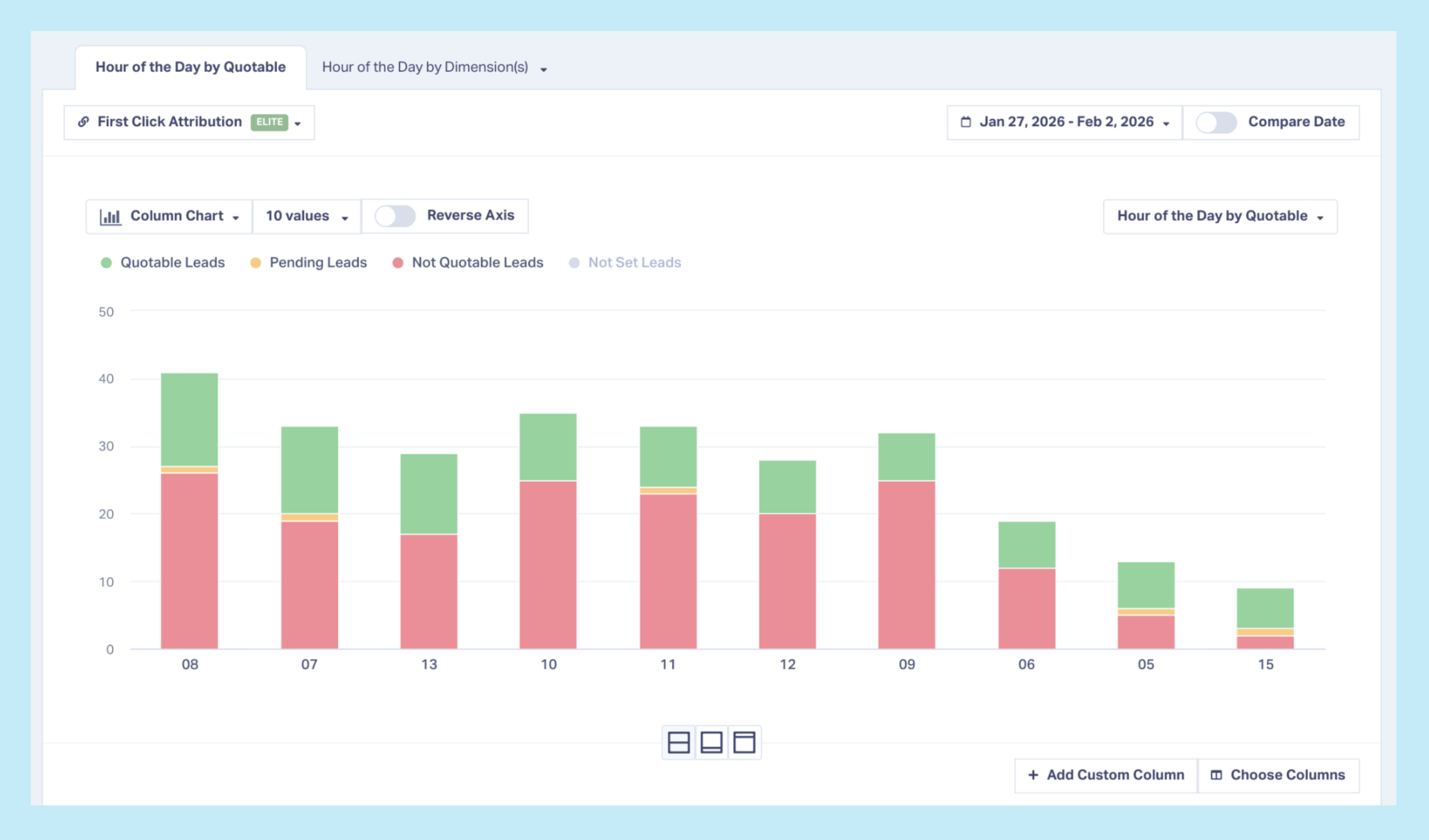
Time-of-day lead qualification reports. See qualification rates and conversion rates broken down by hour or time block. Instantly spot when your best leads come in versus when you're just burning budget on noise.
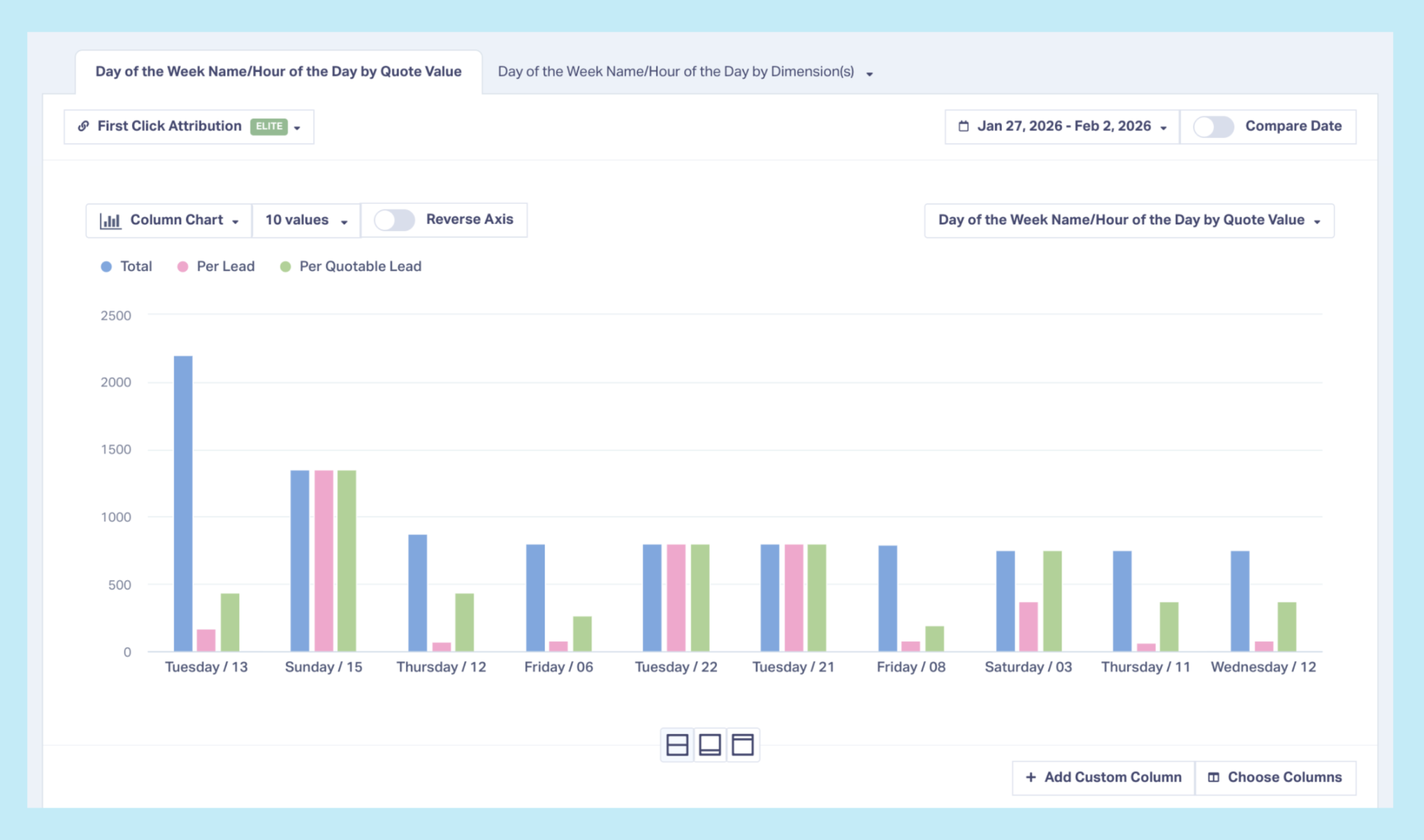
Time-based revenue analysis. Track not just which hours produce leads, but which hours produce revenue. See the stark difference between "12 conversions at 1am" and "$450 in closed business at 1am."
Campaign performance by time window. Compare how different campaigns perform during different time blocks. Maybe Google Search crushes it during business hours while Facebook works better evenings. You can't optimize that if you can't see it.
Automated dayparting insights. Instead of spending hours in spreadsheets every month, pull a report showing exactly which time blocks deliver qualified leads and which ones waste spend.
With this visibility, agencies stop guessing at dayparting and start optimizing based on when real business happens.
Scenario: Cutting Wasted Night Hours and Reallocating to Winners
A legal services agency runs campaigns 24/7 because "people search for lawyers at all hours." Using WhatConverts, they discover that 11pm-7am generates 28% of conversions but only 6% of qualified consultations.
They pause overnight ads and reallocate that budget to 9am-6pm windows that have 3x higher qualification rates. Result: 31% reduction in cost per qualified lead with the same monthly spend.
The overnight conversions looked fine in Google Ads. But WhatConverts showed they were barely worth answering.
Stop Funding Low-Value Time Windows
Here's how to eliminate the dayparting value gap:
- Track every lead with timestamp and business outcome
- Analyze qualification rates and revenue by time of day
- Identify high-value time windows where leads actually close
- Adjust bids or pause ads during low-value hours
- Reallocate saved budget to time windows that drive real results
When 40% of your spend goes to time blocks with 9% qualification rates, every hour you wait is money disappearing into a pattern you can't see.
Ready to stop burning budget on low-value time windows? Start your free 14-day WhatConverts trial today and discover which hours deserve your budget—and which ones are just bleeding spend—or book a demo to see how agencies are using time-based lead intelligence to cut waste and maximize every dollar.
Start your free 14-day trial of WhatConverts today or book a demo with a product expert to see how we help prove and grow your ROI.
Get a FREE presentation of WhatConverts
One of our marketing experts will give you a full presentation of how WhatConverts can help you grow your business.
Schedule a DemoGrow your business with WhatConverts







