


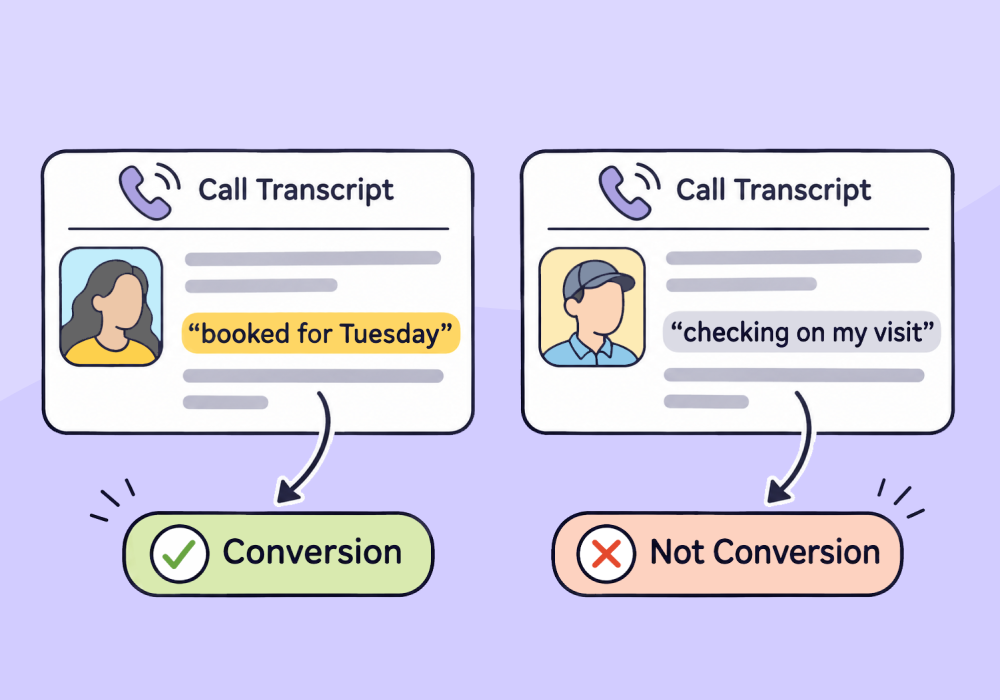
Imagine two calls hitting a dental office on the same Monday morning. One caller books a cleaning. The other, a patient asking about last week's visit. Both calls last around the same time. If conversions are counted by call length alone, Google Ads sees both as a conversion. And that means it trains itself to find more of each.
We all know Google Ads is a fast learner. But it lacks judgment. It bids on the conversions you set as primary, as Google's help page on primary and secondary actions explains. Whatever you count as a win, it goes looking for more of (including calls that aren’t really customers).
AI lead qualification changes what Google Ads learns from at scale. AI reads every call's transcript and decides whether an appointment was booked, and only the bookings go to Google Ads as conversions.
Below, I'll show you why Google can't tell booked calls from the rest on its own, even with its new AI call checker. Then I'll walk you through the five steps I use with customers to get Google Ads counting only the calls that booked. Already know what a booking sounds like for your client? Skip ahead and build your booking rule.
Why Google Ads Can't Tell Which Calls Booked
Google Ads judges calls by how long they lasted or by what Google's AI thinks the caller wanted. Neither one knows what a booking sounds like for your client.
Call length is the old way. Google's help page on call conversions says Google counts every call that lasts at least the minimum length you set. For example, say you only send Google Ads the calls over 60 seconds, a cutoff one agency founder told us they wanted so junk calls wouldn't count. A support call can clear 60 seconds just as easily, and every one that does goes to Google Ads as a conversion. A length cutoff keeps out the junk, but it can't keep out the long calls that were never sales.
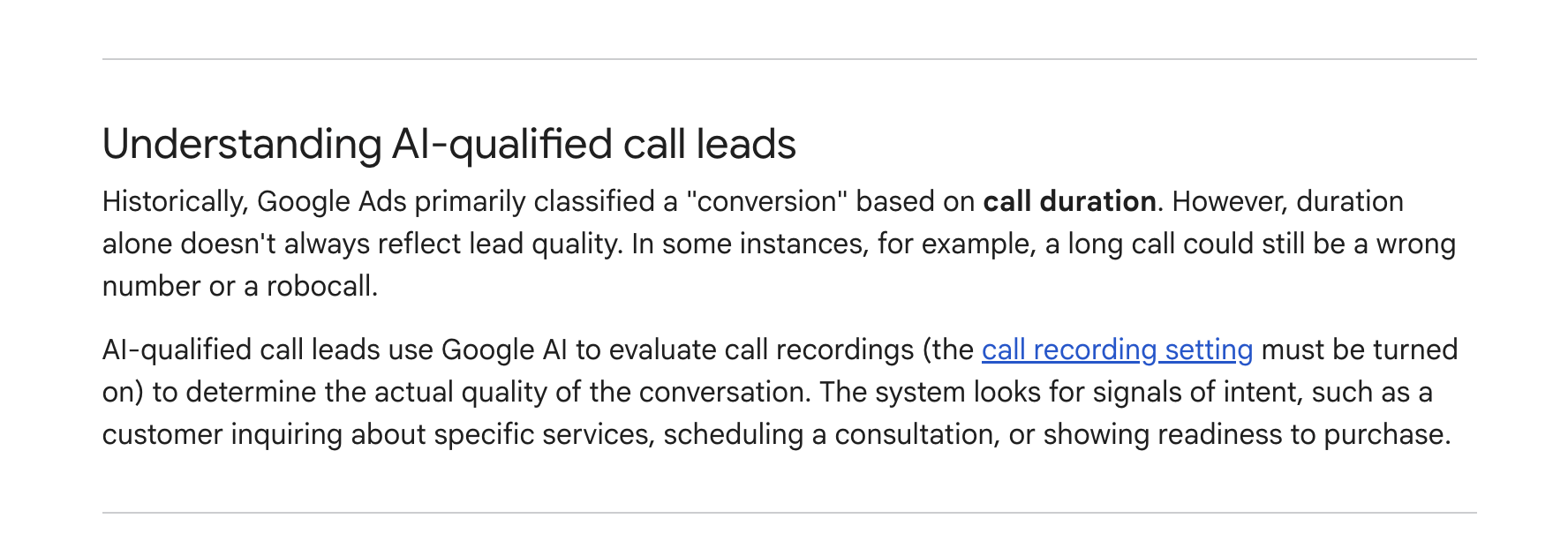
Google's newer answer is big news: Google Ads now has its own AI call evaluator, called AI-qualified call leads. For call campaigns, Google's help page on AI-qualified call leads says recorded calls are "evaluated by AI. Only qualified calls will count as conversions." Google's AI filters out robocalls, spam, and misdials, and looks for intent, such as a caller scheduling a consultation.
That said, Google's AI evaluator still leaves you with three gaps:
- Google defines the booking: Google decides what "qualified" means, and the help page lists no setting for your own definition of a booking.
- It only hears some calls: It judges only the calls Google records from call campaigns in the US and Canada, and recording is off by default for healthcare and financial services.
- It counts before you check: Its verdict automatically counts as a conversion for Smart Bidding. You can review how it classified each call afterward, but the help page lists no way to approve a verdict before it counts.
Listening to every call by hand is the other option, and the hours add up fast. Say your calls average 3 minutes. That's 5 hours of listening a month at 100 calls, 25 hours at 500, and 50 hours at 1,000.
Google's AI judges a call by what was said on it, and the method below does too, with your definition of a booking instead of Google's. A call that sounds qualified still isn't a sale, though, until the client closes it. For more on the gap between what Google counts and what sales closes, read why call conversions in Google Ads rarely match what sales actually closes.
How It Works: Create Ask AI Lead Intelligence Rules
Step 1: Qualify a Few Calls by Hand and Note What You Check
The five steps from here give you a repeatable way to tell qualified calls from everything else without listening to every call. You write down how your team qualifies a call, hand that check to rules and AI, test it, and only then send bookings to Google Ads.
To get started, take the qualification that eats the most of your team's time and do it by hand on a few calls, paying attention to what you check. How long did they talk? Did they ask to book? Are they in the service area? What service do they want? Each check is a dimension: one thing that tells you a lead is real.
Every client will have different questions and answers that show a lead is qualified. A hotel doesn't care where a caller is calling from. An air conditioning repair company does, because it needs to know the caller is in its service area.
Some dimensions are already data on the lead, so a plain rule can check them: call duration (over 60 seconds?), the tracking number called, and the source, such as Google Ads. Whether the caller booked (one of the most important pieces of info) lives only in the conversation itself.
When the plain dimensions can't tell you whether a lead is qualified, it's time to call in the big guns: AI reading the transcript. I recently set this up with a customer whose calls follow no script. Their calls had no keyword that marked a booking, and they wanted support calls kept apart from sales and bookings. The answer was all in the conversation, so we handed the question to AI.
Step 2: Transcribe Every Call and Ask AI Two Questions
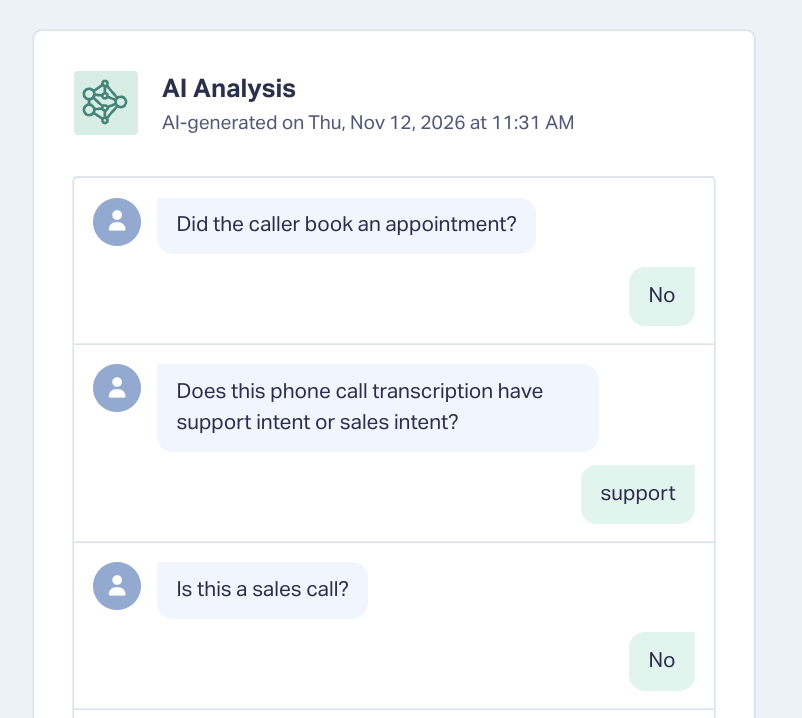
Ask AI is a type of Lead Intelligence rule in WhatConverts. You write a question and pick the answers it can give, AI reads each lead's transcript and answers it, and the answer is saved in a field on the lead. Here's how I set up the booking rule:
- Ask the booking question: Create an Ask AI rule that reads Call Transcription and asks, "Was an appointment booked or scheduled?" Give it the answers Yes, No, and Unknown, and the label Appointment Scheduled.
- Describe a booking: Add the signals your team listens for. For my customer, the prompt looked for a booked or bookable appointment, or questions about what an appointment costs.
- Ask the opposite: Add a second question to the same rule that looks for support calls, such as support questions and updates on past appointments. Label it Support Call.
Ask AI rules are on the Elite plan and billed in units called “input groups” and “output groups.” One group is roughly equivalent to 1,000 characters or 750 words. Once you approve the AI costs in the rule, add the Run AI guard from Step 5 before you turn the rule on to test. For more questions worth asking a transcript, read How to Use AI to Analyze Calls and Every WhatConverts AI Feature, Explained.
The booking rule builder below walks you through one client's setup and hands back both questions, the rules, a one-week test plan, and a monthly cost.
Step 3: Sharpen the Prompt with an AI Assistant
Before you test, use a second AI to sharpen the booking question. Ask AI gives better answers when the prompt is clear about what it's looking for and carries nothing extra that could confuse it. An AI chat such as Claude or ChatGPT can tighten your prompt before it ever reaches Ask AI.
To sharpen the prompt, write the booking question out the long way, with everything that tells you a call is bookable. Paste it into the AI chat and ask something like, "I'm trying to build out this prompt. Can you tell me the best way to form my prompt?" Then paste the tighter version back into the Ask AI rule.
You're using AI to help AI. I use Claude for this, outside WhatConverts, because it knows which keywords to emphasize and how to word a prompt so another AI can work with it. With a clear prompt, the rule answers "Is this bookable or not?" on every call, and nobody on your team has to listen for it.
Step 4: Send Only Bookings to Google Ads
Set the AI answer to generate its answer under a label like Bookable, then build a rule that sends a conversion to Google Ads whenever Bookable is Yes. Calls marked No or Unknown stay in WhatConverts. Here’s how.
- Set Bookable as a condition: The Ask AI answer lands in a Lead Analysis field. You can use this field as a condition for other rules to trigger on.
- Send the booking: Create a rule with the condition Bookable is Yes and an action that sends a conversion to Google Ads, pointed at a booked appointment conversion action. Leave the rule inactive until your test passes.
- Make it primary: In Google Ads, set the booked appointment action as primary. If another call conversion is also primary, such as Google's AI-qualified call leads, pick the one that bids and set the others as secondary.
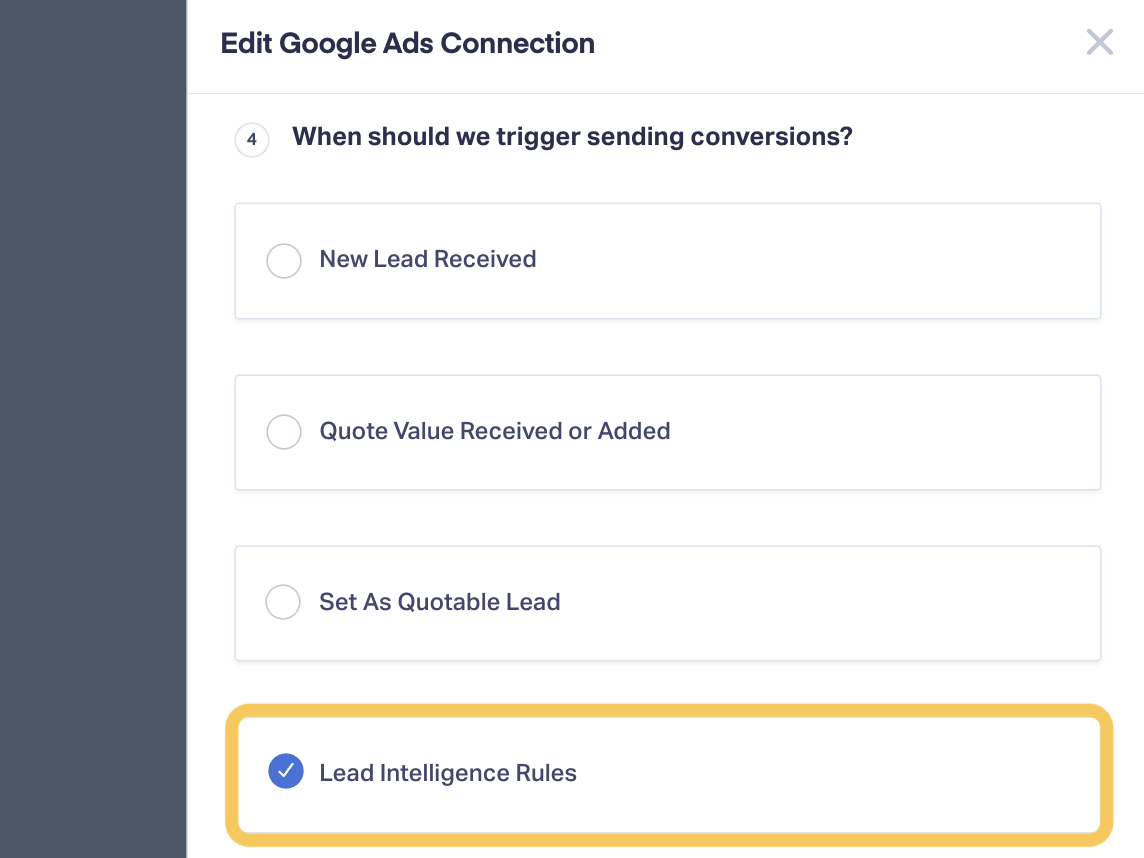
At go-live, you'll switch the Google Ads integration's trigger to Lead Intelligence Rules (an Elite feature), or the same lead may be sent more than once. Conversions wait 6 hours before they're sent.
Once the AI's answer sits in Bookable, any Lead Intelligence rule can check it, so the Google Ads conversion is only the first thing you can build on it. A few more rules that could read Bookable:
- Mark it quotable: Set booked calls as quotable leads, or give them a lead score or a value.
- Tell other ad platforms: Send bookings as conversions to Facebook Ads or Bing Ads too.
- Update the CRM: Send the Bookable answer to your CRM with a webhook.
Integration Spotlight: Google Ads
Step 5: Test It on a Few Leads Before It Goes Live
Run the Ask AI rule on leads you've already reviewed, and compare the AI's answers with yours while the Google Ads rule stays off. A wrong conversion is hard to take back, so be sure to test before you launch. WhatConverts updates a sent conversion only when the lead's sales value changes, and Google's help page on conversion adjustments says a retraction counts for bidding only within 7 days.
I keep the test small with two limits:
- A Run AI guard: Create a custom field called Run AI and add the condition Run AI is Yes to the Ask AI rule and the copy rule. Both rules then skip every lead except the test leads you set to Yes.
- A week of leads: Apply the rules to about a week of existing leads, as Apply Lead Intelligence Rules to Existing Leads suggests.
Next, listen to the calls the AI wasn't sure about: every call marked Unknown, and every call marked Yes for both booking and support, since one of those two answers is wrong. When the AI keeps missing a kind of booking, add what those callers said to the prompt and run the test again.
Once the AI's answers match your team's, tell the client that Google Ads will show fewer conversions after the switch, because only bookings will count. Then go live in this order:
- Remove the guard: Take the Run AI condition off rules, so new calls get read.
- Switch the trigger: With Lead Intelligence Rules as the trigger, only rules send conversions to Google Ads. First give any form or chat conversions the integration sends today a rule of their own, or they'll stop. Then set the Google Ads integration's trigger to Lead Intelligence Rules.
- Turn on the Google Ads rule: Every new booked call from a Google Ads click now goes to Google Ads as a conversion. Don't set this up and walk away. I check in with the customer every week or two for the first month to see how it's set up and how it's affecting results. When a rule catches leads nobody meant it to, look at the leads it touched and add a condition that leaves them out.
What It Costs and Where to Start
Ask AI costs about $.05 to $.06 per lead for a 3-minute call with three to five questions, plus transcription at $.02 a minute. Take the same 500 calls a month at 3 minutes each: transcription comes to $30 and Ask AI adds $25 to $30. That's about $60 a month instead of 25 hours of listening.
On plans below Elite, AI Lead Analysis for calls is included in transcription. Your team can mark booked calls Quotable by hand and send only those with the Google Ads integration's Set as Quotable Lead trigger. Only the automatic version needs Elite.
Start with one client and the review your team spends the most time on, then build your booking rule. There's no real limit to where it goes, so let your next rule come from your team's next slowest review.
Feature Highlight: Connect calls to sales value with Lead Qualification and Valuation.
Get a FREE presentation of WhatConverts
One of our marketing experts will give you a full presentation of how WhatConverts can help you grow your business.
Schedule a DemoGrow your business with WhatConverts


