















































 Amanda Pell
Google Ads lets you schedule when your ads run and adjust bids by hour and day. Most marketers set these schedules based on conversion volume—increasing bids during hours that generate the most conversions and decreasing them when activity drops off.
But conversion volume and lead quality don't always align. High-conversion hours might be filled with spam while low-conversion periods hide your most valuable prospects.
When you optimize schedules based purely on conversion count, you end up paying premium rates for junk traffic while starving the hours that actually drive revenue.
WhatConverts's Hourly and Daily Distribution chart shows exactly when qualified leads arrive—so you can schedule based on lead quality, not just lead volume.
Note: Not a WhatConverts user yet? Start your free 14-day trial today or book a demo with a product expert to see how we help prove and grow your ROI.
The Ad Scheduling Problem: No Visibility Into Lead Quality by Time
Google Ads provides bid adjustment options for every hour of every day. You can increase bids by 50% on Tuesday mornings or decrease them by 30% on Saturday afternoons.
But Google doesn't tell you when your qualified leads actually come in. Their reporting shows:
- When clicks occur
- When conversions happen
- Overall conversion volume by time period
What's missing: which time periods generate clicks and conversions from qualified leads versus clicks and conversions from junk. A conversion at 2 AM Saturday might be spam and a conversion at 10 AM Wednesday might be a $50,000 opportunity, but Google treats them identically.
This creates a critical blind spot. You can see that 100 conversions happened on Mondays, but you can't see that 90 were unqualified and only 10 became real opportunities.
How WhatConverts Shows Lead Timing Patterns
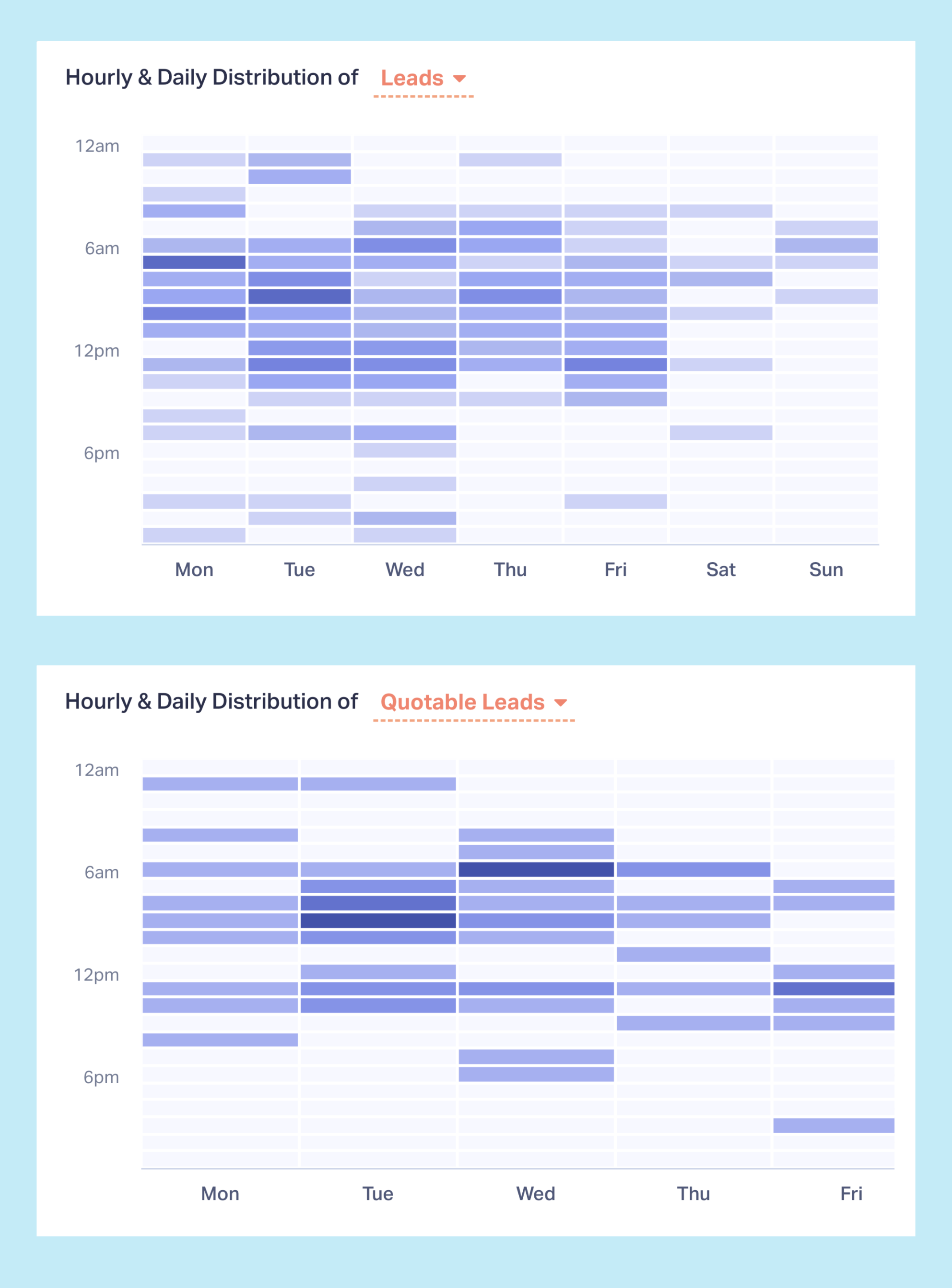
The Google Ads Report in WhatConverts includes an "Hourly & Daily Distribution" chart showing exactly when leads arrive—and more importantly, when qualified leads arrive.
View Total Lead Volume by Time
The chart displays leads across each day of the week for your selected time period, broken down by hour. So if you're viewing a month of data, each 'Monday' bar represents the combined total from all Mondays in that month.
That means you can see at a glance:
- Which days generate the most leads
- What hours see peak activity
- When lead volume drops off
Filter for Qualified Leads Only
Switch the view to show only quotable leads. The pattern changes dramatically.
Total leads might spike on weekend afternoons. Qualified leads might concentrate Tuesday through Thursday between 9 AM and 2 PM. This gap reveals where your budget wastes money on unqualified traffic.
Compare Lead Quality Across Time Periods
When you see both views side by side, quality patterns emerge:
- Monday mornings generate high volume but low qualification rates
- Wednesday mid-day shows fewer leads but higher qualification
- Weekend traffic drives clicks that rarely convert to opportunities
These patterns are invisible in Google Ads reporting, which lumps all conversions together regardless of quality.
Using Timing Data to Optimize Ad Schedules
Once you know when qualified leads actually arrive, you can restructure your ad schedule for maximum efficiency.
Increase Bids During High-Quality Windows
If your qualified leads concentrate between 9 AM and 3 PM on weekdays, increase bids by 30-50% during those hours. Your ads appear more prominently exactly when ready-to-buy prospects are searching.
Decrease Bids During Low-Quality Periods
If evening and weekend traffic generates clicks but few qualified leads, reduce bids by 50-70% during these windows. You'll still capture any serious prospects while spending far less on tire-kickers.
Pause Ads During Dead Zones
If certain hours consistently produce zero qualified leads across months of data, stop running ads entirely during those periods. Redirect that budget to proven conversion windows.

Test Scheduling Hypotheses
Maybe you assumed Saturday mornings were dead. The data shows qualified leads happen then at lower volume but higher rates. Test increasing Saturday morning bids to capture this overlooked opportunity.
Advanced Timing Strategies
Separate Campaigns by Schedule
Instead of applying one schedule to all campaigns, create separate campaigns optimized for different time windows:
- High-value keyword campaign running only during peak qualified hours
- Broader keyword campaign running 24/7 but with aggressive bid adjustments
- Low-cost experimental campaign targeting off-hours at minimal spend
Geographic Time Zone Adjustments
If you serve multiple time zones, timing patterns vary by region. Create location-specific campaigns with schedules matching each timezone's qualified lead patterns.
Day-Parting for Different Services
If you offer multiple services, they might have different optimal timing. Emergency services might convert 24/7. Consultation-based services might peak during business hours. Schedule campaigns separately based on service type.
The Compounding Effect of Smart Scheduling
Ad scheduling optimization creates multiple benefits simultaneously:
Lower Cost Per Acquisition
By concentrating spend during high-conversion windows, you get more qualified leads for the same budget. Cost per qualified lead drops.
Higher Conversion Rates
When ads run primarily during proven conversion times, overall campaign conversion rates improve. Google's automated bidding systems respond by optimizing more aggressively.
Better Budget Utilization
Instead of burning budget during dead hours, every dollar works harder. Monthly ad spend generates more revenue.
Competitive Advantages During Peak Hours
When you know your peak hours and competitors don't, you can dominate ad placement exactly when it matters most while they distribute budget evenly across all hours.
The Bottom Line: Stop Guessing, Start Scheduling
Google Ads gives you powerful scheduling tools. But without knowing when qualified leads actually happen, those tools are useless.
Generic assumptions about "business hours" or "weekday traffic" don't reflect your specific conversion patterns. Your qualified leads might arrive Tuesday mornings, or Saturday afternoons, or scattered across different hours than you'd expect.
WhatConverts's Hourly and Daily Distribution chart eliminates scheduling guesswork. See exactly when qualified leads arrive. Adjust bids to capture more during those windows. Stop wasting budget during dead periods.
Your competitors schedule based on assumptions. You'll schedule based on data.
Ready to optimize your ad schedule with real conversion timing data?
Start your free 14-day trial of WhatConverts today or book a demo with a product expert to see how we help prove and grow your ROI.
Get a FREE presentation of WhatConverts
One of our marketing experts will give you a full presentation of how WhatConverts can help you grow your business.
Schedule a Demo
Grow your business with WhatConverts







