


 Amanda Pell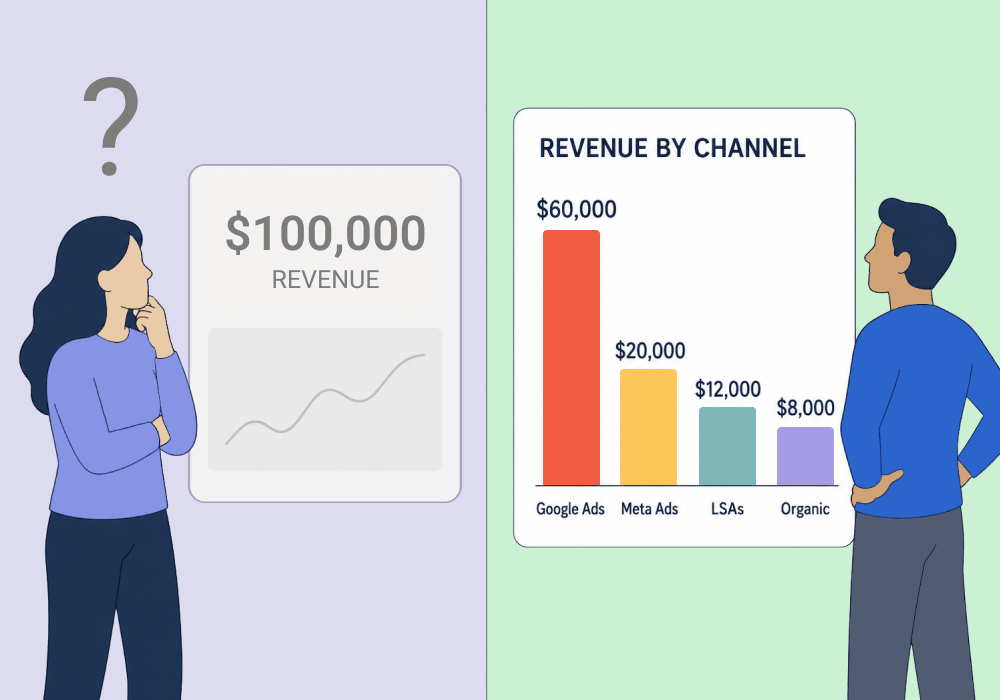
Your business intelligence tool can tell you a client made $100,000 last month. It can't tell you which ad campaign made it.
That missing piece looks minor until you try to build on your success and realize you don’t know which of the eighteen different things you did last month actually moved the needle.
Revenue without a source is just a scoreboard. It can tell you how many goals you got, but it can’t tell you how to increase your lead in the second half.
So when a client asks how to allocate their budget for the upcoming quarter, you’re guessing. And guessing was exactly what your BI tool was supposed to eliminate.
Your BI tool proves the money came in. It can't tell you where to find more of it.
This article shows how to feed marketing source data into your BI system so you can calculate true ROI per channel, and act on it.
Note: Not a WhatConverts user yet? Start your free 14-day trial of WhatConverts today or book a demo with a product expert to see how we help prove and grow your ROI.
Revenue Reporting Isn’t Actionable Without a Source
Most BI systems are built to look at outcomes: jobs booked, average revenue per job, total revenue.
What they can’t see is what brought about those outcomes. So when it comes time to build on those outcomes, your BI tool doesn’t have the data to show you how to do it. You need to see:
- Which channel produced the lead
- Which campaign and keyword drove the call
- Which of those leads actually turned into a booked job
Knowing you earned $100,000 is useless for forward-looking strategy if you can't trace it back to where it came from. You can't scale a campaign you can't name. You can't cut a channel you can't isolate.
The number proves marketing worked, but it doesn't tell you what to do next.
You Need the First Half of the Story
Optimization lives in the details, not the totals.
A total tells you the outcome. The first half of the story tells you the cause: this campaign, this keyword, this channel, this many leads, this many booked. That's where budget decisions actually get made.
Put the two halves together and a flat revenue number becomes a per-channel verdict. Google Ads returned 6x. LSAs returned 2x. Organic booked at twice the rate of paid.
Now you're no longer reallocating on instinct. Instead, you're reallocating on math.
That's the difference between a report that impresses a client and one that actually grows their business.
How to Calculate True ROI Per Channel
The fix is to feed granular marketing source data into the system that already holds your revenue. Two datasets, one equation.
Here's the workflow:
- Capture the source of every lead. Log the campaign, keyword, channel, and conversion type behind each call and form, automatically, not by hand.
- Sync that source data into your BI system. Connect lead-level attribution to the revenue and jobs-booked data your BI tool already tracks.
- Calculate the KPIs that matter per channel. Booking Rate is jobs booked divided by leads generated. Channel ROI is revenue divided by ad spend, segmented by source.
- Reallocate against the results. Move budget toward the channels with the highest return and starve the ones that only looked busy.
Step three is where the story finally reads front to back. When you can see that one channel books at 40% and another at 8%, you know exactly which dollar to move.
Why WhatConverts
WhatConverts captures the detailed marketing source of every call and form: campaign, keyword, channel, and conversion type, tied to each individual lead.
That's the first half of the story your BI tool is missing.
Capture attribution automatically. Every call and form comes in tagged with the campaign, keyword, and channel that produced it, with no manual logging.
Sync it into the tool that holds your revenue. Push lead-level source data into your BI system so booked jobs and earned revenue connect back to the marketing that drove them.
Turn two datasets into real KPIs. With leads on one side and revenue on the other, you can finally calculate Booking Rate and Channel ROI instead of estimating them.
WhatConverts isn't the BI tool, and it doesn't try to be. It supplies the source-level data the BI tool can't collect on its own.
Proof: aptDigital Turned a $3,500 Budget Bump Into $30K
aptDigital built a proprietary Business Intelligence system that pulled jobs booked, revenue per job, and total revenue from a client's stack to calculate ROI. It told the second half of the story cleanly.
The first half was missing. The agency couldn't see how many leads each channel produced, which leads became booked jobs, or the revenue and ROI tied to each source.
They connected WhatConverts to close the gap. Lead-level attribution flowed in from calls across LSAs, Google Business Profile, and Google Ads, then synced into their BI system. With both halves in place, they calculated Booking Rate, Cost per Acquisition, and Channel ROI for every source.
The results for one appliance repair client:
- A $3,500 ad spend increase turned into $30,000 in additional revenue
- Average monthly ROI of 7x
- Growth from a one-truck operation to a five-truck business in a year
The Unlock
When you connect marketing source data to revenue data, a lump-sum result becomes a channel-by-channel decision.
Here's the complete workflow:
- Capture the campaign, keyword, and channel behind every call and form in WhatConverts
- Sync that source data into your BI system alongside jobs booked and revenue
- Calculate Booking Rate and Channel ROI for each source
- Reallocate budget toward the channels with the highest real return
- Report the front and back halves together so clients see cause, not just outcome
A total tells you that marketing worked. In-the-weeds data tells you what to do next.
Ready to give your BI tool the first half of the story?
Start your free 14-day trial of WhatConverts today or book a demo with a product expert to see how we help prove and grow your ROI.
Get a FREE presentation of WhatConverts
One of our marketing experts will give you a full presentation of how WhatConverts can help you grow your business.
Schedule a DemoGrow your business with WhatConverts







