


 Amanda Pell
Automated bidding promises to optimize your campaigns while you sleep. But many marketers activate it too early, feeding Google's algorithm insufficient data to make intelligent decisions—then blame the technology when performance tanks.
The real issue isn't the algorithm. It's the training data.
Google's automated bidding requires a minimum of 30 conversions in 30 days to start learning effectively—but that's just the floor, not the finish line. The more conversion data you feed the algorithm, the faster it identifies profitable patterns and optimizes your spend.
This guide breaks down exactly how many conversions you need for your bidding strategy, why quality matters more than quantity, and how to accelerate algorithm training by sending only qualified conversion data instead of raw lead counts.
Note: Not a WhatConverts user yet? Start your free 14-day trial of WhatConverts today or book a demo with a product expert to see how we help prove and grow your ROI.
The Minimum Threshold: 30 Conversions in 30 Days
Google's official recommendation for automated bidding strategies is at least 30 conversions within 30 days. This applies specifically to strategies like Maximize Conversions and Target CPA.
But the critical thing to remember is that that's the bare minimum, not the target.
Think of it like teaching someone to recognize spam emails. You could show them 30 examples and they'd get the basic idea. But show them 300 examples and they'd spot patterns you didn't even notice—suspicious domains, specific phrase structures, timing patterns across different types of spam.
Google's algorithm works the same way. More conversion data means faster learning and better optimization.
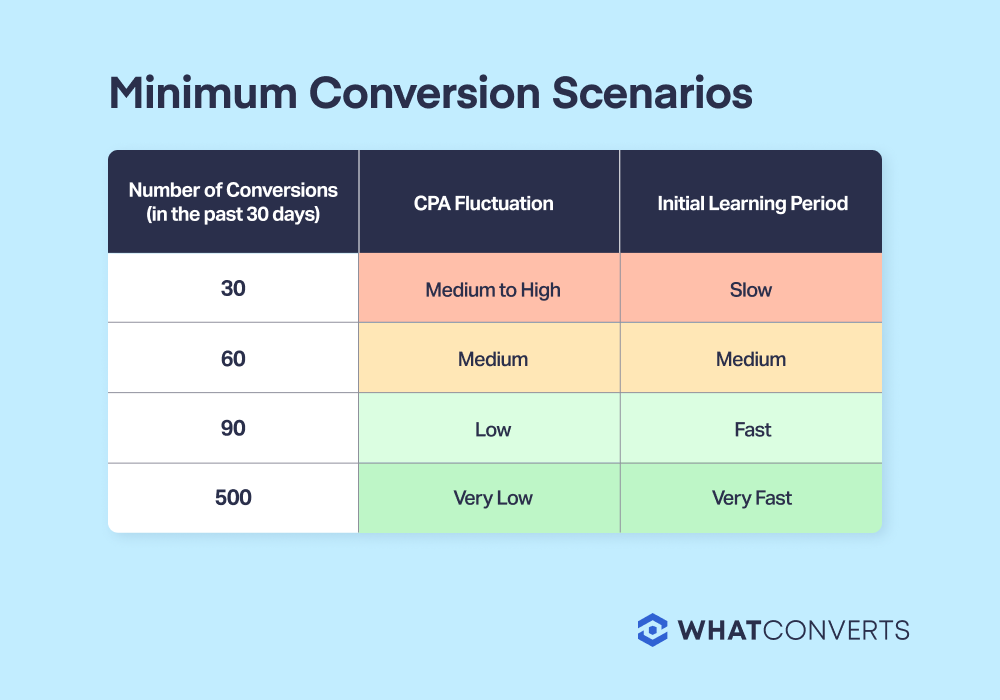
Why 30 Conversions Matters (And Why More Is Better)
Google's machine learning needs volume to identify patterns. With only a handful of conversions, the algorithm can't distinguish between what's working and what's random luck.
At 30 conversions, Google's system begins recognizing basic patterns:
- Which keywords consistently drive conversions
- What time of day converts best
- Which device types perform better
- Basic demographic trends
But here's where most marketers make a mistake: they hit 30 conversions and expect immediate optimization magic.
The algorithm doesn't stop learning at 30—that’s when it starts learning.
With 60, 100, or 500 conversions, Google's system develops increasingly sophisticated pattern recognition:
- Subtle differences in user behavior signals
- Complex interaction effects between targeting dimensions
- Seasonal and timing micro-patterns
- Nuanced quality distinctions between similar keywords
More data equals faster learning, which means you reach profitable optimization sooner rather than burning budget during the extended learning phase.
But Here’s the Catch: Garbage Data Trains Garbage Algorithms
Here's what Google's "30 conversions in 30 days" guideline doesn't tell you: not all conversions are created equal.
Standard conversion tracking counts every form submission and phone call as a conversion, regardless of whether those leads have any business value. Your 30 conversions might include:
- Spam form fills from bots
- Calls from existing customers looking for support
- Wrong-number dialers who hung up immediately
- Competitors checking your pricing
- Unqualified prospects with zero buying intent
When you feed this mixed data to Google's algorithm, you're teaching it to optimize for noise instead of quality.
The algorithm learns that "this keyword generates calls"—but it can't distinguish between a spam call and a $50,000 opportunity. So it bids on keywords that drive worthless conversions just as confidently as it bids on ones that bring in the big bucks, burning your budget on patterns that look like success in the data but deliver zero revenue.
Hitting 50 or 100 conversions only helps if those conversions represent actual business opportunities. Otherwise, you're just training Google's algorithm to chase junk leads more efficiently.
The Fix: Qualified Conversions Only
The solution is straightforward: stop sending every conversion to Google Ads. Send only the ones that represent genuine business opportunities.
This requires marketers to filter conversions before they reach Google—capturing everything and evaluating quality using signals like call duration and conversation content, then passing only qualified leads through to the algorithm.
Twenty filtered conversions train the system more effectively than sixty unfiltered ones because every data point represents an actual opportunity.
The problem is that building and maintaining this filtering system manually is a nightmare. You need to:
- Listen to every call recording or read every form submission
- Apply consistent qualification criteria across your team
- Manually import qualified conversions to Google Ads
- Update your criteria as your business evolves
- Train new team members on the qualification process
For most marketing teams, this falls apart within weeks. Leads pile up unreviewed, qualification becomes inconsistent, and you're back to sending unfiltered conversions—or nothing at all.
How WhatConverts Filters Conversion Data for Better Training
WhatConverts eliminates the manual work by automating the entire qualification and filtering process.
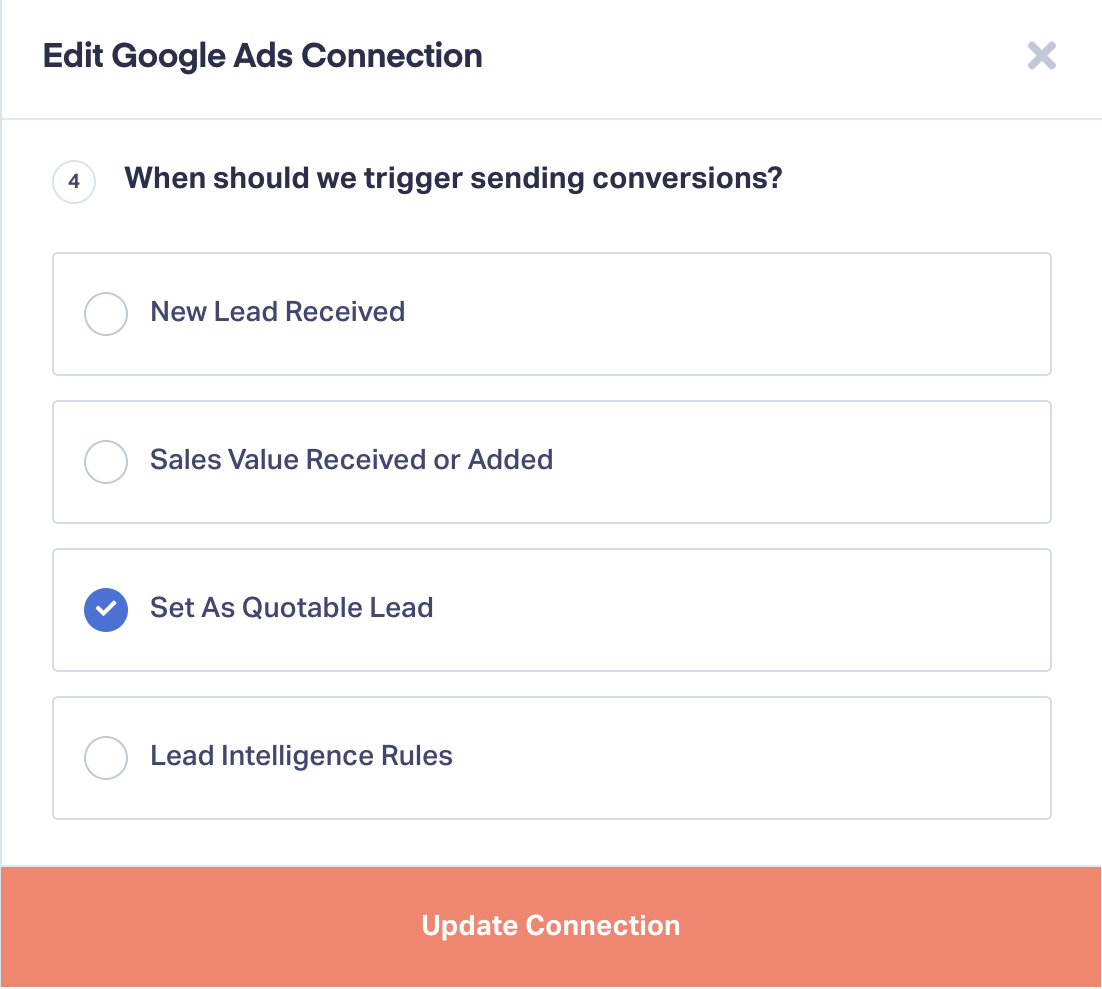
Conversion Trigger 1: Mark as Quotable
Send conversions only when leads are marked as "Quotable" in WhatConverts. This ensures Google only sees leads that your team has validated as genuine opportunities after listening to calls, reading form submissions, or reviewing chat transcripts.
Conversion Trigger 2: Sales Value Added
Trigger conversions when sales value is received from your CRM or manually added. This teaches the algorithm to optimize specifically for revenue-generating leads rather than just lead volume.
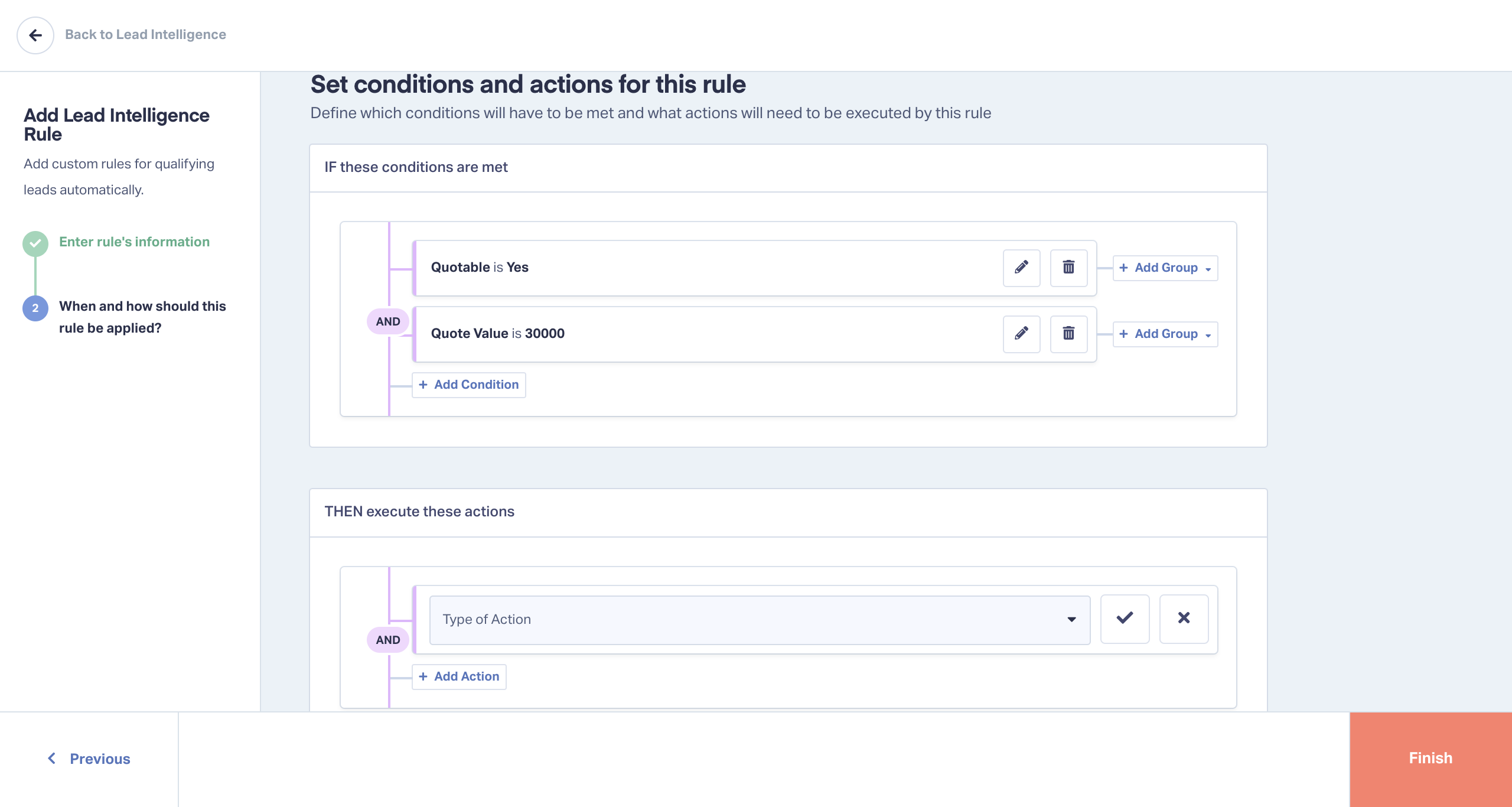
Conversion Trigger 3: Lead Intelligence Rules
Use automated Lead Intelligence rules to score leads based on multiple quality factors:
- Call duration (minimum 60 seconds)
- Keywords mentioned in call transcripts
- Pages visited during customer journey
- Form field responses
- Time of day and device type
Then trigger conversions only for leads exceeding your score threshold.
By filtering out junk leads before they reach Google, you reduce noise in your conversion data and help the algorithm identify success patterns 2-3x faster than standard tracking.
The Real Conversion Requirement: 30+ Quality Conversions
Understanding Google's 30-conversion minimum through the lens of data quality changes everything.
You don't just need 30 conversions. You need at least 30 conversions that represent genuine business opportunities.
If your standard tracking shows 45 conversions but only 15 of those are qualified prospects, you haven't met the threshold. You're at 15 quality conversions—and Google's algorithm is being trained on 30 data points where half the "success" examples are actually failures.
This explains why so many marketers hit the 30-conversion mark but still see poor automated bidding performance. They met the quantity requirement while failing the quality requirement.
With WhatConverts filtering your conversion data, your 30 conversions are actually 30 qualified opportunities. The algorithm trains on pure signal instead of mixed noise, reaching effective optimization weeks faster than campaigns using unfiltered conversion tracking.
Start Training Your Algorithm the Right Way
Automated bidding isn't magic—it's machine learning. And like any learning system, it's only as good as the data you feed it.
Reach the 30-conversion minimum as quickly as possible, but don't stop there. The more qualified conversion data you provide, the faster Google's algorithm identifies what actually drives revenue for your business.
Ready to accelerate your algorithm training with qualified conversion data? Start your 14-day free trial of WhatConverts today and see how lead tracking transforms automated bidding performance.
Start your free 14-day trial of WhatConverts today or book a demo with a product expert to see how we help prove and grow your ROI.
Get a FREE presentation of WhatConverts
One of our marketing experts will give you a full presentation of how WhatConverts can help you grow your business.
Schedule a DemoGrow your business with WhatConverts







