


 Alex Thompson
At a certain point, smart agencies stop asking, “Can we get this client results?” and start asking, “Is this the kind of client we can scale with?”
High-performing agencies don’t fail because they lack marketing skill. They fail because they fill their roster with disorganized operators: clients who lose leads, miss appointments, and blame the agency when their own operations collapse under the weight of new business.
That’s why the tools your prospect uses—not their budget—are a better predictor of LTV (Lifetime Value).
In the home services space, seeing Jobber in a prospect’s tech stack is one of the clearest "Green Flags" an agency can find. This article explains why this specific software signal predicts a scalable, profitable relationship and how to leverage it.
Note: Not a WhatConverts user yet? Start your free 14-day trial of WhatConverts today or book a demo with a product expert to see how we help prove and grow your ROI.
Why Jobber Signals Operational Maturity
Jobber isn’t just a scheduling tool; it is a filter. A contractor using pen and paper is operating on instinct. A contractor paying for Jobber is operating on infrastructure.
When you see Jobber, it signals that the business has already outgrown the "chaos phase." They have standardized their scheduling, dispatching, and invoicing.
Agency Translation: This client can actually handle the lead volume you are about to send them. Marketing won't break their business; it will feed it.
Here are three ways in which using Jobber shows this client is one worth working with.
Resource: Jobber Integration
Green Flag #1: They Are Operationally Ready for Scale
Marketing campaigns die when operations fail. If you send 50 leads to a plumber who writes numbers on napkins, 30 of them will vanish (or get stuck between the car seats). The client will claim the leads were "bad," and you will churn.
Clients on Jobber have already solved the workflow problem.
- Defined Workflows: They have a linear path from Request → Quote → Job → Invoice.
- No "Lost" Leads: Customer info is digitized immediately, not lost in a van.
- Consistent Delivery: They look professional to the homeowner, which improves conversion rates.
Why this matters to you: You can scale demand without creating operational chaos. You spend less time diagnosing why they didn't call the lead back and more time optimizing campaigns.
Green Flag #2: They Are Growth-Minded, Not Survival-Minded
Businesses in "survival mode" rarely adopt robust field service management software. They are too busy putting out fires.
A business using Jobber is playing a different game. They are:
- Thinking beyond today’s schedule.
- Planning efficient routes and capacity.
- Tracking repeat work and long-term customer value.
- Investing ahead of demand.
Agency Translation: This client wants growth and is structurally prepared for it. They aren't looking for a silver bullet to save them next week; they are looking for a pipeline to feed them next year.
Green Flag #3: They Have Margins That Support Marketing
This is the quiet financial signal agencies learn to respect.
Software costs money. A business paying for Jobber demonstrates they understand the value of efficiency and have the margins to support overhead. They aren't shopping purely on the lowest price.
Why this matters: Low-margin clients create high-stress relationships. They scrutinize every click cost and panic if results aren't instant. Jobber users understand that systems require investment. They are far more likely to:
- Stay invested through the optimization phase.
- Fund testing and iteration.
- Scale spend aggressively when the ROAS proves out.
Asset: The Pre-Onboarding "Tech Check"
Copy this checklist for your sales team. If a prospect answers "No" to more than two, they are a high churn risk.
1. Do you use a CRM or Field Service Management (FSM) tool like Jobber? (If no: Red Flag)
2. Can you tell me your average revenue per job? (If no: They don't know their numbers well enough.)
3. If we sent you 20 leads tomorrow, what is your exact process for contacting them? (If vague: Operational maturity is low.)
4. Do you track which jobs come from existing vs. new customers? (If no: They can't calculate LTV.)
The Gap: Jobber Runs the Business, But It Doesn't Track the Source
Jobber is excellent at telling the client what happened (the job was booked, the invoice was paid).
But it doesn’t tell them why it happened.
Jobber doesn't know if that $8,000 roofing job came from your Google Ad, a Facebook post, or a referral. It just knows it exists. This leaves the agency in a vulnerable position: you are filling their Jobber schedule, but you can't prove which specific campaigns are doing the heavy lifting.
Beyond that, optimizing your automated bidding (like in Google Ads) means you need to pass job value back to the platform. And that value’s held inside Jobber.
In order to scale a Jobber client, you need to close that loop: connect ad platforms → lead tracking → sales value.
The Fix: How WhatConverts Unlocks Jobber Data
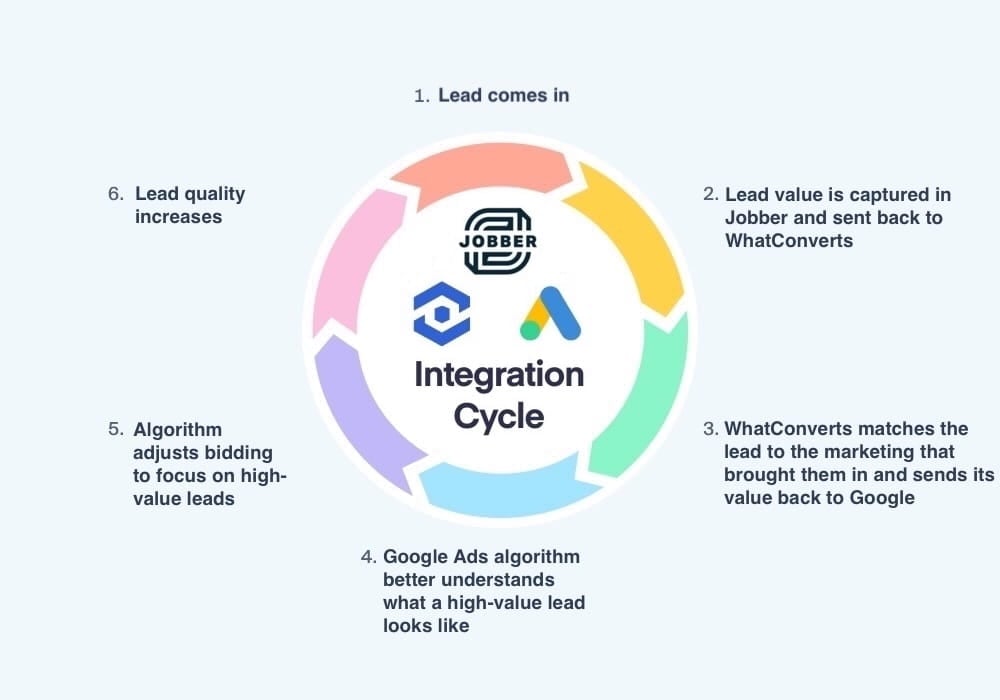
You don't need to replace Jobber; you need to feed it marketing intelligence. By integrating WhatConverts with Jobber, you create a closed-loop revenue system.
The Combined System:
- WhatConverts tracks the incoming lead (Call, Form, Chat) and captures the marketing source (Source, Campaign, Keyword).
- The lead syncs into Jobber, carrying that marketing data with it.
- The client completes the work in Jobber.
- The Loop Closes: When the invoice is paid in Jobber, the sales value syncs back to WhatConverts.
The Result: You can look at a report and see: "Google Ads Campaign B generated 15 leads, resulting in 4 Jobber invoices totaling $24,500."
Best of all, you can then pass that data back to Google Ads to “steer the algorithm” and target better, higher-value leads.
Resource: Jobber Integration
The Strategic Takeaway
Ambitious agencies don’t scale by taking more clients. They scale by taking better ones.
Jobber is one of the strongest indicators that a prospect is ready for the big leagues. It signals operational maturity, financial stability, and a growth mindset.
But operational readiness is only half the equation. You need attribution to prove your value.
- Jobber signals they can handle the work.
- WhatConverts proves you generated it.
When you pair a Jobber-ready client with revenue-based attribution, you aren't just running ads. You're building a revenue engine that they—and their finance team—won't ever want to turn off.
Ready to turn your client's Jobber data into marketing proof?
Start your free 14-day trial of WhatConverts today or book a demo with a product expert to see how we help prove and grow your ROI.
Get a FREE presentation of WhatConverts
One of our marketing experts will give you a full presentation of how WhatConverts can help you grow your business.
Schedule a DemoGrow your business with WhatConverts







