


 Amanda Pell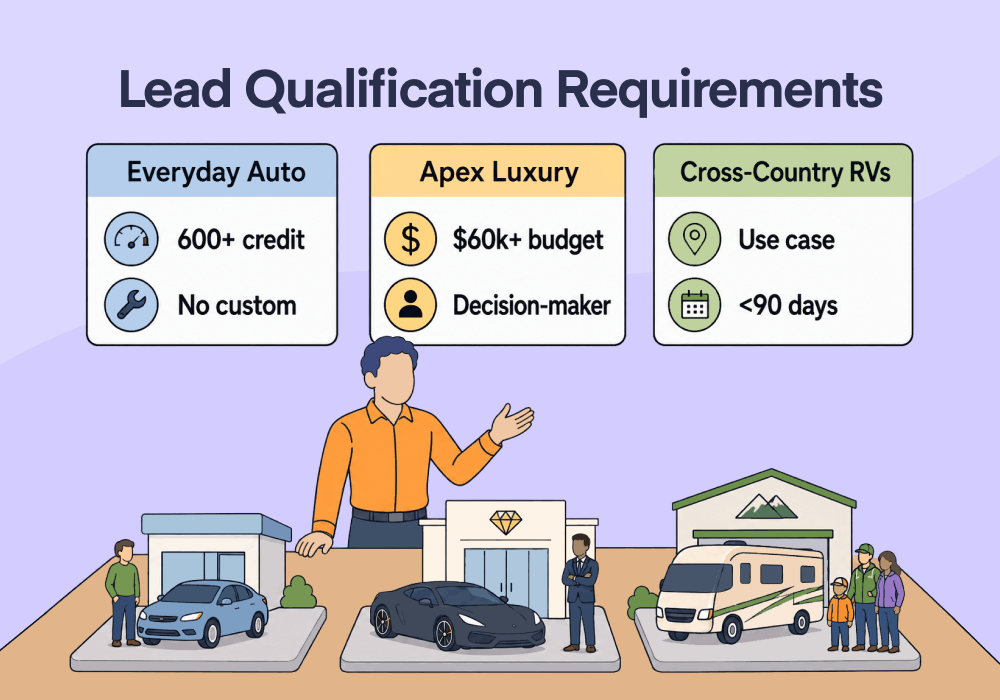
When you manage a portfolio of clients, each one typically gets treated separately. Each one gets an account manager, and that manager sits down with the client to craft a campaign strategy.
But when a client is a parent company for multiple brands, it requires different strategies and resources for each of its subsidiaries. It’s one client, but it feels like five.
Each sub-brand under the same corporate umbrella has different buyers, price points, and definitions of a good lead. What qualifies as a strong lead for one brand can be junk for another.
If you try to apply one strategy across all five brands, none of them winds up getting what they want.
This article shows how to build a separate optimization strategy for each sub-brand, based on that brand's own Marketing Qualified Lead (MQL) definition, without losing the master view across the account.
Note: Not a WhatConverts user yet? Start your free 14-day trial of WhatConverts today or book a demo with a product expert to see how we help prove and grow your ROI.
The Problem: One Strategy Can't Serve Five Brands
A parent company has more in common with raising children than the name suggests. Each brand has its own personality, its own needs, and its own path to growth.
If you treat them as a monolith, the math doesn't work. A blended report says the account returned 2x. It doesn't say what actually happened: one brand returned 4x while two others lost money.
Here's what managing the portfolio as a single unit hides:
- One shared optimization target applied to brands with completely different buyers
- A blended ROAS that masks which subsidiaries are winning and which are bleeding
- No way to tell whether a lead is qualified without knowing which brand it belongs to
When every brand feeds the same strategy, the platform optimizes for the loudest one and starves the rest. Predictable growth becomes impossible, because you can't scale a result you can't isolate.
The Insight: Each Brand Has Its Own Definition of a Good Lead
You can't optimize at the parent company level. You have to optimize for the brand.
A qualified lead for a high-end luxury car dealership looks nothing like a qualified lead for the average sedan seller next door. They have different price points, different sales cycles, and different intent.
If you optimize both using one definition of "qualified," you teach the ad platform to chase the wrong type of buyer for at least one of your brands.
Each brand needs its own MQL definition, its own qualified-lead signal, and its own optimization target. Then you manage the portfolio as a set of custom strategies running side by side, not as one strategy stretched across five brands that share nothing but an owner.
Related Reading: How to Measure Lead Quality [+ Scoring Checklist]
How to Optimize Each Brand on Its Own Terms
The fix is to separate the brands in your data, then optimize each one against its own benchmark.
Here's the workflow:
- Define the MQL for each brand separately. Write down what a qualified lead actually looks like per brand: the service requested, the quote value, the call length that signals real intent.
- Split tracking by brand. Give each subsidiary its own tracking so leads, sources, and outcomes stay attributed to the right brand instead of pooling into one bucket.
- Feed each brand's qualified leads back to its own campaigns. Send the qualified-lead data for each brand into that brand's ad platform so bidding optimizes for its buyer, not the portfolio's average.
- Judge each brand against its own benchmark. Compare a brand to its own target, never to a sibling with a different economic model.
Step one is where most portfolios go wrong. Skip the per-brand MQL, and every step after it gets the same blended blur.
Related Reading: Using Segmentation to Target Quality, Not Quantity
Why WhatConverts
WhatConverts tracks every brand independently while keeping the whole portfolio in one place. That's the combination a parent company actually needs: brand-level control and account-level oversight at the same time.
- Separate tracking per brand. Every call and form comes in attributed to the right subsidiary, with its own source, keyword, and lead detail intact.
- A master view across the portfolio. Manage five or more brands from a single account, then drill into any one of them without untangling shared data.
- Custom optimization for each brand. Qualify and value leads per brand, then push each brand's qualified-lead data back to its own campaigns so every subsidiary optimizes for its own buyer.
WhatConverts lets you run a distinct strategy for each brand and still report on the parent company as a whole.
Related Reading: Build Trust and Transparency with Clients Using Lead Manager
Proof: AdVenture Media Hit 3x ROAS Across Five Brands
AdVenture Media took on TekBrands, a parent company whose subsidiaries included MemoryStitch, AccuCut, AccuQuilt, and CustomShapePros. The previous agency couldn't produce predictable results, in part because it applied one strategy to every brand.
The problem was lead quality. Without direct CRM access, AdVenture couldn't tell which leads, keywords, or campaigns were generating real value for each brand, so it couldn't optimize any of them.
WhatConverts gave them a clear window into lead quality. For every lead, the team could see who the lead was, where it came from, and what it wanted. That let them build a custom strategy per brand and optimize toward each brand's own qualified leads.
The results across the portfolio:
- 3x ROAS earned across all brands
- Unique challenges addressed across five brands using six channels
- $60 average CPA across all brands
The Unlock
A parent company isn't one client. It's a set of brands that happen to share an owner, and each one grows on its own terms.
Here's the complete workflow:
- Define a separate MQL for each brand
- Split tracking so every lead stays attributed to the right brand
- Feed each brand's qualified leads back to its own campaigns
- Judge each brand against its own benchmark, not a sibling's
- Report the portfolio as a whole while managing every brand individually
A blended strategy proves the account is busy. Per-brand optimization proves each brand is growing.
Ready to run a custom strategy for every brand without losing the master view?
Start your free 14-day trial of WhatConverts today or book a demo with a product expert to see how we help prove and grow your ROI.
Get a FREE presentation of WhatConverts
One of our marketing experts will give you a full presentation of how WhatConverts can help you grow your business.
Schedule a DemoGrow your business with WhatConverts







