


 Amanda Pell
A PPC lead shows up as an anonymous number. It’s just one conversion out of hundreds that come in each month, disappear into the crowd, and may or may not pop back up as a customer when it makes it to the sales side.
But a conversion isn’t a number. It’s a person with a name, a request, and a budget, whose lead journey will end in either disqualification or a successful sale.
All of that data is recordable. The trouble is that most tracking doesn’t record it. Most platforms only confirm that something happened without keeping track of who it happened to.
This article shows how to turn each anonymous conversion into a named, documented lead: the person behind the number, what they asked for, and whether they became customers.
Note: Not a WhatConverts user yet? Start your free 14-day trial of WhatConverts today or book a demo with a product expert to see how we help prove and grow your ROI.
A Conversion Count Proves Volume, Not People
A conversion count answers exactly one question: how many. It can't answer who.
That's fine until a client starts asking harder questions. Which of these leads was real? What did they want? Did any of them actually buy?
Here's what an anonymous count looks like in a client meeting:
- 30 conversions reported for the month
- No names, requests, or outcomes attached to any of them
- A client wondering whether those 30 are customers or noise
A number with no people behind it is easy to doubt. And a skeptical client won't argue with your strategy. They'll argue with your results, because the result is all you gave them to look at.
When you can't name a single lead, you're asking the client to trust the dashboard. Skeptical clients don't extend that trust for long.
Related Reading: How to: Build Trust with the Skeptical Client
Every Conversion Has an Identity You Can Keep
Behind every form fill is a name and an email. Behind every call is a phone number and a recording. Those identifying details exist the moment the conversion happens. The only question is whether your tracking captures it.
Conversion tracking throws the identification away. Lead capture keeps it.
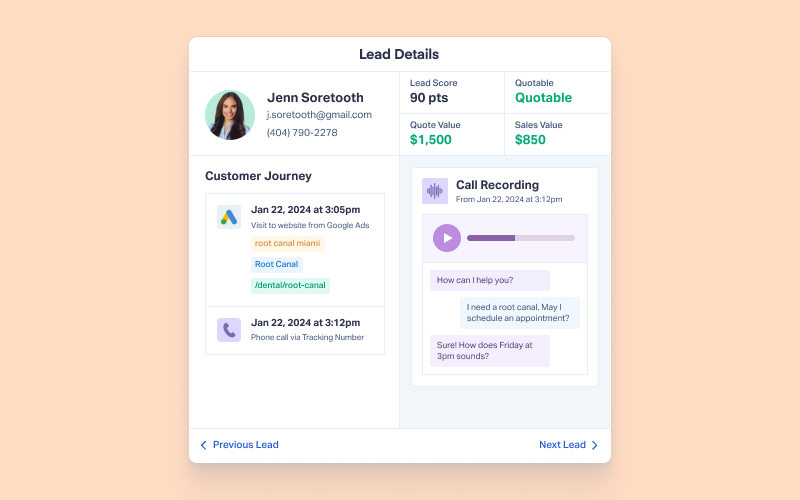
When you capture instead of count, a row in a report stops being "conversion #14" and becomes "Maria, who called about a kitchen remodel after clicking your Google Ad, and booked a $12,000 job." Same conversion, completely different thing to hand a client.
Feature Highlight: Customer Journey Tracking
How to De-Anonymize Your Conversions
The fix is to record the identity and detail behind each conversion the moment it lands. Here's the workflow:
- Capture the person, not just the event. For every call and form, log the name, phone or email, and the request, automatically.
- Tie each lead to its source. Attach the campaign, keyword, and channel that drove the conversion, so you know which ad produced which person.
- Record what they asked for. Use call recordings and form fields to note the service requested and the quote value.
- Mark the outcome. Update each lead as it closes, so the record shows who became a customer and for how much.
Run those four steps and "30 conversions" suddenly becomes a list of 30 names, each with a source, a request, and a result. That list is what you put in front of a client.
Related Reading: How to: Turn Anonymous Conversions into ROI-Ready Leads
Why WhatConverts
WhatConverts records every call and form as an individual lead, with the person and their detail attached, not just a tally.
- Capture the identity automatically. Every conversion comes in with the name, number or email, and request already recorded. No manual logging.
- See who each lead is and where they came from. WhatConverts captures 70+ data points per lead, tying each person to the exact campaign and keyword that drove them.
- Document the outcome. Add quote and sales values to each lead so the record follows the person from first click to closed sale.
What you get is a lead list, not a lead count. Thirty rows with names, requests, and revenue instead of one anonymous number.
Proof: Make The Turn Turned "Mystery Numbers" into Named Customers
Midwest agency Make The Turn had a client, a custom sporting goods supplier, who was skeptical of Google Ads. The client could see leads coming in but had no idea who they were or whether they were valuable. As Make The Turn put it, they were showing "mystery numbers on a sheet," with no way to prove the leads were real.
The client wanted to know three things:
- Who the leads were
- Whether they became sales
- What each sale was worth
Make The Turn switched to WhatConverts to be able to drill into individual lead records and connect online clicks to in-person customers. With individual lead tracking, the client's team could identify leads by name and enter sales data on each one.
That let the agency pull up the dashboard and say exactly who a lead was: this person came in last week, booked a custom fitting, and spent this much.
The results:
- A 67% lead-to-MQL conversion rate on PPC leads within a few months
- A sales team optimized in under 90 days using real lead data
- Built client trust and reduced churn with a named, customer-facing dashboard
The Unlock
An anonymous conversion count asks a client for faith. A named lead list hands them proof.
- Capture the name, contact, and request behind every call and form
- Tie each lead to the campaign and keyword that drove it
- Record what the lead asked for and what they were worth
- Mark which leads became customers
- Report the list, not just the number
A count tells a client something happened. A named list shows them who.
Ready to turn your anonymous conversion counts into a named list you can put in front of a client?
Start your free 14-day trial of WhatConverts today or book a demo with a product expert to see how we help prove and grow your ROI.
Get a FREE presentation of WhatConverts
One of our marketing experts will give you a full presentation of how WhatConverts can help you grow your business.
Schedule a DemoGrow your business with WhatConverts







