


 Amanda Pell
When we talk about WhatConverts, we want to provide a clear understanding of what our platform does and how that can benefit your business. Part of that clarity involves getting clear on what WhatConverts doesn’t do.
No one wins when someone who genuinely isn’t a fit for WhatConverts signs up anyway, spends three weeks trying to get it to do something it wasn’t built to do, and then switches to the platform they should have chosen to begin with. We want to give you everything you need to make the right choice for your needs, the first time around.
That’s why we’ve put together this article: to explain in detail exactly what WhatConverts does and doesn’t do.
Note: Not a WhatConverts user yet? Start your free 14-day trial of WhatConverts today or book a demo with a product expert to see how we help prove and grow your ROI.
The Short Version: What WhatConverts Is Designed For
WhatConverts is a full-funnel call and lead tracking platform that lets PPC marketers and agencies track not just which marketing campaigns are generating calls and conversions, but also which are generating qualified prospects and real revenue.
First it shows marketers where their most valuable prospects are coming from. Then it lets them use that data to optimize campaigns, improve sales efficiency, and prove the ROI of their efforts.
However, there are some things that WhatConverts just isn’t for. Here’s a quick rundown of the top three things WhatConverts doesn't do, along with what it does instead.
Clarification #1: Yes Call Tracking, No Call Center
WhatConverts offers a full suite of call tracking features. This includes advanced capabilities like AI call analysis, keyword detection, greetings and whispers, and call flows and routing. What we don’t offer are call center features like softphone, live call listening, outbound calling, or whisper coaching.
| ✅ Dynamic Number Insertion (DNI) and static numbers | ❌ Outbound dialing |
| ✅ Local and toll-free numbers | ❌ Live call listening |
| ✅ Call recording and transcription | ❌ Live whisper coaching |
| ✅ AI call summaries, keyword spotting, and sentiment analysis | ❌ Skills-based call agent distribution |
| ✅ Call flows, IVR menu, and geo-routing | |
| ✅ Greetings and whispers | |
| ✅ Multi-ring, round robin, and simultaneous dialing | |
| ✅ White labeling | |
| ✅ HIPAA, GDPR, and SOC2 compliance |
Call Flows and IVR vs. Adaptive Call Routing
WhatConverts’s call routing features help users ensure that calls reach the right destination:
- Call flows and IVR menus let callers choose the right department or destination for their call
- Geo-routing connects calls to the receiving office that’s closest to them
- Multi-ring, round robin, and simultaneous dialing decide who picks up once the call is headed the right way (whether that means ringing a whole team at once, taking turns across the group, or working down a list until someone answers)
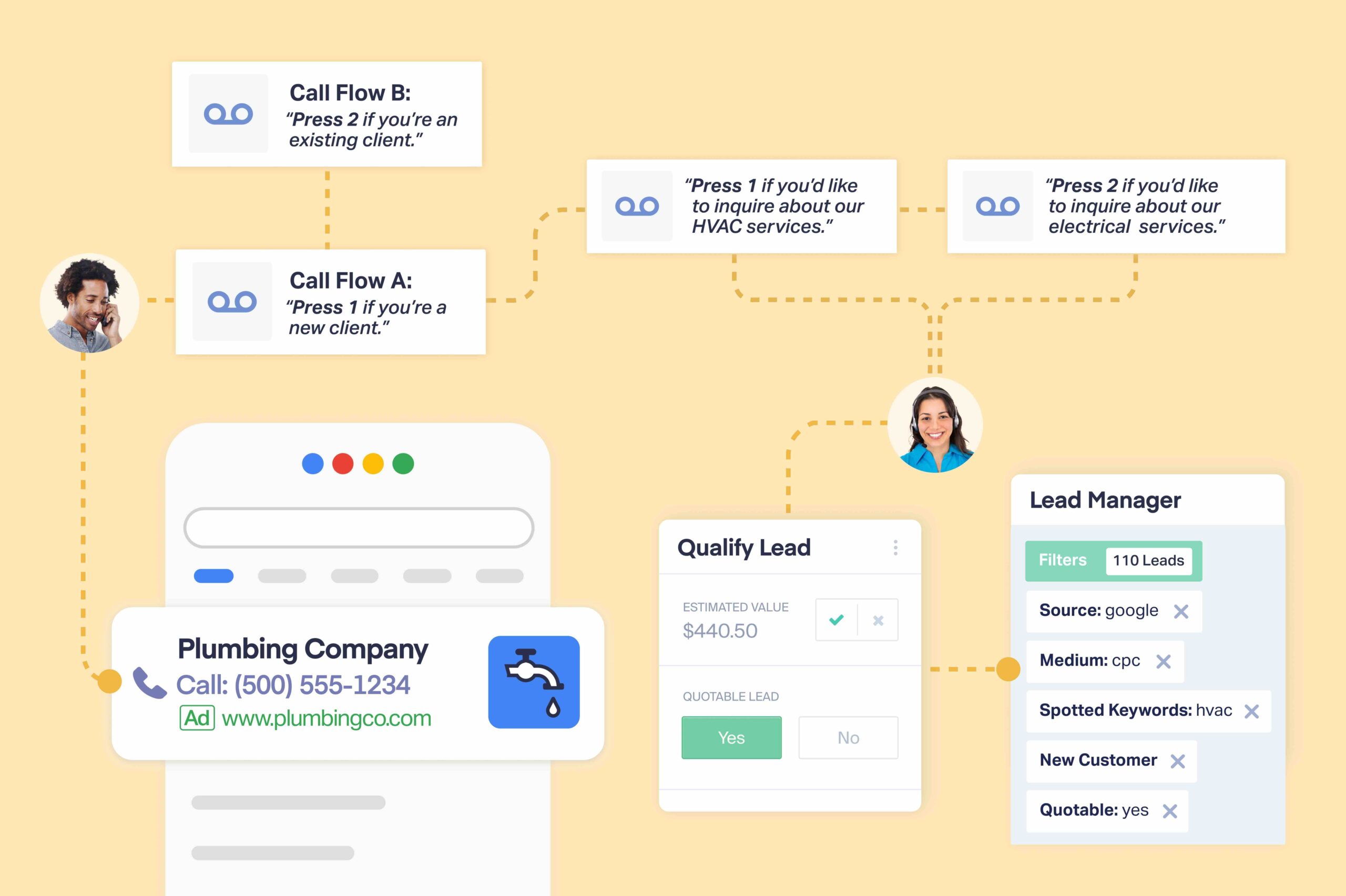
These features don’t decide who is best suited to take a call and adaptively route calls based on skills or availability. For call routing with position tracking, callback offers, or routing based on who’s currently free or has been idle the longest, you’ll need a dedicated call center software.
How It Works: What Are Call Flows?
Call Whispers vs. Live Whisper Coaching
WhatConverts offers call whispers, not live whisper coaching. A call whisper is a message that plays to the recipient after they pick up but before the call connects. It lets the receiving party know which campaign and keyword brought the caller in, so they enter the conversation with important context to help them handle the call.
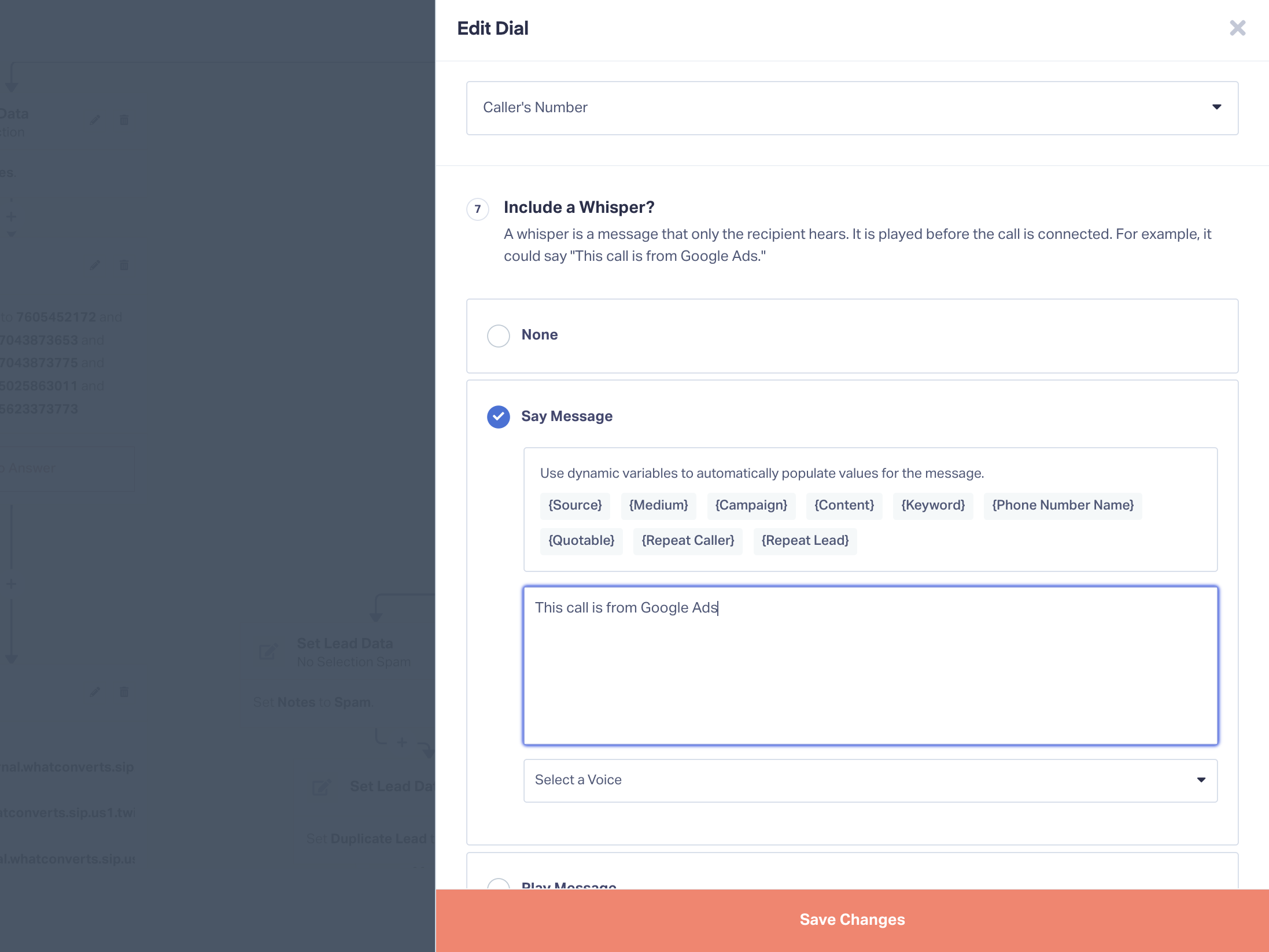
That’s different from live whisper coaching, where sales managers or supervisors listen in on a call and talk to the sales rep without the caller hearing them. In both cases, the “whisper” is a message that the rep can hear but the caller can’t. The difference is that WhatConverts’s call whispers are an automated message whereas whisper coaching is a live call listening feature.
Clarification #2: Yes AI Analysis, No AI Agents
WhatConverts offers advanced AI call analysis features that automatically evaluate call transcripts and surface keywords, identify buyer sentiment, and feed into automated qualification rules that users set up. What we don’t offer are AI voice agents or virtual receptionists.
| ✅ AI Lead Analysis | ❌ AI voice agents |
| ✅ Instant call summaries | ❌ Virtual receptionists |
| ✅ Automatic intent and topic detection | ❌ Real-time AI agent assistance |
| ✅ Spotted keyword extraction | ❌ AI appointment booking |
| ✅ Real-time sentiment scoring |
AI That Answers Calls vs. AI That Analyzes Them
The difference between AI call handling and AI analysis comes down to who picks up the phone. An AI voice agent answers the call itself, talks to the caller, and either passes them on to a person or books the appointment itself. With WhatConverts, a human person at your business answers every call, the same as they do now.
Our AI Lead Analysis comes into play after the conversation. It writes up a summary of the call, pulls out the relevant keywords that were mentioned, and feeds information to your Lead Intelligence qualification rules so the lead can be sorted and valued by the time you open your dashboard, without any manual input.
That means you can open your lead dashboard in the morning and find a pre-sorted lead list that shows only real prospects, each with the specific service they’re interested in and their buyer timeline documented in the file.
See everything that AI Lead Analysis with WhatConverts can do.

One thing worth noting is that the two aren’t mutually exclusive: if you decide an AI receptionist is right for your business, WhatConverts can continue working alongside it. WhatConverts will still track, transcribe, analyze, qualify, and attribute the calls your AI agent handles.
Clarification #3: Yes Sales Insights, No Sales Management
WhatConverts shows you what happens to a lead both before and after the conversion, which includes everything that occurs throughout the sales process: how quickly the call or form was answered, how the conversation went, and whether or not the deal closed. That’s why we created the Sales Call Handling report, which packages all of this data in a way that helps sales teams optimize call coverage and improve sales performance.
Related Reading: How to: Improve Call Handling with Zero Extra Training
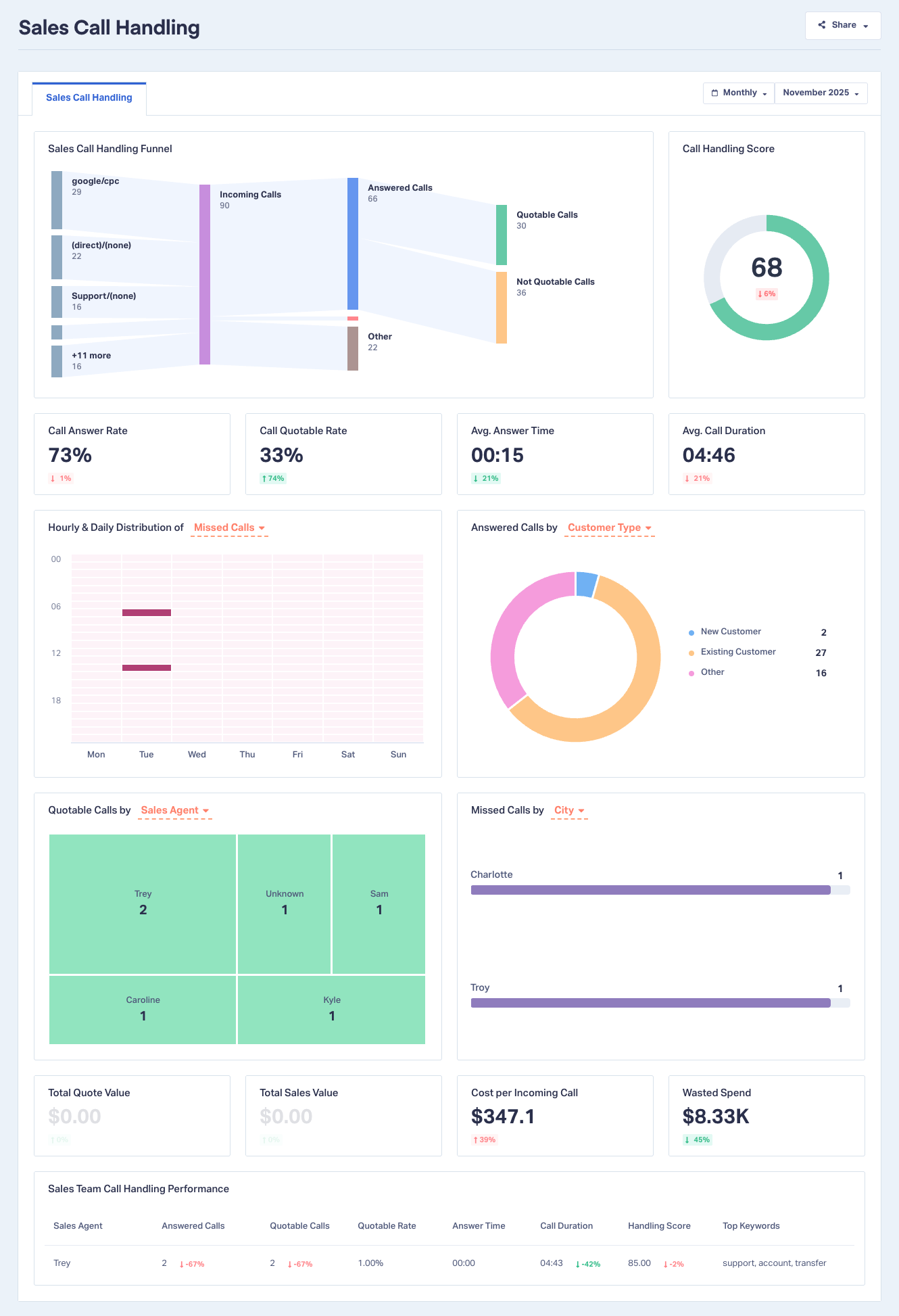
What WhatConverts doesn’t do is provide full-fledged pipeline management tools to run the sales process. Users can mark leads “quotable,” “not quotable,” or “pending” and can assign them to a particular sales rep using custom fields, but beyond that there are no deal stages, sequences, or task assignments.
| ✅ Sales Call Handling Report | ❌ Deal pipeline management |
| ✅ Answer rate, answer time, and quotable rate by rep | ❌ Sales sequences and outreach automation |
| ✅ Missed and unanswered call visibility | ❌ Task assignment and rep workflows |
| ✅ Real time lead notifications to sales | ❌ Contact and account records |
| ✅ Qualified leads pushed directly to your CRM with full attribution |
Lead Management vs. Customer Relationship Management
WhatConverts is a lead management tool, which is different from (but can overlap with) the customer relationship management provided by a sales CRM.
Lead management covers everything that happens to a lead between arriving and becoming a customer. That means:
- Capturing it
- Seeing which campaign produced it
- Qualifying it
- Assigning it a value
- Marking its status
- Leaving notes
- Making sure the right person follows up
Customer relationship management covers what happens during and after the sale: multi-stage pipelines, automated outreach sequences, task assignment, and workflows.
Related Reading: Build Trust and Transparency with Clients Using Lead Manager
Which Do You Need?
What we’ve found is that many WhatConverts users opt to use the Lead Manager as a sort of makeshift CRM. For smaller businesses and industries with shorter sales cycles, users find that the Lead Manager’s features work well for qualifying, categorizing, and following up on leads.
Users in industries with longer or more complicated sales cycles often need the dedicated power of a sales CRM. WhatConverts can connect directly to the CRM (either natively or using Zapier or webhooks) so that when leads come in, WhatConverts can automatically document the lead with full marketing attribution, use automated rules to qualify and value leads and disqualify junk, then pass only real MQLs onto the CRM for receipt by the sales team.
Integration Spotlight: CRM Integrations
The Bottom Line
WhatConverts is for marketers and agencies who want to see which campaigns are bringing in real business. It allows marketers to route, record, and analyze calls with AI, and provides valuable call handling data that can inform and improve sales-side call coverage.
But for those users who need full-fledged call center functionality, AI call agents, or sales pipeline management, there are other tools that are better suited to the job. If you fall into one of those categories, we’re glad to help you on your path to finding the right solution for you.
If your needs align with WhatConverts does provide, then you can get your free 14-day trial started and have your tracking setup up and running in less than an hour.
Ready to get started?
Start your free 14-day trial of WhatConverts today or book a demo with a product expert to see how we help prove and grow your ROI.
Get a FREE presentation of WhatConverts
One of our marketing experts will give you a full presentation of how WhatConverts can help you grow your business.
Schedule a DemoGrow your business with WhatConverts







