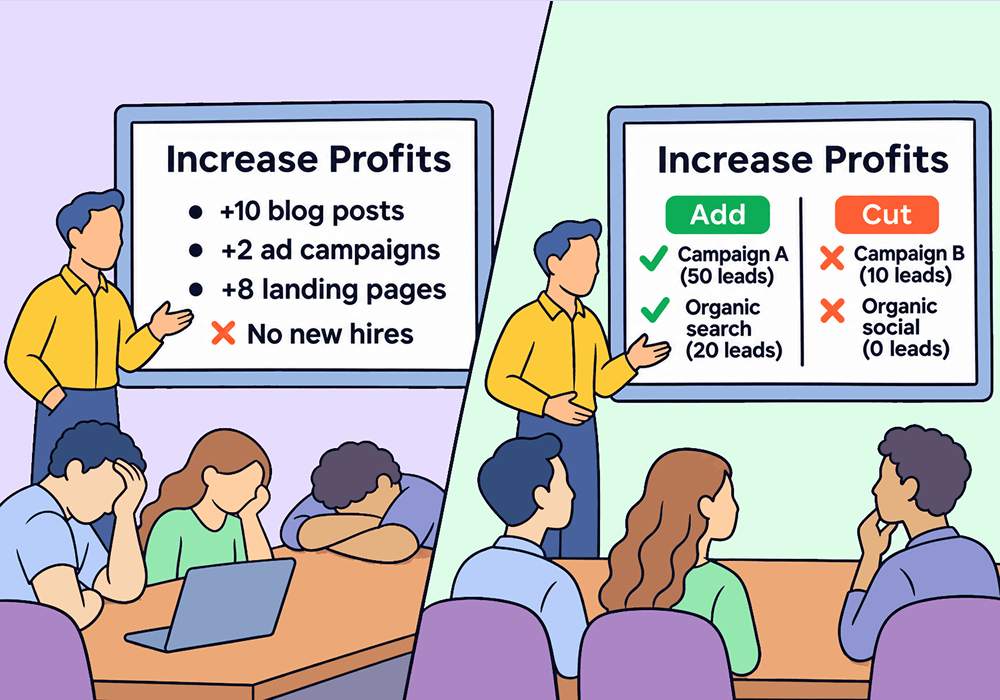
Agency reporting comes down to two things: busy-ness and business.
- Busy-ness is the work itself: Pages built, articles published, campaigns managed, hours logged.
- Business is what the work produced: Leads and the revenue those leads turn into.
Every agency reports some of both, but what matters is which one the agency is actually selling.
An agency that sells its work is selling labor, and labor has a profit ceiling. The only way to earn more is to sell more hours or squeeze more out of the people working them.
On the other hand, an agency that sells leads has another option: get more leads out of the work it already does.
This article shows how to find which agency work produces qualified leads and grow margins by shifting hours toward it.
Note: Not a WhatConverts user yet? Start your free 14-day trial of WhatConverts today or book a demo with a product expert to see how we help prove and grow your ROI.
Why Selling Labor Caps Your Margins
When the product is your staff’s time, revenue is tied to hours and headcount. A retainer covers a set amount of work, so profit depends on how efficiently your team delivers it.
That leaves two levers for increasing profit:
- You can raise prices, which is hard to justify when you’re not offering more work in return.
- Or you can get more output from the same people: more accounts per manager, more posts per writer.
Most agencies take the second option, which leads to employee burnout, high turnover, and a workforce that skews junior because senior employees leave once they have the experience to land a position at a company with better work/life balance.
Selling Leads Changes Your Profit Math
When you sell leads, labor stops being the product and becomes just one ingredient involved in producing the product.
A labor-selling agency grows by producing more labor. A lead-selling agency grows by producing more leads from the labor it already has.
| If you sell labor: | If you sell leads: | |
| Margins grow by | Getting more output from each person | Getting more leads from each hour |
| Renewals depend on | Whether the hours felt worth the fee | Whether the leads paid for the retainer |
| When the client's budget tightens | The easiest hours get cut | The work producing leads gets protected |
| Work that doesn't produce leads | Keeps getting done because it's billable | Gets reworked or dropped |
To make the shift, you need to optimize your team's hours the same way a PPC marketer optimizes their ad budget. Figure out which work is producing qualified leads and which isn't, then double down on what works and cut what doesn't.
Related Reading: Send Quote Value with Google Ad Conversions
How to Find Out Which Work Produces Leads
Most agencies already track how many hours it spends on each project or campaign. Not many agencies know how many leads each project produces.
To find out which of your projects is producing qualified leads, you need three pieces of data:
- Each individual lead you produce
- Each lead's specific source, medium, campaign, keyword, and ad
- The quality of each lead
Here's how to gather the information you need to make that assessment:
1. Set Up Marketing-Side Lead Conversion Tracking
Many agencies never see the actual leads they generate. Form fills and phone calls go straight to the client's team, and the agency is left looking at conversions and call durations.
If your reports stop at traffic, impressions, or a total conversion count, you can't tell whether your work generated any leads at all, let alone which of your projects is producing qualified ones. Marketing-side lead tracking puts every call, form, and chat in front of your agency, tied to the campaign, keyword, or page that produced it. That's the essential ground-level data you need in order to identify which work is worth doing.
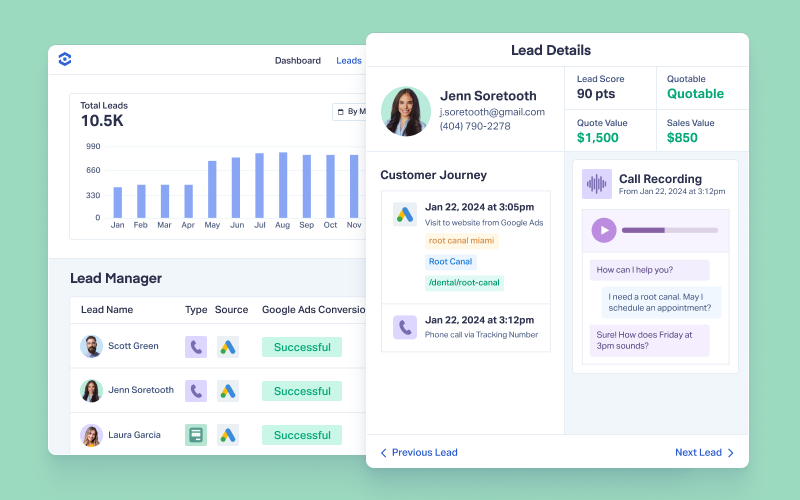
Related Reading: How to: Turn Anonymous Conversions into ROI-Ready Leads
2. Identify Which Leads Are Qualified
You have total leads generated; now you need to figure out which of those leads were real prospects and filter out spam calls, job seekers, and existing customers. For agencies, that's easier said than done: qualification is usually a client-side process, and most businesses are too busy selling to keep you updated on which leads wound up being qualified.
There's a simple marketing-side solution to this. When you set up call and lead tracking, you have enough data to qualify leads yourself, without any client input at all:
- Call duration shows you which leads were hang-ups and which led to real conversations
- Form fields show you which held real requests and which were spam
- Call transcripts show you which leads were interested buyers and what services they were interested in
A call and lead tracking platform will document all of that information on the marketing side, where you can review it yourself. Depending on which platform you use, you can enable AI analysis to generate summaries, identify relevant keywords, and assess buyer intent automatically, without any manual review at all.
Related Reading: How to Measure Lead Quality [+ Scoring Checklist]
3. Measure Qualified Leads Per Project
With your lead pool narrowed down to only qualified prospects, you can measure each of your campaigns and pages by the number of qualified leads they produced.
There are any number of ways to parse this data across:
- Organic vs. paid channels
- Different paid ad platforms (like Google Ads vs. Facebook Ads)
- Different keywords or campaigns
- Different landing pages and lead pages
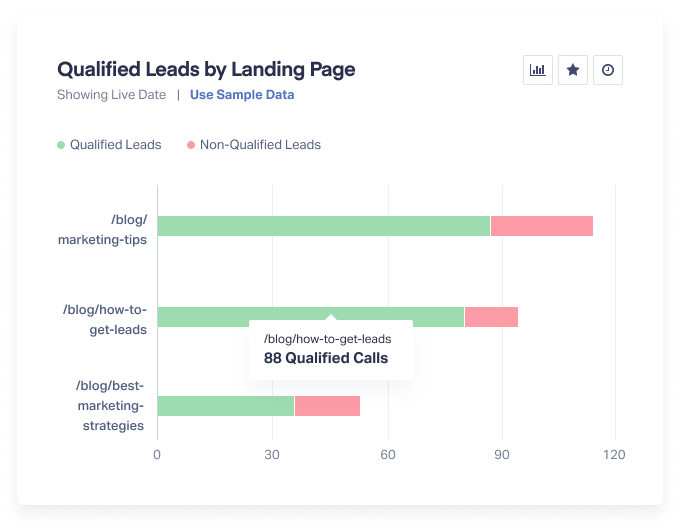
Decide how you want to attribute credit for each lead, then assess which campaigns, pages, and projects are worth your team's time. When you discover a project that's high-effort and low-lead gen, you can cut it and reallocate your resources to the work that's generating leads.
How WhatConverts Ties Agency Work to Leads
WhatConverts handles all three steps on the marketing side, with no client input required.
- Every lead in one place: WhatConverts tracks calls, forms, and chats with a single tracking script and ties each lead to its source, medium, campaign, keyword, and ad.
- Qualification without the client: Call recordings, transcripts, and form submissions live in the Lead Manager, where your team can mark each lead as qualified and add quote and sales values.
- Review on autopilot: AI analysis summarizes calls and assesses buyer intent, and Lead Intelligence qualifies leads based on rules you set, so nobody has to review every lead by hand.
- Smarter bidding from the same budget: Qualified conversions sync back to Google Ads, so Smart Bidding buys more of the leads that became customers.
- Reports that open with outcomes: Client reports open with qualified leads and their value, with tasks as supporting detail.
The same data shows which ad dollars produce leads and which hours do.
Read the Article – Introducing the Revenue Retainer: A New Way to Price Agency Work
From Billing Hours to Selling Leads
Here's how to make the shift:
- Set up marketing-side tracking for every call, form, and chat.
- Qualify leads with call duration, form fields, and call transcripts.
- Measure qualified leads by campaign, page, and project.
- Cut the high-effort, low-lead work, and move that time and budget to what's working.
- Open every client report with qualified leads and their value.
When your agency sells leads, growth comes from making the work count, not from making the team work more.
Ready to see which work is actually producing leads?
Start your free 14-day trial of WhatConverts today or book a demo with a product expert to see how we help prove and grow your ROI.
Get a FREE presentation of WhatConverts
One of our marketing experts will give you a full presentation of how WhatConverts can help you grow your business.
Schedule a DemoGrow your business with WhatConverts