















































 Alex Thompson
Most marketers know how much they’re spending. Far fewer can clearly show what that spend is actually producing.
Marketing Spend has been part of WhatConverts for a while. With it, reports give you a clear indicator of your ROI broken down by channels like Google Ads. What’s new is how much easier it is to analyze, report on, and act on that data.
Here’s a quick snapshot of the updates just rolled out:
- New Marketing Spend Report: A 12-month performance view with CPL metrics and exports
- Multiple source & medium mapping: Associate multiple sources and mediums with a single marketing channel
- Additional cost tracking: Include agency fees, SEO retainers, and other non-media costs
- Monthly spend selector: Quickly switch between months to see spend for a specific period
- Recurring manual costs: Automatically roll forward monthly spend and fees
Together, these updates make it easier to answer one question marketers care most about:
Where is the money going — and what is it actually producing?
Note: Not a WhatConverts user yet? Start your free 14-day trial today or book a demo with a product expert to see how we help prove and grow your ROI.
Why This Matters
Most marketers already track ad spend. The problem is what happens next.
Spend data often lives in spreadsheets, ad platforms, or finance tools. Lead data lives somewhere else. When those two don’t connect cleanly, reporting turns into guesswork and optimization slows down.
These updates close that gap by making Marketing Spend:
- Easier to review month by month
- More accurate by including real, all-in costs
- Directly connected to lead volume and cost per lead
- Usable in real reporting and optimization workflows
Instead of just tracking spend, you can now analyze spend performance with clarity and confidence.
Best of all, your Marketing Spend flows into the six main reports, so you can easily get insights like ROI by channel, campaign, keyword, landing page, etc.
What’s New in Marketing Spend
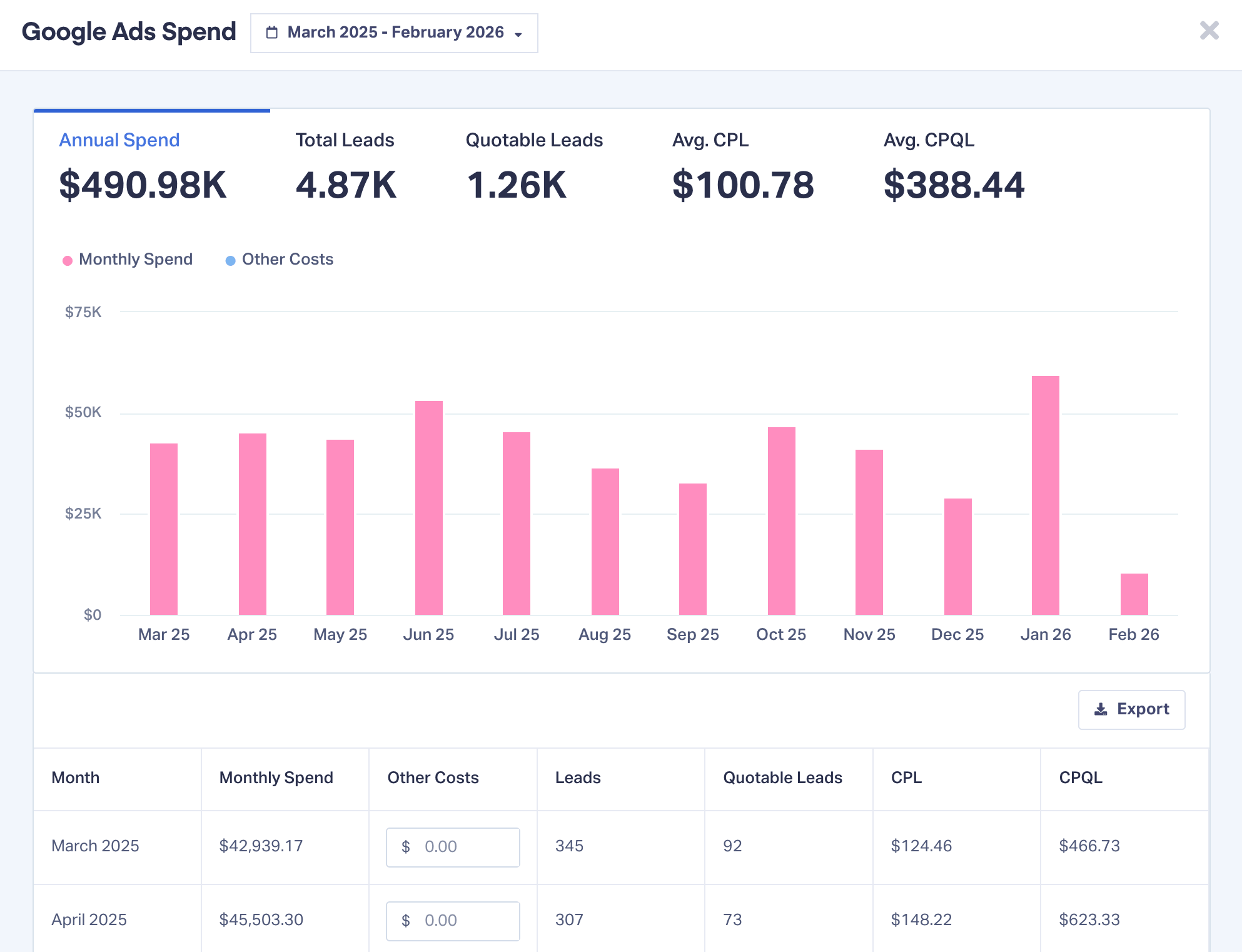
New Marketing Spend Report (12-Month Performance View)
What it does
Adds a dedicated performance report for every marketing channel you’re tracking.
How it works
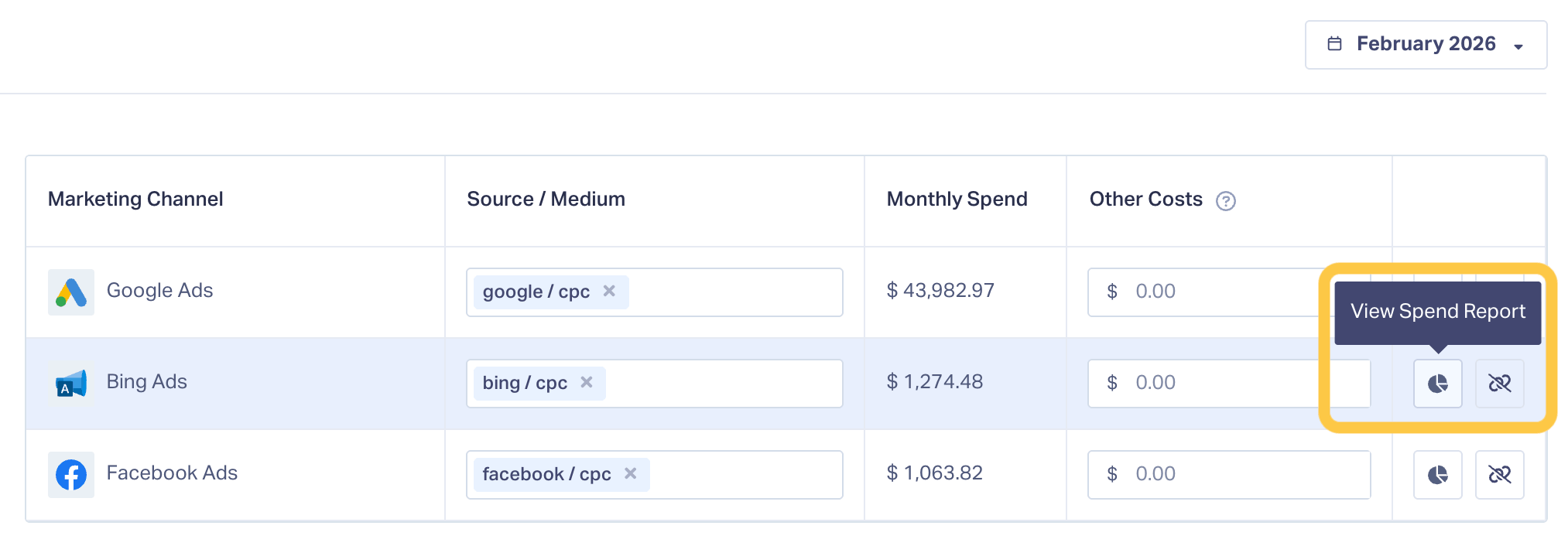
From Reports → Marketing Spend, click View Spend Report (pie chart button on the right side) on any channel to open a side panel showing a rolling 12-month view of performance. You can adjust the date range (within a 12-month window) and export the data for reporting.
The report includes:
- Total spend
- Total leads
- Average cost per lead
- Average cost per qualified lead
- Editable spend data (based on channel type)
Why it matters
This is the biggest shift in how Marketing Spend is used. Instead of static numbers, you get context. You can finally evaluate spend over time, compare efficiency across channels, and bring clean, defensible data into client and internal conversations.
Multiple Source & Medium Mapping
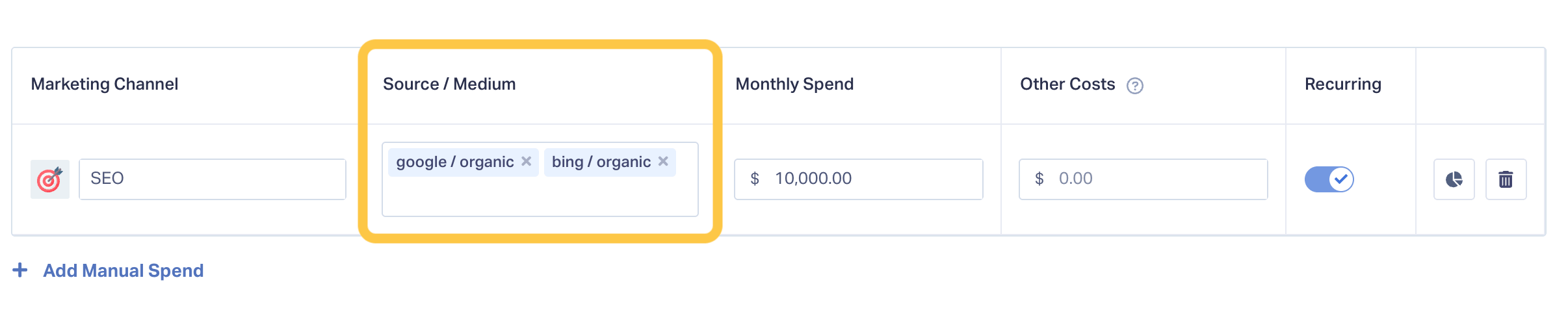
Allows you to associate multiple sources and mediums with a single marketing channel.
How it works
If a channel includes more than one source or medium, such as Google Organic and Bing Organic for SEO, you can map them together under one spend channel.
Why it matters
Real-world marketing channels aren’t always one-to-one. This keeps reporting clean and ensures spend aligns correctly with how leads are actually attributed, without forcing artificial channel splits.
Additional Cost Tracking
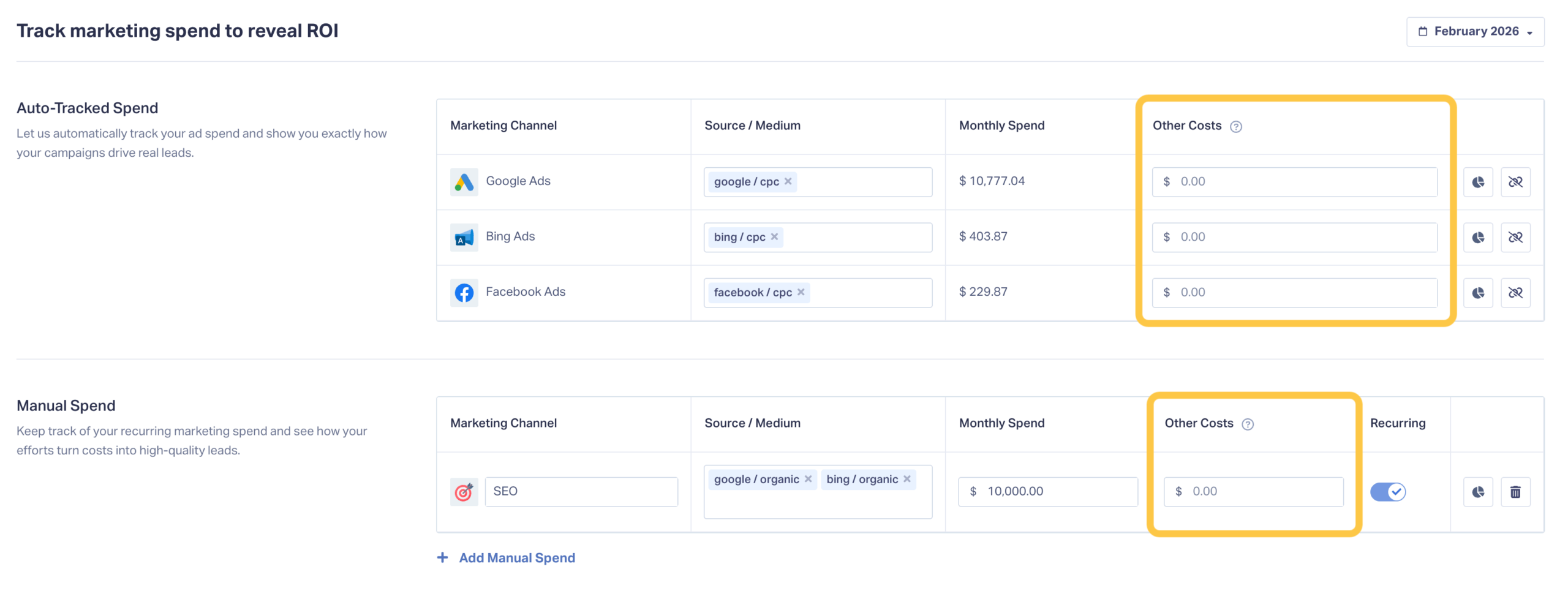
Adds a dedicated column for costs beyond ad platform spend.
How it works
You can now include expenses like:
- Agency management fees
- SEO retainers
- Other non-media costs tied to a channel
These costs appear alongside spend in both the table view and the spend report.
Why it matters
Ad spend alone rarely reflects true marketing cost. Including additional fees gives you a more accurate cost-per-lead picture and prevents underreporting real investment.
Monthly Spend Selector
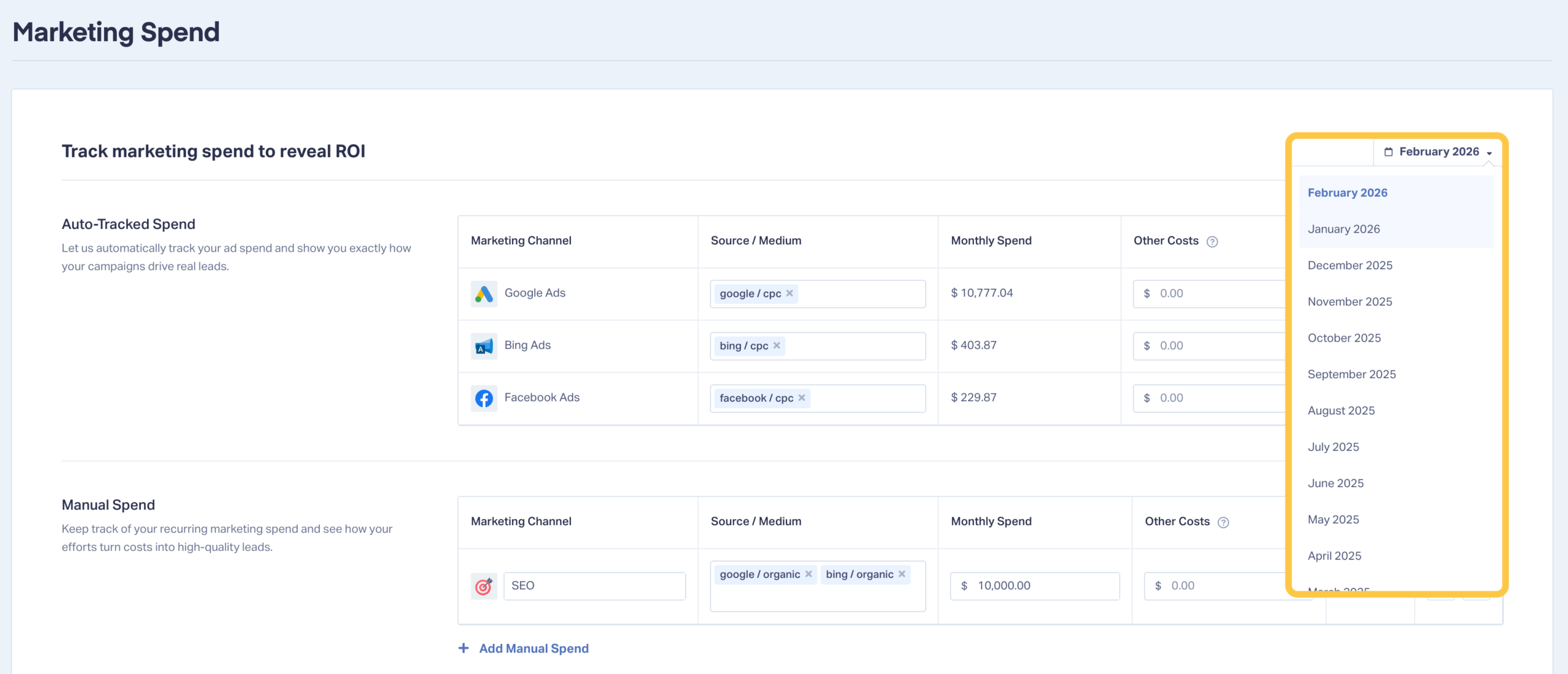
Lets you quickly switch between months to adjust spend for a specific period.
How it works
Use the month dropdown inside Reports → Marketing Spend to instantly change the time period you’re viewing.
Why it matters
Month-over-month comparisons are foundational to optimization and reporting. This makes trend analysis faster and reduces the need for external spreadsheets.
Recurring Manual Costs
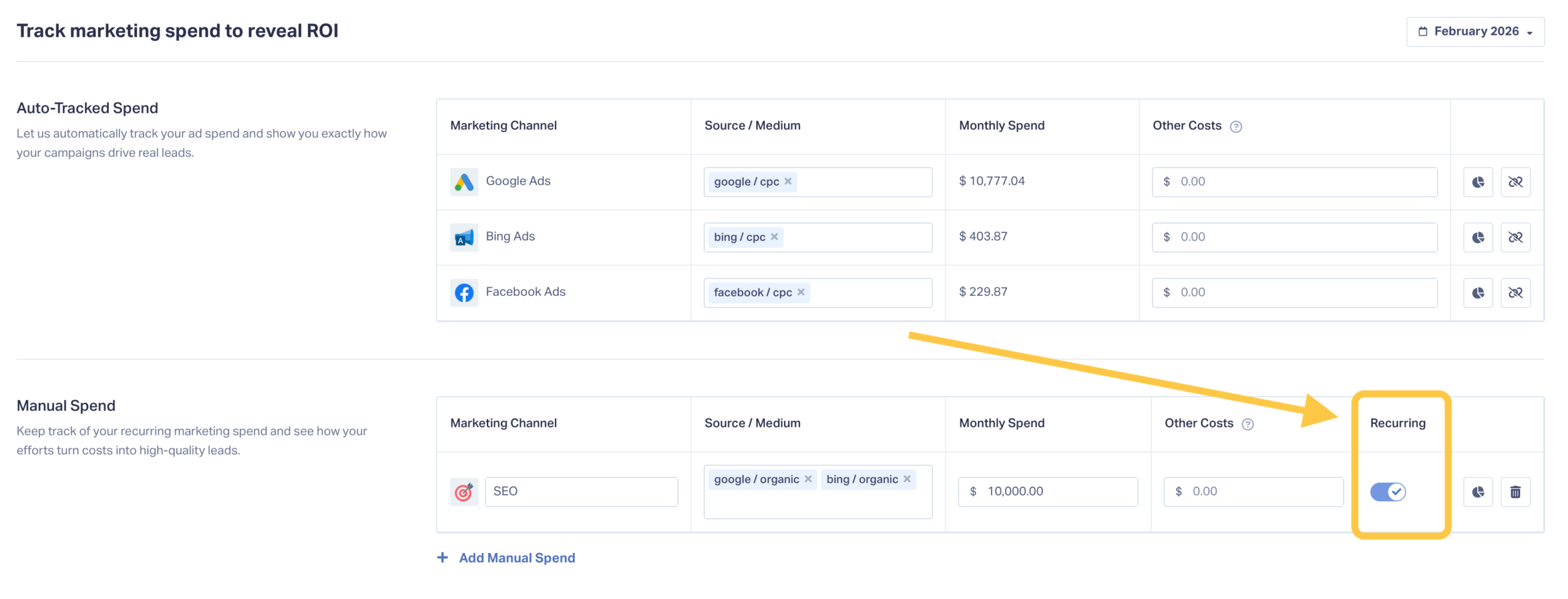
Automatically rolls forward monthly manual spend and additional costs.
How it works
When recurring spend is enabled, manual channel costs carry into future months without needing to be re-entered.
Why it matters
This removes repetitive work and prevents gaps in reporting for predictable, fixed monthly expenses.
Real-World Use Case
Imagine you’re preparing a quarterly client review.
Before, you might export spend from ad platforms, reconcile fees manually, and try to line everything up in a spreadsheet.
Now:
- You select the last 12 months
- Open the Marketing Spend Report for each channel
- See total spend, leads, and CPL in one view
- Export clean reports without rebuilding anything
The conversation shifts from “How much did we spend?” to “What did that spend produce?”
How to Get Started
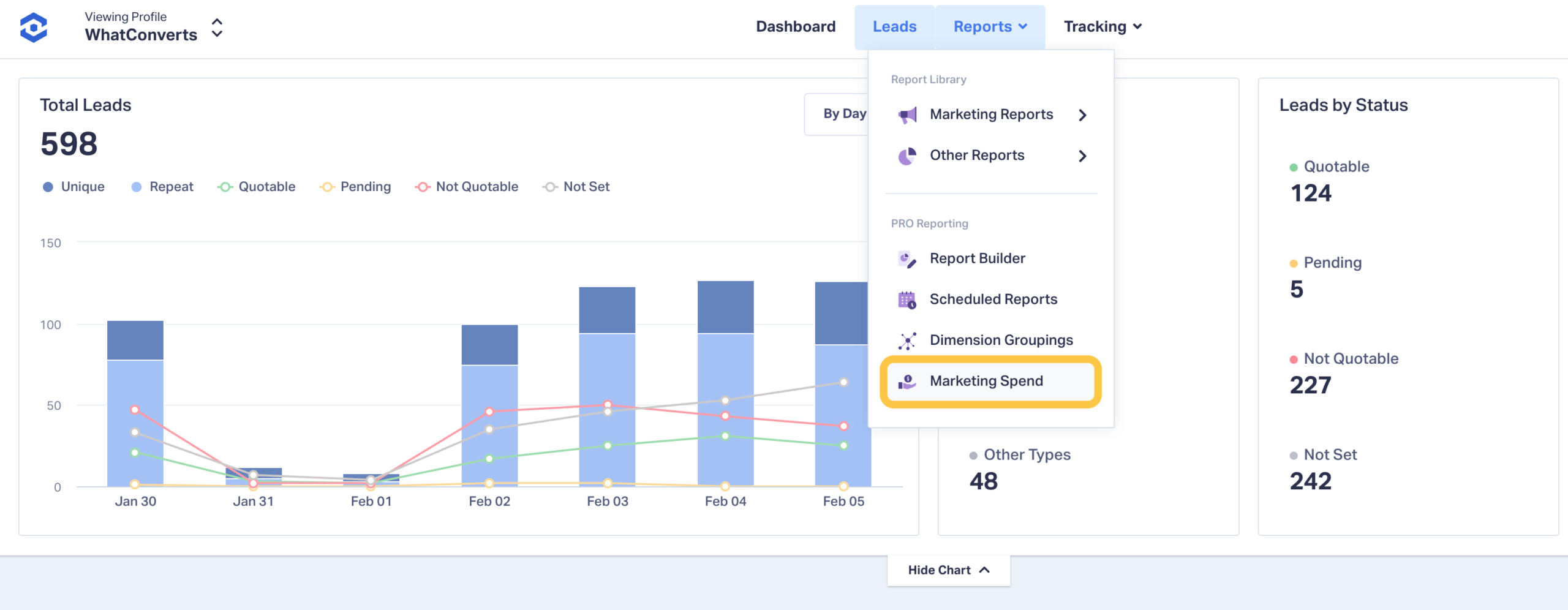
- Log in to WhatConverts
- Go to Reports → Marketing Spend
- Use the month selector to review spend by period
- Add additional costs where applicable
- Click View Spend Report (pie chart button on the right side) on any channel to see 12-month performance
Tips & Best Practices
- Include all real costs, not just ad platform spend
- Use recurring manual spend for fixed monthly expenses
- Review spend reports during monthly or quarterly optimizations
- Export reports to support client conversations and budget planning
What’s Next
We’re continuing to expand how spend connects to lead quality, outcomes, and optimization insights. Expect even deeper visibility into how spend translates into real results as these reports evolve.
If you’re a current user, log in to your account explore the updated Marketing Spend reports now.
Not a current user and want to see how Marketing Spend fits into your workflow?
Start your free 14-day trial of WhatConverts today or book a demo with a product expert to see how we help prove and grow your ROI.
Get a FREE presentation of WhatConverts
One of our marketing experts will give you a full presentation of how WhatConverts can help you grow your business.
Schedule a Demo
Grow your business with WhatConverts







