


 Amanda Pell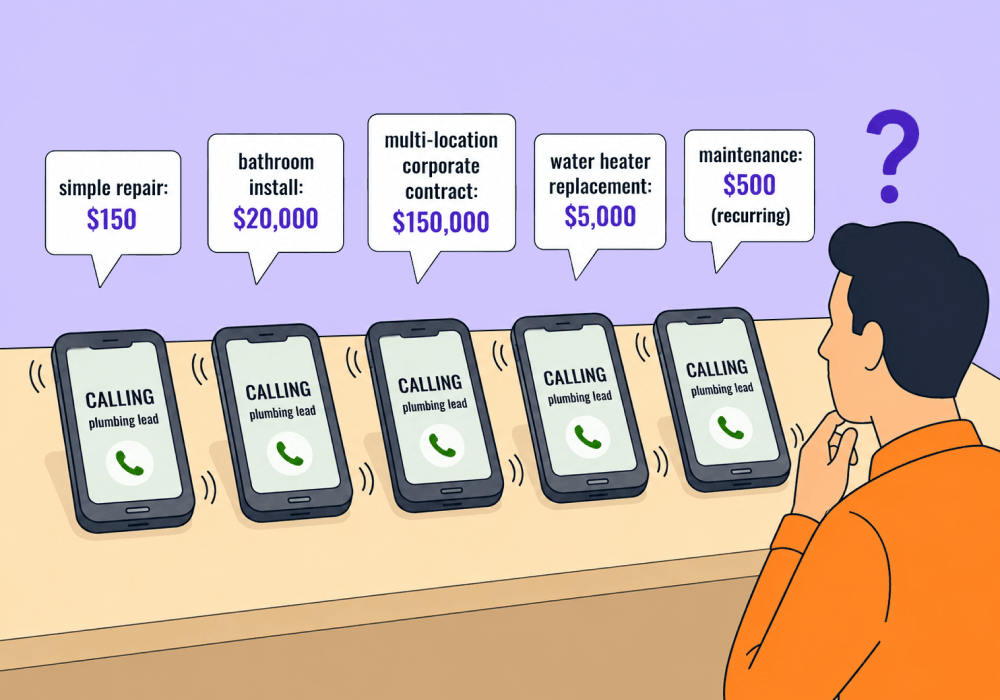
When you run ads for a service industry client, calls all tend to sound the same. Every lead needs a plumber, and they need it now.
But “now” is the only thing those callers have in common. One needs a $95 service call while the next is a $4,000 system replacement. Some leads need a one-time fix, while others have the potential to become long-term retainer contracts. One is a single-property homeowner, while the next manages twelve commercial buildings. And your conversion report counts them all as identical leads.
When you can't tell the $4,000 jobs from the $95 ones, your strategy can't either. The big jobs and the small jobs come through the same phone number, so spend flows toward whatever is cheapest to win, not whatever pays the most.
This article shows how to separate the high-value calls from the cheap ones, so you can move budget toward the jobs that actually grow the business.
Note: Not a WhatConverts user yet? Start your free 14-day trial of WhatConverts today or book a demo with a product expert to see how we help prove and grow your ROI.
The Problem: Identical Leads, Wildly Different Value
Emergency service calls all start the same way. People search "emergency plumber near me," call the first few results, and describe a problem. Every intake sounds the same.
Underneath that sameness, the revenue spread is huge:
- One clogged drain versus a full repipe
- A faucet swap versus a water heater install
- One single home repair versus a commercial account with recurring work
- A one-off call versus a yearly maintenance contract
When all of these register as one undifferentiated "lead," a few things break at once.
Cost per lead hides the real story. A campaign driving 80 drain cleanings at $30 each looks more successful than one driving 20 repipe quotes at $90 each, simply because the CPL is cheaper. What you can’t see is that the cheaper leads are funding your least profitable work.
The best jobs hide in plain sight. The $4,000 replacement and the $95 service call are buried in the same row of your dashboard, with the same label, worth the same on paper.
Your ad platforms learn the wrong lesson. Feed Google Ads raw conversion counts and Smart Bidding chases the easiest, cheapest call to win. It optimizes toward volume because volume is all it can see.
Why This Hits Service Categories Hardest
In categories like B2B software, leads sort themselves. Company size, job title, and form fields separate prospects before anyone picks up the phone.
Service leads, on the other hand, arrive flat. A homeowner with a $200 repair and a property manager worth $40,000 a year type the same three words into Google and call the same number. As a result, you don’t figure out the value of the prospective job value until you have the conversation. Which means if you’re not capturing what happens on the call, you’re optimizing a pipeline you can't see.
Learn How It Works: See Which Services Drive ROI with the Leads by Service/Product Report
The Fix: Read the Call, Tag the Value, Feed It Back
The differences are not invisible. They are spoken out loud on every call. The trick is capturing them and turning them into something your reports and ad platforms can act on.
- Capture what each caller actually asked for. WhatConverts records and transcribes every call, form, and chat, then ties it to the source, campaign, and keyword that drove it. The $4,000 job and the $95 job stop looking the same the moment you can read what each one wanted.
- Detect high-value intent automatically. Lead Intelligence scans transcripts for the words that separate big jobs from small ones, like "replacement," "commercial," "whole property," or "annual contract." You configure these rules once, and they run on every call after that. The high-value leads surface on their own instead of waiting for someone to listen back.
- Assign realistic value by job type. Use your average revenue per service to tag each lead. Now a lead carries a dollar figure, not just a tally mark, and your reporting shows which campaigns fill the schedule with cheap work versus which ones book the jobs that pay the bills.
- Sync those values back to Google Ads and Meta. With Campaign Optimizer, real conversion values flow back to the platforms. Smart Bidding stops chasing the cheapest call and starts bidding toward the leads that resemble your $4,000 replacements.
What Changes When Leads Stop Looking the Same
The same campaign report reads completely differently once value is attached.
| Campaign | Leads | Cost per Lead | Revenue | True ROI |
| Emergency Service | 80 | $35 | $9,200 | Low |
| Replacement & Install | 22 | $90 | $71,000 | High |
By cost per lead, you would cut the second campaign. By revenue, it is the one funding the business. You only see that once every lead carries the value of what it asked for.
Optimizing by volume would unknowingly steer your campaign in the wrong direction. Optimizing by revenue is the only way to chase the leads that actually turn into high-value jobs.
The Unlock
For commodity service businesses, growth isn't about generating more calls. It's about finding the high-value jobs already inside the calls you get.
- Capture every call, form, and chat with full source and keyword data.
- Detect high-value intent in transcripts with Lead Intelligence rules.
- Tag each lead with realistic service-level value.
- Sync those values back to Google Ads and Meta.
- Move budget toward the campaigns booking your most profitable work.
When every lead carries the value of what it actually wanted, your cheapest-looking campaign and your most profitable one finally tell the truth.
Ready to find the $4,000 jobs hiding inside your $95 lead volume?
Start your free 14-day trial of WhatConverts today or book a demo with a product expert to see how we help prove and grow your ROI.
Get a FREE presentation of WhatConverts
One of our marketing experts will give you a full presentation of how WhatConverts can help you grow your business.
Schedule a DemoGrow your business with WhatConverts







