


 Michael Cooney
When you start talking about call tracking, CallRail and WhatConverts are two of the platforms you'll hear about most.
Each platform meets different needs, and different businesses will find that one suits them better than the other. In order to make that decision, you’ll need a solid understanding of the technical differences between the two platforms.
This is a just-the-facts breakdown of both platforms’ capabilities. If you’d like to hear more about how WhatConverts can solve your specific pain points, book a demo for a personalized assessment from our team of product experts.
User Reviews
Before we go into detail, let’s first take a look at the user reviews for both platforms. These come directly from the third-party review site G2’s Summer 2026 data.
| CallRail | WhatConverts | |
| Meets Requirements | 9 | 9.4 |
| Ease of Use | 9 | 9.2 |
| Ease of Setup | 9 | 9.1 |
| Ease of Admin | 9.1 | 9.4 |
| Quality of Support | 8.8 | 9.9 |
| Good Business Partner | 9.2 | 9.7 |
| Product Direction | 8.9 | 9.7 |
| Overall Star Rating | 4.6 out of 5 | 4.9 out of 5 |
At a Glance: CallRail vs. WhatConverts
Here’s a quick, top-line summary of the key differences in call tracking using CallRail and WhatConverts.
1. CallRail tracks individual conversion sessions separately; WhatConverts unifies all interactions from each lead into a single integrated profile.
In CallRail, you can track calls, texts, and forms, but the platform tracks each session separately, across three disconnected dashboards. WhatConverts anchors its tracking to the person behind the conversions and organizes all of a lead’s interactions under a single profile in the centralized Lead Manager.
So if someone submits a form from their laptop on Monday and then places a call from their cell phone the following week, CallRail will track those sessions separately, while WhatConverts will attach both sessions to the same lead profile.
2. WhatConverts lets you view, sort, and filter your leads directly within the platform; CallRail data must be exported for analysis.
CallRail lets you analyze all of your calls, all of your forms, or all of your texts, but if you want to analyze your actual leads, you need to export and stitch that data together yourself.
WhatConverts documents over 70 different data points in a single integrated dashboard, so you can sort and filter your entire pool of leads by things like landing page, keyword campaign, quote or sales value, and more without leaving the platform.
3. WhatConverts provides in-platform lead qualification, valuation, and revenue reporting; CallRail uses manual “tags” that must be attached to each conversion.
If someone submits a quote request for a $500 service on Monday, then follows up with a call asking about that same $500 service on Friday, WhatConverts counts this as a single lead worth $500. CallRail counts it as two $500 conversions, and it’s up to you to figure out how to merge and dedupe your data.
4. CallRail tracks calls, forms, and texts; WhatConverts tracks these plus chats, transactions, bookings, and custom click events (all in one dashboard).
Both CallRail and WhatConverts offer call tracking, form tracking, and SMS text tracking. But if you want to track activity like chats, purchases, or bookings, CallRail requires you to integrate with separate tools.
WhatConverts tracks all types of leads across all channels, giving you a complete 360-degree view of your marketing results.
Already convinced? Get started with a free 14-day trial of WhatConverts today. Not so easily swayed? Read on as we dive into the details.
1. WhatConverts Tracks All Conversion Sessions to a Single Lead Profile in a Unified Lead Database
The way that WhatConverts and CallRail track conversions is fundamentally different:
- CallRail tracks on a session-by-session basis
- WhatConverts tracks on a lead-by-lead basis
CallRail: Session-Based Tracking
CallRail organizes its data by conversion: each call, form, or text (and the marketing source and contact information associated with it) gets its own line item. So:
- If you get two calls from the same number or two forms from the same account, CallRail will log those as part of the same customer journey.
- If you get one call and one form from the same person, CallRail will document those separately.
To merge those records, you need to either manually attribute both conversions to the same “Company” or export to a spreadsheet or third-party analytics platform.
WhatConverts: Lead-Based Tracking
WhatConverts organizes its data by lead, using a single first-party tracking script to connect all of the interactions, data points, and conversion types from one person and organize them under that person’s unified Lead Profile.
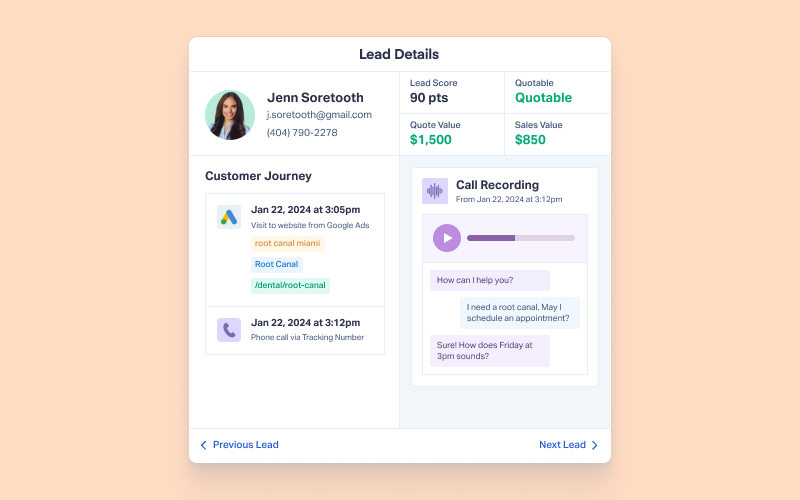
That means that even if their conversions come in different formats (like calls, forms, texts, chats, etc.) or occur during completely different user sessions (from different devices or on different days), WhatConverts ill attach all of those interactions to the Lead Profile and log them on a single, continuous Customer Journey view.

(You can even track offline campaigns in the same integrated database.)
Feature Highlight: Customer Journey Tracking
Why Is This Important?
When you’re counting conversions instead of leads and documenting different conversion types separately, you lose a lot of valuable functionality:
- Leads that perform different conversion types or interact across multiple sessions are duplicated in your system, so you can’t get a real assessment of how many actual prospects were generated.
- When you run ads using the same keyword with different conversion types, you can’t measure how well each keyword performs overall.
- If your lead page includes both a form and a phone number, you can’t evaluate that lead page cohesively. Performance data will be siloed across form conversions and calls.
2. WhatConverts Lets You Sort and Filter All Leads Inside the Platform
WhatConverts doesn’t just track all data in one place. It also lets you navigate and manipulate that data in a single, spreadsheet-like database. The Lead Manager lets you sort and filter your entire lead pool by any of over 70 data points without leaving the platform or exporting anything.
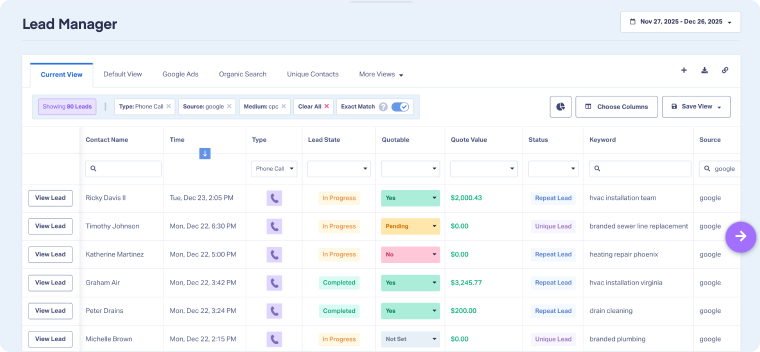
Each individual lead is tracked with:
- Contact Information: Name, email, phone number, and location data
- Call Data: Transcripts, recordings, time and date, first-time or repeat caller
- Conversion Types: All calls, forms, chats, emails, e-commerce transactions, click events, etc. performed by that individual
- Marketing Source Data: Channel, medium, keyword, ad group, and campaign behind each conversion
- Visitor Information: Landing page and lead page
- Quotability Status: Was this lead qualified, unqualified, or spam?
- Service or Product Interest: What is this lead interested in purchasing?
- Quote Value: What is the dollar value of the product or service this lead is interested in?
- Sales Value: How much revenue is this lead responsible for (logged after purchase)?
Note: If you need even more data points, WhatConverts also allows you to add custom fields that are unique to your business.
With all of that data stored in the Lead Manager, you can sort, filter, or run Quick Reports on any data point. For example, if you’re running ads for a dental clinic and you want to see all of your leads with the keyword “crown,” head into your Lead Manager and search the keyword column, just like a spreadsheet.
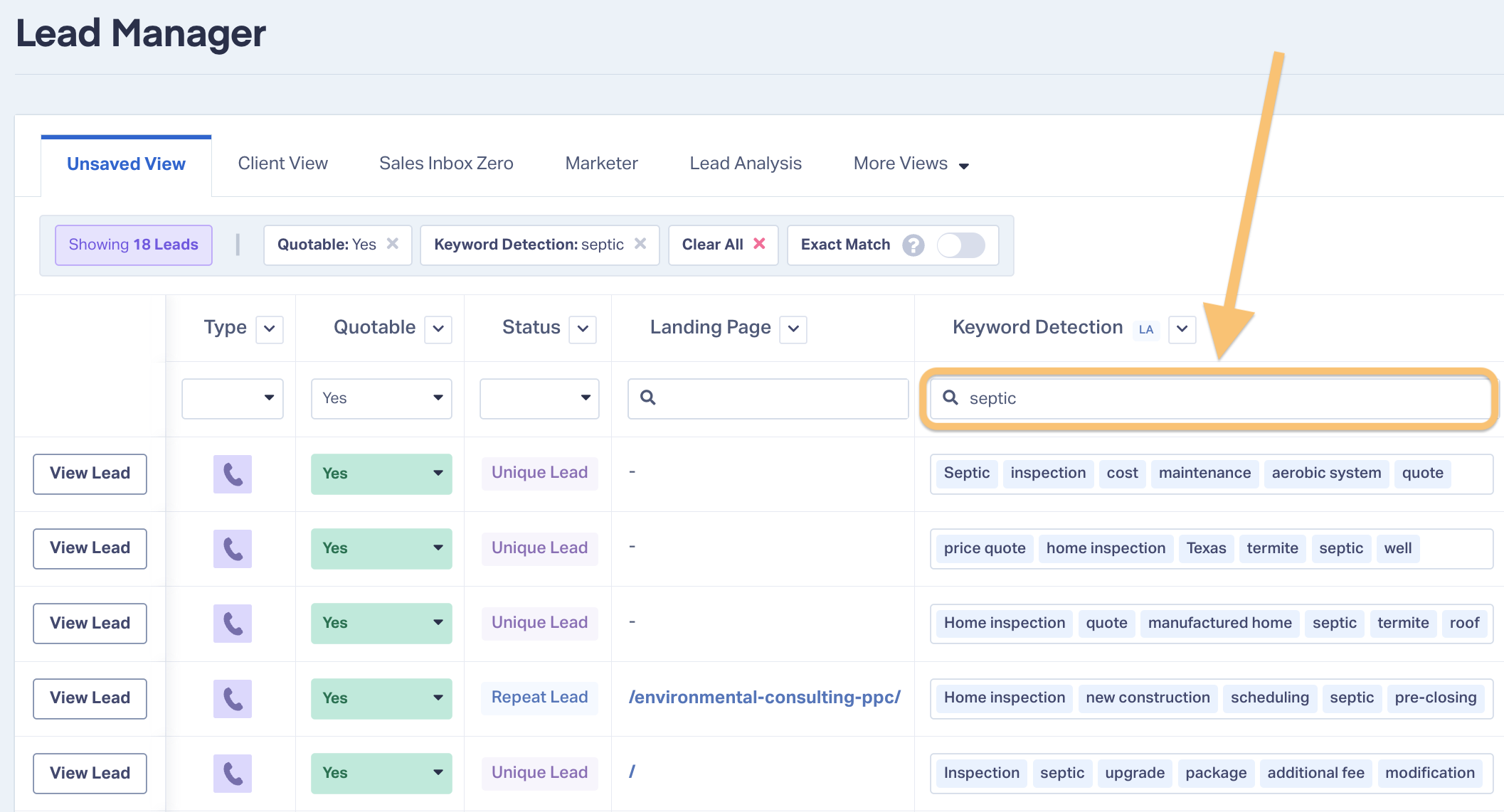
This will pull up every single lead with that keyword, no matter what type of conversion action they performed.
Why Is This Important?
When you’re running multiple ads with multiple keywords for different services across channels and platforms, you need to be able to accurately measure the success of each of those variables. You can only do that with a unified, searchable database like the Lead Manager.
Here’s a practical example:
Let’s say you’re running ad campaigns for a plumbing company. Each time a lead clicks on an ad and places a call, they go through a call flow that asks them to press 1 if they’re a new client or press 2 if they’re an existing one. New clients are then asked to press 1 for HVAC or press 2 for electrical.
At the same time, you’re running “HVAC plumbing” and “electrical plumbing” keyword campaigns that point to a quote request form.
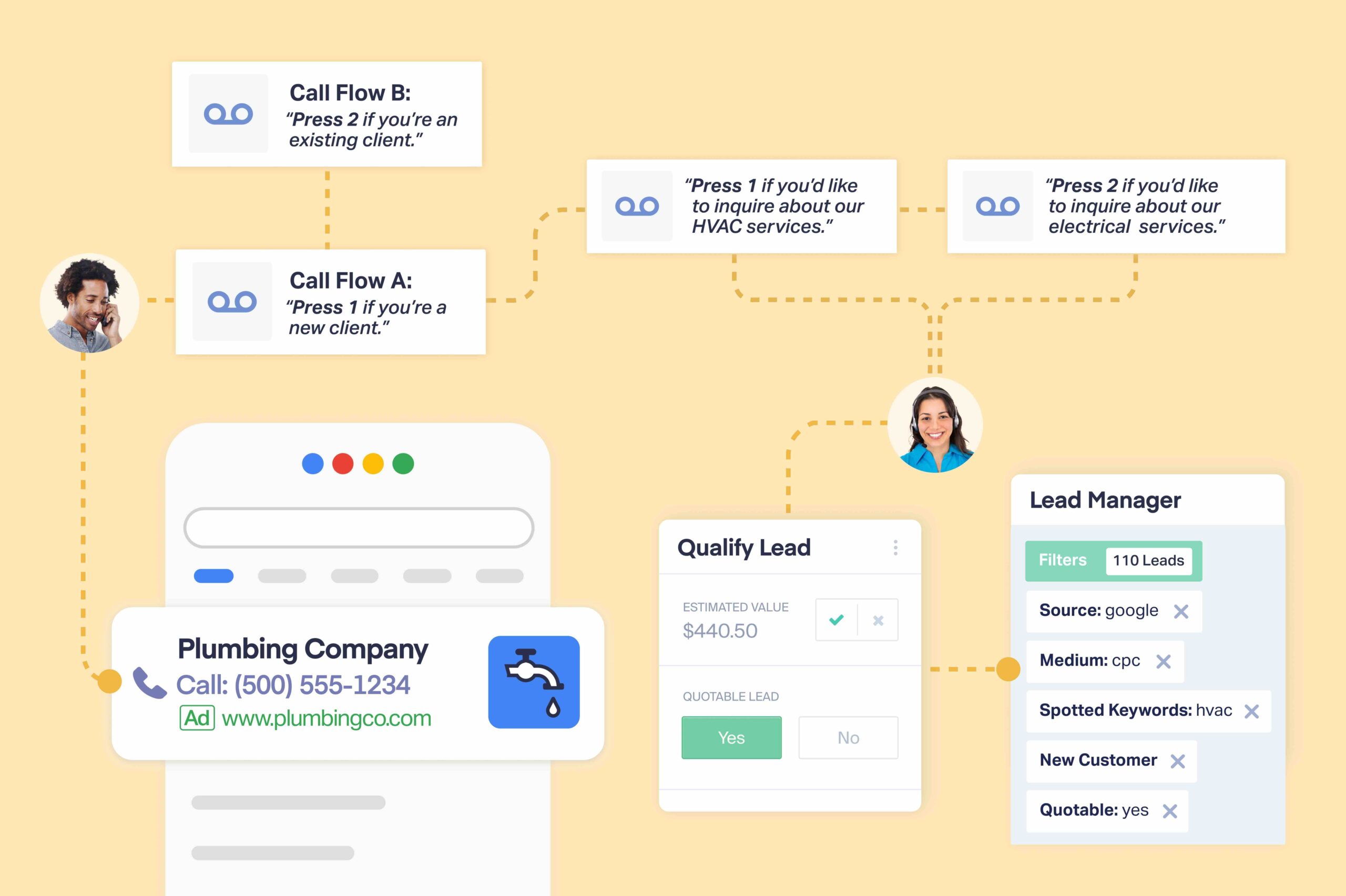
When each lead comes in, the sales person can use WhatConverts to mark the lead as “quotable” or “not quotable” and add a quote value based on the service they’re interested in.
With all of these data points documented in a unified database, you can answer questions like:
- Which service is generating the most leads?
- Are calls or forms converting more leads—overall and for each service?
- What channels get the most calls, and which get the most leads?
- Which landing pages are performing better across lead types, services, and keywords?
Then, to get a list of all of your prospective HVAC customers, you can use the Lead Manager’s filters to isolate all leads that are new customers, inquired about HVAC, and were marked quotable.
This all happens inside WhatConverts. With other call tracking software companies, you’d have to manually export and work with the data in Excel.
3. WhatConverts Lets You Measure Your Marketing by Customers and Revenue
Because WhatConverts tracks by lead instead of by individual conversion session, that means you can mark leads as “quotable” (a.k.a. “qualified”) and add quote or sales values to the lead itself.
CallRail also lets you attach qualification and value tags, but you can only attach them to the conversions themselves. That causes a few problems:
- Number of Qualified Conversions ≠ Number of Qualified Leads. Especially in industries with longer sales cycles, a single lead is likely to perform multiple conversion actions before they become a customer. A high number of qualified conversions doesn’t predict a high number of sales; it just lets you know that people are interacting with your marketing materials.
- Conversion Value ≠ Revenue. Adding accurate values to leads is simple: the cost of the product or service they’re interested in is the quote value of the lead. When leads perform multiple conversions before they purchase, the value of each of those conversions is unclear, and they certainly don’t correlate with the revenue generated by the lead.
Feature Highlight: Connect calls to sales value with Lead Qualification and Valuation.
Why Is This Important?
When you qualify and value leads instead of conversions, it allows you to generate reports that measure the success of your campaigns using the metrics that clients and stakeholders really care about: customers driven and revenue generated.
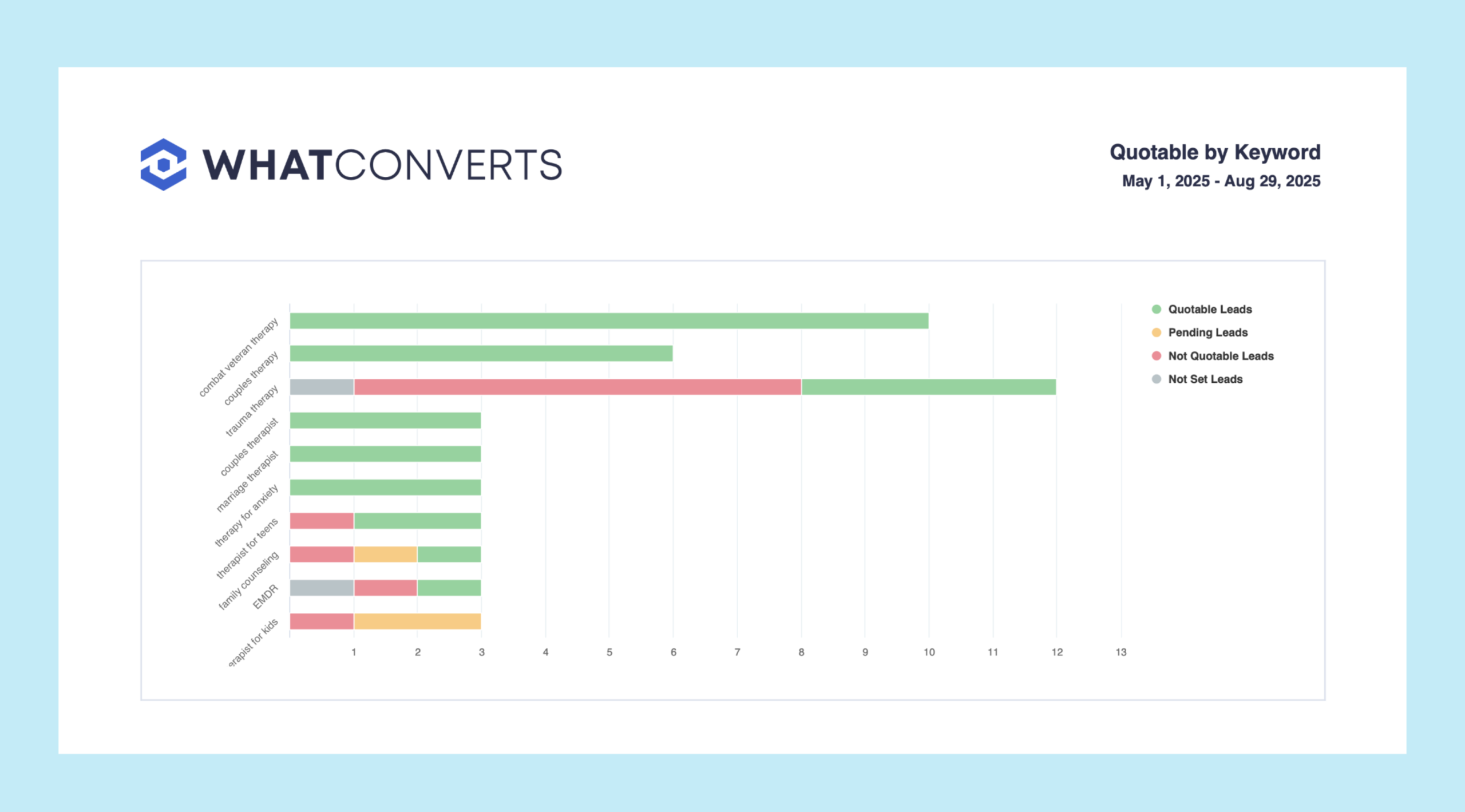
When your client questions whether the traffic from your campaigns was qualified, you can hand over a report that shows exactly how many legitimate prospects each of your marketing channels produced:
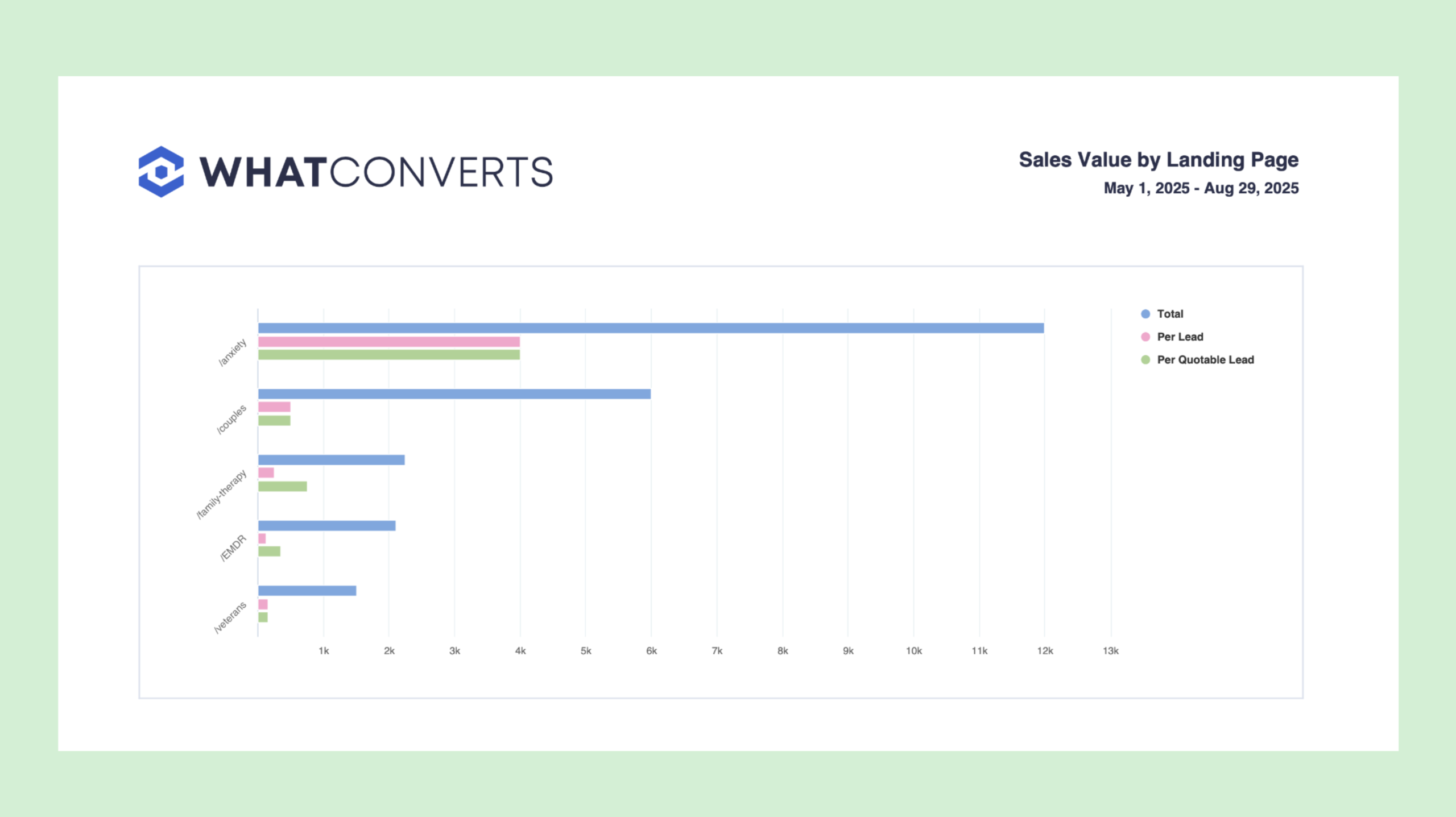
If your marketing director questions whether the $5,000 you spent building a new landing page was worth it, you can produce a “Sales Value by Landing Page” that proves beyond a doubt that $12,000 worth of revenue came from customers who started their lead journey on that very page:
And those are just two examples: you can also build custom reports that measure what’s most relevant to your business (and set up scheduled reporting emails daily, weekly, or monthly).
Feature Highlight: Prove your marketing ROI with Attribution and Reporting.
4. Track All Conversion Types (and Keep Your Advanced Call Tracking Features)
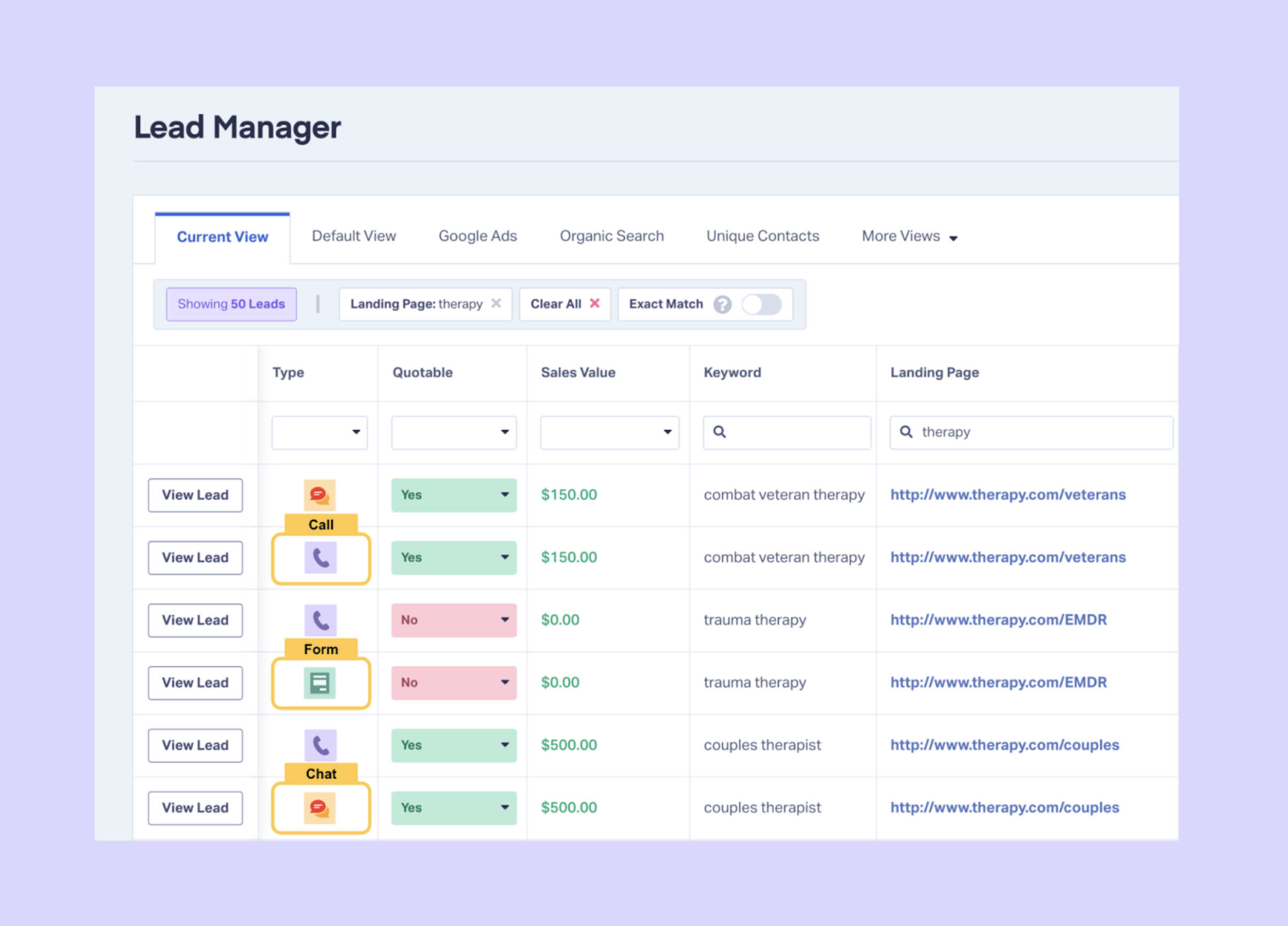
CallRail tracks calls, forms, and texts in three separate, siloed dashboards. WhatConverts tracks every conversion type (calls, forms, texts, chats, e-commerce transactions, appointment bookings, custom click events, and more) and tracks them all in a single unified database.
Thus, each lead type turns into a data point that you can filter when creating reports:
But WhatConverts’s comprehensive lead tracking isn’t a “jack of all trades, master of none” situation. It still offers all of the advanced capabilities that you need to run a comprehensive call tracking operation.
Here’s a one-to-one breakdown of all of CallRail and WhatConverts’s call tracking features:
| CallRail | WhatConverts | |
| Dynamic Number Insertion | ✅ | ✅ |
| Dynamic Number Pools | ✅ | ✅ |
| Local and Toll-Free Tracking Numbers | ✅ | ✅ |
| Automated Spam Blocking | ✅ | ✅ |
| Call Greetings | ✅ | ✅ |
| Call Flows | ✅ | ✅ |
| Voicemail | ✅ | ✅ |
| IVR/Phone Tree Menus | ✅ | ✅ |
| Geo-Routing | ✅ | ✅ |
| Automatic Caller Qualification | ✅ | ✅ |
| Call Recordings | ✅ | ✅ |
| Call Transcription | ✅ | ✅ |
| Custom Reporting | ✅ | ✅ |
| AI Call Intelligence | ✅ | ✅ |
| Lead-Level Tracking | ❌ | ✅ |
| Full Customer Journey View | ❌ | ✅ |
| Lead Qualification and Valuation | ❌ | ✅ |
| Reporting by Sales Value | ❌ | ✅ |
| Appointment Tracking | ❌ | ✅ |
| Custom Event Tracking | ❌ | ✅ |
Feature Highlight: Call Tracking
Wrapping Up
With CallRail and WhatConverts both handling call tracking, it can be easy to overlook the fact that there are actually some major differences between these two tools.
Many marketers and agencies prefer using WhatConverts due to its ease of use, abundance of insights, and its superior ability to help marketers prove and grow their ROI.
Start your free 14-day trial of WhatConverts today or book a demo with a product expert to see how we help prove and grow your ROI.
Get a FREE presentation of WhatConverts
One of our marketing experts will give you a full presentation of how WhatConverts can help you grow your business.
Schedule a Demo
Grow your business with WhatConverts







