


 Amanda Pell
Both WhatConverts and CallRail offer AI call analysis. Each platform’s AI analysis features include different capabilities and are available at different plan levels.
WhatConverts offers:
- All plans ($30/mo and up): AI call transcripts, call summaries, keyword spotting, call sentiment identification, and call handling scores
- Elite plan ($160/mo): AI lead scoring and custom Ask AI analysis
CallRail offers:
- All plans ($55/mo and up): AI call transcripts and keyword spotting
- Premium Conversation Intelligence plans ($165/mo and up): AI call summaries, call intent detection, call sentiment, and lead scoring
- Not offered: Custom Ask AI analysis or AI lead valuation
In this article, we’ll do a detailed breakdown of exactly what each platform’s AI call analysis features include, what plan level is required to access each one, and what each platform enables you to do with the insights their AI analysis provides.
Note: Not a WhatConverts user yet? Start your free 14-day trial of WhatConverts today or book a demo with a product expert to see how we help prove and grow your ROI.
CallRail vs. WhatConverts AI Features at a Glance
WhatConverts’s AI Lead Analysis for calls is available on all plans and includes AI call transcription, call summaries, extracted keywords, call sentiment identification, and call handling score. Custom Ask AI analysis and AI lead qualification and scoring are available on the Elite plan ($160/mo).
CallRail’s standard Conversation Intelligence comes with all plans and includes AI call transcription and keyword spotting. Premium Conversation Intelligence, which includes call summaries, call sentiment, and AI lead scoring, requires a Lead Conversion plan ($165/mo).
Here’s a line-by-line breakdown of what AI call analysis features WhatConverts and CallRail include at each plan level:
| AI Call Analysis Features | WhatConverts | CallRail |
| AI Call Transcription | All plans | All plans |
| Keyword Spotting | All plans | All plans |
| AI Call Summaries | All plans | Premium Conversation Intelligence only |
| Call Sentiment | All plans | Premium Conversation Intelligence only |
| Call Handling Score | All plans | Premium Conversation Intelligence only |
| AI Lead Scoring | Elite plan | Premium Conversation Intelligence only |
| AI Lead Valuation | Elite plan | Not offered |
| Custom Ask AI analysis | Elite plan | Not offered |
See everything that AI Lead Analysis with WhatConverts can do.
CallRail’s Two AI Feature Tiers, Explained
CallRail has two levels of AI analysis:
- Conversation Intelligence comes with Lead Tracking plans ($55/mo)
- Premium Conversation Intelligence requires a Lead Conversion plan ($165/mo)
What’s Included with CallRail’s Standard Conversation Intelligence
CallRail’s standard Conversation Intelligence product includes AI call transcriptions and keyword spotting.
First the platform transcribes the text of your calls, and then it combs that text to find keywords that match a list of terms that you choose (which CallRail calls “key terms”) as well as keywords that AI identifies as relevant (which CallRail refers to as “Call Highlights”).
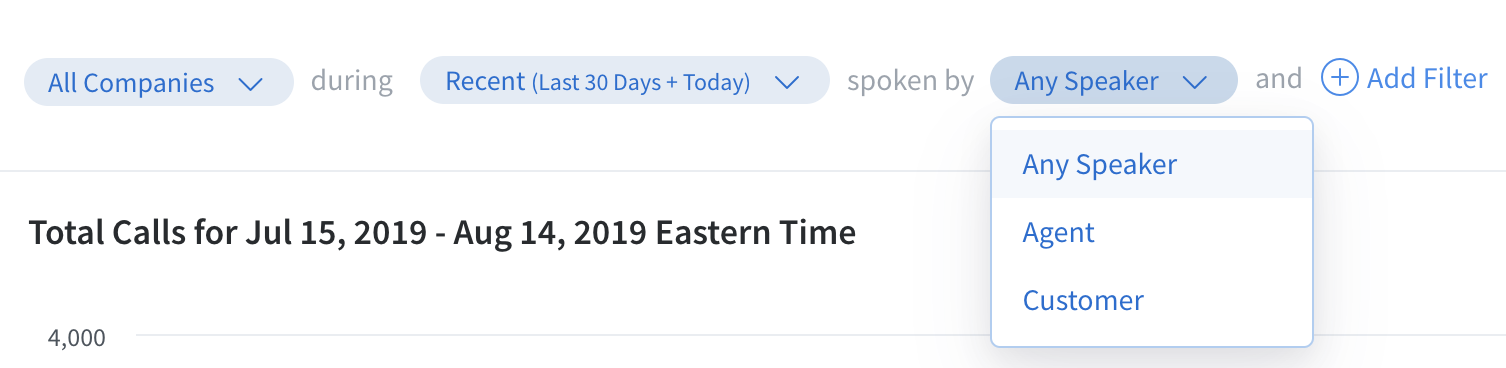
You can find calls that mention your chosen keywords using the Key Terms Spotted report:
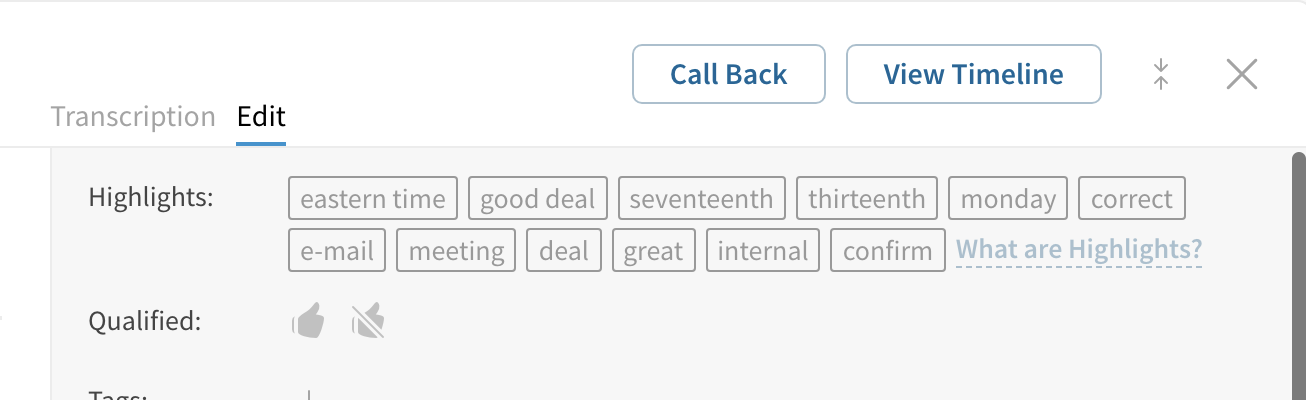
AI-identified keywords, or Call Highlights, show up on the Edit tab as well as the Call Highlights report.
What’s Included with CallRail’s Premium Conversation Intelligence
CallRail’s Premium Conversation Intelligence product, available on Lead Conversion plans and higher, includes AI call summaries, caller sentiment, and AI lead scoring.
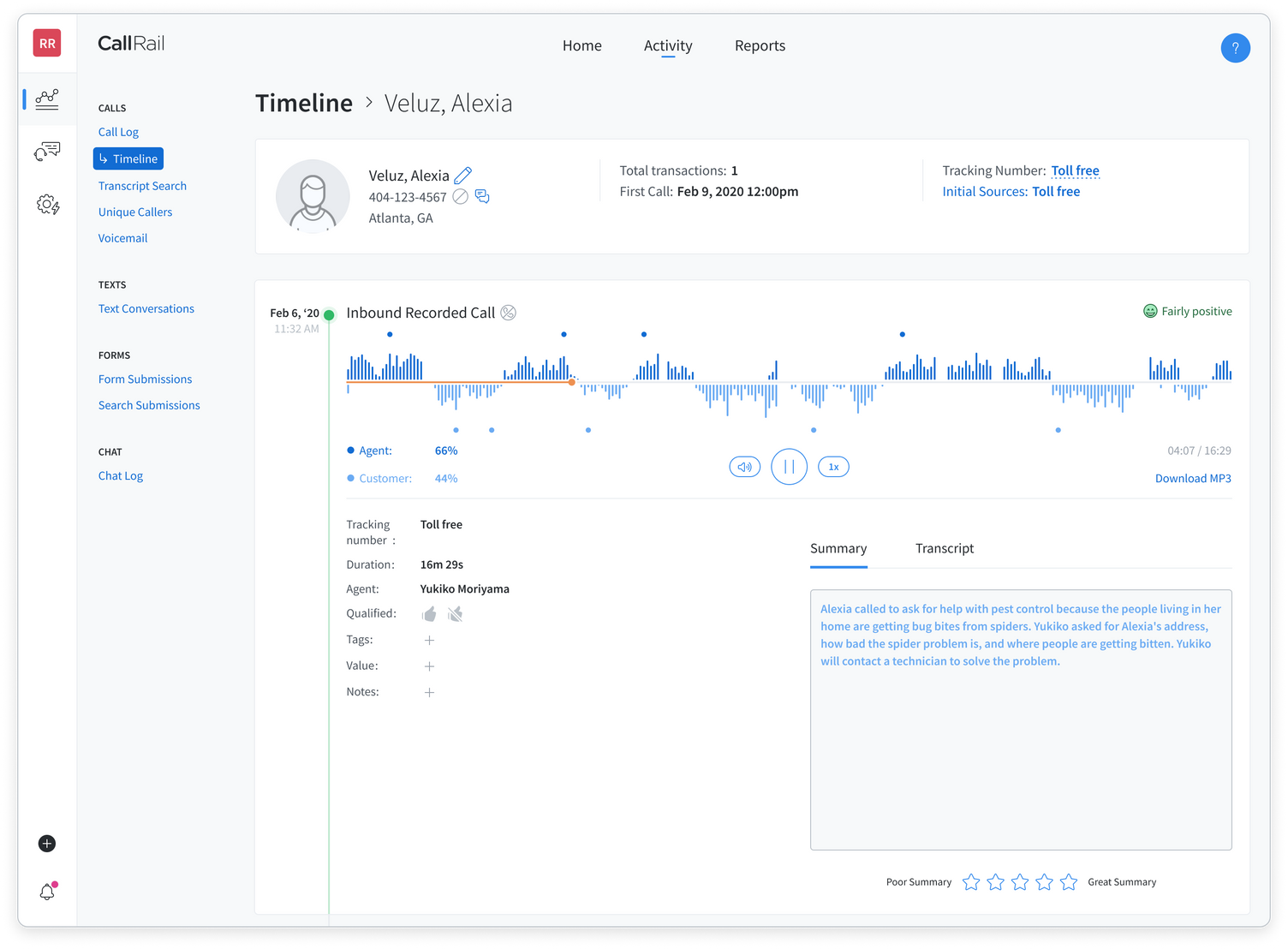
Call summaries condense the content of the call into a few sentences, while caller sentiment assesses the call and categorizes it as slightly, fairly, or mostly positive or negative. Both pieces of information show up on the call timeline view:
To set up automatic lead scoring, users fill out a Business Profile that includes information like what industry they’re in and what an ideal lead looks like, as well as what requests and inquiries to screen out. CallRail then gives each lead a score out of five as well as a one-line explanation.
However, callers can only sort by lead score in the Unique Callers report. The call log can’t be filtered by lead score.
WhatConverts’s Two AI Feature Tiers, Explained
WhatConverts’s AI call analysis features also come at two levels:
- AI Call Analysis is available for calls on all plans (starting with the $30/mo Call Tracking plan)
- AI-Enabled Automatic Scoring and Qualification and Custom Ask AI Analysis are available on the Elite plan ($160/mo)
Related Reading: Every WhatConverts AI Feature, Explained
What’s Included with WhatConverts’s AI Call Analysis
WhatConverts’s AI Call Analysis reads each call transcript and generates:
- A call summary
- A caller intent summary
- Detected topics
- Extracted keywords
- Call sentiment
- Call handling score
All of this information lives under the Lead Analysis tab on the Lead Details panel:
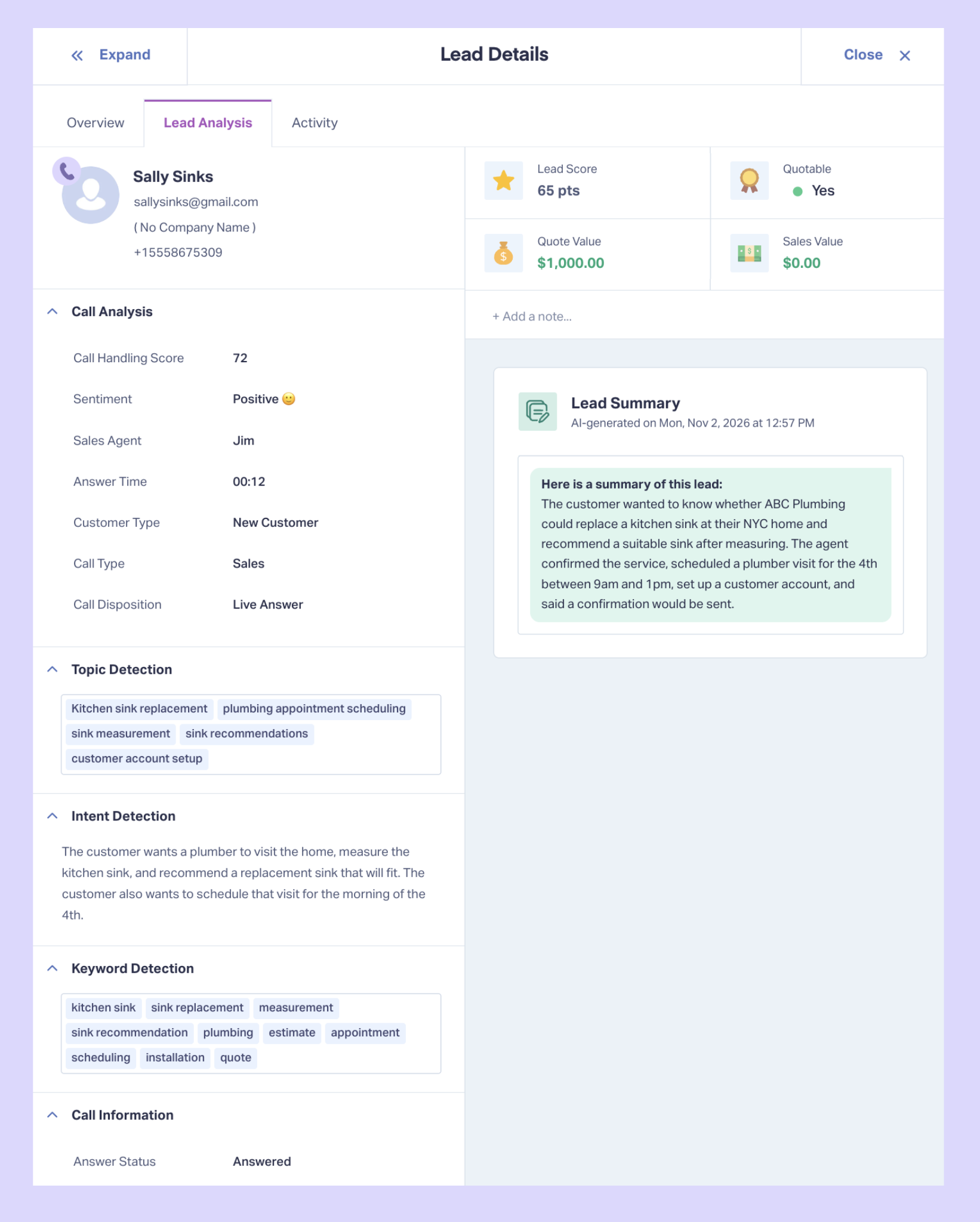
Each of these fields also exists in the Lead Manager view, so users can instantly sort and filter leads by insights like sentiment or keywords.
What’s Included with WhatConverts’s Elite Plan AI Analysis Features
WhatConverts’s Elite plan includes two AI call analysis features: AI-Enabled Automatic Lead Scoring and Qualification, and Custom Ask AI Analysis questions.
AI-Enabled Automatic Lead Scoring and Qualification
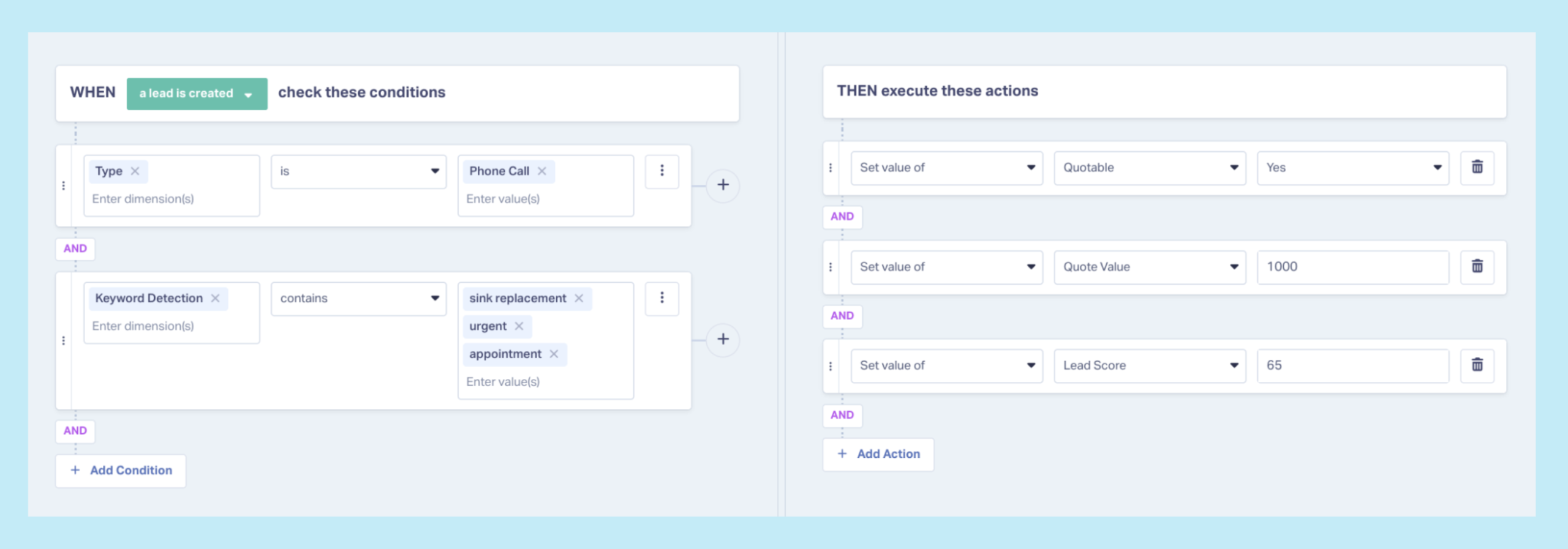
The Elite plan unlocks Lead Intelligence rules, which are if/then automation rules that users can set up to take actions like qualifying and scoring leads that meet a certain set of criteria.
With AI Call Analysis enabled, users can write Lead Intelligence rules based on information gathered as part of that analysis. For example: if extracted keywords include “sink replacement,” “urgent,” and “appointment,” Lead Analysis can set the lead status to “quotable,” assign a quote value of $1,000, and set the lead score to 65.
Custom Ask AI Analysis Questions
AI Call Analysis generates a standard set of outputs on every call lead. But most marketers also have additional information they need to know about each caller that’s unique to their business. For that, WhatConverts has custom Ask AI analysis questions, actioned using Lead Intelligence rules.
Ask AI Analysis lets users set up specific prompts that Lead Intelligence automatically asks AI about each incoming lead. The answers to these prompts then go in Lead Analysis tab and in custom data fields in the Lead Manager.
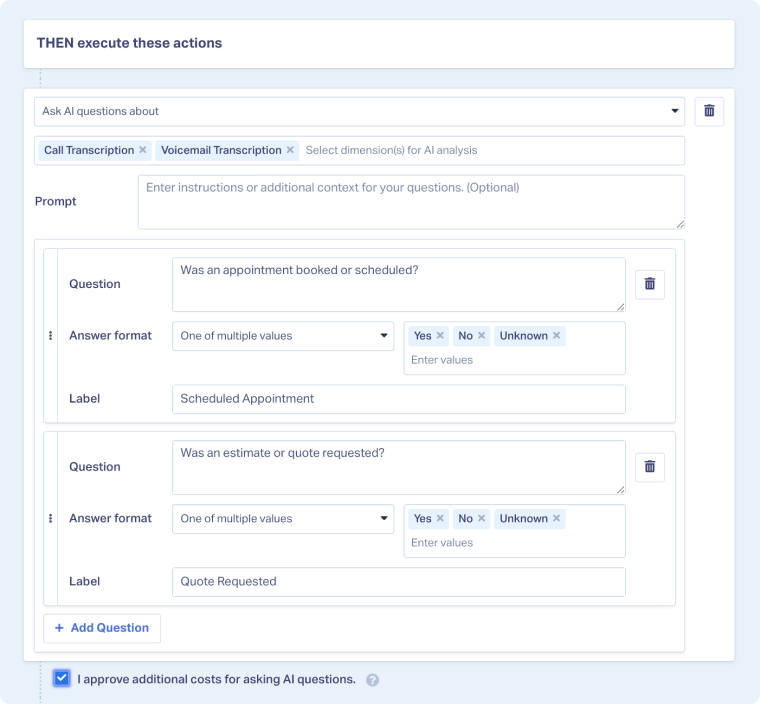
For example, a marketer can set up a Lead Intelligence rule that says:
IF a call lead:
- Lasts longer than 60 seconds AND
- Call sentiment is positive AND
- Keyword detection contains “appointment”
THEN Ask AI:
- Was an appointment booked?
- What service was requested?
These rules are also stackable, so you can also set up another rule that checks whether the answer to these questions is yes, and then instructs Lead Intelligence to send the booked appointments back to Google Ads as enhanced conversions.
Related Reading: How to: Use Agentic AI to Supercharge Your Lead Gen
What It Comes Down To
Both platforms use AI to analyze calls and turn them into structured lead data. The difference is in how these analysis features are offered:
- CallRail splits AI into two tiers, with keyword spotting available on the lower tier and call summaries, sentiment, and lead scoring in Premium Conversation Intelligence.
- WhatConverts includes AI Lead Analysis on calls with transcription on every plan, then adds form and chat analysis plus custom Ask AI questions on Elite.
The right setup depends on how much analysis depth you want at your plan level and what you want to be able to do with the outputs once you have them.
Put AI to Work on Every Lead
Here's the full workflow in WhatConverts:
- Turn on call transcription and Call Analysis for your tracking numbers.
- See summary, intent, sentiment, and keywords for each call under the Lead Analysis tab of the Lead Details panel.
- Use "Choose Columns" in the Lead Manager to add AI Lead Analysis categories and search, sort, and filter leads by any of your AI outputs.
- On Elite, extend AI Lead Analysis to form and chat leads with a Lead Intelligence rule.
- Write Ask AI rules for the qualification questions your clients care about most.
- Use those answers to qualify leads, assign values, and send conversions to Google Ads.
Every call already contains the answers that decide whether a campaign is working; AI Lead Analysis puts them where you can use them.
Ready to see AI analysis on your own calls?
Start your free 14-day trial of WhatConverts today or book a demo with a product expert to see how we help prove and grow your ROI.
Get a FREE presentation of WhatConverts
One of our marketing experts will give you a full presentation of how WhatConverts can help you grow your business.
Schedule a DemoGrow your business with WhatConverts


