















































 Amanda Pell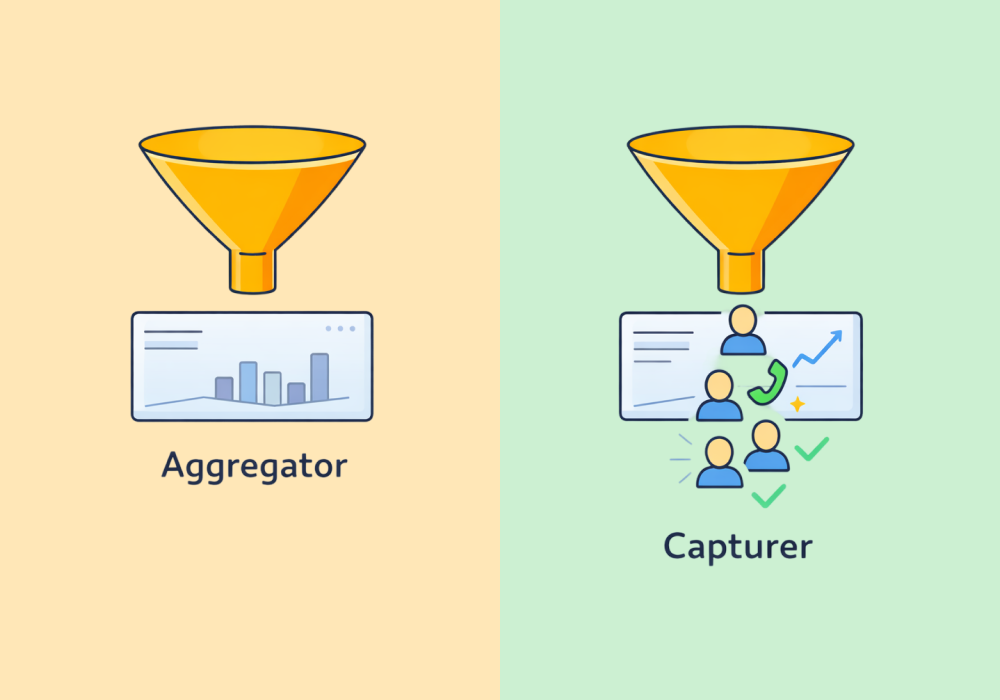
Most marketing reports are built to make data easier to read.
They pull numbers from ad platforms, call tracking tools, and CRMs, then roll everything up into a clean dashboard.
It looks complete, but something important gets lost in the process: when performance is reduced to totals, you can’t see what actually happened to the leads. All you get is a summary.
Some tools move data around. Others document it from the ground up. And that distinction controls exactly how deep you can drill when a client asks a hard question.
This article explains the architectural difference between data aggregators and data capturers—and why it determines what you can prove, investigate, and optimize. If you're evaluating your reporting stack, this is the framework you need first. When you're ready to apply it to specific tools, our guide to agency reporting software picks up from here.
Note: Not a WhatConverts user yet? Start your free 14-day trial today or book a demo with a product expert to see how we help prove and grow your ROI.
What an Aggregator Actually Does
Data aggregators pull metrics from platforms where the data already lives. You connect:
- Your Google Ads account
- Your Meta account
- Your Google Analytics property
Then the aggregator collects those numbers into a single dashboard.
Tools like AgencyAnalytics, Looker Studio, and Databox work this way. They're genuinely useful for consolidating spend, impressions, click volume, and cost-per-click across channels without logging into five different platforms.
But notice what they're working with: the data that those platforms already decided to give you.
Why Aggregated Data Leads to Bad Decisions
Here’s what an aggregated report can show you:
| Leads | CPL | |
| Campaign A | 50 | $40 |
| Campaign B | 30 | $70 |
Based on that report, you’d scale Campaign A: lower CPL, higher volume, easy decision.
But that report can’t show you the whole picture, and the rest of the picture could change your decision entirely. What if Campaign B’s leads close at a higher rate?
| Leads | CPL | Real Customers | |
| Campaign A | 50 | $40 | 5 |
| Campaign B | 30 | $70 | 18 |
Now Campaign B is the obvious winner. Campaign A is flooding the pipeline with leads that go nowhere. If you'd acted on the first report, you would have scaled the wrong campaign.
But hang on—what if Campaign A's five customers averaged $10,000 per job and Campaign B's 18 averaged $500?
| Leads | CPL | Real Customers | Avg. Job Value | Revenue | |
| Campaign A | 50 | $40 | 5 | $10,000 | $50,000 |
| Campaign B | 30 | $70 | 18 | $500 | $9,000 |
Now Campaign A is back to being the winner.
The answer keeps changing because there's always a data layer missing. And that’s the problem with aggregated data: there’s always another question that could flip everything.
Aggregators can only show you the layers they've been given. They can't tell you what's underneath.
To stop the flip and actually see what's happening, you need to own the data yourself.
What a Capturer Actually Does
Data capturers don't just pull data from other platforms. They originate it themselves.
Instead of summarizing outcomes, they record them: every call, every form, every interaction. Not just the fact that it happened, but also:
- Where it came from
- What was said or submitted
- Whether it turned into a real opportunity
- Whether it generated revenue
That’s the difference—and it changes what you can do. The interrogation depth is incomparable:
| Data Aggregator | Data Capturer | |
| Data origin | Pulls from third-party platforms | Creates data at point of contact |
| Attribution model | Inherits the platform's model | Owns first-party attribution |
| Lead-level visibility | No | Yes |
| Qualification data | No | Yes |
| Revenue/value attachment | No | Yes |
| Drill-down depth | Metric-level | Lead-level |
Aggregators tell you how campaigns perform on the surface.
Capturers show you what those campaigns actually produce.
When You Can See the Outcome, Everything Changes
The “winner” above kept flipping because the answer to each new question was buried in a layer of data the previous report didn’t have access to. A data capturer never flips—when the data lives at the lead level with every call recorded, every form captured, and every outcome logged, you can keep drilling until you actually hit the bottom.
That’s what makes the difference to your clients. Not just that you have better numbers, but that you can answer the follow-up (and the follow-up to the follow-up).
Not all reporting tools are built the same—and the difference matters more than most agencies realize.
For a full breakdown of:
- How the top 9 agency reporting platforms compare
- What separates a data capturer from a data aggregator
- What to look for when choosing a reporting stack that actually proves client ROI
Check out the full guide:
9 Best Marketing Reporting Software for Agencies in 2026
Building a Stack That Can Answer the Hard Questions
Aggregators still have a role—consolidating spend, traffic, and platform metrics across channels without logging into a dozen different places. But they can only show you what other platforms already decided to record. When the questions get harder, they run out of road.
To actually prove ROI, you need more than aggregated reports. You need to capture what happens to every lead from the moment it comes in.
That means:
- Tracking calls, forms, and chats at the lead level
- Connecting each lead back to its source
- Seeing how it was handled
- Identifying whether it turned into a real opportunity
- Assigning value where possible
This is exactly what WhatConverts is built to do. Instead of aggregating performance metrics, it captures every lead and shows what happened next.
Every layer that kept flipping the winning campaign above—close rate, job value, revenue per campaign—becomes something you can actually pull up, filter, and interrogate in real time.
The answer to the next question is always there.
The Reporting Ceiling
Aggregated data makes marketing look clean. Captured data makes it accountable.
Most agencies don't notice the difference until a client pushes past the summary and the dashboard runs out of road. A capturer means that doesn't happen—the interrogation stops when you decide it does, not when your tools give out.
Ready to start interrogating your leads?
Start your free 14-day trial of WhatConverts today or book a demo with a product expert to see how we help prove and grow your ROI.
Get a FREE presentation of WhatConverts
One of our marketing experts will give you a full presentation of how WhatConverts can help you grow your business.
Schedule a Demo
Grow your business with WhatConverts







