
Most people think of WhatConverts as a call tracking or lead tracking platform, and they’re not wrong.
But ultimately, WhatConverts is a marketing attribution tool: it tracks calls and leads for the specific purpose of attributing them (and the customers and revenue they result in) to their marketing source.
This article breaks down how WhatConverts’s lead-by-lead approach compares to other attribution platforms, and how it works at each stage, from capturing the first touchpoint to proving revenue and feeding it back to your ad platforms.
Note: Not a WhatConverts user yet? Start your free 14-day trial of WhatConverts today or book a demo with a product expert to see how we help prove and grow your ROI.
How WhatConverts Approaches Attribution
WhatConverts covers the same core ground as any attribution platform: it ties conversions to their marketing sources, maps the journey that led to them, applies attribution models, and connects the results to revenue.
Where it differs is the unit of measurement. Many attribution platforms measure at the channel level, often relying on statistical estimates and projections to determine which channel has the most influence or returns the most on ad spend. WhatConverts answers those same questions, but it builds its answers by tracking individual leads.
When every call, form, and chat is its own record, understanding a campaign’s return is just a matter of adding up revenues from the individual leads it drove.
What WhatConverts Doesn’t Do
This approach also shapes what aspects of marketing attribution WhatConverts leaves out. Marketing mix modeling, for example, uses statistics to estimate each channel’s contribution from aggregate sales. WhatConverts records the actual sales tied to each tracked lead, so there’s nothing to estimate.
It all comes down to the core question that WhatConverts answers: which marketing produced this lead, and what was it worth? To answer that question thoroughly, WhatConverts follows every lead from its first touchpoint to its final sale, by:
- Capturing the lead and where it came from
- Mapping the journey that led to the conversion
- Assigning credit with attribution models
- Connecting each converted lead to potential revenue
- Sending attribution data back to ad platforms as training data
Capturing the Lead and Where It Came From
Attribution that starts from channel totals has to work backward to figure out which conversions deserve credit. WhatConverts takes the opposite approach, by tracking individual leads and then building channel totals from the ground up.
Every conversion action gets its own record, with its marketing source attached, at the moment it converts:
- Website visits: A tracking script records the source, medium, campaign, keyword, and landing page for every session.
- Calls: Dynamic number insertion shows each visitor a unique phone number tied to their session, so a call carries the same marketing detail as a form fill.
- Forms and chats: The same script captures form submissions and chat conversations and ties them to the same session data.
- Offline campaigns: Billboards, mailers, and radio spots get their own tracking numbers, so the calls they drive arrive with a source too.
When you track individual leads and then calculate aggregates instead of the other way around, you get a much more accurate picture of each channel and campaign’s marketing impact.
Tracking by individual lets you filter out unqualified individuals before you total them up by channel. Spam calls, job seekers, and existing customers can be filtered out, so your attribution is based on real outcomes, not just total conversion activity.
Related Reading: Data Aggregators vs. Capturers: Determining What You Can Prove
Mapping the Journey Behind Each Lead
Few leads convert on their first visit. A patient might click a Google ad for a root canal and leave, return four days later through a Facebook ad, then search your name a week after that and call to book an appointment.
When you measure in aggregates, those three touchpoints are reported as unrelated events:
- One click in a Google Ads report
- Another in a Facebook Ads report
- An organic page view in GA4
Nothing ties them to the same person.
WhatConverts tracks all three touches to one profile in a single Customer Journey, displayed next to the call recording where the patient asks to schedule their appointment. You can see which channels were involved, who the lead was, and what they wanted.
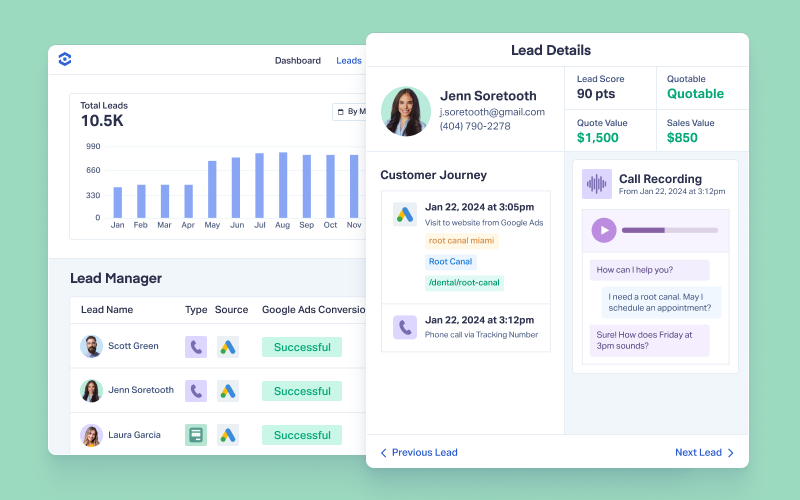
That context is essential for assigning credit. A journey that ends in a quote request for a new system is worth far more than one that ends in a support question or a caller outside your service area. With the full record in front of you, each lead can be qualified or dismissed based on what actually happened instead of every one counting the same.
Assigning Credit with Attribution Models
You can toggle WhatConverts reports between first-touch and last-touch attribution or compare both side by side. Elite plans add multi-touch modeling that splits credit across every touchpoint in a lead’s journey.
Because WhatConverts’s attribution builds from lead-by-lead tracking, its models re-sort actual leads and their values instead of estimating percentages from conversion totals. The homeowner from our example gets credited to Google Ads in a first-touch report, organic search in a last-touch report, and all three channels under a multi-touch model.
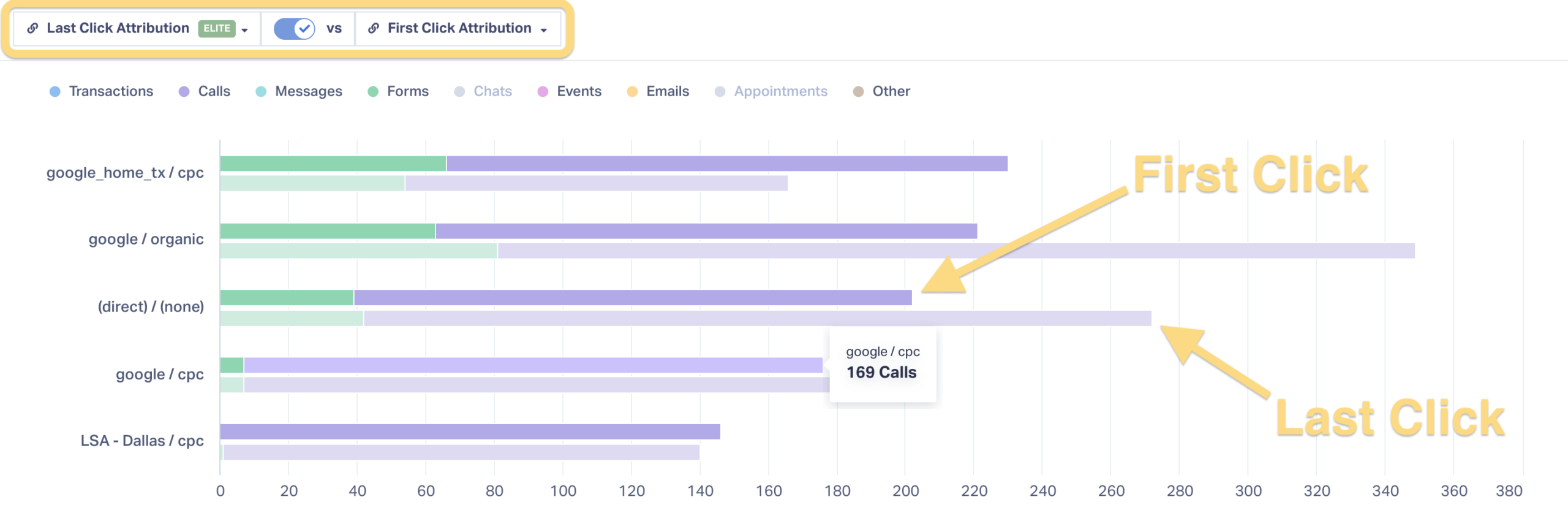
Whichever model you use, every report is backed by specific, documented leads, with data you can drill into and a call recording or chat transcript you can review.
Connecting Leads to Revenue
Perhaps the most important part of marketing attribution is tying channel outcomes to revenue in a way that holds up under scrutiny. That’s hard to do with a pile of separately tracked conversions in one hand and a single revenue total in the other, especially when your CFO is asking what share of that revenue marketing can actually claim.
WhatConverts handles this by tracking each conversion individually while tying it back to the person behind it. Qualification and quote values attach at that level, so when the patient calls back four more times before booking a $1,500 root canal, WhatConverts reports one qualified lead worth $1,500 and lets marketers choose which attribution model to use to divide up the credit.
Values can come from three places:
- Manual entry by your team
- Lead Intelligence rules that apply values automatically
- CRM sync from the system where your sales team already logs closed deals
Reports then roll everything up by source, campaign, and keyword, so the revenue figure you bring to your CFO is a sum of real, qualified leads.
Related Reading: All 7 Ways to Add Values to Leads in WhatConverts
Sending Attribution Data Back to Ad Platforms
The whole point of tracking attribution is to make sure you’re spending your money and effort on the marketing channels that actually produce business. WhatConverts automates that by pushing qualification and value data back to ad platforms as bid training data.
Google Ads Smart Bidding and similar systems optimize toward whatever the account counts as a conversion. By default, that’s usually any call over a set length or any form submission. A spam call, a job seeker, and a $1,500 root canal all register the same way, so the algorithm learns to find more of all three.

WhatConverts changes what the platform learns from. Since every lead is qualified and valued individually, you choose which leads get sent back as conversions, and each one goes back with its quote or sales value attached. The $1,500 root canal reaches Google Ads as a $1,500 conversion, and the conversion that turned out to be a spam call never reaches it at all.
Over time, bidding shifts toward the searches and audiences that produce revenue rather than volume. When you control which individual leads count, you control what the totals say, including the ones an algorithm learns from.
Marketing Attribution in Practice
Agency Repeat Digital faced a familiar attribution problem with client Navitas Safety. Navitas wanted to expand aggressively into PPC while email, organic social, paid media, and partnerships were all running at once, which made it harder to tell which channel deserved credit.
Repeat Digital used WhatConverts to attribute each lead to its campaign, keyword, and channel, then assess lead quality and value across five PPC channels. With revenue tied to sources, they raised budgets month over month. Over seven months, Navitas saw:
- A 28x return, with more than £1 million in revenue from a £35,000 PPC budget
- 239% more goal completions across five PPC channels
- 12x growth in paid media spend
Real Results: Agency Untangles Attribution Knot, Scales Client to $1M
Attribution Built from the Lead Up
Most attribution reports ask you to trust the math behind the totals. In WhatConverts, every total is built from individual leads you’ve qualified and valued, from a channel’s lead count to the revenue figure you bring to your CFO.
So when someone asks where a number came from, you can show them the leads.
Ready to trace revenue back to the marketing that produced it?
Start your free 14-day trial of WhatConverts today or book a demo with a product expert to see how we help prove and grow your ROI.
Get a FREE presentation of WhatConverts
One of our marketing experts will give you a full presentation of how WhatConverts can help you grow your business.
Schedule a DemoGrow your business with WhatConverts