


 Alex Thompson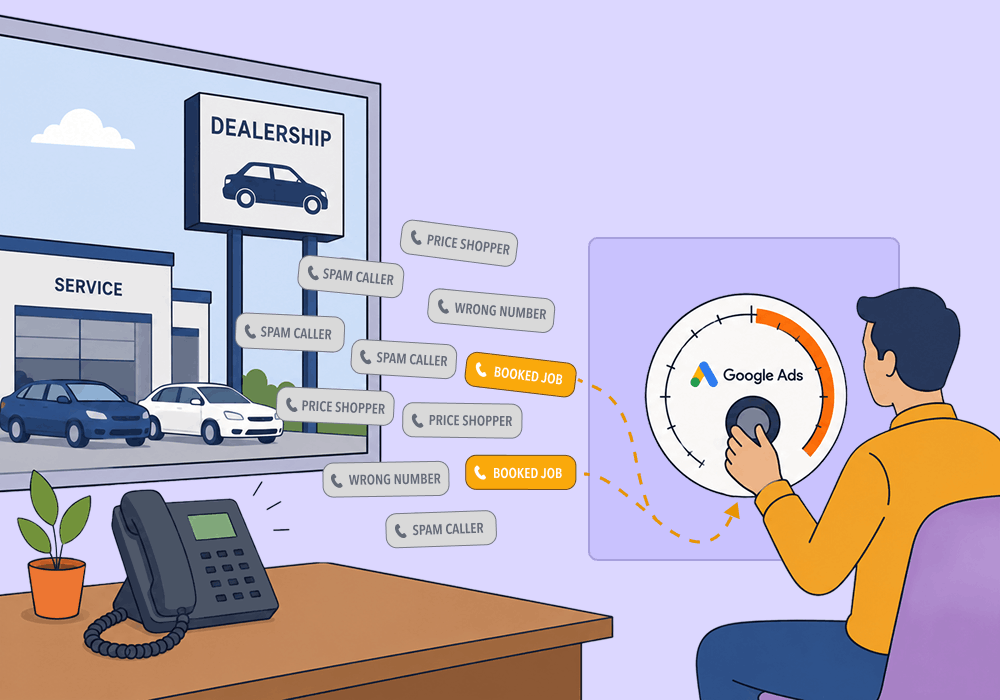
Phone calls are the lifeblood of dealerships and auto repair businesses. And if you're running automotive PPC for them, your goal is clear: get that phone to ring.
The problem is that most of those calls are often price-shoppers, status checks, and wrong numbers. Plus, the campaign that rings the phone most is usually the one pulling the most of them. So when a client asks which campaign to fund next month, you're stuck. The call-count report can't tell you which campaigns produced booked appointments and which just produced noise.
The fix is to feed booked appointments back into Google Ads as what you optimize toward, by campaign and keyword. This article shows you how.
By the end, you'll know how to:
- Attribute booked appointments to specific campaigns and keywords
- Teach Google Ads to chase buyers instead of price-shoppers
- Tell a campaign problem from a front-desk problem before you cut budget
Why Raw Call Volume Misleads You in Automotive Google Ads
In automotive, the campaign that rings the phone most is usually the one pulling the most price-shoppers. That's why call volume is the wrong scoreboard. You optimize toward that number, and you never see the miss until a client asks why bookings are flat.
Most automotive calls aren't buying calls
Most automotive inbound isn't a buyer ready to book. It's price-checks, parts and service questions, status calls, and wrong numbers, with only a slice carrying real intent. The numbers back this up. A Marchex Institute analysis of more than 8 million calls found that just over 10% of dealer calls are new sales opportunities, nearly 70% are parts and service, and more than 19% go unanswered or abandoned.
A separate Marchex study put purchase intent on only 57% of sales-department calls. Just 28% of callers go on to buy.
Picture a "general line" campaign that tops your call report every month (the one your client reads first). Then you listen. Most of it is "what's your best price" and "is my car ready." Almost none of it is someone booking a brake job. Count those calls equally, and you've handed your bidding a corrupted signal.
Google's bidding optimizes toward whatever you count
Google's bidding optimizes toward the conversion you define, and nothing else. Give it no quality signal, and it does the rational thing. It hunts the cheapest, most plentiful conversions. Then it pours budget there. Cheap wins.
In automotive, the cheapest conversions are price-checks and wrong numbers, because spam is easier to make than a booked job. So the efficient-looking campaigns are often the ones bringing in callers who never meant to book. There's a deeper reason behind this. It starts with why Google counts a call as a conversion when sales might not.
Optidge audited one lead-gen account spending $10,000 a month. It was producing 200 leads at a cost per lead the client liked. Then they checked the CRM. Twelve of the 200 leads were qualified. Three closed. All three came from the one campaign the team had lined up to pause. It carried the highest cost per lead.
On the call-count report, the winner and the loser were flipped.
So which campaign do you cut? You can't answer that from call volume. If you want the full mechanics, see how Smart Bidding decides where your budget goes. The real question is what you should be counting instead.
Related Reading: PPC Call Tracking: The Key to Google Ads ROI
What It Takes to Attribute Spend to Booked Appointments
To attribute automotive PPC spend to booked appointments, follow the closed loop system. First, capture the Google click ID with each call and form. Then store the booking outcome from your shop or dealer system against that same lead. Feed only the confirmed appointments back into Google Ads as the conversion you optimize toward. Raw call counts reward price-shoppers. Confirmed bookings reward buyers.
Each lead's real outcome flows back to Google Ads as the conversion you optimize toward.
| 1 | An ad click gets a tracking ID Google Ads stamps every ad click with a unique tracking ID, the GCLID, the instant someone clicks. |
| 2 | The call or form captures that ID When the click becomes a phone call or form fill, that tracking ID is stored with the lead. |
| 3 | The booking outcome is recorded Your shop or dealer system records whether the lead became a confirmed appointment. |
| 4 | The confirmed booking goes back to Google Ads You send it back as a conversion with a value attached, so the booking becomes what bidding optimizes toward. This is the step that changes what Google chases. |
| 5 | Bidding optimizes toward booked appointments Smart Bidding shifts budget toward the campaigns and keywords that produce bookings, not just calls. |
| The loop closes. Each round wins more booking-ready clicks, and the cycle repeats. | |
This is the full value of offline conversion tracking. With it, you can send a real-world outcome back to Google Ads, matched against the ad click that started it. Sending this kind of first-party data back to Google gives advertisers a 10% median lift in conversions according to Google's offline conversion import documentation.
What you feed back, and what it's worth
You feed Google three tiers. The raw call or form is a volume signal, there to give the algorithm enough data to learn on. A confirmed appointment is the value you optimize toward. The sold car or completed job is the revenue number, kept in observe mode for reporting. Each tier gets a weight that scales to the deal.
Make it concrete.
For a repair shop with a $450 average repair order, an "Appointment Confirmed" event translates into revenue about 10% of the time, so $45, and a completed job is worth $450. For a used-car lot averaging $3,000 in gross per unit, an appointment shown is worth roughly $300, and a vehicle sold is worth $3,000. Now Google is bidding toward booked work.
Set Up Booked-Appointment Tracking Manually
You can build this yourself with Google's native tools and no extra software. The path to import offline conversions into Google Ads runs in five steps. Do them in order. A shop that never buys a platform can finish all five from this section alone.
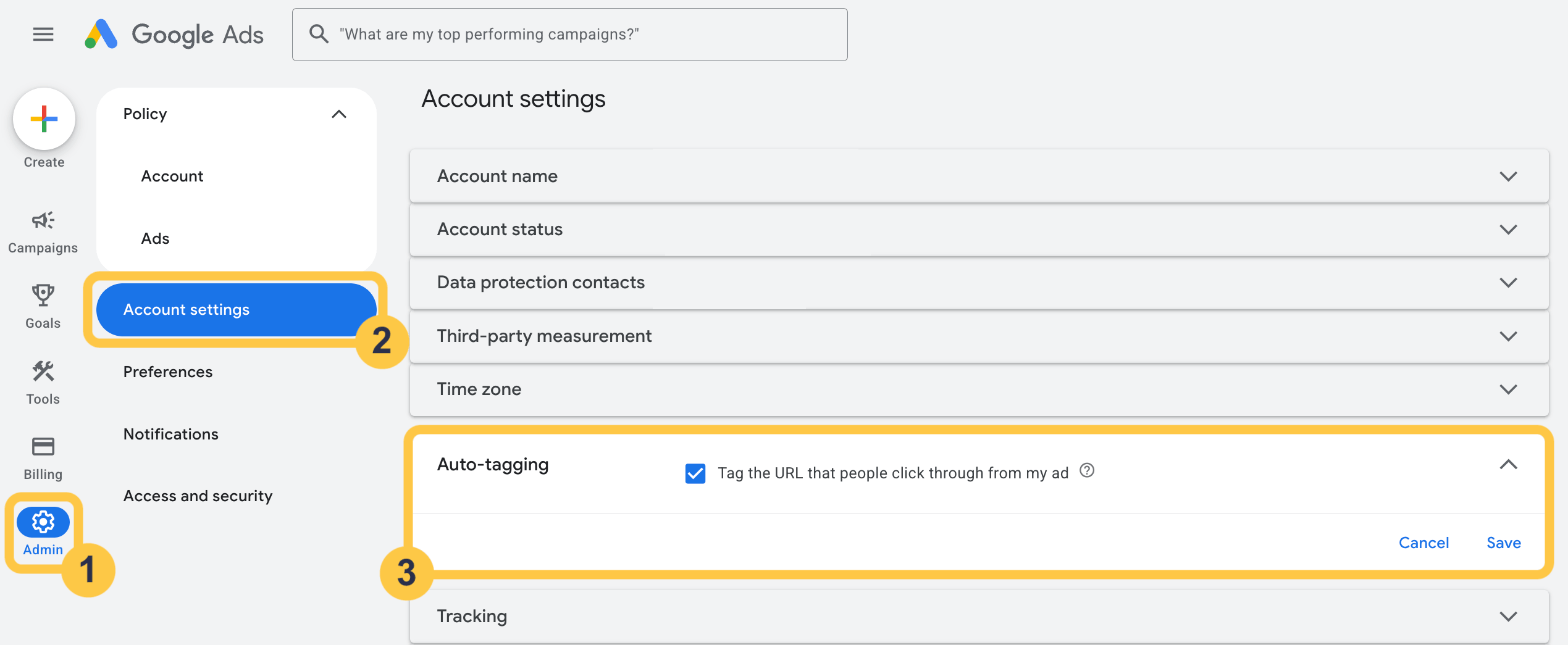
1. Turn on auto-tagging and capture the click ID
This gets the click ID onto every lead. Turn on auto-tagging at the account level so each ad click carries a GCLID. Add a hidden field and a small script to every form and call-tracking flow. Store that GCLID on the lead record.
One caveat trips up almost everyone. The GCLID is case-sensitive, and you can't pull it back later, so capture it the instant the lead happens. Watch for redirects that strip it on the way to the page.
2. Create the offline conversion actions
This tells Google which outcomes to count. In Google Ads, go to Goals, then Conversions, then Import, then "Other data sources or CRMs," then "Track conversions from clicks." Name each action plainly: "Appointment Confirmed," "RO Written," "Car Sold."
Two things to get right. The conversion name has to match your upload file character for character, or the import errors out. A common practitioner move: create each action as Secondary first, then promote it to Primary once it has history. That keeps bidding from chasing a signal it has never seen.
3. Assign weighted proxy values
This teaches bidding to find the leads that become bookings. Weight the appointment at roughly 10% of your average deal value and the sale at 100%. Then scale to your cost per click. Don't value a lead at 1 when a click costs $10 or more, or Google will throttle delivery. Optidge documents a three-tier weighted-value approach that maps cleanly onto a shop or a lot.
A single upload row looks like this: abc123, Appointment Confirmed, 2026-05-10 10:00:00-05:00, 45, USD. The upload-file layout below lays out every field.
Five columns. Each row is one conversion you send back to Google Ads.
| Field | Example | What it is |
| Click ID (GCLID) | abc123 | The unique ID from the ad click |
| Conversion Name | Appointment Confirmed | Must match your action name exactly |
| Conversion Time | 2026-05-10 10:00:00-05:00 | Date, time, and time-zone offset |
| Conversion Value | 45 | The weighted value of the booking |
| Conversion Currency | USD | Three-letter currency code |
| Put together, one row reads: abc123, Appointment Confirmed, 2026-05-10 10:00:00-05:00, 45, USD | ||
4. Time the conversion to the deal-creation date
Long automotive sales cycles need this step. Time the conversion to the date the deal was created in your CRM. Google accepts a conversion only within 90 days of the click. A deal created in February and closed in June still uploads. A January click that closes in June does not.
5. Add Enhanced Conversions for Leads to recover lost click IDs
Click IDs go missing. Ad blockers, privacy tooling, and signed-out browsing strip them, so GCLID-only matching loses leads. Enhanced Conversions for Leads closes that gap. It matches on a hashed email or phone, and you keep importing the GCLID alongside it. WhatConverts has a walkthrough on how to recover conversions lost to stripped click IDs. One limit to plan for: these uploads have to land within 63 days of the click.
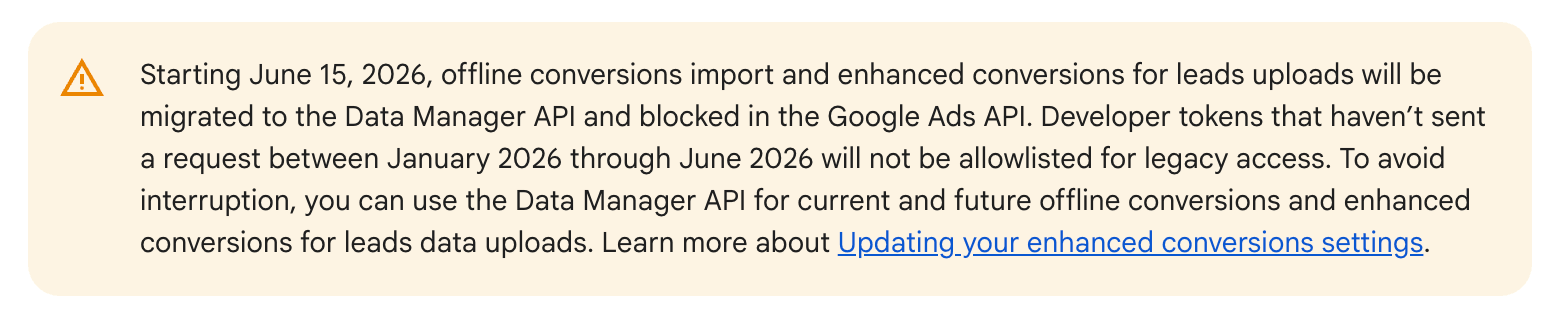
Note: Google is moving offline-conversion uploads to its Data Manager API. The web and leads enhanced-conversions settings are now combined into one. For more on this, be sure to review Google's official documentation.
Where Manual Attribution Breaks for an Agency at Scale
All of that works for one account. Run it across a dozen automotive clients and it breaks. Three things go wrong: the plumbing is fragile and per-client, nothing separates buyers from price-shoppers at the source, and the signal dies at the handoff.
Start with the plumbing. Every client sits on a different system, Tekmetric or Shop-Ware for a repair shop, CDK, Reynolds and Reynolds, DealerSocket, or VinSolutions for a dealer. Each one needs its own click capture, its own backend store, and its own daily upload file that somebody maintains. Stripped click IDs and redirects break capture on any of them. The 90-day window forces the deal-date workaround on every account, separately.
Then there's the quality gap. Even a perfectly wired loop can pass back a "booking" that was really a price-shopper, because nothing along the way qualified the call before it counted as a conversion. You're back to feeding Google noise, just slower and at more cost.
The handoff is where the signal goes dark
The hard break comes at the handoff. The lead enters the client's system, and from there the agency can't see what happened to it. As WhatConverts co-founder Michael Cooney describes it, the feedback loop goes dark the moment the lead hits the CRM, and the agency is left optimizing blind. That's the gap lead tracking software was built to close.
Both paths begin with a Google Ads click. They split at the handoff.
| The loop breaks | ||||||
| Google Ads | → | Lead capture | → | Client system | → | ✕ Signal goes dark |
| After the handoff, the agency can't see whether the lead ever booked. | ||||||
| The loop closes | ||||||
| Google Ads | → | Lead tracking | → | Booking outcome | → | ↺ Back to Google Ads |
| The booking flows back to Google Ads, so the next round of clicks skews toward buyers. | ||||||
How Lead Tracking Closes the Loop Automatically
Lead tracking software like WhatConverts runs the same loop automatically. It works the same across every account, with no per-client upload files to maintain and no daily exports. Each piece below is the automated version of a manual step you just read.
Capture the click and keyword on every call
Dynamic number insertion ties each call to the campaign and keyword that drove it, automatically.
No per-form scripting. That replaces the hidden-field-and-script step from the manual path. One setup, every account. It can even tie phone calls to the exact keyword that drove them.
Qualify calls so bookings separate from price-shoppers
Rules score and mark each call as it comes in. A 20-second price-check gets flagged. A booked appointment gets counted and carries a sales value, so only the bookings feed back as conversions worth bidding on. That replaces the manual call-tagging step.
Say a repair-shop client takes around 300 calls a month. You set rules so sub-30-second calls and price-only calls are marked unqualified automatically. The conversion that syncs back to Google is the booked appointment. Your client's dealer system still tracks the appointment and the sale, while WhatConverts ties each call back to its campaign and keyword and assigns it a value.
Sync only booked appointments back to Google Ads
On the manual path, this is the part you rebuild by hand every day, per account. Campaign Optimizer does it for you: it sends only the qualified, valued conversions back to Google Ads, so bidding learns from booked appointments, not raw calls. The same data reports by campaign and keyword. That's how you finally see which campaigns drive bookings, account after account. With the numbers finally trustworthy, one judgment call is left before you cut any budget.
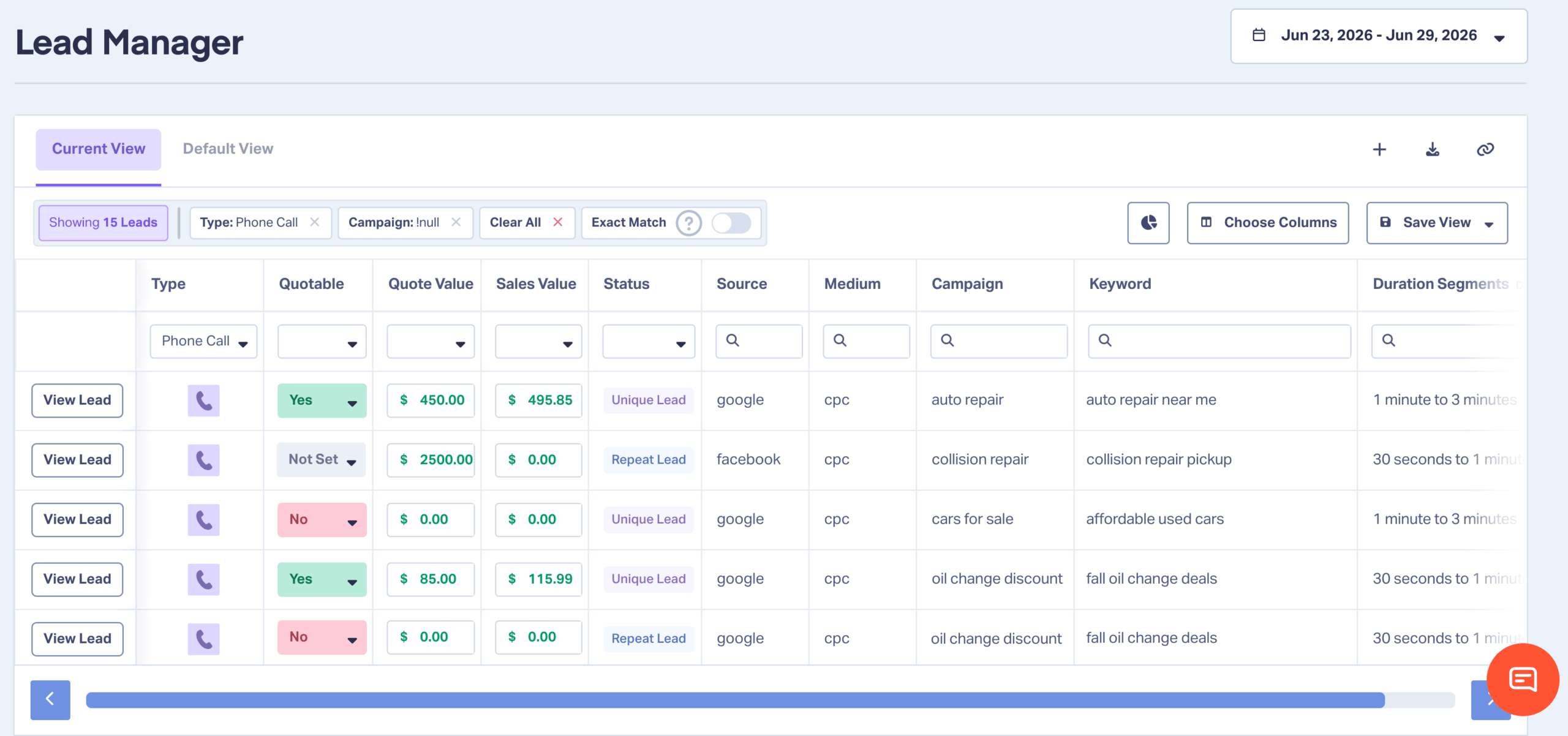
Booked appointments are marked and valued, price-shopper calls are filtered out, and only the qualified conversions sync back to Google Ads.
See how WhatConverts syncs only the qualified, valued conversions into Google Ads, so bidding optimizes toward booked appointments instead of raw calls.
Integration Spotlight: Google Ads
Tell a Campaign Problem From a Front-Desk Problem
Before you cut a campaign for "bad leads," check whether the front desk mishandled good ones. A low booked rate usually means an intake problem, where the front desk drops calls a campaign worked to win. The two look identical on the report. A rep who quotes a price and never offers a slot produces a call that reads exactly like a junk lead in your conversion data. The diagnostic below sorts one from the other.
Pull the recordings before you cut spend
Pull a sample of call recordings per account. Listen for two things: how fast the rep answered, and whether they actually tried to book. Then segment booked calls from price-shopper calls. The benchmarks tell you what good looks like.
The handling gap is real. A Marchex Institute study found that on connected dealer calls, reps made no attempt to set an appointment 63% of the time. Sixteen percent went unanswered, and two-thirds of the time nobody asked for contact information.
Foureyes data shows the upside when handling is good: used-vehicle phone leads set appointments at 81%, against 41% for internet leads. Speed is the other half of it. A booking-ready caller who waits goes cold. A rep who answers in the first minute, and one who lets it ring, are telling you about handling, not about the campaign.
Here's how it plays out. A brake-repair campaign shows the fewest booked jobs, so it looks like the one to pause. The recordings tell a different story. Those callers answered fast and came in ready to book. The reps quoted prices and never offered a slot. So they coached the front desk and kept the campaign running. Report call handling and recordings to the client, and the real problem gets fixed.
A low booked rate looks the same either way. One question tells them apart.
Were the calls appointment-ready?
| YES The callers were ready to book Front-desk problem Report call handling and coach the team. Keep the campaign running. | NO The calls were low-intent Campaign problem Adjust targeting and keywords. |
Automotive PPC Attribution Questions
How do you track booked appointments from Google Ads?
Capture the click ID on each lead, store the booking outcome from your shop or dealer system, then import confirmed appointments back into Google Ads as an offline conversion. Add Enhanced Conversions for Leads to recover click IDs that get stripped before they reach the lead record.
Why are my automotive PPC leads low quality?
High call volume in automotive skews toward price-shoppers, parts and service, and wrong numbers. Optimize toward raw calls, and bidding just finds more of the same. Check the front desk before you blame targeting. A low booked rate is often an intake problem.
What conversion should automotive campaigns optimize toward?
An intake-confirmed appointment, weighted at roughly 10% of the deal value. Keep the sold car or completed job in observe mode for reporting, and use the raw call or form as a volume signal so bidding has enough data to learn on.
Why Booked Appointments Are the Only Signal Worth Optimizing Toward
Optimize automotive campaigns toward intake-confirmed bookings, fed back to Google Ads by campaign and keyword. That's the whole move. Do it, and you can finally see which campaigns book service appointments and which ones just ring the phone, and whether a weak number is a campaign problem or a front-desk one, before you cut spend.
The system, in four steps:
- Capture the click and keyword on every call.
- Separate booked appointments from price-shopper and wrong-number calls.
- Feed only the confirmed bookings back to Google Ads, weighted by what they're worth.
- Check call handling before you pause a campaign for "bad leads."
A busy phone looks like a winning campaign. Booked-appointment data shows you which ones actually book the work.
Ready to see which campaigns drive booked appointments, not just calls? Check out WhatConverts Call Tracking below.
Feature Highlight: Call Tracking
Get a FREE presentation of WhatConverts
One of our marketing experts will give you a full presentation of how WhatConverts can help you grow your business.
Schedule a DemoGrow your business with WhatConverts







