


 Amanda Pell
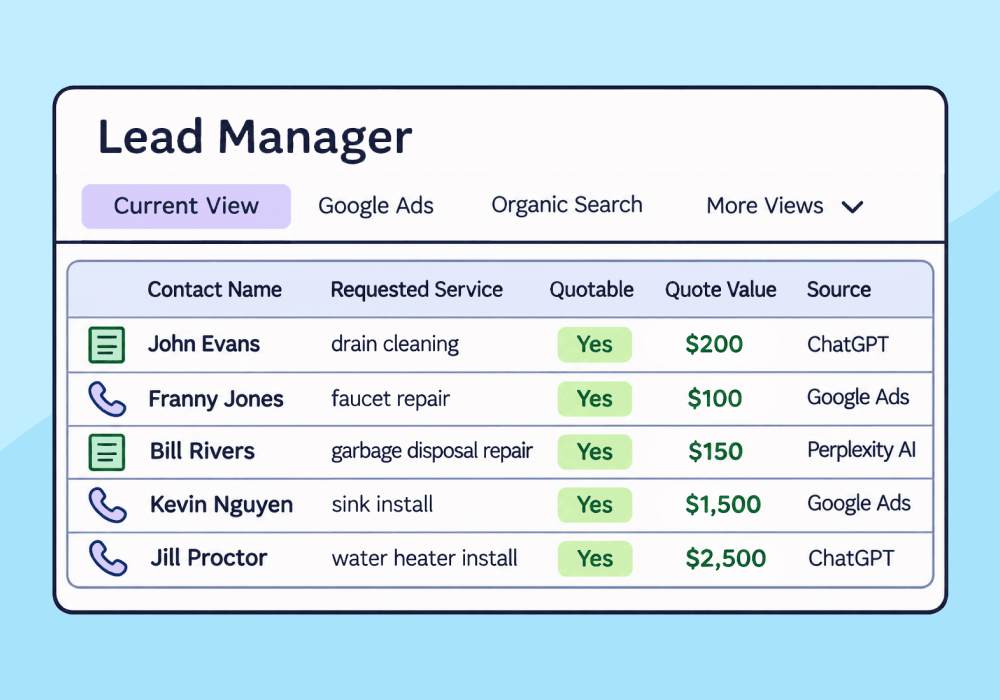
According to the International Data Corporation, 87% of people now use AI in at least part of their purchase decisions, and 63% of consumers now start with AI when researching products or services.
If AI is helping consumers find the things they want to buy, that’s a positive for both buyers and sellers. For marketers, it’s a problem: unlike search, AI has no ad clicks to track and no high-volume keywords to target.
And a channel you can’t track is a channel you can’t manage or grow.
Fortunately, leads from AI platforms can be tracked. This article shows how to set up tracking that reveals which AI platforms send you leads, which of those leads become customers, and how much revenue each platform drives.
Note: Not a WhatConverts user yet? Start your free 14-day trial of WhatConverts today or book a demo with a product expert to see how we help prove and grow your ROI.
Why AI Leads Are Harder to Track
The tracking methods marketers rely on were built for channels they can control, like paid advertising, or channels that provide data, like organic search. AI doesn’t do either of those things.
1. You Don’t Control the Link
On paid, email, and social, every link gets a UTM tag or click ID before it goes live. With AI, the platform picks the page and provides the URL. In most cases, it doesn’t add any identifying info.
Related Reading: What Is Call Tracking and Why Do Marketers Need It?
2. The Platforms Report Nothing Back
When someone clicks on your Google ad, Google tells you exactly which keyword they searched and whether that click turned into a conversion. On the organic side, Search Console tells you which queries are bringing you traffic.
AI platforms don’t share any of that data: not the prompts people are submitting nor the responses being generated. If you want a record of what AI platforms are sending you, you need to track it yourself.
3. AI Gets Buried With Every Other Referral
Platforms that pass a referrer usually show up in referral traffic, alongside directories, partner links, and other linking sites. At low volume, AI looks like noise and gets left out of client reports.
And as with every channel, the trail ends at the visit. When an AI-referred buyer picks up the phone, the source disappears unless call tracking is there to catch it.
4. Home Page Referrals Break Static Call Tracking
Search leads are easier to track partly because marketers control where they land. Google Ads point to dedicated landing pages, and organic searches surface specific product pages.
Many marketers track calls from those channels by assigning each one a dedicated tracking number. Number A goes on landing page A. Calls to that number get credited to that page and its campaigns.
The problem is that AI platforms often point to the home page for a business that they recommend. If your home page shows one static number, AI-driven calls arrive as anonymous calls to your main line.
Related Reading: How to Set Up Google Ads Offline Conversion Tracking
The Fix: Treat Each AI Platform as Its Own Lead Source
When someone clicks a link inside an AI chat platform like ChatGPT, Gemini, or Perplexity, the platform passes its own URL along with the visit. When you set up first-party tracking with WhatConverts, it records that URL as the lead source on every call, form, and chat the visitor produces.
In the Lead Manager, those leads show up with sources like:
- chatgpt.com
- gemini.google.com
- perplexity.ai
- copilot.microsoft.com
- claude.ai
This guide shows you how to track those leads, where to find them in the Lead Manager, and how to turn that data into can inform your AEO or GEO marketing strategy.
How It Works: Using the Lead Manager
How to Track AI Leads with Whatconverts
Getting AI leads into your reports takes three steps. Capture every conversion, filter for AI sources, and add qualification and value.
Step 1: Make Sure Your Calls and Conversions Are Tracked
AI referrals can land on any page and convert any way your site allows. That means your tracking has to cover every conversion type: calls, form fills, chats, and appointment bookings. Install the WhatConverts tracking script sitewide so to capture each one with its source attached.
For calls, you can solve the anonymous call problem by switching from static tracking numbers to dynamic number insertion (DNI). DNI draws from a pool of phone numbers and uses JavaScript to swap them out on your site so each visitor gets a tracking number tied to their visit and the marketing source, even if they only landed on your home page.
Once tracking is active, when a visitor comes from AI and calls your business or submits a form or chat, WhatConverts will document it as a lead in the Lead Manager with the referring AI platform as the source.
Related Reading: Dynamic Number Insertion (DNI): What It Is and Why You Need It
Step 2: Run a Leads by Source Report
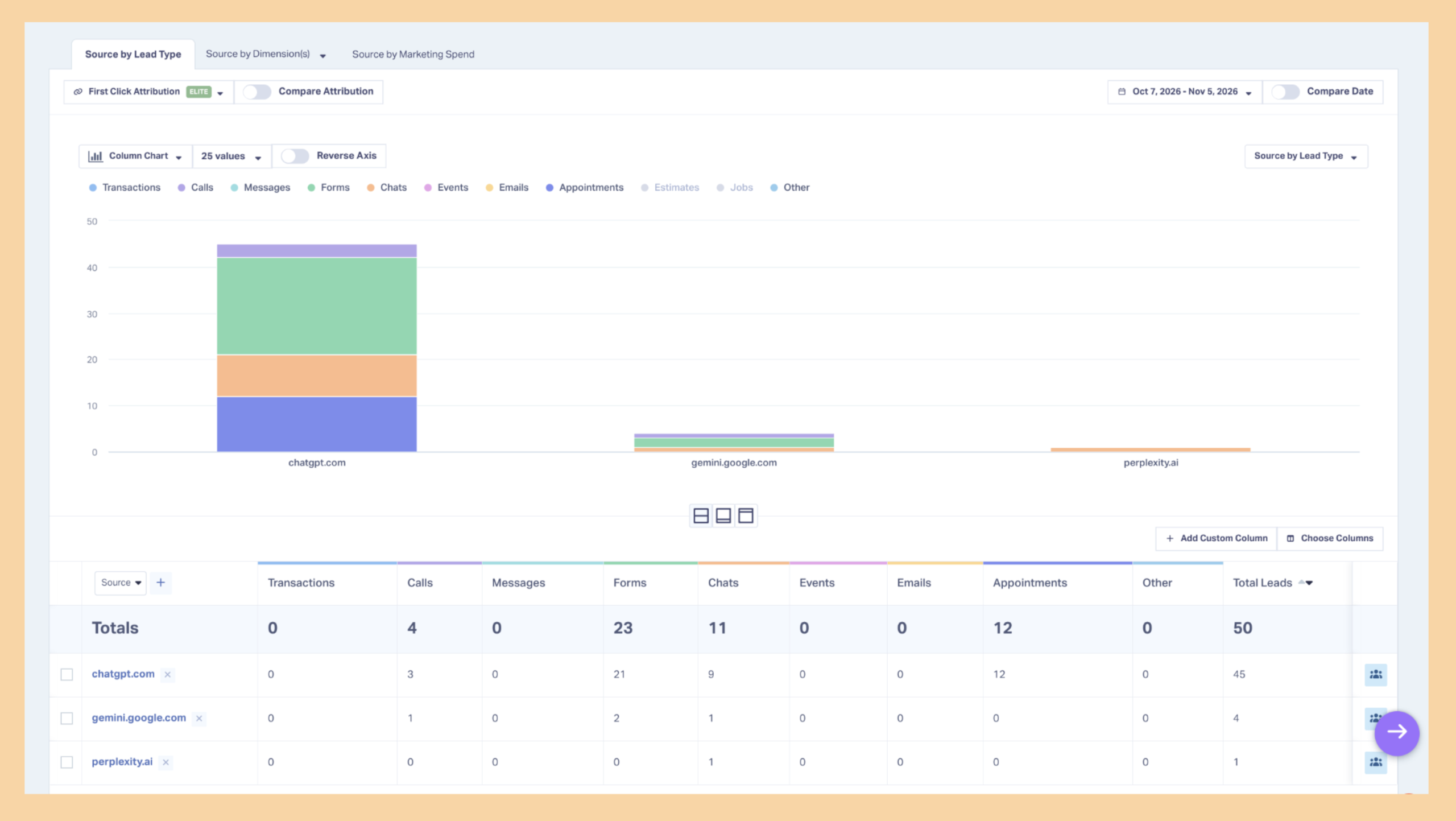
Once all of your leads and their sources are in WhatConverts, you can report on that information without leaving the app. In the Report Library, pull up the Leads by Source report and add a source filter and input the AI platforms you’re interested in. (To include multiple platforms, use Matching RegExp.)
This will show you all of your leads that came from each platform, separated by lead type:
Related Reading: Pinpoint Your Best Channels with the Leads by Source Report
Step 3: Take It Further With Qualification and Value
The other thing that WhatConverts allows you to do that other platforms can’t is qualifying and adding quote values to each of your lead prospects. When each call comes in, you can decide whether the caller is a real potential customer or not, and if they are you can mark them “quotable” in WhatConverts.
Once you’re adding this information, you can run reports to measure sources not by how many total clicks and conversions they drive (which includes conversions from spam, wrong numbers, and other callers who don’t have any real sales potential), but by the number of actual qualified prospects they drive.
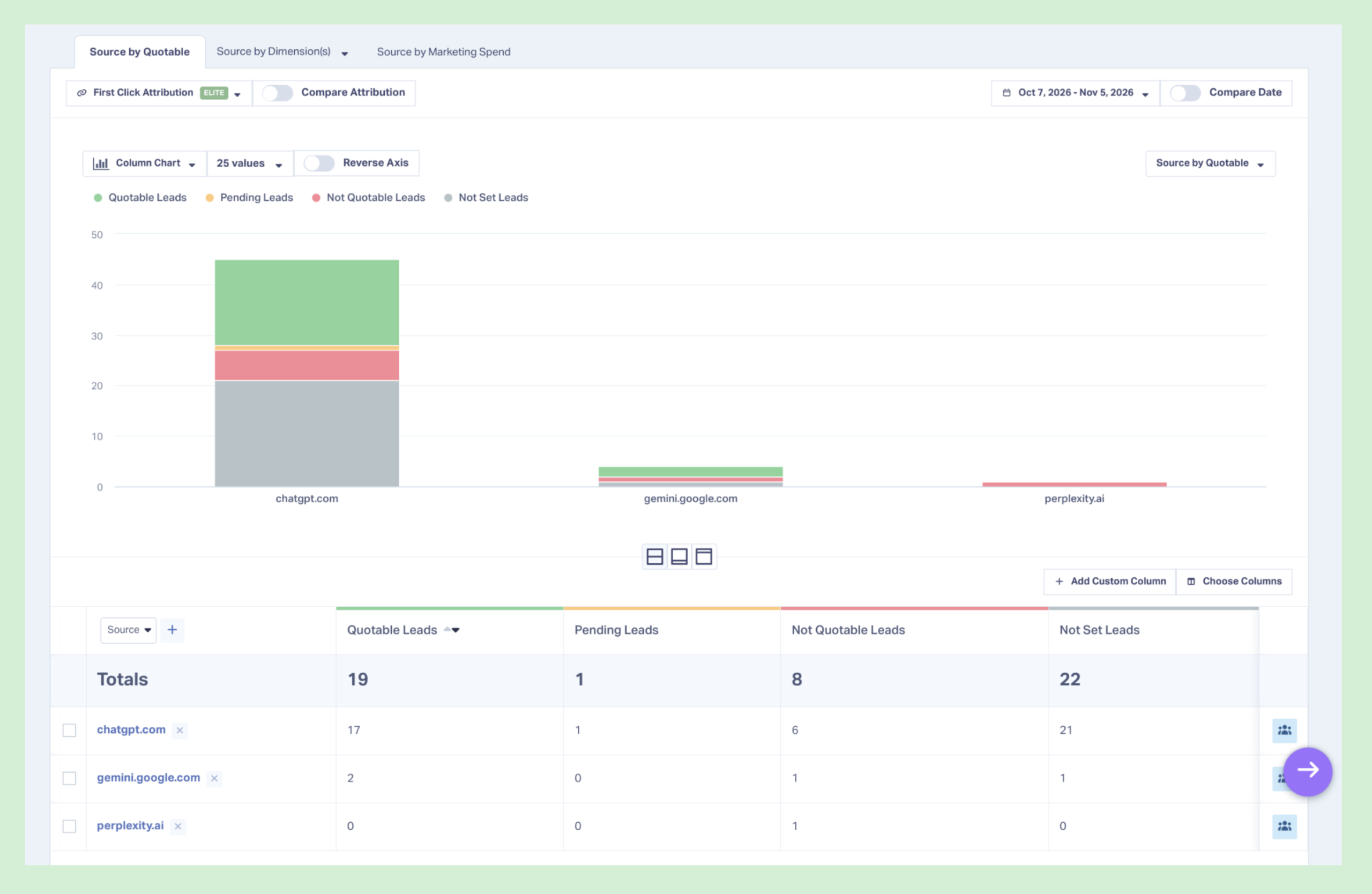
Similarly, you can also add a dollar value to each lead that reflects the value of the product or service they’re interested in, then run reports measuring each source by the size of the business they’re driving.
The Bottom Line
AI assistants are already recommending businesses. The only question is whether those recommendations show up in your reporting.
To track leads from AI in WhatConverts:
- Track every call, form, chat, and booking on your site, with DNI on every page.
- Filter your Leads by Source report for chatgpt|perplexity|copilot.
- Qualify and value each AI lead.
- Compare each platform's qualified leads and revenue against your other channels.
Once AI leads carry a source and a value, you can report on AI the same way you report on Google Ads: by the revenue it brings in.
Ready to see which AI assistants are sending your clients real business?
Start your free 14-day trial of WhatConverts today or book a demo with a product expert to see how we help prove and grow your ROI.
Get a FREE presentation of WhatConverts
One of our marketing experts will give you a full presentation of how WhatConverts can help you grow your business.
Schedule a DemoGrow your business with WhatConverts


