


 Alex Thompson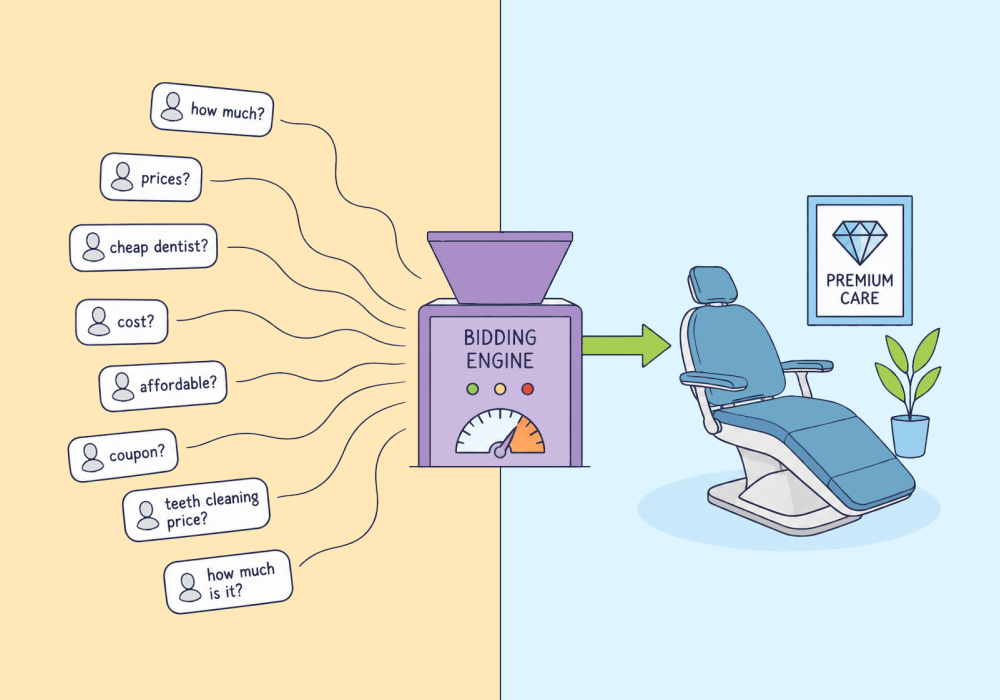
Your med spa client spends $6,000 a month on Botox and filler ads. Leads come in cheap, the phone rings, the schedule fills. But as performance plateaus and the superficial metrics (clicks, impressions) lose their luster, your client begins asking questions: which campaigns book treatments? Which just bring people who wanted a price? What exactly are we paying for?
That's the core med spa PPC problem. You can see cost per lead by campaign all day. You can't see which lead booked a $1,200 filler and which called three other clinics and never came back. So, how do you know which campaigns deserve more budget? And how can you use that info to teach Google to find even better leads?
Those are the questions this article answers. By the end, you'll know how to tie campaigns to booked treatments and feed that signal back so bidding chases patients who actually book.
Cost Per Lead Hides What a Booked Treatment Actually Costs
Cost per lead is the most-watched number in med spa PPC, and it's the one most likely to lead you astray.
Google CPL for med spa terms runs roughly $30 to $80 by most agency benchmarks. Manageable, on paper. But only about 20 to 30% of those leads book a consult. Half to two-thirds of those consults become a paid treatment.
So do the math. A $50 lead at a 25% book-and-show rate really costs around $200 per patient in the chair. As you can see, the headline CPL was hiding a number four times bigger.
Then stack on the treatment values. A Botox session runs $300 to $600. A single filler session often clears $1,000, with the average near $1,628 in RealSelf's patient data. Roll all of that into one "leads" number and the signal disappears. You can't tell the campaign booking fillers from the one collecting price questions.
Take "Radiance Aesthetics," a single-location spa you run $3,500 a month on Google Search. That buys about 26 leads at $135 each. Four book a treatment. Real cost per booked treatment: about $875. The table below shows the same campaign two ways.
| Campaign | Leads | Cost Per Lead | Leads That Booked | Cost Per Booked Treatment |
| "Botox cost" cluster broad, price-shopper terms | 20 | $120 | 1 | $2,400 ❌ worst per booking |
| "Lip filler consultation" cluster exact-match, high-intent terms | 6 | $180 | 3 | $360 ✅ best per booking |
| Illustrative figures based on the Radiance Aesthetics example: one account, one month, about $3,500 in spend and 26 leads. | ||||
A campaign can look like your best buy on cost per lead and be your worst on patients booked. That's how a falling cost per lead can be a warning sign instead of a win. Want your own numbers? Run them in the calculator below.
Counting Inquiries Trains Smart Bidding to Find Price-Shoppers
That cheap campaign keeps winning budget for one reason: it's doing exactly what you trained it to do.
Smart Bidding is a pattern-matcher. You hand it a conversion, and it goes looking for more people who look like the ones who converted. Make "form fill" the conversion and it finds more people who fill out forms, not more people who book treatments. Those are not the same crowd.
In aesthetics, they're barely related. Cheap lead-form and "$9/unit Botox" creative pull in comparison shoppers. The average med spa caller checks around 2.5 providers before booking. The cheapest leads are often the least likely to commit, because price is the only reason they raised their hand.
Feeding that signal at volume doesn't help. Automated bidding needs enough of the right conversions before it performs, and a short learning period where results lag. Point it at the wrong event at scale and you teach it the wrong lesson faster.
The instinct is to tighten the audience or rebuild the landing page. The fix is upstream of both: a better conversion signal. Ad platforms optimize for volume, not revenue until you hand them revenue to chase.
Connect the Click to the Booked Treatment, Then Feed It Back
So what is that signal? One question answers it: did this lead book a treatment, and what was it worth?
That signal exists already. It's just split across two systems that don't talk. Your ad platform knows the click came from a specific campaign and keyword. Your booking system knows the patient showed up and paid $1,200 for filler. Nothing connects "came from this campaign" to "booked this treatment."
The job is to join them, then send the result back. When a consult turns into a paid treatment, you fire that booked-treatment event, with its value, back to Google and Meta as an offline conversion. Now the platform can optimize toward revenue, and it shifts budget to the campaigns that produce it. Google's own data backs this: accounts that pair first-party data with their offline conversions see a median 10% lift over standard imports.
This is where most agencies stall. The lead lands in the CRM, and the feedback loop dies there. Your CRM tracks the patient through the sales process. It can't tell you which paid campaign produced the booked treatment, because this is a marketing question a CRM can't answer. Lead tracking closes the gap: it captures the click ID at the inquiry and carries the treatment value back.
The flow below walks the whole loop, from ad click to bidding that finally chases bookers.
| 1 Ad click, tagged A visitor clicks a Google or Meta ad and the GCLID or fbclid rides in with them. |
| 2 Inquiry comes in They call or submit a form, and that click ID is captured and saved with the lead. |
| 3 Consult booked The lead books a consult in the scheduling system. |
| 4 Treatment booked, with a value The consult converts to a paid treatment, and you attach its dollar value. |
| The key step 5 Sent back to Google and Meta The booked-treatment event and its value go back as an offline conversion: Enhanced Conversions for Leads on Google, the Conversions API on Meta. |
| 6 Bidding shifts to bookers The platforms see which campaigns produce revenue and move budget toward the ones that book treatments. |
| 🔁 The next ad click now comes from a campaign aimed at bookers, so the loop tightens with every cycle. |
Booking Platforms Don't Pass Click IDs to Google or Meta
To close that loop, you need one thing out of the spa's systems: the booked-treatment event and its value. That's the hard part, because of where that data lives.
Med spa bookings sit in scheduling and practice-management platforms like Boulevard, Zenoti, Mangomint, and Aesthetic Record. Those tools are built for booking, charting, compliance, and payments. Feeding ad platforms isn't their job, and most are documented as thin on revenue attribution. What's left is four gaps to bridge. The four gaps below show them at a glance:
| Four gaps to bridge | |
| 🏷️ The click ID The GCLID or fbclid must be caught the moment someone inquires and stored with the lead. Booking widgets often strip it from the URL first. | 📞 The phone Plenty of high-ticket bookings come in by phone, and a form-only setup never sees them, or the click ID they arrived with. |
| 📤 The event The booked-treatment signal and its value have to leave the booking system, usually through a webhook, Zapier, or an export. | ⚠️ The drop Click IDs don't survive every journey. iOS, Safari, ad blockers, and cross-device hops lose them, so hashed email or phone is the backup. |
None of this is strategy. It's wiring, which is why the build below is mostly connection work.
Set Up the Booked-Treatment Feedback Loop in Four Steps
| 1 Capture | → | 2 Value | → | 3 Feed Back | → | 4 Shift Bidding |
Here's the whole build in four steps. Each one works manually, and each has a faster, more reliable version once the manual path starts to strain.
To attribute med spa PPC to booked treatments:
- Capture the GCLID or fbclid on every inquiry, including phone calls.
- Value each lead by whether it books a treatment.
- Send that booked-treatment event back to Google and Meta.
- Shift bidding to treatment value once you have enough booked conversions.
The four steps below build on each other, so work them in order.
Capture the click ID on every inquiry, including phone calls
Turn on auto-tagging in Google Ads so the GCLID lands on every click. Capture it, and Meta's fbclid, in a hidden field on your booking form, and store it with the lead. That covers web forms.
Phone calls need their own capture. Put call tracking with dynamic number insertion on the phone path. It swaps in a tracking number per visitor. Each call then arrives carrying the keyword, campaign, and click ID, the same fields your form captures. That's how you tie inbound calls to the keyword that drove them instead of losing them.
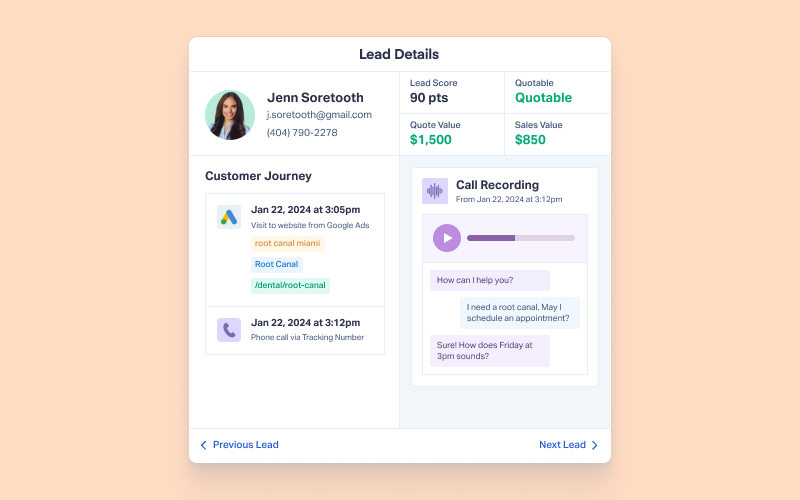
Every call and form lead arrives tagged with the keyword and campaign that drove it, so the click ID is already attached when the patient books.
Value each lead by whether it books a treatment
Raw lead counts are what got you here. So stop counting leads and start scoring them. Define the event you care about, a booked treatment, and tag it with a value. A booked filler and a booked Botox session aren't worth the same to the client, and the platform should know it.
By hand, this breaks down on consistency: eyeballing which leads "seem qualified" doesn't repeat across accounts. Rule-based lead qualification scores and values every lead the same way each time. In WhatConverts, Lead Intelligence rules apply that scoring automatically as leads arrive.
When you can't track exact treatment revenue yet, value the qualified lead instead of the raw one. A consult likely to convert is worth more than a price question, and bidding can run on that proxy until real revenue flows.
Send the booked-treatment event back to Google and Meta
On Google, create an import conversion action for the booked treatment, then upload it as an offline conversion with the click ID, timestamp, and value.
Layer Enhanced Conversions for Leads on top, so a hashed email or phone backs up the click ID when it drops.
On Meta, send the Schedule or Purchase event through the Conversions API with hashed identifiers, and aim for a strong match score. Meta's API reference lists the event names.
Mind the upload windows: roughly 90 days on Google (90 for GCLID and 63 for Enhanced Conversions), 62 on Meta. One change to confirm: Google recently shifted these uploads to its Data Manager API, so make sure your pipeline is on the current path. The manual route works but leans on CSV exports. WhatConverts pushes that event to both platforms automatically through its ad-platform integrations, which removes the export step.
See how the Google Ads integration sends every booked-treatment conversion straight into your account, no CSV export, no spreadsheet.
Integration Spotlight: Google Ads
Shift bidding to treatment value once volume supports it
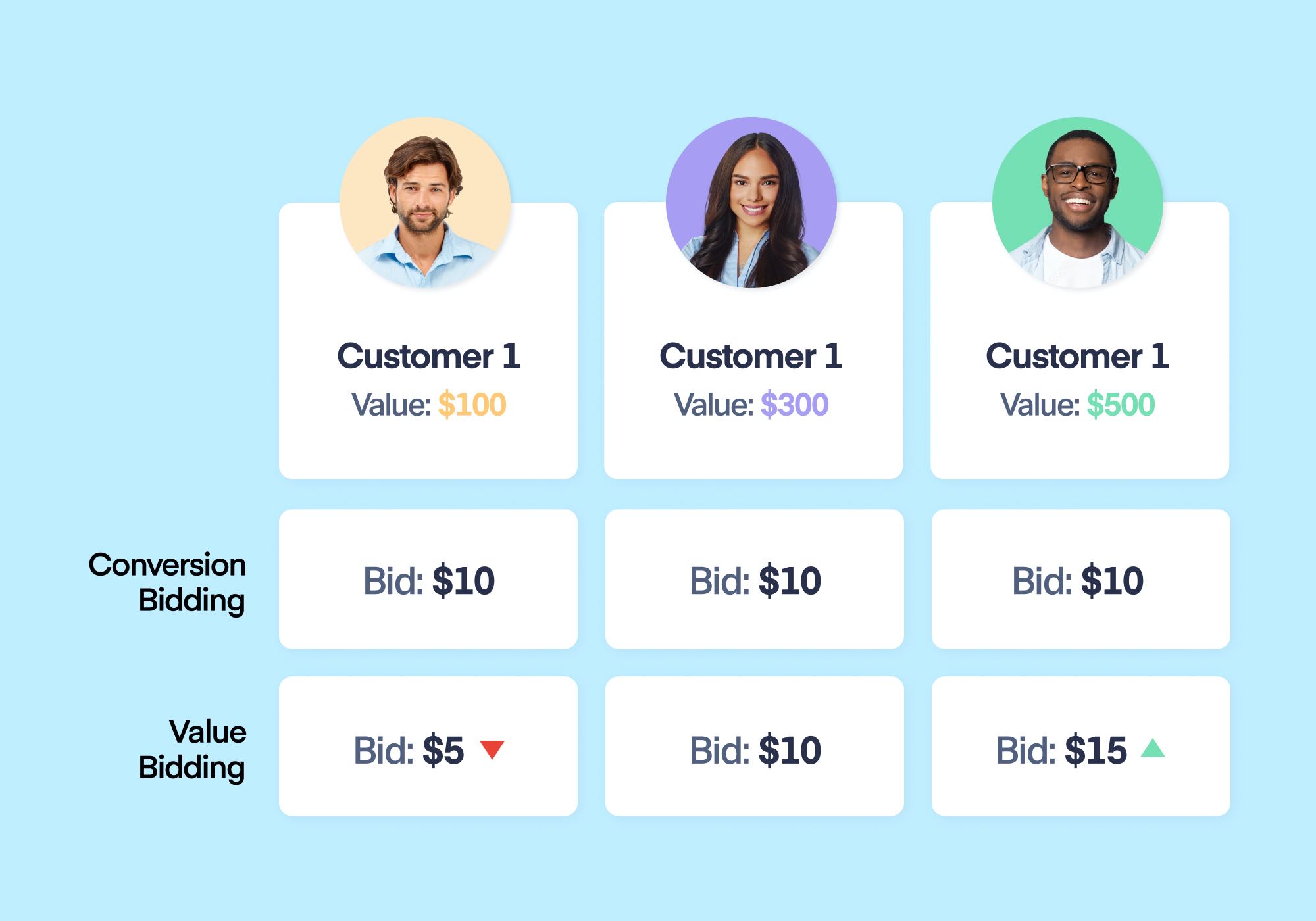
Don't rush this. Automated bidding needs a real base of conversions before it can learn, so wait for roughly 30 booked treatments a month before you lean on value-based bidding. Below that, hold steady.
When you have the volume, move in steps. Switch from form-fill optimization to Maximize Conversions on the booked event, then to Maximize Conversion Value or Target ROAS using real treatment values (or stage-based proxies if the client won't share revenue). Google's internal data found the move from Target CPA to Target ROAS lifted conversion value by a median of 14%, according to Optmyzr's value-based bidding guide.
Hold changes through the roughly two-week learning period, and judge results only after the full consult-to-treatment window passes. That discipline is what lets you move to value-based bidding once the signal is clean. WhatConverts keeps that signal flowing through its Campaign Optimizer, so it doesn't go stale between uploads.
Report Cost Per Booked Treatment, Not Cost Per Lead
Once bidding runs on treatment value, your reporting has to change with it. Retire cost per lead as the headline. Report cost per booked treatment and revenue per campaign, because those are the numbers that tell a client which ads fill chairs.
Back to Radiance. Reported the old way, the broad "botox cost" cluster looked busy and cheap. Reported by booked treatments, the exact-match "lip filler consultation" group produced the actual bookings while the cheap-CPL terms produced browsers. Same spend, completely different story.
Then act on it. Shift budget toward the campaigns and keywords booking treatments. Negative-match the price-shopper queries that never book, like "cheap filler" and "botox cost," unless they earn their keep. Frame it against patient value over time: the average med spa patient spends in the low thousands the first year, and one booked treatment is rarely the last.
This is the report worth putting in front of a client. One agency fed only booked, qualified lead data back to Google, used Smart Bidding properly, and gave clients accurate cost-per-lead numbers and a clear read on return. The same approach works for a dental client or any high-ticket service.
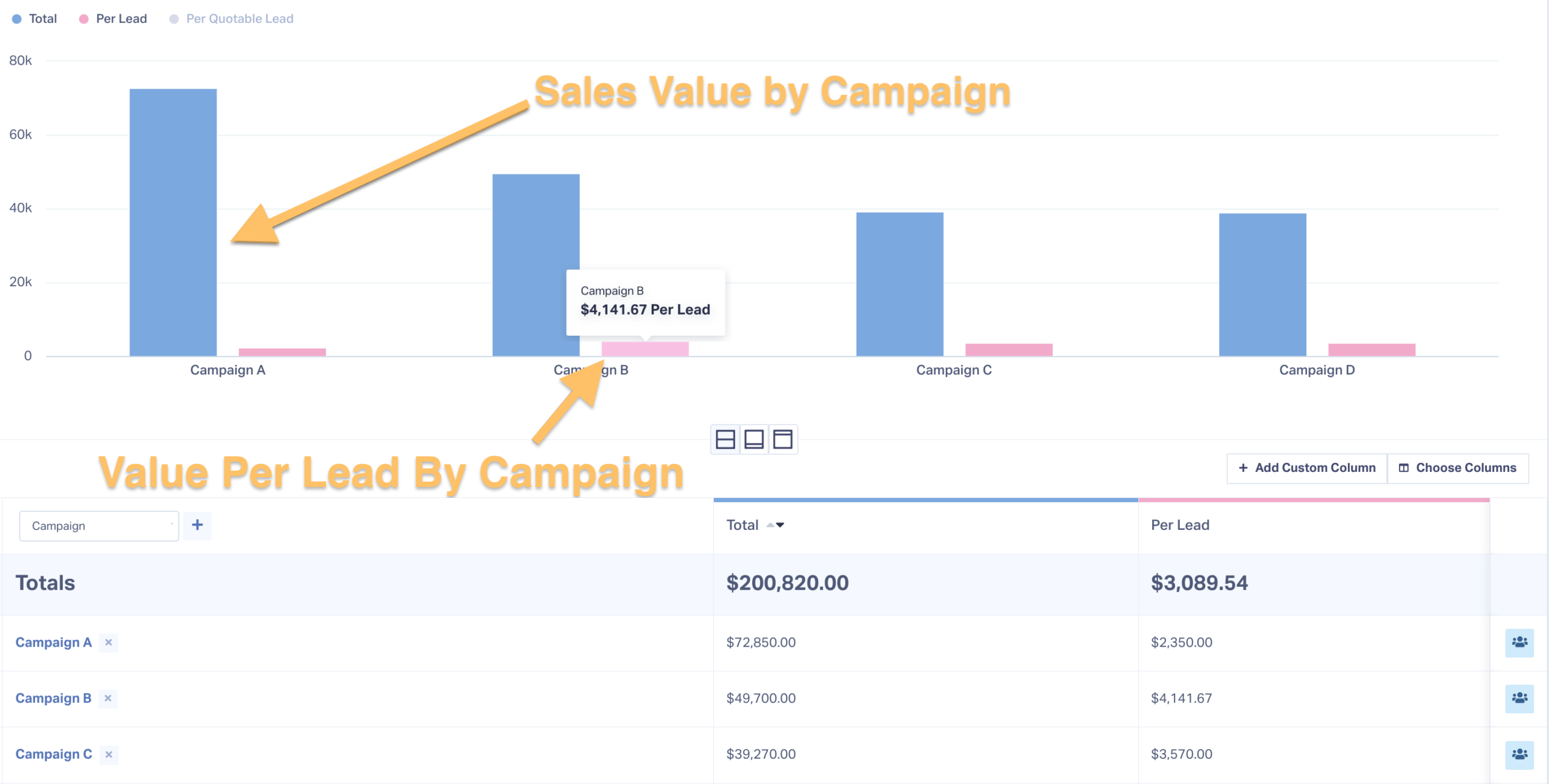
The report the client sees, campaigns ranked by booked treatment value, not by how cheap their leads looked.
See how one agency did exactly this for an ophthalmology clinic, shifting budget to high-value procedures and growing patients 42%.
Real Results: 42% More Patients with Value-Driven PPC Strategy
When the Booked-Treatment Loop Isn't Worth Building Yet
For most med spa accounts, this loop is the right move. A few situations change that, and saying so up front keeps you honest with the client.
If booked-treatment volume never climbs past a trickle, value-based bidding has nothing to learn from. Stay on Maximize Conversions and don't force the switch. And if the booking system simply can't export a booked-treatment event, optimize on the consultation-attended event instead. A booked consult is a weaker signal than a paid treatment, but far better than a raw form fill.
Set expectations on accuracy, too. Click IDs drop, match rates are never perfect, and conversions lag by weeks. Judge campaigns only after the consult-to-treatment window closes. There's no public, independently verified med spa case study proving an exact return from this setup yet. Treat vendor numbers as directional, and let your own account data be the proof.
Perfect attribution isn't on offer, and chasing it burns time you don't have. A signal aimed at booked revenue beats one built on form fills, every time.
HIPAA and PHI handling are out of scope here. Hash identifiers and review compliance before sending any patient data, and keep call and form tracking compliant from the start.
Bid for Patients Who Book, Not Browsers
You started with a question you couldn't answer: which campaigns bring patients who book, and which just bring people asking about price? Now you can answer it. Capture the click ID on every call and form, value each lead by the treatment it books, send that value back to Google and Meta, and report on cost per booked treatment, not cost per lead.
Do that, and the guessing stops. The campaigns filling treatment chairs show up as the ones producing revenue, the price-shopper terms show up as the drain they always were, and Smart Bidding is finally chasing the patients who book.
Ready to tie every booking call back to the exact campaign and keyword that drove it?
Feature Highlight: Call Tracking
Get a FREE presentation of WhatConverts
One of our marketing experts will give you a full presentation of how WhatConverts can help you grow your business.
Schedule a DemoGrow your business with WhatConverts







