


 Alex Thompson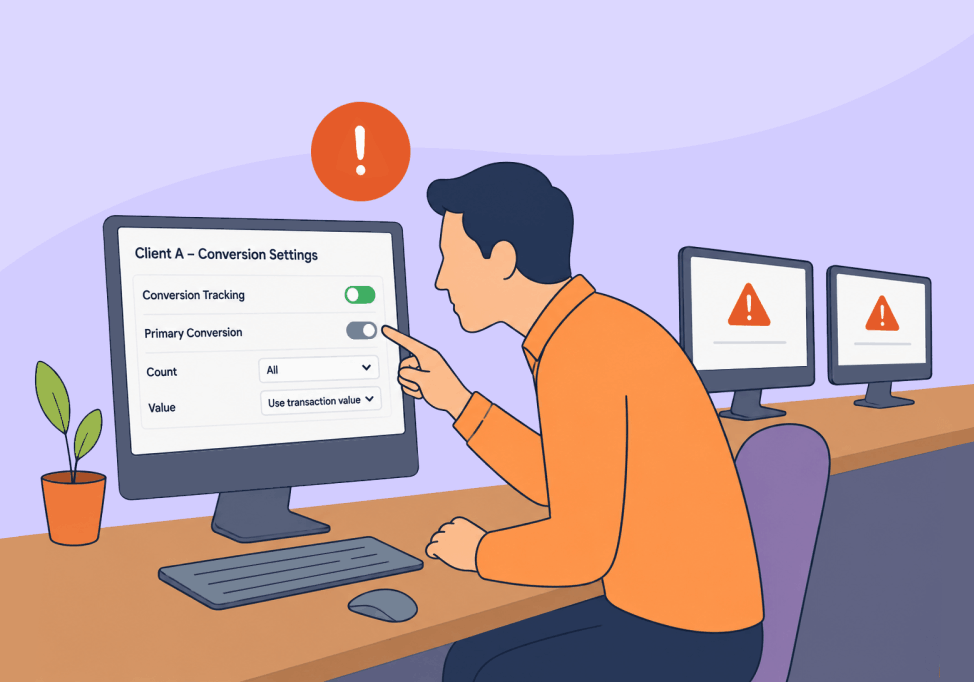
Creative asset generation, weekly ad platform updates, 15 thousand martech tools to choose from: with everything going on in the marketing world, it’s tough to get excited about something as dry as setting up call attribution.
But nevertheless, it has to be done to track your lead gen success. And if you’re an agency managing dozens of clients, getting a single setting wrong means a major risk. Think handing a report to your client showing 240 calls while their front desk only logged 150. Now imagine it across every client (yikes).
This article shows the per-account setup you can standardize and maintain across a whole portfolio. The number on the dashboard becomes one the client can act on. And for you, it means peace of mind knowing your data and your decisions are built on solid ground.
Conversion-Action Setup Decides Portfolio Accuracy
Your tracking numbers confirm a call happened and where it came from. It can’t confirm the call is counted once, counted clean, and fed to bidding as a real lead. That second job is the conversion-action layer. This is the setup step most marketers don’t get right.
The two setups below show why it matters. Take one inbound call. Counted once as a native call conversion, your reported cost per lead matches reality. Counted twice (say with a native tag and an imported GA4 event firing on the same call) the lead reads as two, making your cost per lead look like half its real value.
Same call. Two stories.
Call tracking is only the first step, and reporting accuracy comes from what you do with the data once the call lands. The foundation is capturing that call as a structured lead tied to its source, so the thing you feed bidding is a real lead, not a loose event.
Duplicate conversions is a real problem too. One landmark report auditing thousands of Google Ads accounts found that only 50% of accounts with conversion tracking were tracking correctly.
See the accuracy gaps standard call tracking leaves open for agencies, the ones this setup is built to close.
Related Reading: 5 Big Problems Call Tracking for Agencies Doesn’t Solve
One Account’s Bad Signal Becomes the Whole Portfolio’s Problem
Incorrect call attribution setups aren’t just a problem for your reports. They can wreak havoc on your campaign performance too.
Smart Bidding reads your conversion data and optimizes toward whatever signal you feed it. That’s the whole problem with a misconfigured conversion action: a tag that fires twice, or one counting junk calls, teaches the algorithm to chase more of the wrong thing.
The loop below shows that path in five steps. One account’s conversion misfires. Bidding optimizes toward it. Pooled budget reallocates. The cross-account dashboard inflates. The client scales.
Two things make portfolio scale worse instead of safer.
- Polluting the algorithm by pooling. Smart Bidding tends to perform best at roughly 50 conversions per 30-day period, so agencies pool conversion data across campaigns with portfolio bid strategies and shared budgets to hit it. Pool a polluted signal and you scale the pollution across the group instead of containing it to one campaign.
- Pushing the dashboard totals. Cross-account dashboards stack a small per-account inflation into a portfolio-wide overstatement no single account view would reveal.
And then there’s the painful recovery. Moving polluted actions back to observation forces a relearn. A polluted primary pool is the most common cause of bidding drift. Performance stays depressed for weeks while the model rebuilds on cleaner data. You pay for the mistake after the cleanup, not during it. Prevention beats it every time.
Four Conversion-Action Mistakes That Inflate Agency Dashboards
Most portfolio call attribution errors trace back to the same four conversion-action mistakes. Learn the tell for each. Then you can scan any client account and know whether its numbers hold up before you touch a bid.
In one audit-tool review of more than 500 accounts, most tracking problems clustered into a short list of categories. Duplicate counting that inflates reported performance led the list. Broken tracking wasted close to a quarter of ad budget in that sample.
The four-mistakes table below is the recognition list. Here’s each one.
1. Double-counting when GA4 imports and native tags both fire
This is the big one. A native Google Ads conversion and an imported GA4 event both track the same form or call as primary. So one lead counts twice. Reported cost per lead reads about half its real value, and bidding chases conversions that were never really there.
The tell is simple: reported conversions sit well above the leads the client can actually name, and two actions describe the same event. Google’s own migration guidance admits it can’t rule out double counting and tells you to set the imported action to secondary.
2. Counting “every” conversion when a lead should count once
Leave a lead action on “every conversion” instead of “one,” and the count inflates. Every repeat dial and every thank-you-page reload adds another.
Watch for conversion counts that climb faster than distinct leads, with repeat dials logged as separate wins. Calls from ads default to “one” in Google’s settings. Website actions and imported conversions can default to “every,” which is wrong for lead generation.
3. Micro-conversions polluting the primary bidding pool
Page views, button clicks, chat starts, stale GA4 imports. Left as primary or account-default goals, they drag Smart Bidding toward a blur of engagement instead of revenue-correlated actions. New campaigns then inherit those stale goals automatically.
The tell: your primary pool mixes high-intent calls with low-intent clicks. A campaign you launched last week is optimizing for something that no longer makes business sense.
4. GCLID-only matching that drops calls
Offline import that leans on GCLID alone loses reliability as the conversion window stretches. It also can’t match cross-device journeys once the original click ID is gone. Real calls go uncounted as a result.
You’ll see it as offline-imported conversions that undercount the closed calls you already know landed, especially on longer sales cycles.
A Standard Conversion Setup You Can Repeat Across Every Account
One setup closes all four mistakes, and you can build it yourself on any account without buying a thing.
- One source of truth per conversion action
- Native call conversions as your primary
- GA4 imports of the same action as secondary
- Lead actions counted once
- Only revenue-correlated actions in the primary pool
The primary-versus-secondary panel below sorts the common actions into the right buckets.
The portable piece is a per-account conversion map. For every conversion action, record three things:
- Its source: native, GA4, GTM, or offline import
- Its trigger
- Whether it’s primary or secondary
That map is what makes drift visible later, and what makes this standard repeatable across the whole book.
Capturing native call conversions and passing them to Google Ads cleanly is exactly why WhatConverts has a native Google Ads integration. It ties each call to its source and hands it over as the conversion you set as primary.
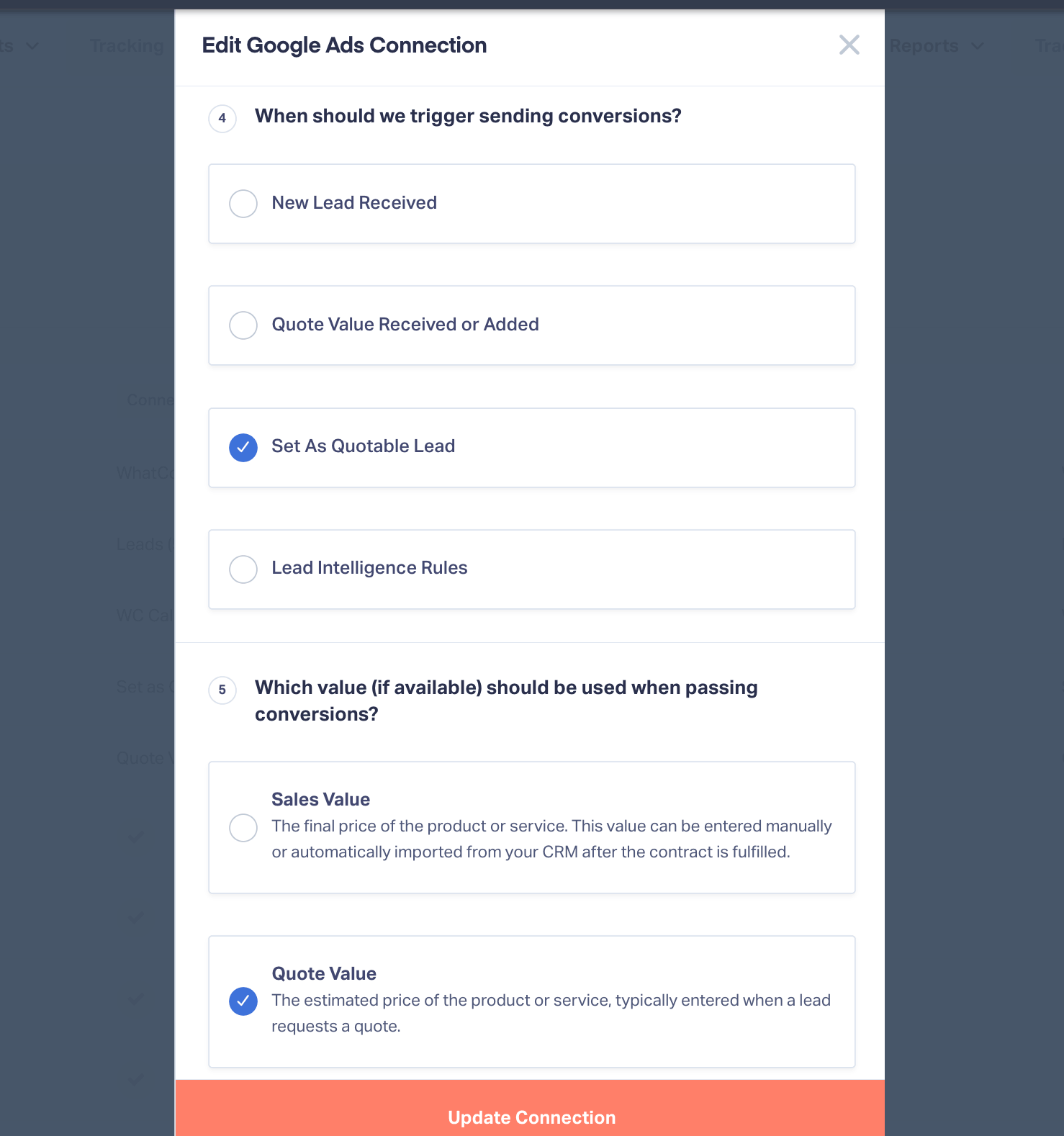
Ties the captured call to its source and passes it to Google Ads as a primary conversion.
Native call conversions primary, GA4 imports secondary
Always pick one source of truth per action.
Keep native call conversions as the primary, bidding-driving conversion. Import GA4 key events as secondary, for comparison only, never as a second primary for the same event.
This is the single highest-impact fix, because it kills double-counting at the source. Adswerve, a Google partner, gives the same advice: native tags primary, GA4 imports secondary to compare attribution.
Set a call-duration threshold, but treat it as a filter, not a verdict
Start near a 60-second minimum to screen out the obvious non-sales calls, then calibrate per vertical from your own recordings.
Just don’t mistake duration for proof of quality. Hold music and a polite greeting can push a junk call past 60 seconds, while a genuine missed-then-returned call can register as zero and count as a loss.
Quality automotive calls often run anywhere from 45 to 90 seconds as a baseline. But again, take that with a grain of salt. One auto-shop account on a 60-second minimum was logging wrong numbers, appointment confirmations, and vendor calls as conversions. And a real prospect’s unanswered call, the one that later booked the job, counted as nothing.
Duration filters noise. It doesn’t confirm value.
Use Enhanced Conversions for Leads, and test it per account
Move offline import from GCLID-only to Enhanced Conversions for Leads. It matches on hashed first-party data, with email the primary key and phone secondary, and still includes GCLID where available. That recovers the cross-device and longer-window calls GCLID alone misses, and Google now treats email as the primary match key.
Our walkthrough of enhanced conversions covers the match-key setup.
Treat the method as testable, not settled. One single-site A/B test found a well-implemented GCLID import about 25.79% more accurate than Enhanced Conversions for Leads. The author’s caution: it was one site. Switch, then verify per account.
If you’re wiring up offline import from scratch, our guide to offline conversion tracking walks the whole flow.
Feed Smart Bidding Verified Calls, Not Raw Call Volume
The manual standard setup above gets you a clean count, which is 50% of the way there. But a clean count still treats every qualifying call as equal. It can’t tell a booked job from a wrong number that ran long, so bidding learns from raw qualifying volume, not outcomes.
The fix lives in the marketing layer. Qualify which calls count, then send only those conversions back to Google Ads. Now Smart Bidding learns what a real client looks like, not just what a searcher looks like.
WhatConverts has this functionality built in.
- Call recordings, transcriptions, and AI Lead Analysis let you see exactly which calls were qualified and which were junk.
- Lead Intelligence rules automatically qualify each call against conditions you set.
- Native integrations send only qualified conversions out to the ad platforms, in near real time.
One agency fed cleaner, qualified-call signal to its ad platforms. The result: three times the qualified leads, a 61% lower cost per lead, and 8% lower spend.
If a CRM comes up, keep the roles straight. Your CRM tracks the lead through the sales pipeline. Lead tracking ties that lead back to the campaign that produced it, and forward to the revenue it generated, so the marketing signal reaches bidding. That’s a different job, and a CRM can’t answer the marketing question on its own.
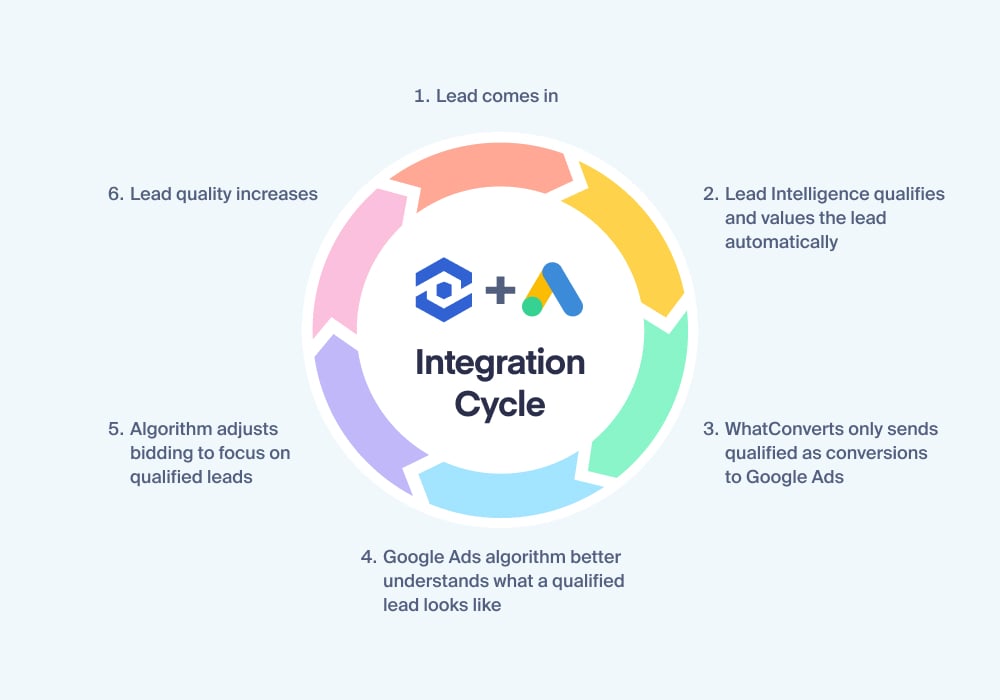
Only calls that qualify get sent back as conversions, so bidding optimizes toward real outcomes.
See how one agency sent Google Ads only its qualified calls, and turned that cleaner signal into a 12.4X ROAS for its client.
Keep the Setup From Drifting as Accounts Change Hands
A conversion setup decays, so the standard is only as good as the routine that re-checks it. That routine is part calendar, part trigger.
The re-audit trigger card below lists the five events that most often break a setup. Four are moments of change: onboarding a new account, a manager handoff, a GA4 migration, and a website change that re-fires tags. The fifth is a performance swing, a cost-per-lead jump past about 20% or a return-on-ad-spend drop past about 25%.
2. An account changes hands between managers
3. A GA4 migration happens
4. A website change re-fires the tags
5. Cost per lead swings past about 20%, or ROAS drops past about 25%Any one is a reason to open the conversion map and check it against the account.
Any one of them is a reason to open the conversion map and check it against the account.
On cadence, a workable rhythm:
- A quarterly deep audit for every account.
- A monthly light check on tracking and wasted spend.
- A biweekly check for higher-spend accounts.
Accounts drift fast when automated recommendations and broad match keep expanding reach. The per-account conversion map from your setup is the thing you audit against, not a document you wrote once and filed.
Reconcile what Google reports against the leads you actually got
Define an accepted variance first, then investigate when the gap jumps rather than chasing every small discrepancy. A reported count that runs well above the leads the client can point to is your signal. Something is double-counting, or counting junk. It’s the check that keeps a client dashboard trustworthy.
It’s also the check that catches the breaks nobody documented. One lead-gen agency lost 20 to 100 leads per affected client when call-tracking code was stripped from forms to clear a Google flag. Nobody owned the pipeline’s accuracy, and the gap only surfaced when someone reconciled lead volume against the tracking system.
Across many accounts, the fix is one place to see every client’s leads, with reporting that ties them to revenue. That turns reconciliation from a per-account spreadsheet chore into a single cross-account view.
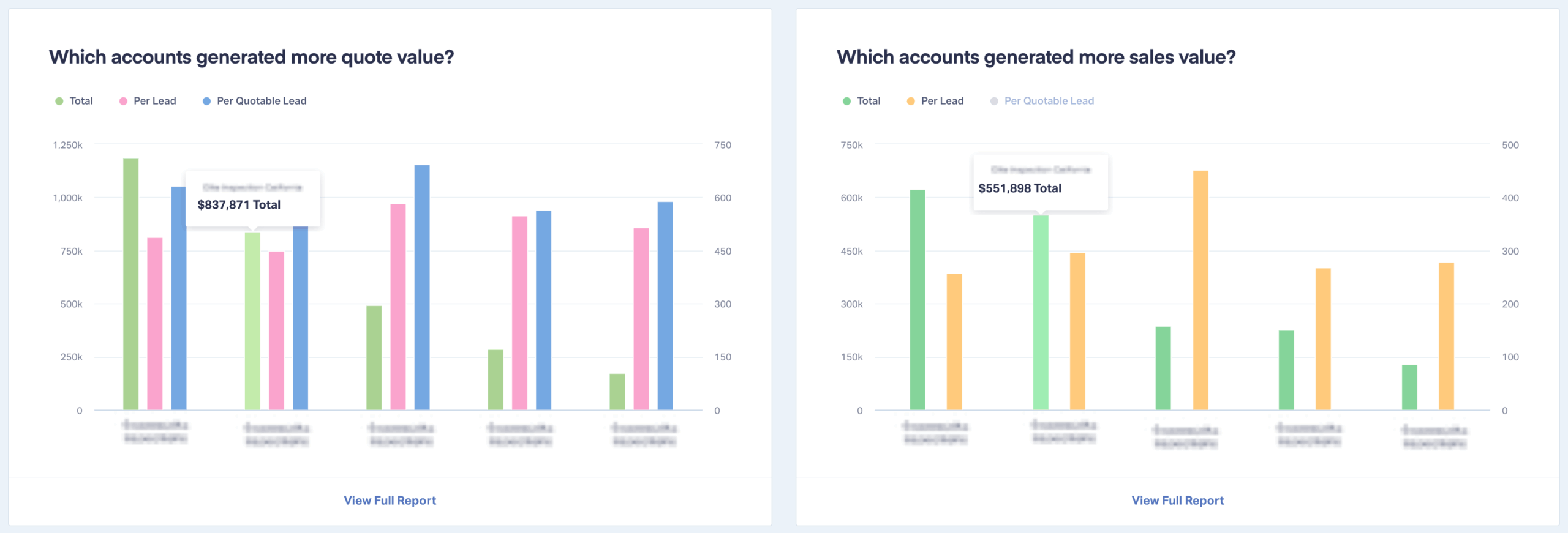
Every client's leads in one place, so the reported number and the real number can be checked against each other.
Standardize Before the Numbers Go Wrong
Every account still on its default settings is one bad signal away from a dashboard the client stops trusting. Standardize it, and it holds up under a relearn, a manager handoff, or a client asking why the numbers moved.
So build the conversion map on your next account this week.
One source of truth per action, only verified calls feeding bidding, and a re-audit set to fire when an account changes hands or the cost per lead swings. Get that running across the portfolio, and the monthly call changes.
Instead of defending the numbers, you’re showing the client where to put more budget.
Ready to tie every client’s calls back to the campaign, keyword, and revenue behind them?
Feature Highlight: Call Tracking
Get a FREE presentation of WhatConverts
One of our marketing experts will give you a full presentation of how WhatConverts can help you grow your business.
Schedule a DemoGrow your business with WhatConverts







