


 Amanda Pell
Many people know WhatConverts as the best platform for unified lead tracking across calls, forms, chats, and e-commerce transactions. But WhatConverts is also the best choice for straightforward call tracking, even if calls are the only thing you track.
Here’s why: WhatConverts gives you every call tracking feature you’d get from a dedicated platform, including AI analysis, with setup that takes minutes. Then it goes a step further and shows you which campaigns bring in real customers and real revenue, not just the most phone calls.
In this article, we’ll walk through exactly what call-only tracking looks like at each plan tier, what setup involves, and how value-based tracking changes what you can learn from your calls.
Note: Not a WhatConverts user yet? Start your free 14-day trial of WhatConverts today or book a demo with a product expert to see how we help prove and grow your ROI.
Call Tracking Fundamentals: What Every WhatConverts Plan Includes
WhatConverts offers three core plans, each of which are available at the Individual business tier or the Agency tier. Individual tier plans include one tracked account, while Agency tier plans include unlimited tracked accounts. This helps agencies with many clients keep tracking costs predictable, even as they scale their business.
Individual users also have one additional plan option: the starter Call Tracking plan at $30/mo. This plan is designed to offer all of the basic call tracking fundamentals a business needs to start tracking calls, at a below-market entry price.
Related Reading: Call Tracking Pricing: What It Costs and How Not to Overpay
The $30 plan includes:
- Call tracking fundamentals: Local and toll-free tracking numbers, Dynamic Number Insertion (DNI) and dynamic number pools, call recording and transcription, call greetings and whispers
- AI Lead Analysis: Instant call summaries, keyword spotting, and caller sentiment analysis
- Keyword- and visitor-level attribution tracking: Individual caller tracking that attributes every call to the marketing source, medium, campaign, keyword, and ad that drove it
- Unlimited integrations: Direct integration with 1,000+ platforms included in your plan, like Google Ads, GA4, Facebook Ads, Bing Ads, Shopify, and Salesforce; plus API access and webhooks
- Usage credit: $30/month in usage credits
Usage costs follow a simple fee schedule:
- $2.50 per local number and 4.5 centers per local minute
- $3.50 per toll-free number and 6.5 centers per local minute
- $.03 per text message
- $.02 per call transcription minute
The plan includes $30 of included credit that’s automatically applied to your usage for the month, and then additional usage is charged after the credit is depleted.
AI Lead Analysis on Every Plan
Many people assume that AI features require a premium subscription or come at a high cost, but WhatConverts’s AI Lead Analysis is included with call transcription, billed at $.02/minute, for all call leads at every plan level.
AI Lead Analysis runs automatically on call leads and includes:
- Call summary: A short recap of what was discussed, so you can triage leads without listening to the recording
- Caller intent: What the caller was trying to accomplish, like requesting a quote, booking a service, or asking a billing question
- Sentiment: The caller’s tone and how it shifted over the course of the conversation
- Keywords and topics: The services, products, and terms that came up on the call
- Call handling: How the call was managed on your end, including whether the caller’s question was answered
All AI Lead Analysis outputs are documented in the Lead Profile alongside all of the other data you have on the call. You can also view them as columns in the Lead Manager, where you can use the information to quickly sort, filter, qualify, and value your leads at scale.
See everything that AI Lead Analysis with WhatConverts can do.

Complete Call Tracking: WhatConverts Pro
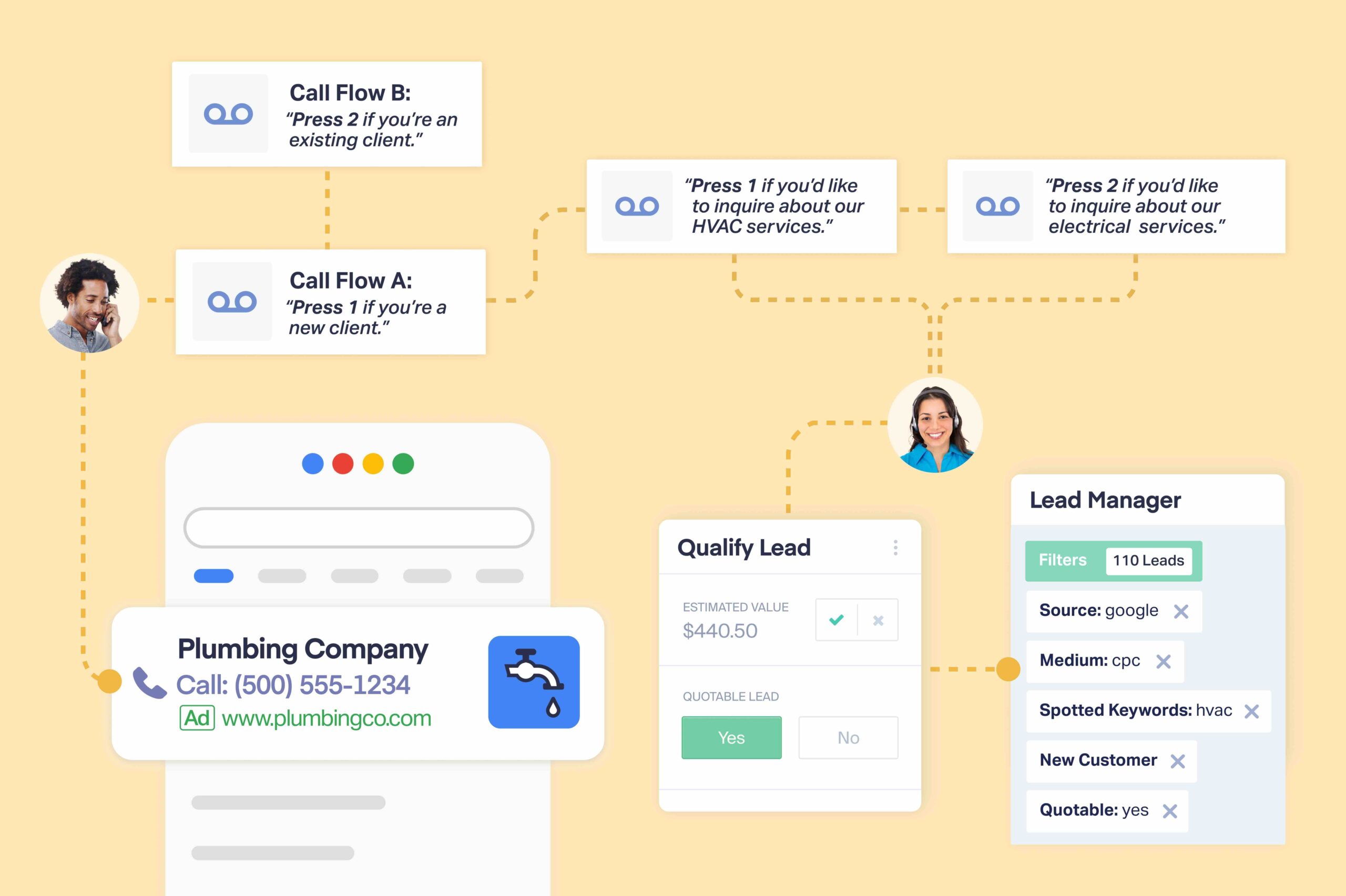
For those whose call tracking needs go beyond the fundamentals, the WhatConverts Pro plan offers the complete suite of call tracking features at a monthly cost of $100 plus usage.
The Pro plan includes everything in the Call Tracking plan, plus:
- Call flows
- IVR menus
- Geo-routing
The Pro plan also unlocks a few features that aren’t call tracking-exclusive, like the custom report builder, scheduled reports, and HIPAA compliance.
Automated Call Qualification: WhatConverts Elite
WhatConverts’s highest plan tier is the Elite plan. At a monthly cost of $160 plus usage, the Elite plan includes everything in the Pro plan, plus:
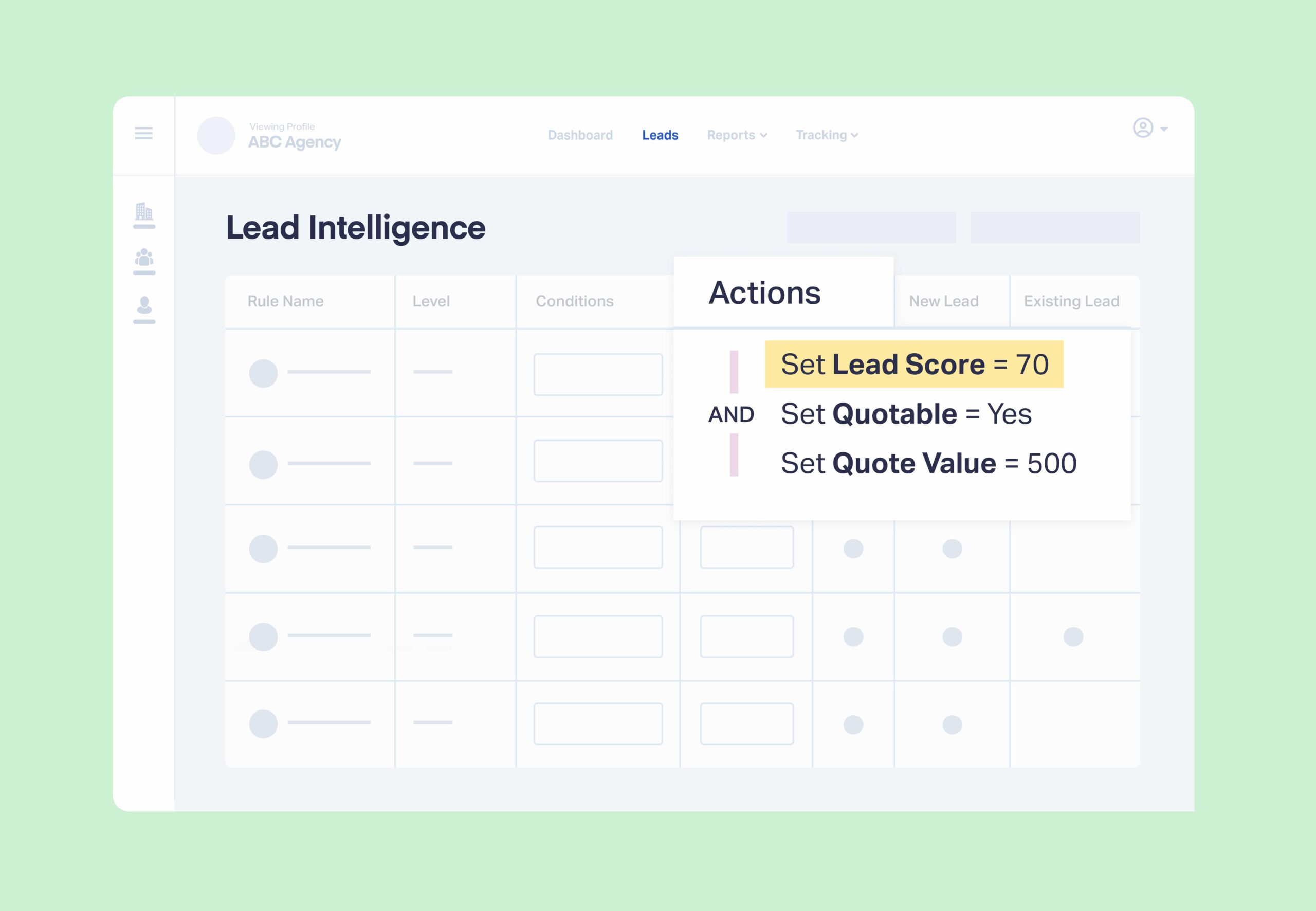
- Lead Intelligence rules
- Customer Journey view
- Multi-click marketing attribution
These are features that aren’t exclusive to call tracking, but which offer increased speed, efficiency, and insight depth on the calls you track.
Lead Intelligence Rules
Lead Intelligence rules are a set of automated if/then conditions that marketers can set up to qualify and attach values to leads as they arrive without any manual review. For example, you might set up a Lead Intelligence rule that says, “IF a call is >30 seconds and mentions ‘roof repair’, THEN set quotable status to ‘quotable’ and set quote value to $500.”
Multi-Click Attribution and Customer Journey View
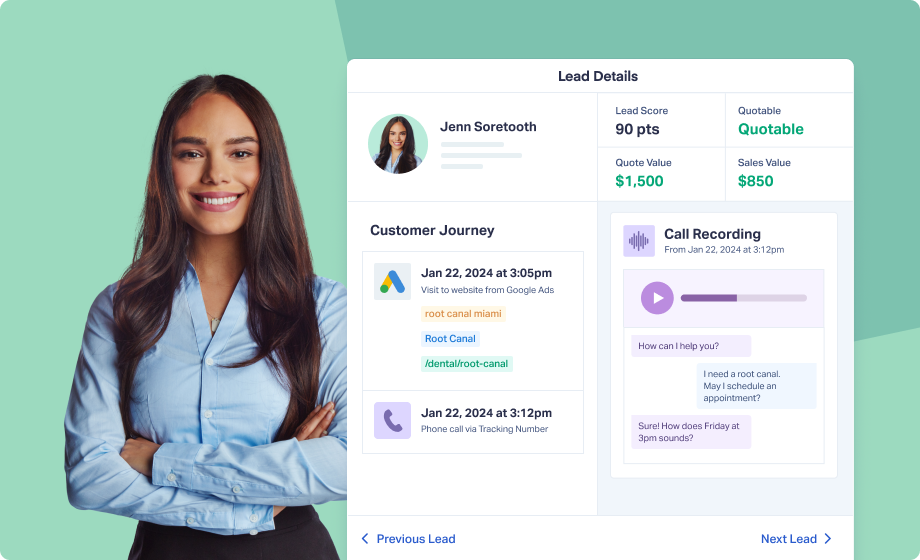
The rest of the Elite tier deepens attribution. The Customer Journey view shows every session, page, and touchpoint a caller had before they picked up the phone, not just the one that got credit. Multi-click attribution lets you distribute credit across that full path, so the keyword that starts the conversation is visible alongside the one that closes it.
Feature Highlight: Customer Journey Tracking
Simple Setup, Complex Insights
Many assume that a broader lead tracking will come with a more complicated setup and user experience, but that’s not true. Getting call tracking live is a simple, four-step process, and most users finish it in one sitting.
- Choose your numbers. Pick your country, local or toll-free, and an area code. WhatConverts returns available numbers immediately.
- Pick your call features. A setup wizard walks you through choosing whether you want to set up call recording, greeting and whisper messages, text tracking, and transcription.
- Assign numbers to a dynamic number pool. Add your numbers to a pool, which will automatically swap your tracking numbers with the real business number on your site.
- Install the tracking script. Either add the built-in WordPress WhatConverts plugin, or paste the WhatConverts tracking snippet across your site.
Then place a test call to the tracking number on your page and confirm it lands in your dashboard. That’s it! It’s simple enough to do yourself in minutes, but our Support team is also available from 8am to 6pm ET, Monday through Friday, to walk you through the process.
How It Works: WhatConverts Quickstart Guide
What sets WhatConverts apart is the fact that its barrier to entry is low, but the sky is the limit when it comes to the complexity of the insights it offers.
As soon as you start tracking, you can run pre-built reports and see which channels and keywords produce calls.
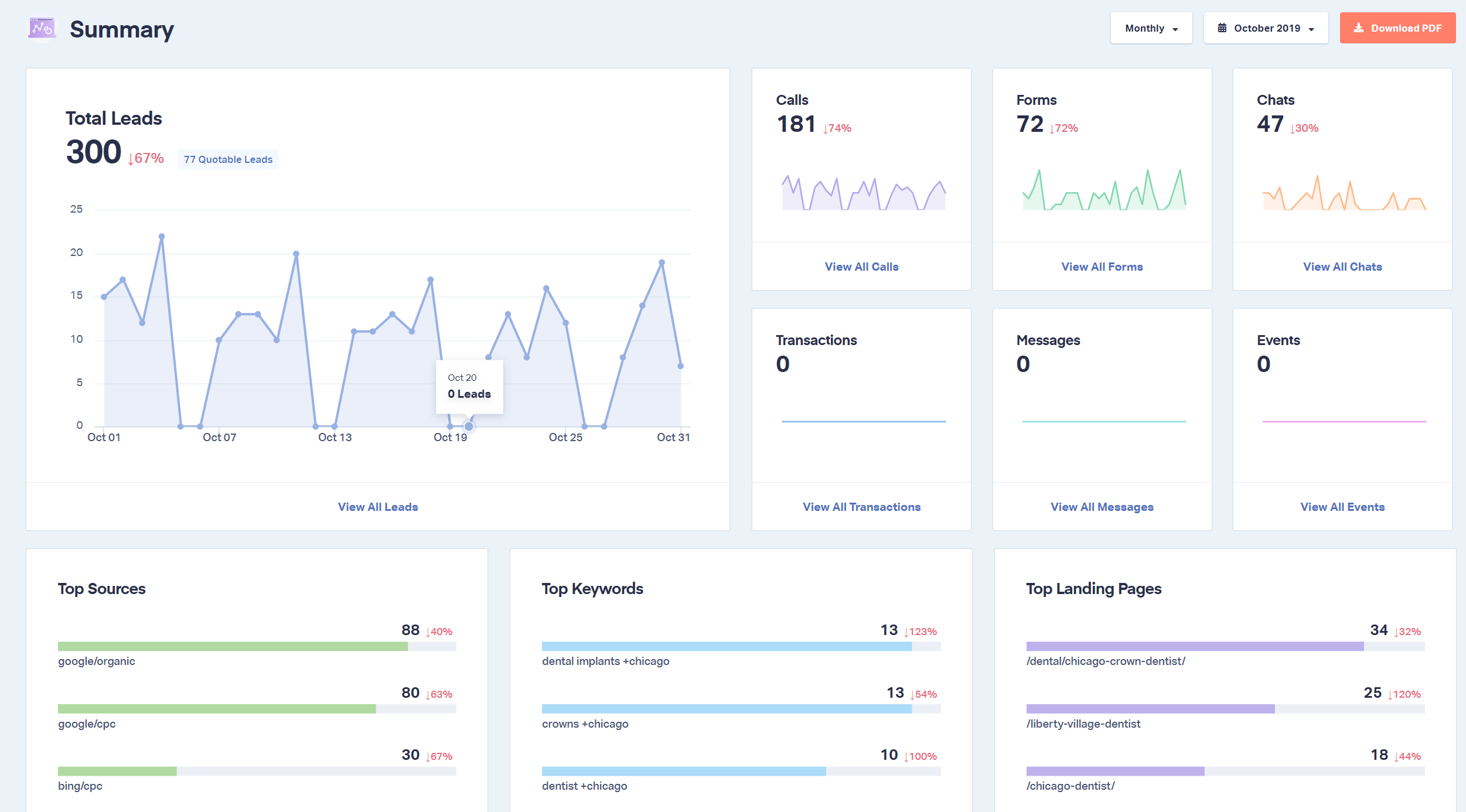
Later, without making any changes to your tracking setup, you can:
- Map call data onto custom fields
- Group dimensions to answer complex questions
- Build and schedule custom reports to stakeholders
- Push call leads into Google Ads, your CRM, or any of over a thousand integrations through the API and webhooks
Straightforward call tracking is always possible, whether or not you ever make use of WhatConverts’s more complex reporting capabilities.
The WhatConverts Call Tracking Difference: Measure by Call Value, Not Call Volume
WhatConverts offers call tracking and attribution at the same level of depth and complexity as traditional call tracking platforms. Where it goes further than traditional call tracking platforms is in attributing value: WhatConverts not only attributes every call to the campaign it came from, but it qualifies and values those calls so that marketers can see which campaigns are driving real results and revenue, not just the highest call counts.
In other words, traditional call tracking tells you which campaigns are generating calls, and WhatConverts tells you which campaigns are generating the calls that are making you money.
What Volume Tracking Looks Like
All traditional call tracking shows you is which campaign, ad, and keyword produced each call. It might have some basic call duration-based filtering that lets you see calls over a certain threshold, but that’s it.
So what you see is which campaigns produce the most calls of a certain length, which allows you to optimize your ad bidding to grow the campaigns with the highest call volume. It looks something like this:
| Campaign A | Campaign B | |
| Total budget | $5,000 | $5,000 |
| Total calls >30 seconds | 100 | 50 |
| Cost per lead | $50 | $100 |
Based on this information, you’d increase the budget for Campaign A, which looks like the winner with twice as many calls and half the CPL.
The Value Tracking Difference in Action
With WhatConverts, you can qualify and attach a value to each lead based on the keywords and buyer intent surfaced by the AI Lead Analysis (or use Lead Intelligence to automate the qualification and valuation process). This tells you exactly how many real prospective customers and how much potential revenue each campaign produced.
Now, your numbers look more like this:
| Campaign A | Campaign B | |
| Total budget | $5,000 | $5,000 |
| Total calls >30 seconds | 100 | 50 |
| Total quotable leads | 20 | 40 |
| Total quote value | $4,000 | $20,000 |
| Cost per quotable lead | $250 | $125 |
Now you can see that Campaign B was the real winner by far: though it only brought in half as many calls, 80% of those calls were qualified, compared to just 20% of Campaign A’s calls.
When the total budget is divided by quotable leads only, we see that Campaign B’s CPQL was actually half of Campaign A’s.
What’s more: since WhatConverts allows you to attach the quote value of the service each lead is inquiring about directly to the call itself, you can also measure campaigns by the total potential revenue that each one generates.
Not only is Campaign B attracting a higher volume of qualified leads, but the services those leads are requesting are worth more on average. So the real ROI on Campaign B is 4x, while Campaign A is actually losing money.
None of this is visible with traditional, volume-based call tracking and attribution. That’s why WhatConverts is the best choice for call tracking, even for marketers who don’t track a single form or chat.
So Is WhatConverts Worth It for Call-Only Tracking?
WhatConverts is the best choice for any type of lead tracking, even if you only track calls. It provides all of the features and capabilities of a traditional call tracking platform, plus quality and value-based tracking that you can only get with an end-to-end lead tracking system.
The call tracking fundamentals and AI analysis start at $30 per month, advanced routing and HIPAA unlock at the $100/mo level, and full journey tracking and Lead Intelligence automation becomes available on the $160/mo plan. You get the full-featured call tracking platform you need if calls are all you ever track, and the option to grow if that changes.
Ready to see what your calls are actually worth?
Start your free 14-day trial of WhatConverts today or book a demo with a product expert to see how we help prove and grow your ROI.
Get a FREE presentation of WhatConverts
One of our marketing experts will give you a full presentation of how WhatConverts can help you grow your business.
Schedule a DemoGrow your business with WhatConverts







