


 Alex Thompson

“Price is what you pay. Value is what you get.“
– Warren Buffet
How much does call tracking cost?
You may have seen pricing as low as $40/month for some tools. But once you factor in all of the features you need, premium integrations, and usage rates, most agencies can expect to pay anywhere from 2-10x that when all is said and done.
To help you avoid unexpected costs and get the most bang for your buck, this guide takes you through exactly how call tracking is priced, including:
- Everything that goes into the final cost of call tracking (not just the base subscription price)
- The difference between price and value, and how to assess the ROI of a given call tracking platform
We’ll also look at the pricing offered by six of the most popular tools in the industry, so you can pick the right platform for your business.
How Much Does Call Tracking Cost?
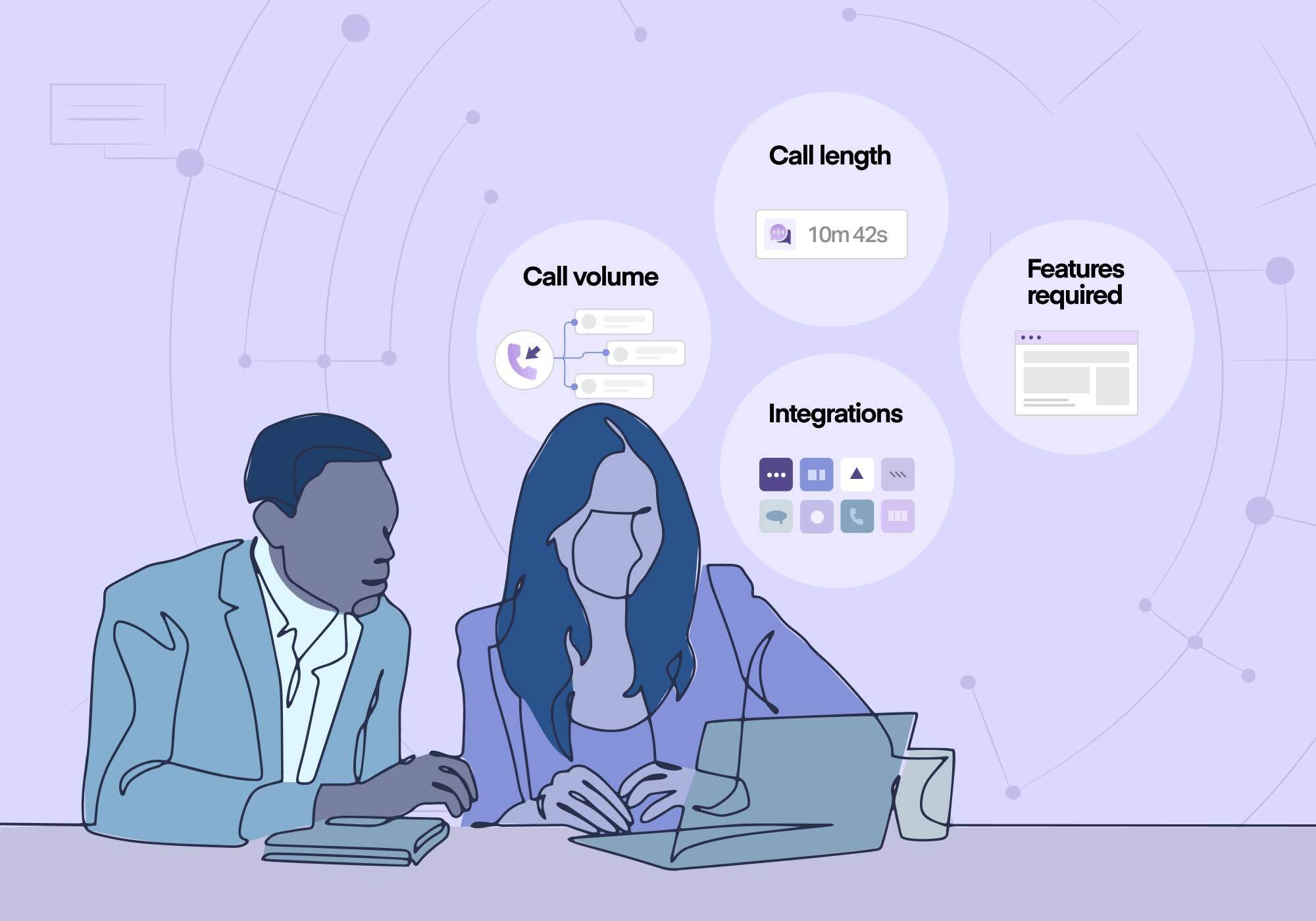
For call tracking software, you can expect to pay anywhere from $30 to $100 per month for basic plans and upwards of $1,000 per month for higher-tier plans. With over 100 inbound call tracking platforms listed by G2, pricing can vary wildly depending on which platform you use and what features you need.
Call tracking pricing is typically based on a few key factors:
- The number of phone numbers you need, and whether they’re local or toll-free
- Your monthly minute usage
- The number of separate accounts you’re tracking
- Whether you want to track other lead types (like texts, forms, chats, transactions, and appointment bookings) alongside calls
- Access to AI features, like conversation analysis
- Whether you need white labeling or HIPAA compliance on your tracked accounts
Some call tracking platforms also charge extra for API access or to integrate with what are categorized as “premium” integrations, like Salesforce and Marketo.
Understanding Call Tracking Pricing Models

Most call tracking platforms use a combination of three pricing models: subscription, pay-per-use, and feature access tiers.
Subscription Pricing
Most call tracking platform pricing starts with a base plan subscription. This subscription provides access to the core platform functions for a monthly fee, and different subscription tiers offer different levels of core functionality for different user needs. The base plan will often come with some amount of included usage as well, after which the user will need to pay for usage costs.
Additional features can also be offered on an add-on subscription basis. For example, you might pay $100/month for your plan and then add white labeling for an additional $50/mo. It’s important to take note of which features are included in your chosen tier and which require an additional cost, since add-on subscriptions can stack up quickly.
Per Account vs. Per Owner Subscription
Many marketers looking for call tracking need multiple accounts to track multiple different businesses. If this is the case, it’s important to find out whether your call tracking subscription is charged per account or per owner.
A $100/mo subscription charged per owner will cost $100/mo. But a $100/mo subscription charged per account will cost $100 x however many accounts you’re tracking, and any add-on feature subscriptions will multiply by the number of accounts as well.
WhatConverts solves the per account vs. per owner issue by offering both: Individual Business plans are per account, and Agency plans are per owner.
Both tiers offer a Plus, Pro, and Elite plan, but users can upgrade to the Agency tier when they have enough accounts that it no longer makes financial sense to price them individually.
For example, let’s look at a growing agency subscribed to the Pro plan:
- When they start out with two clients, they’ll pay for two Individual Business plans for a total of $200/mo.
- When they gain two more clients, they’ll pay for four Individual Business plans for a total of $400/mo.
- When they reach eight clients, they’ll switch to the Agency plan priced at $800/mo.
- From that point on, they’ll remain on the $800/mo Agency plan, and their price will remain the same whether they grow to ten, 50, or 100 clients.
This model works to cap subscription pricing at a set limit, so agencies don’t have to worry about costs scaling out of control as they continue to grow.
Pay-Per-Use or Usage Cost Pricing
In addition to the cost of the plan, most call tracking pricing also includes usage charges for things like additional tracking numbers, call minutes, and AI feature queries. Whereas subscription costs remain the same each month, usage costs will vary depending on how many calls you track.
Usage pricing will typically apply to things like:
- Additional tracking phone numbers
- Call minutes and text messages
- Transcription minutes
- Forms, chats, and transactions tracked (for platforms that offer additional lead types alongside call tracking)
- AI feature queries
- Analysis minutes
Feature Access Tiers
Finally, most call tracking pricing will involve access to additional features that may not be considered part of the core subscription. Some platforms solve this through per-feature subscription add-ons, as discussed above. The other way that additional features may be offered is through access tiers.
In this model, rather than offering additional features individually through subscription add-ons, features are included in higher tiers of the base subscription. For example, CallRail uses the subscription add-on model to offer HIPAA compliance for an additional $150/mo. WhatConverts offers HIPAA compliance using the feature tier access model, so it’s included in all plans at the Pro level ($100/mo) and higher.
Call Tracking Price vs. Call Tracking Value
Like anything in life, cheaper isn’t always better when it comes to comparing call tracking platforms.
A $50/mo tool that tells you a call came from "Google Ads" is cheaper than a $160/mo tool that tells you which keyword drove it, whether the caller was a qualified lead, and what the job was worth.
If the cheaper tool can't help you cut wasted ad spend or prove results to a client, it isn't the better deal.
To compare call tracking platforms fairly, you need to work out three things: what the tool will actually cost you, what it will give you in return, and the ratio between the two.
Step 1: Calculate Your True Total Cost
The cost on the site will rarely be the cost of your plan once you account for the features and usage you need. To estimate, add up:
- The base subscription account
- Add-on subscriptions
- Usage beyond what’s included in the plan
Or if you’re looking at WhatConverts, you can calculate it (and get a plan recommendation) using the usage calculator on our pricing page.
Find the Plan That Fits: Compare WhatConverts Plans
Step 2: Assess the Value of What You’re Getting
The value of call tracking doesn’t come from the data itself. It comes from the decisions the data lets you make.
Most call tracking platforms offer a few core benefits:
- Seeing which marketing drives calls. With Dynamic Number Insertion, each call is tied to the source, campaign, and often the keyword that prompted it. That shows you which channels are producing calls and which aren't getting any traction, so you can move budget toward what's working.
- Better call handling. Call recordings and missed-call logs show how leads are being handled once they pick up the phone. That makes it easier to spot unanswered calls, follow up before a lead goes cold, and coach the people answering.
- Time saved. Manually listening to calls, qualifying leads, and building client reports takes hours every month. Features like AI call analysis and scheduled reporting turn that into time your team can bill or spend elsewhere.
Every platform you compare should deliver these basics. Where platforms differ is in what they offer in addition to the basics.
Related Reading: Best Call Tracking Software for Marketers and Agencies
WhatConverts builds on the core call tracking functions with tools that turn call tallies into qualified lead counts and dollar amounts, then use that data to prove ROI and automatically optimize ad campaigns:
- Get true cost per lead with per-lead qualification. WhatConverts tracks calls (and forms, chats, and transactions) to the person behind them, so marketers can qualify (or automate qualification with Lead Intelligence on Elite plans) each lead. Spam, wrong numbers, and existing customers are removed from your reporting, so your cost per lead reflects real prospects only and you make budget decisions on accurate data.
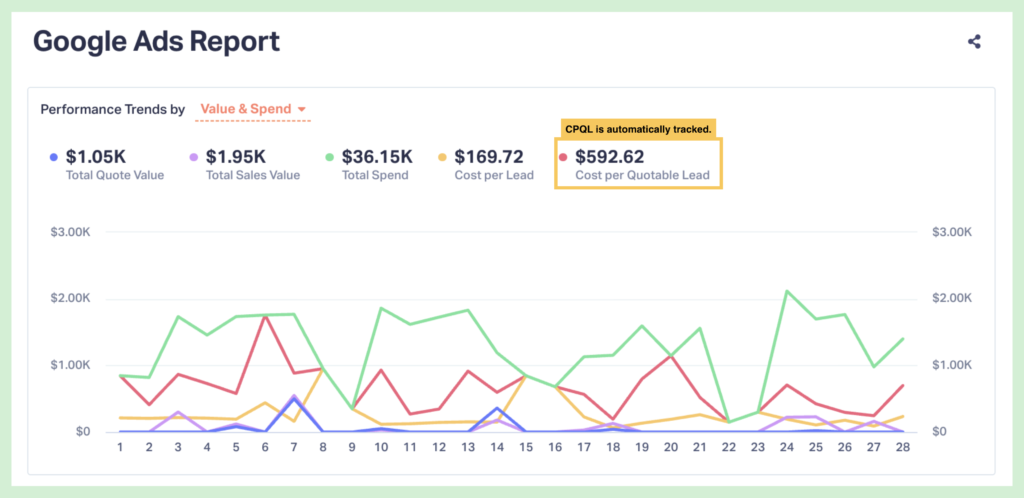
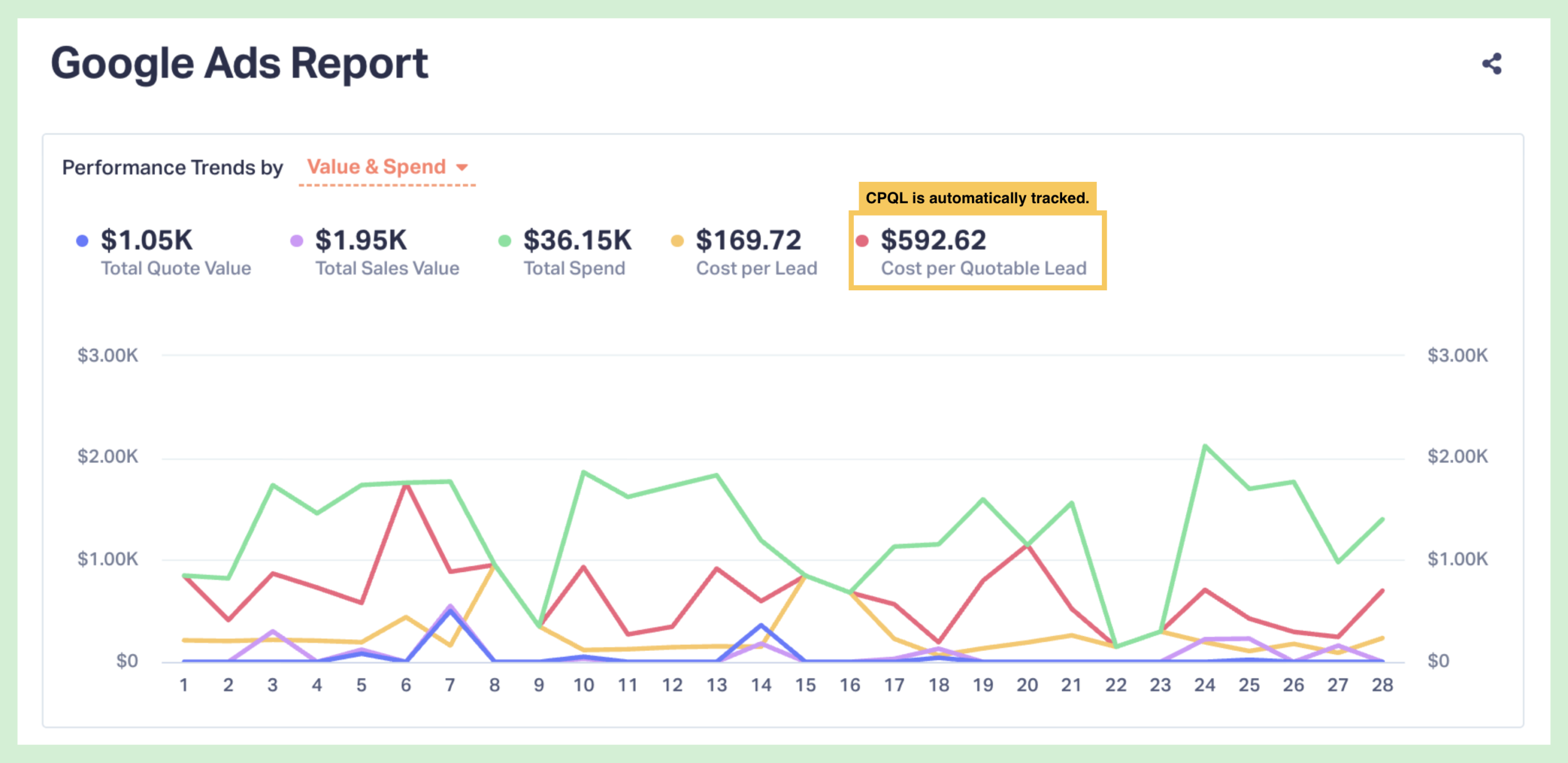
- See the real dollar value of every marketing channel. When qualifying leads, marketers can attach a quote value based on the service the prospect is interested in. With quote value and marketing source data tracked in the same place, you can report revenue by source, campaign, keyword, and landing page to see that a keyword produced $12,000 in closed business, not just that it drove 20 calls.
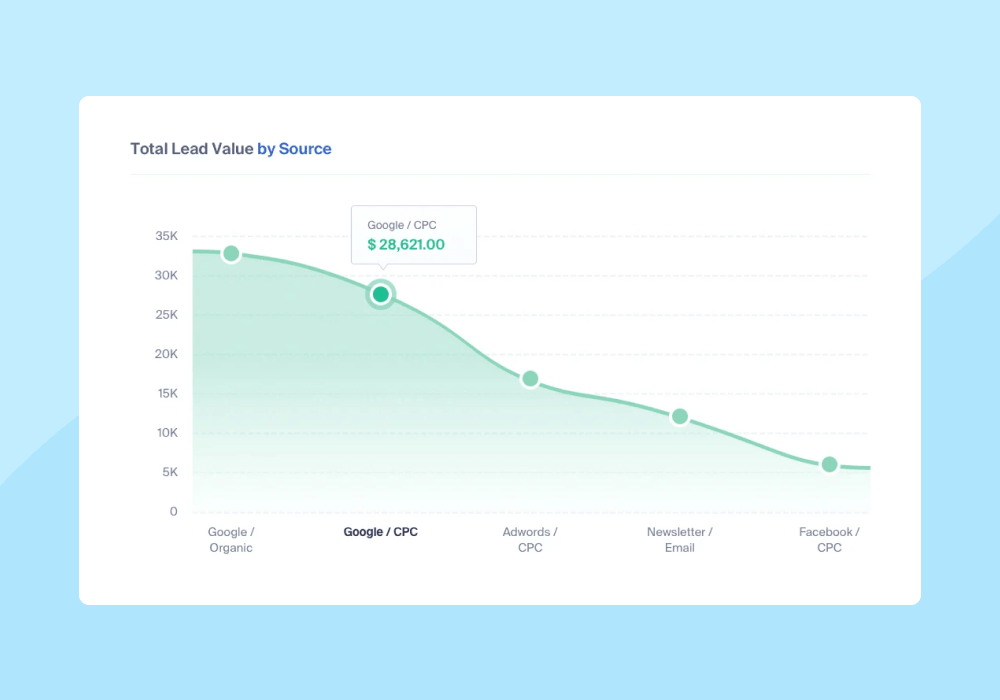
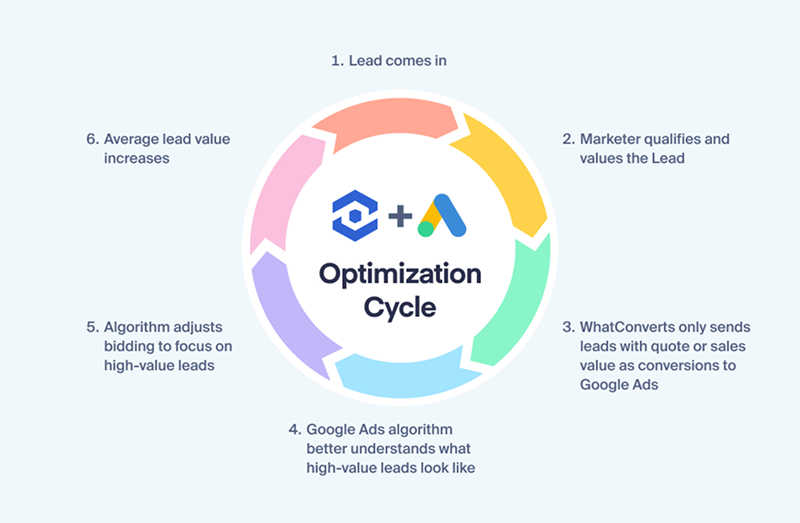
- Optimize ad campaigns to target real customers and job value, rather than raw volume. Leads that are qualified can be sent back to Google Ads with their quote value, so that Smart Bidding optimizes to find more of the clicks that turn into customers, rather than bidding on whatever keywords produce the most calls.
Step 3: Understand Your ROI
Finally, take each benefit you identified in Step 2, put a rough dollar figure on it. For example:
- Cutting campaigns that aren’t working. Once every call is tied to its source, you might find that one of your campaigns produces no calls at all. Pausing it saves $1,000/month.
- Reviewing calls faster. If your platform includes automated conversation analysis, your team no longer has to listen to every recording to find the good leads. If that saves 10 hours a week and those hours are worth $50 each to your business.
Together, those two benefits are worth an estimated $3,000 a month. Against a call tracking cost of a few hundred dollars a month, that’s a clear positive ROI, even if it’s based on estimates.
One of the biggest benefits of using WhatConverts is that you don’t have to use rough estimates to understand your ROI. It lets you qualify every lead and attach quote and sales values to it, so that you can see exactly what each campaign and keyword is worth to your business. Here’s how that translates to exact value:
- Seeing the difference between volume and value. With job values attached to every lead, you can see that a high-volume campaign you thought of as “successful” is actually bringing in much less total value than a “low-performing” campaign that’s driving low volume, but the leads it does drive are worth five figures a piece. You adjust your budget to fund the low-volume campaign and double its output for an additional $100,000/month.
- Using proven revenue generation to readjust client costs. Most agencies price their services based on labor performed, rather than on outcomes achieved. Your monthly agency fee is $10,000, but once you start tracking lead value with WhatConverts, you learn that you’re driving a proven $250,000 in job value for your client. With that proof in hand, you renegotiate your fee and start collecting 10% of your lead value, bumping your revenue 2.5x to $25,000/month.
Top 6 Call Tracking Providers and Their Pricing
Below is a breakdown of how six of the most popular call tracking platforms price their plans, outlining what's included, what costs extra, and where the totals are likely to land.
1. WhatConverts Pricing
WhatConverts Pricing Overview
Pricing differentiator: One flat monthly fee per plan, with all integrations and HIPAA compliance included at the plan levels where they're offered, plus Agency plans that cover unlimited accounts.
- Pricing model: Subscription + usage + feature tiers
- Starting price: $30/mo + usage
- Included usage: $30 monthly usage credit on Individual plans; 250–400 on Agency plans
- Free trial: Yes, 14 days on all plans
WhatConverts plans are split into Individual plans, charged per account, and Agency plans, which include unlimited accounts for one flat fee. White labeling is the only add-on, at $50/mo.
WhatConverts Plans

| Plan | Monthly Price | What's Included |
| Individual Plans (All plans include a $30 usage credit) | ||
| Call Tracking | $30/mo | Phone call and text message tracking, Dynamic Number Insertion, call tracking and recording, API access, and GDPR compliance. |
| Plus | $60/mo | All Call Tracking features plus form and chat tracking, campaign and keyword reporting, and platform integration with Bing, Google Ads, and GA4. |
| Pro | $100/mo | All Plus features plus call flows, custom Report Builder, automatic scheduled reports, and HIPAA compliance. |
| Elite | $160/mo | All Pro features plus Lead Intelligence, customer journey tracking, and multi-click marketing attribution. |
| Agency Plans | ||
| Plus | $500/mo | $250 free usage credit; all call tracking features plus form and chat tracking, campaign and keyword reporting, and platform integration with Bing, Google Ads, and GA4. |
| Pro | $800/mo | $300 free usage credit; all Plus features plus call flows, custom Report Builder, automatic scheduled reports, and HIPAA compliance. |
| Elite | $1,250/mo | $400 free usage credit; all Pro features plus Lead Intelligence, customer journey tracking, and multi-click marketing attribution. |
Usage Rates
| Individual plans | Agency plans | |
| Additional local numbers | $2.50 ea. | $1.75 ea. |
| Additional local minutes | $0.045/min | $0.04/min |
| Additional toll-free numbers | $3.50 ea. | $3.00 ea. |
| Additional toll-free minutes | $0.065/min | $0.06/min |
| Call transcription | $0.02/min | $0.02/min |
| Text messages | $0.03 ea. | $0.03 ea. |
| Form, chat, and transaction tracking (Plus plans and higher) | $0.10 ea. | $0.10 ea. |
| White label | $50/mo | $50/mo |
Key Pricing Considerations
- No paid add-ons for integrations or HIPAA or GDPR compliance
- Agency pricing caps subscription costs regardless of how many client accounts you add (see "Per Account vs. Per Owner Subscription" above)
- Usage credits apply to your usage costs before overage charges begin, and the pricing page usage calculator lets you model costs by call and lead volume
2. CallTrackingMetrics Pricing
Pricing differentiator: Agency features unlock at the second tier, and AI features are billed per use on every plan.
- Pricing model: Subscription + usage + feature tiers, with per-use AI billing
- Starting price: $79/mo + usage
- Included usage: Not published
- Free trial: No
CallTrackingMetrics doubles as call center software, so its higher tiers add sales tools like a softphone and call routing. Form tracking, white labeling, sub-accounts, and premium integrations all start at the Marketing Pro tier.
CallTrackingMetrics Plans
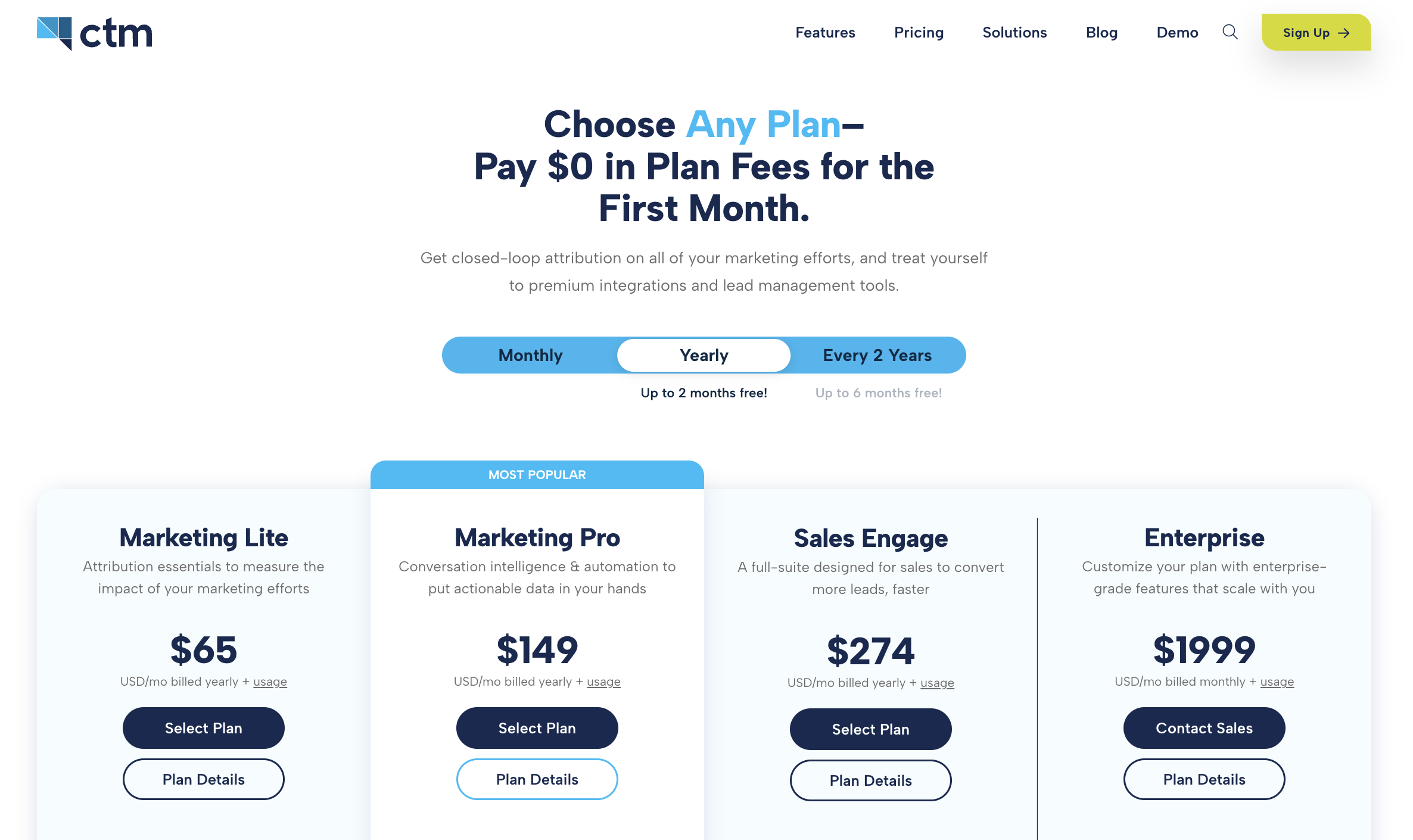
| Plan | Monthly Price | What’s Included |
| Marketing Lite | $79/mo | Call and text tracking, call recording and call flows, and integrations with Google Ads and GA4. |
| Marketing Pro | $179/mo | All Marketing Lite features plus form tracking, call transcription, AI call analysis, premium marketing integrations (like HubSpot, Facebook, and Yext), and HIPAA/GDPR compliance. |
| Sales Engage | $329/mo | All Marketing Pro features plus VOIP softphone, AI answering, intelligent call routing, and premium sales integrations (like Salesforce, Zoom, and Calendly). |
| Enterprise | $1,999/mo | All Sales Engage features plus dedicated account management team, and volume-based pricing for AI functionality and add-on enhancements. |
Usage Rates
| Local numbers | $2.00 ea. |
| Local minutes (call forwarding) | $0.04/min |
| Local minutes (CTM Softphone) | $0.02/min |
| Toll-free numbers | $3.00 ea. |
| Toll-free minutes (call forwarding) | $0.055/min |
| Toll-free minutes (CTM Softphone) | $0.042/min |
| Outbound calls | $0.031/min |
| Inbound SMS messages | $0.016 ea. |
| Outbound SMS messages | $0.016 ea. |
| Inbound MMS messages | $0.05 ea. |
| Outbound MMS messages | $0.05 ea. |
Key Pricing Considerations
- AI features (AskAI, transcription, and VoiceAI) are billed per use on top of the base plan.
- Agencies need at least Marketing Pro ($179/mo) for form tracking, white labeling, and sub-accounts.
- Annual and two-year prepay options lower the effective monthly rate at every tier.
- With no free trial, evaluating the platform requires a sales conversation.
Related Reading: CallRail vs CallTrackingMetrics vs WhatConverts: In-Depth Comparison
3. CallRail Pricing
Pricing differentiator: Low entry price, with several commonly-needed features sold as separate add-ons.
- Pricing model: Subscription + usage + feature tiers + add-ons
- Starting price: $55/mo + usage
- Included usage: Entry plans include 5 numbers and 250 minutes
- Free trial: Yes, 14 days on all plans
CallRail's plans vary by feature set and by how many numbers and minutes are included. Annual billing takes 10% off listed prices.
CallRail Plans
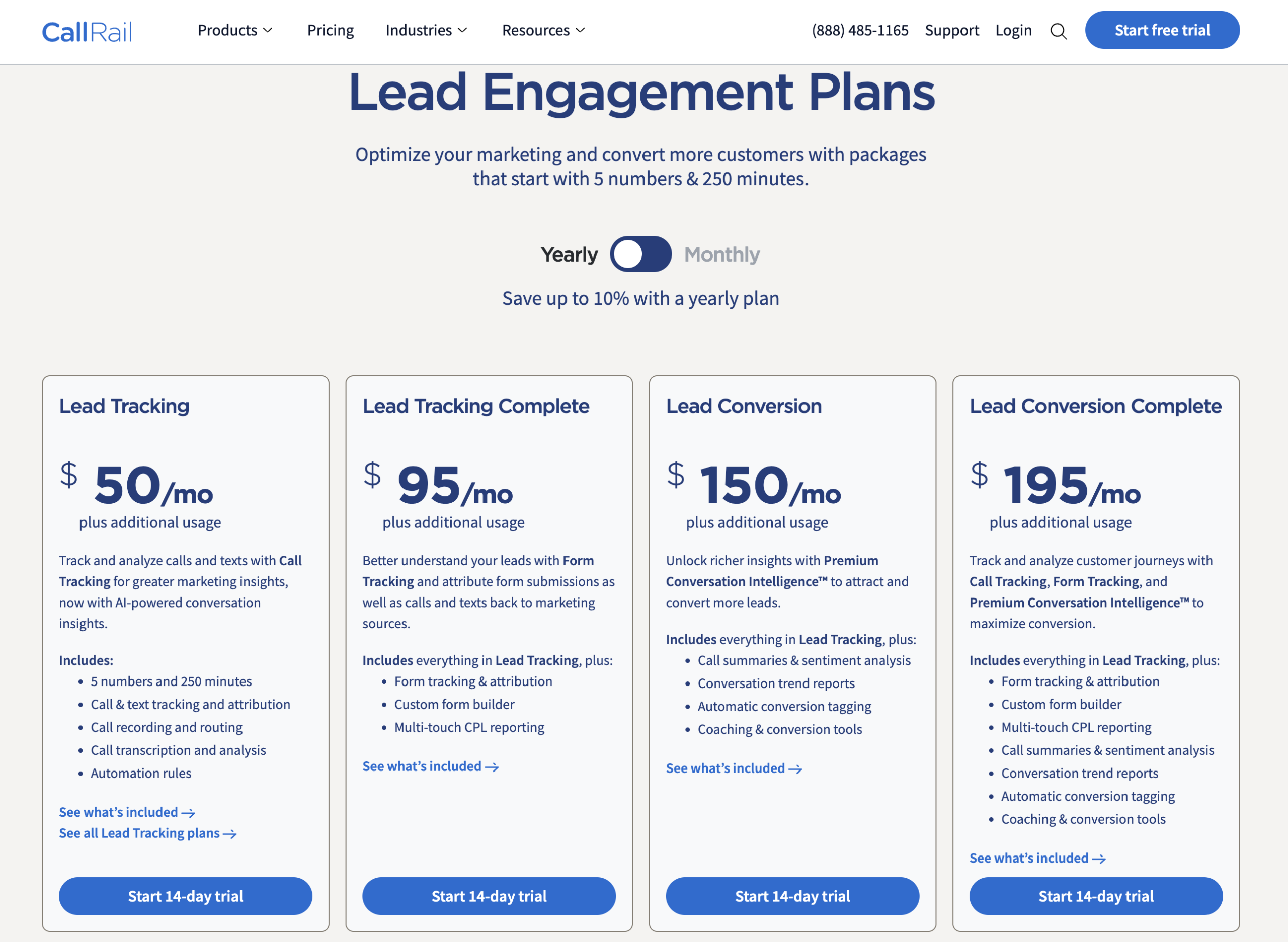
| Plan | Price | What’s Included |
| Lead Tracking | Starts at $55/mo for five numbers and 250 minutes, up to $295/mo for 40 numbers and 4,000 minutes plus additional usage | Includes basic call tracking features like DNI, keyword-level attribution, and standard reporting. Available at four different plan levels, each offering different amounts of included local numbers and local minutes, text messages, and usage pricing. |
| Lead Tracking Complete | Starts at $105/mo for five numbers, 250 minutes, and 1,000 form submissions plus additional usage | Adds form tracking along with call and text tracking; prices increase with additional numbers and minutes. |
| Lead Conversion | Starts at $165/mo for five numbers and 250 minutes plus additional usage | These plans add conversation intelligence, which allows for call transcription and keyword analysis. You can also opt for Premium Intelligence to unlock call transcription summaries and conversation sentiment and analysis. |
| Lead Conversion Complete | Starts at $215/mo for five numbers, 250 minutes and 1,000 forms plus additional usage | This plan combines all the features from every plan into one, meaning it offers everything in Call Tracking as well as call transcription, keyword analysis, form tracking, and access to the custom form builder. |
Usage Rates
| Lead Tracking | Lead Tracking Complete | Lead Conversion | Lead Conversion Complete | |
| Local numbers | $3.00 ea. | $3.00 ea. | $2.50 ea. | $1.75 ea. |
| Local minutes | $0.06/min | $0.06/min | $0.05/min | $0.045/min |
| Toll-free numbers | $5.00 ea. | $5.00 ea. | $4.50 ea. | $3.00 ea. |
| Toll-free minutes | $0.09 ea. | $0.09 ea. | $0.65 ea. | $0.65 ea. |
| Text messages | $0.03 ea. | $0.03 ea. | $0.03 ea. | $0.03 ea. |
Add-Ons
| Monthly price | |
| White labeling | $65/mo |
| Advanced call flows | $15/mo per company |
| Premium integrations (Salesforce, Marketo, Optimizely X) | $80/mo |
| HIPAA compliance | $150/mo per account |
Key Pricing Considerations
- Add-ons stack on top of the base plan. An entry-level plan with HIPAA compliance and premium integrations costs at least $285/mo before usage.
- HIPAA compliance is charged per account, so it multiplies for agencies with multiple healthcare clients.
- Usage beyond included numbers and minutes is billed separately, which can make costs less predictable as call volume grows.
4. Invoca Pricing
Pricing differentiator: Quote-only enterprise contracts that scale with annual call volume.
- Pricing model: Quote-based subscription + feature tiers
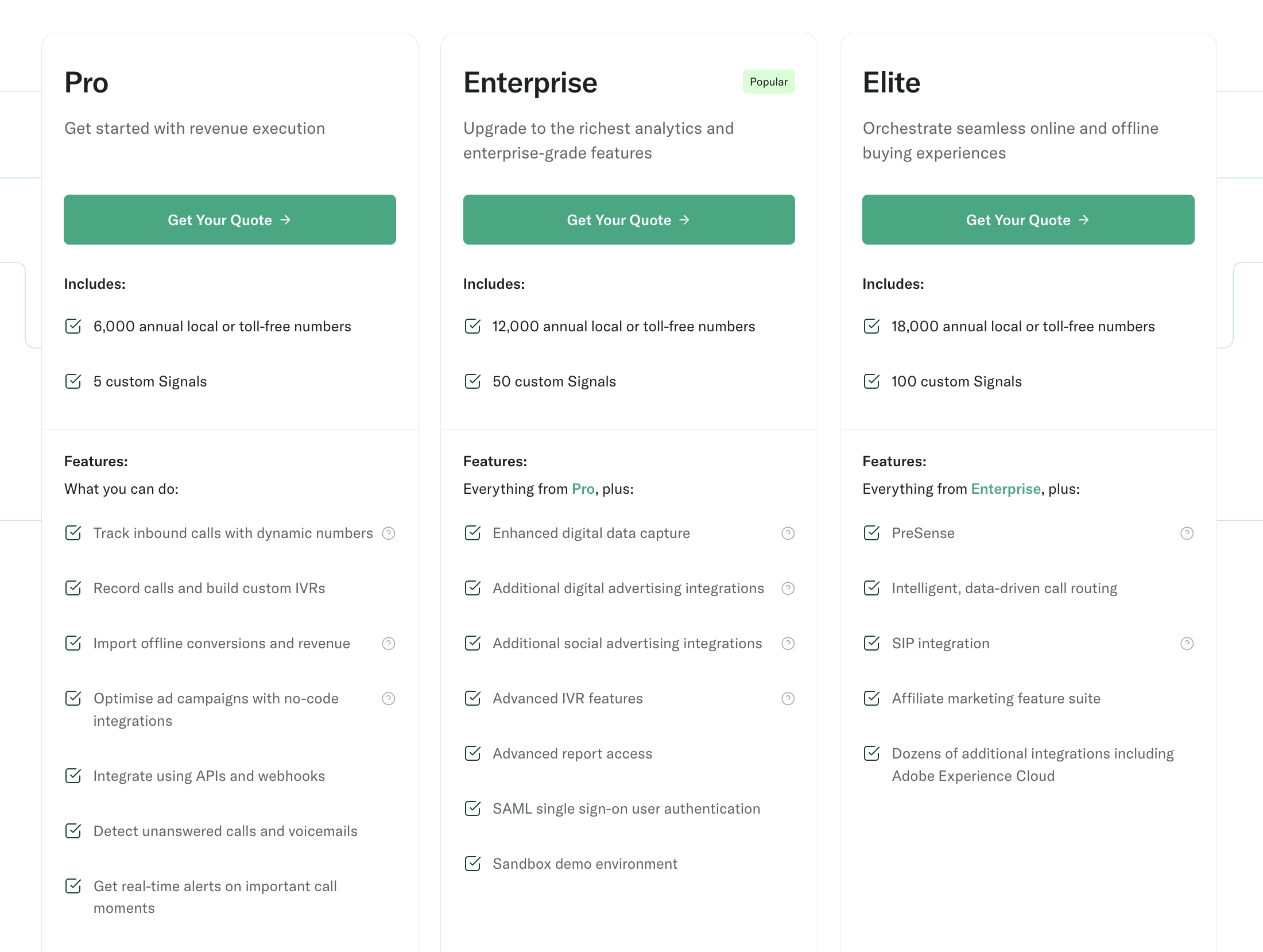
- Starting price: Not published; typical contracts run five to six figures annually
- Included usage: Annual number allotments by tier (Pro covers 6,000–60,000 annual phone numbers)
- Free trial: Not published
Invoca is built for large call centers in regulated industries and for pay-per-call and affiliate programs, and its pricing reflects that scope.
Invoca Plans
Key Pricing Considerations
- Signal AI, Invoca's trainable conversation intelligence, is a paid add-on at every tier.
- Implementation typically takes weeks, compared with minutes or days for self-serve tracking tools.
- Invoca doesn't track forms, chats, or e-commerce transactions, so businesses tracking those lead types will need to pay for a second platform.
Related Reading: 3 Best Invoca Alternatives: In-Depth Comparison
5. Phonexa Pricing
Pricing differentiator: Custom packages with usage fees layered on nearly every activity.
- Pricing model: Quote-based subscription + usage
- Starting price: Not published
- Included usage: Not published
- Free trial: No
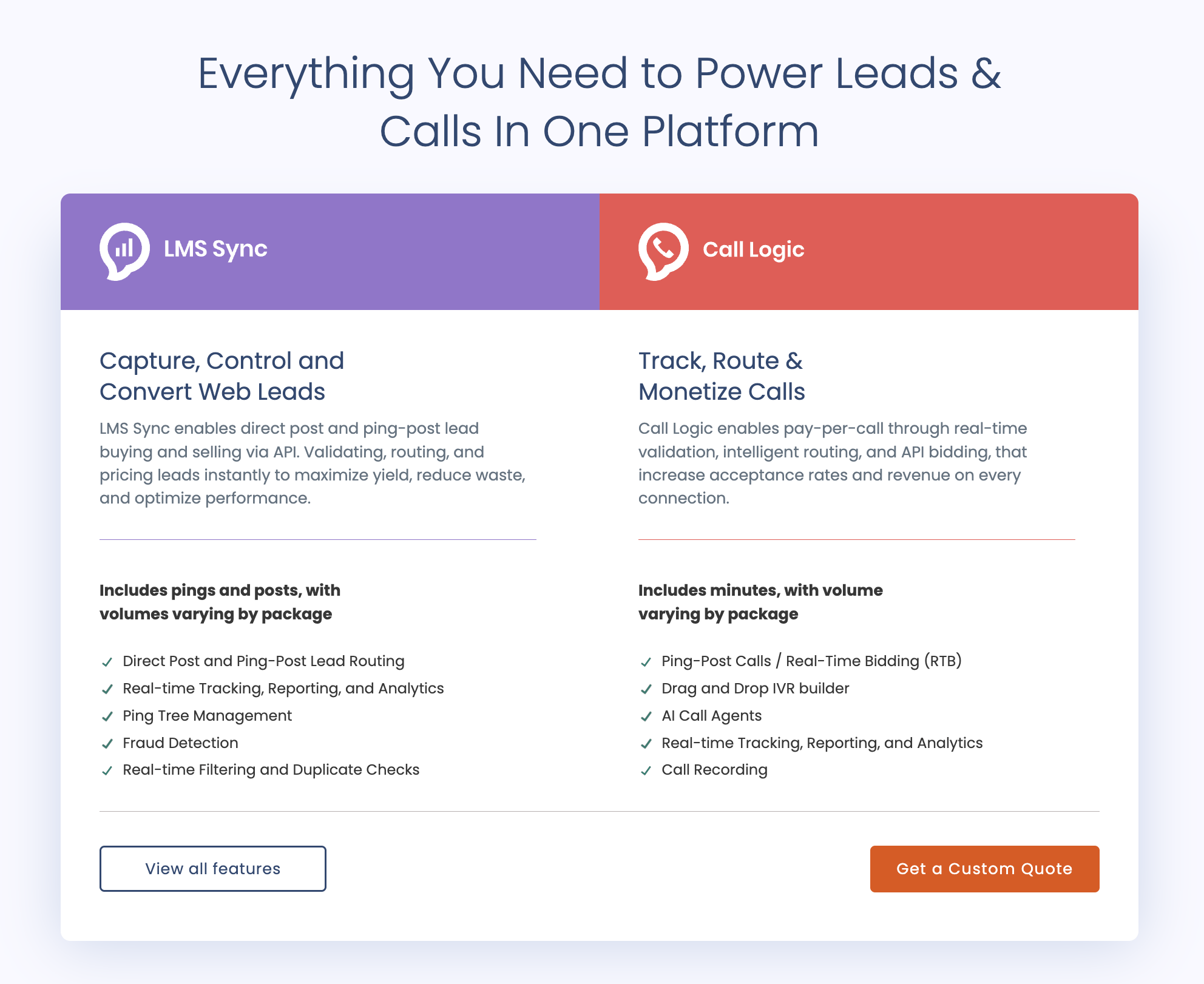
Phonexa is built for businesses that buy, sell, and distribute calls and leads across partner networks. It doesn't publish pricing or product tiers; packages are recommended through a sales conversation based on individual needs.
Phonexa Plans
Key Pricing Considerations
- Usage fees apply on top of the base subscription, including per-minute call charges, per-ping lead fees, and per-thousand email and click charges.
- The number of separate usage categories makes total cost harder to predict than with platforms that publish their rates.
6. Marchex Pricing
Pricing differentiator: Quote-only pricing, with implementation and training billed as separate fees.
- Pricing model: Quote-based subscription + feature tiers + one-time fees
- Starting price: Not published; industry estimates place entry-level contracts in the low four figures per month
- Included usage: Not published
- Free trial: No self-serve option
Marchex offers two named tiers, Marketing Edge-Core and Marketing Edge-Advantage, both of which require a custom quote.
Key Pricing Considerations
- Implementation and training fees should be factored into your first-year cost, not just the monthly subscription.
- Every plan requires a sales conversation before you can see pricing.
Wrapping Up
When it comes to call tracking pricing, there are two things you need to consider beyond what’s on the pricing page.
You also need to understand:
- The total costs of each software solution, including usage rates
- The value that comes along with that pricing, including unique feature sets and tool capabilities
And remember: the right price is the one that delivers the right value for your agency.
Ready to prove and grow your ROI?
Start your free 14-day trial of WhatConverts today or book a demo with a product expert to see how we help prove and grow your ROI.
Get a FREE presentation of WhatConverts
One of our marketing experts will give you a full presentation of how WhatConverts can help you grow your business.
Schedule a DemoGrow your business with WhatConverts


