


 Michael Cooney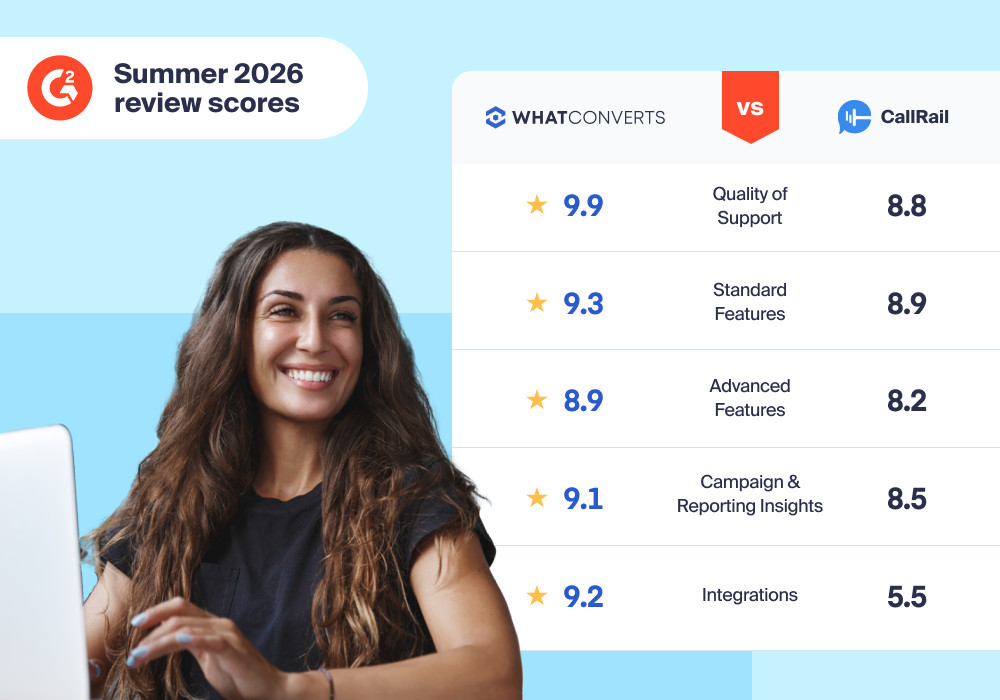
There are now 114 different inbound call tracking solutions on the market according to G2. Capterra lists 214. With all those choices, how can you be sure you’re getting the best call tracking software for your business?
It's a good question, and it's exactly what we answer in this guide. Inside you'll find the 9 best call tracking software, scored across six categories using 3,000+ G2 reviews.
Top 9 Best Call Tracking Software
All call tracking software scores in this guide are calculated using reviews from G2, an unbiased, third-party software review company trusted by 80 million people annually.
Below you'll find a table showing the scores of the top call tracking solutions. For more on our scoring methodology, see here.

- Standard Features9.3
- Advanced Features8.9
- Campaign and Reporting Insights9.1
- Integrations9.2
- Automated Intelligence9.0
- Support and Onboarding9.5
-
Prove and grow your marketing ROI
-
Advertise and optimize strategically based on lead quality/value
-
Create custom, interactive reports on 70+ lead data metrics
-
Fast, technically competent support
-
PPC marketers, agencies, and Google Ads power users
Five other notable call tracking software apps:
Now let's dive deeper into the pros and cons of each call tracking platform.
1. WhatConverts (9.8/10)
Best for PPC Marketers, Agencies, and Google Ads Power Users
WhatConverts is the top choice for inbound call tracking software. It provides comprehensive lead tracking, intuitive lead management, insightful reporting, and powerful intelligence in a single tool.
| Pros | Cons | Pricing |
| ✅ Full call tracking feature set (recording, transcription, keyword-level tracking, DNI) | ❌ No outbound calling and power dialer for sales teams | Starts at $30/mo |
| ✅ Instant number setup, no provisioning wait | ❌ Bit of a learning curve for advanced reporting and Lead Intelligence | Free trial (with credit card) |
| ✅ AI-powered call summaries and lead scoring go beyond basic conversation intelligence | ❌ No softphone and live call listening | |
| ✅ Customizable reporting, including lead qualification and revenue reports | ||
| ✅ Unites call leads with form, chat, and other lead types for a complete attribution picture | ||
| ✅ Highly rated, fast support |
For in-depth reviews from a trusted third party, be sure to check out the 217 G2 WhatConverts Reviews. At the time of writing, WhatConverts also has a total of 50 reviews and 4.9/5 stars on Capterra.
WhatConverts Standard and Advanced Features
WhatConverts outperforms other call tracking solutions in both Standard and Advanced Features.
Since WhatConverts was built for agencies, we also made it easy for your clients to see their data directly, either through a white labelled solution featuring your unique branding or through our Partner Program.
Related Reading: Best White Label Call Tracking Software: In-Depth Comparison
WhatConverts Campaign and Reporting Insights (9.1/10)
WhatConverts was purpose-built to help marketers uncover valuable insights, like:
- Which campaigns are outperforming the rest?
- What was the sales value generated by each landing page?
- Which channels are worth investing more budget into and which should be removed entirely?
The Lead Manager: Powerful Lead Analysis and Management
WhatConverts makes it easy to filter and sort through the details behind each lead to know which marketing channels are driving the most calls.
Behind each lead is a rich array of data points that describes where that lead came from, what they saw on your site, when they made a call, and more. With WhatConverts, you can capture lead attribution, lead value, and lead contact data, all from one platform.
| Lead Attribution Data | Lead Value Data | Lead Contact Data |
| Lead Type (call, form, chat, email, etc.) | Quotable: Was this lead qualified or spam? | Contact Name |
| Source and Medium (e.g., Google PPC) | Service/Product Interest: What service or product was the lead interested in? | Contact Email |
| Keyword and Campaign | Quote Value: How much was the quote value for this lead? | Phone Number |
| Landing and Lead Page | Sales Value: How much revenue has this lead brought to your company? | Location Data |
Most call tracking software either skips these details entirely, reporting only a total lead count, or locks them into a handful of rigid report formats. The WhatConverts Lead Manager lets you group and filter by any of these metrics to see exactly which marketing is working.
Related Reading: Build Trust and Transparency with Clients Using Lead Manager
Report Library: Beautiful and Insightful Ready-Made Reports
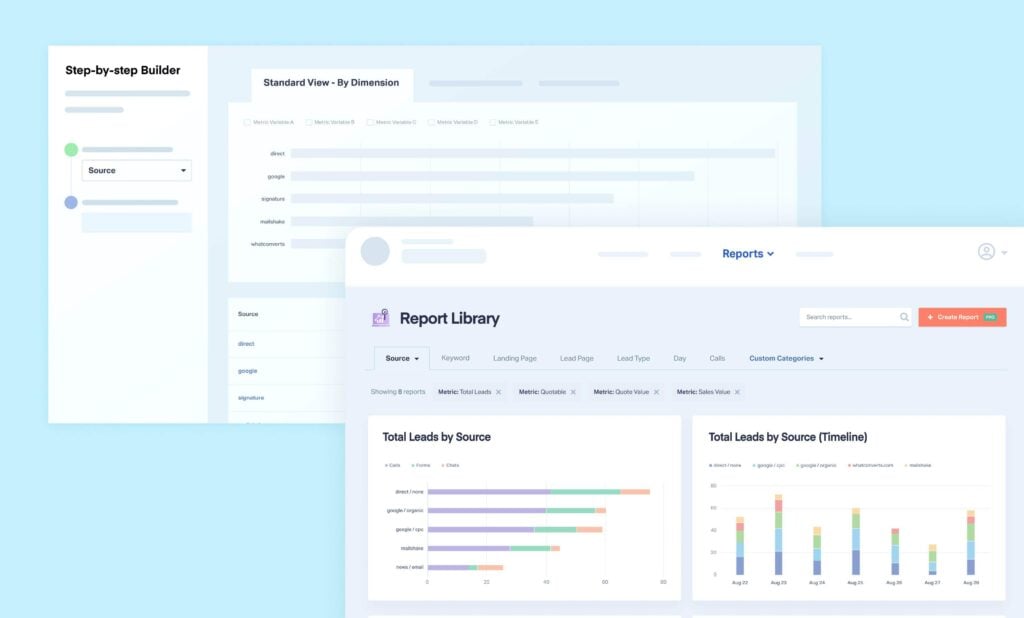
WhatConverts includes a built-in reporting platform for viewing, building, and sharing lead data, no external tools required.
Example Report: Calls by Source/Medium (see more details)
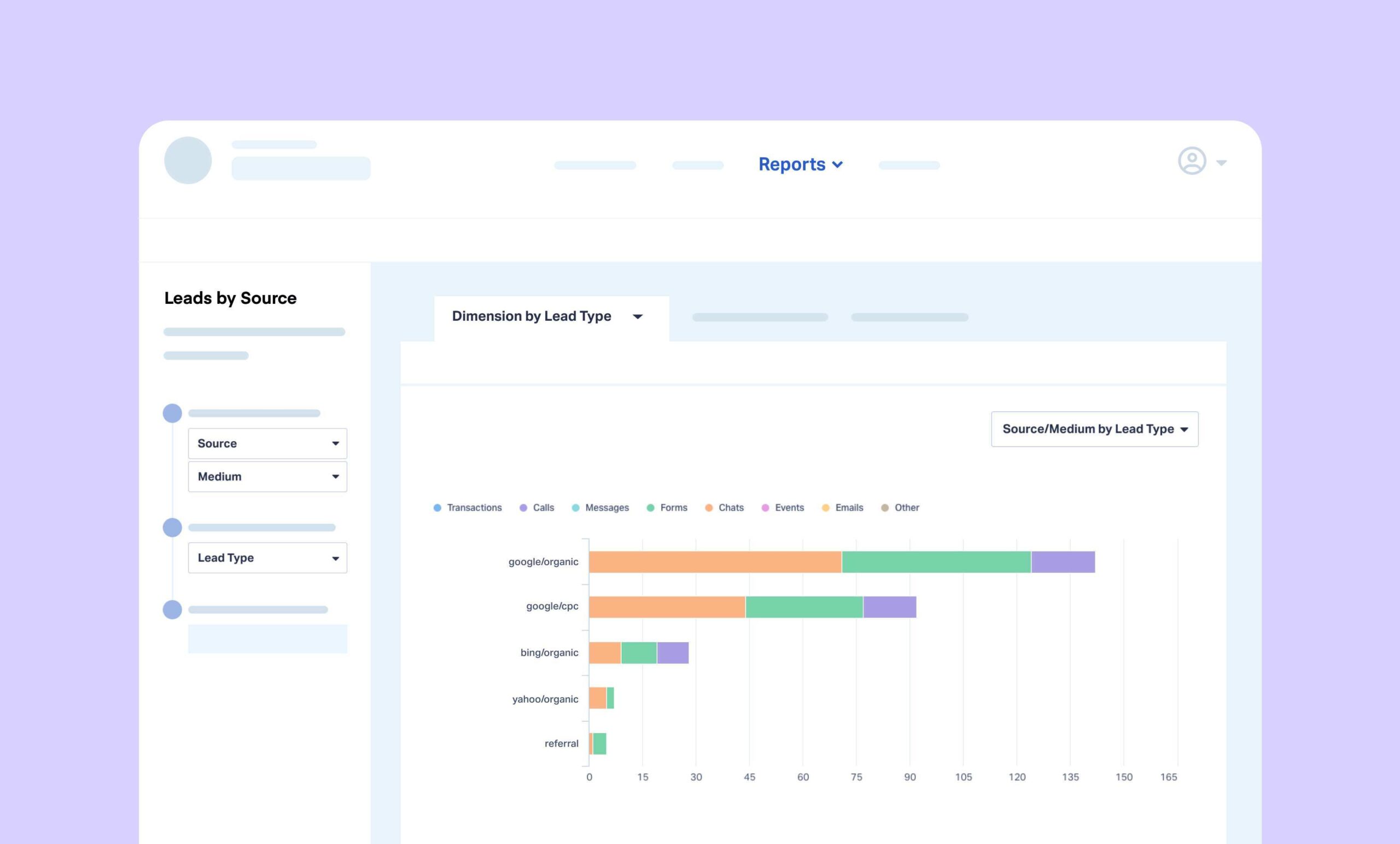
Reports like this are available out of the box, and go much deeper with custom filtering by campaign, keyword, or landing page.
Custom Reporting: Reports That Speak Your Client's Language
In addition to standard reports (leads by landing page, keyword, campaign, etc.), you can also build fully custom reports with Report Builder, save them, and schedule automatic delivery on any cadence, covering any question about leads or calls, without exporting to a spreadsheet or connecting outside tools.
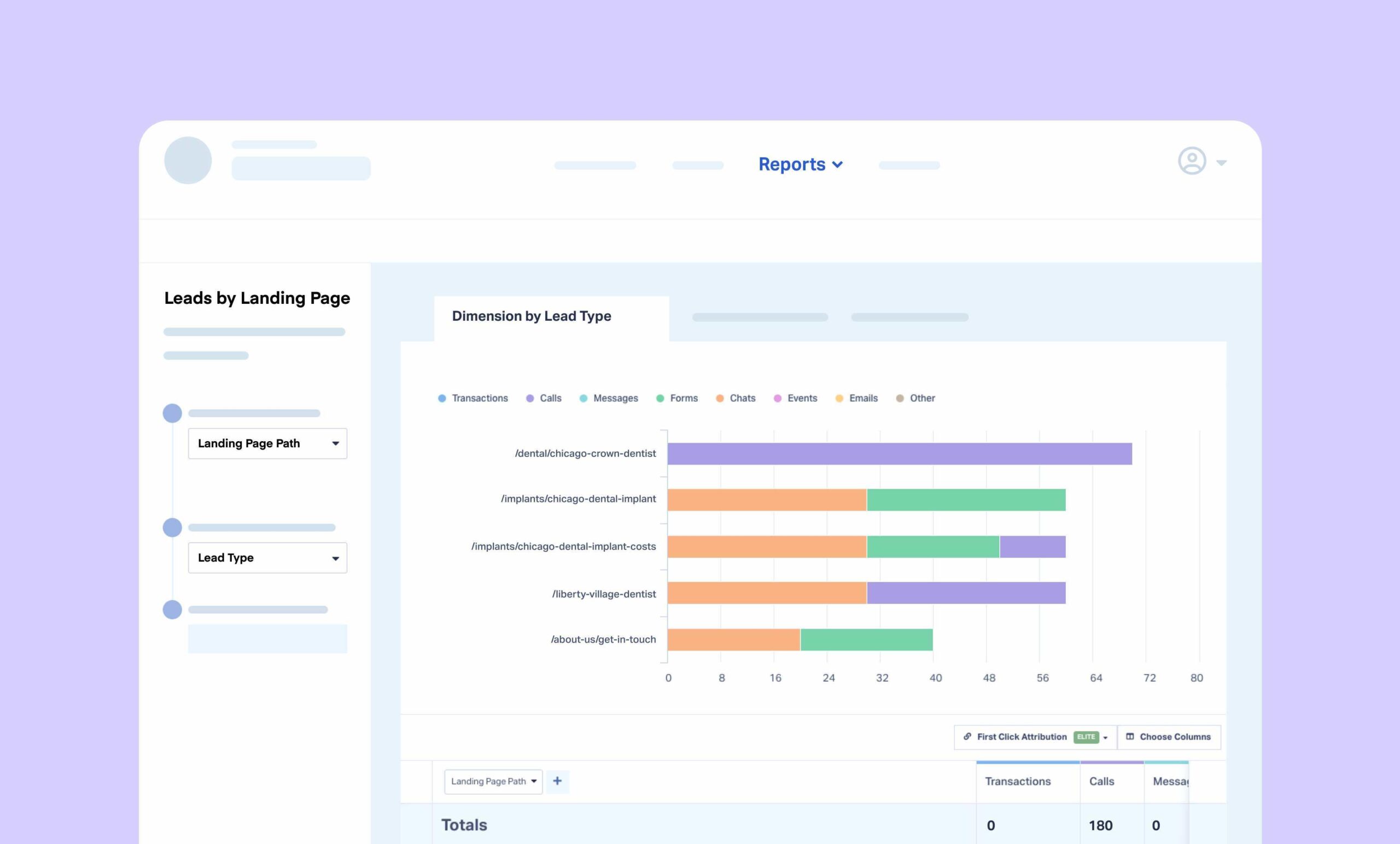
For example, this landing page report can be filtered down to a single source/medium in a couple of clicks. This is the kind of drill-down that typically requires manual spreadsheet work.
WhatConverts Integrations (9.2/10)
WhatConverts has a long list of seamless integrations, including:
- Major ad platforms like Google Ads, Bing Ads, and Facebook Ads
- Google Analytics (GA4)
- CRMs
- Offline Platforms
WhatConverts integrates deeply with Google, Meta, and Bing Ads, letting you train automated bidding to target specific lead types and send segmented conversion data back to Google Ads without needing GA4. It also integrates with GA4 itself, ensuring core lead metrics like source and medium report accurately, with data integrity beyond what GA4 captures alone.
Integrations extend past ad platforms too: CRM connections (Salesforce, HubSpot, and others) let sales pick up a qualified lead without re-entering data, and analytics integrations let you analyze lead-level detail alongside the rest of your marketing stack.
WhatConverts Automation Intelligence (9.0/10)
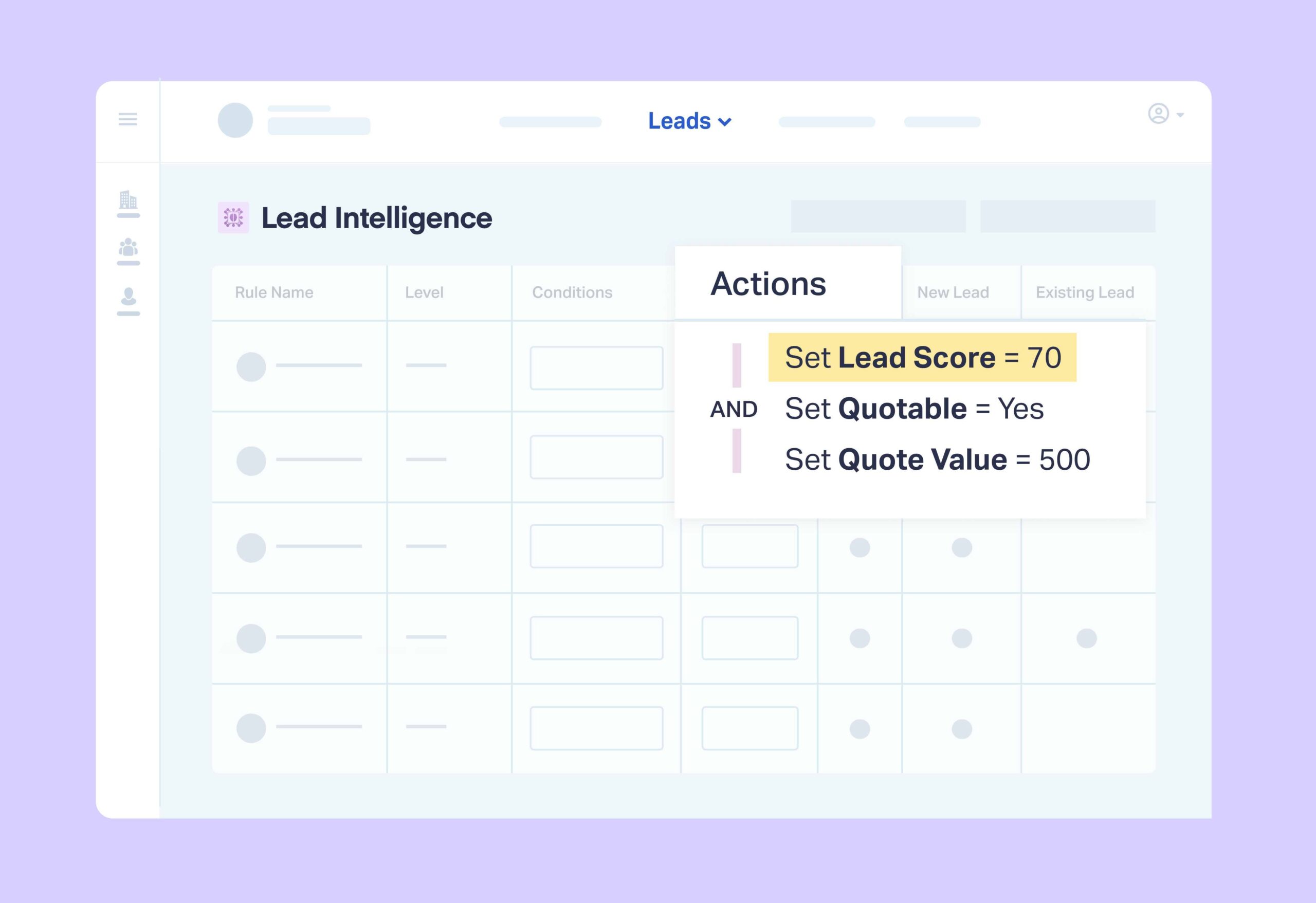
WhatConverts offers two automated intelligence features: Lead Intelligence and Lead Analysis.
Most call tracking software offers some version of Conversation Intelligence, which qualifies leads using the call transcript. Lead Intelligence goes further, auto-qualifying and scoring leads using all 70+ WhatConverts data points, with the transcript as just one input. You can also trigger actions automatically, like adjusting lead scores, sending data to your CRM, or passing only qualified leads to Google Ads as conversions.
Lead Analysis adds AI-generated call summaries, surfacing keywords, caller intent, and topics discussed, and producing a 3–5 sentence summary for every call so you can qualify a lead without listening to the full recording.
WhatConverts Support and Onboarding (9.5/10)
WhatConverts invests heavily in customer success, and it's a clear standout for support and onboarding quality:
- Support staff is available from 6AM to 8PM EST Monday through Friday
- The support team is run by people who designed the software
- The Help Center contains 150+ detailed support documents
- A dedicated onboarding team ensures you get the most out of the product
“Whatconverts is not only a great platform with sophisticated capabilities for call (and text) tracking, but the support team is phenomenal. Whenever our team has a question or issue, we receive a thorough reply within minutes, often including videos and detailed explanation on what we're seeing. I find their support to be as valuable as the tool itself!”– Wesley T.
“[What do you like best about WhatConverts?] The outstanding support and level of technical expertise in answering support questions. Platform is very stable and reliable and very feature packed.”– Sok V.
For more on support-related user reviews, be sure to check out our G2 reviews.
Start your free 14-day trial of WhatConverts today or book a demo with a product expert to see how we help prove and grow your ROI.
2. CallTrackingMetrics (9/10)
Best for Call Centers That Prioritize Sales-Focused Features
CallTrackingMetrics is the second product we’re most often compared to. And as with CallRail, we also created a detailed guide on how it compares to WhatConverts and other tools (see here).
| Pros | Cons | Pricing |
| ✅ Some plans include sales-based features like softphones and real-time conversation monitoring | ❌ Sales-focused features take away from marketing tracking | - Starts at $36/mo |
| ✅ Good customization options | ❌ Complex user interface | |
| ✅ Plenty of Advanced Features | ❌ Limited support at lower plans |
For an in-depth comparison from a trusted third party, be sure to check out the G2 CallTrackingMetrics vs. WhatConverts reviews. At the time of writing, CallTrackingMetrics has a total of 130 reviews and 4.6/5 stars on Capterra.
CallTrackingMetrics Standard and Advanced Features
CallTrackingMetrics offers both Standard and Advanced Features.
| Standard Features (9.0/10) | Advanced Features (8.6/10) |
| Call Recording | Advanced DNI Options |
| Call Transcription | Customer Journey |
| Keyword Level Call Tracking | Multiple Attribution Models |
| Dynamic Number Insertion (DNI) | Call Flows |
| Call Greeting | HIPAA, GDPR, and SOC2 Compliance |
| Call Whisper |
They also offer lots of features for call centers, like:
- Softphone
- Auto Dialer
- Activity Tracking
- Live Listening
CallTrackingMetrics Campaign and Reporting Insights (8.7/10)
CallTrackingMetrics offers lots of functionality for sales reps and call centers, making it a great choice for outbound call tracking. Its lead management dashboard (Activities) displays:
- Name and number
- Tracking number
- Lead score
- Recorded audio
- Whether a call was inbound or outbound
- Answering agent
- Duration and answer time
- Various follow-up actions (email, tag, flag, etc.)
You’re also able to filter leads on this dashboard by a variety of metrics like agent answered, date, and tracking number. However, the filtering and organization options are very limited compared to lead management in WhatConverts, especially when it comes to marketing attribution.
You can filter by 27 different data points (WhatConverts lets you filter by 70+). You can also view form and text leads within CallTrackingMetrics, though on another page (not together with call leads).
CallTrackingMetrics offers an extensive list of standardized reports, but customization is limited. Customers describe it as far less flexible than the WhatConverts reporting engine.
CallTrackingMetrics Integrations (8.7/10)
Basic plans integrate with the following:
- AMP
- Google Ads Direct Connect
- Google Analytics
- Kissmetrics
- Looker Studio
- Microsoft Advertising
- Optimizely
- Wix
- WordPress
- Zapier
However, integrations with any other tools or platforms (including CRMs) require upgrading to either a Growth or Connect plan.
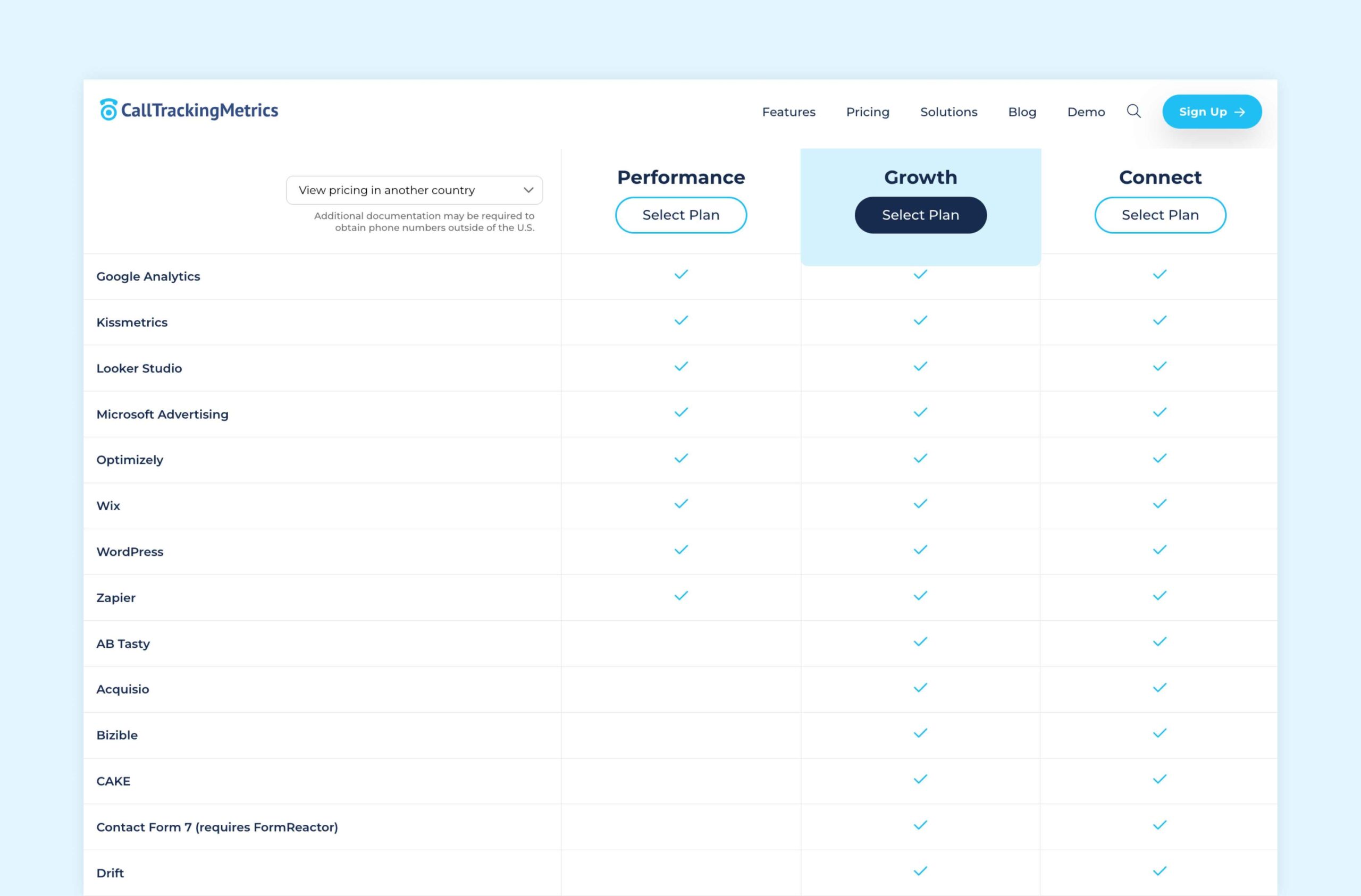
CallTrackingMetrics also has a fairly powerful Google Ads integration, similar to WhatConverts, letting users choose which leads count as conversions, with some automation options available too.
CallTrackingMetrics Automation Intelligence (8.4/10)
Like CallRail, CallTrackingMetrics offers Conversation Intelligence, using phrase and keyword spotting to give a general read on lead quality and caller sentiment.
However, this assessment is based again on a single data point, just the call transcription. Marketers who want to automatically evaluate lead quality using more than a transcript will need Lead Intelligence.
And in line with the sales side of CallTrackingMetrics, there are sales-focused automation options too. For instance, you can use automation to help you identify coaching opportunities, create dynamic scripts for reps, and serve up sentiment analysis to help with scoring calls.
CallTrackingMetrics Support and Onboarding (8.7/10)
Live phone and live chat support require an upgraded plan, and the same goes for standard onboarding. They also offer “Premier Help Desk” and customized onboarding for an additional fee with certain plans.
Support is not 24/7. However, they do have an “academy” where you can learn more about the product.
Reviews of support are generally favorable.
“When you need help with technical things, they are the best support out there.” –Glen P.
“Has a friendly and responsive customer support team as well.”–Verified User
To read more user reviews on CallTrackingMetrics customer support, have a look at their G2 reviews.
3. CallRail (9/10)
Best for General Call Tracking for Most Small Businesses
CallRail is a great product and we view them as our main competitor. For that reason, we created an article (see here) that discusses the main features that differentiate our product.
| Pros | Cons | Pricing |
| ✅ Track a fair amount of call data down to the keyword | ❌ Clunky and hard-to-navigate interface | - Starts at $40/mo - Free trial |
| ✅ Some good automation features (lead tagging and scoring) | ❌ Siloed lead data (form and call data are on separate pages of the lead manager, not integrated) | |
| ✅ Expansive Help Center | ❌ Limited reporting for campaign optimization | |
| ❌ Mixed support reviews | ||
| ❌ Integration paywalls |
For an in-depth comparison from a trusted third party, be sure to check out the G2 CallRail vs. WhatConverts reviews. At the time of writing, CallRail has a total of 170 reviews and 4.5/5 stars on Capterra.

CallRail Standard and Advanced Features
CallRail offers both Standard and Advanced Features.
| Standard Features (8.9/10) | Advanced Features (8.2/10) |
| Call Recording (available on higher plans) | Advanced DNI Options |
| Call Transcription (available on higher plans) | Customer Journey |
| Keyword Level Call Tracking | Multiple Attribution Models |
| Dynamic Number Insertion (DNI) | Call Flows |
| Call Greeting | HIPAA, GDPR, and SOC2 Compliance |
| Call Whisper |
CallRail Campaign and Reporting Insights (8.5/10)
CallRail reporting is easy to use. You have ready access to both templated and saved reports right from the side navigation.
Customization is limited: you can see which marketing is generating calls, but not lead quality, sales value, or qualification status. So you can see what's making the phone ring, but not what those calls are worth.
CallRail does have a lead management system (Activity within the app). But the individual lead data shown here is limited to:
- Phone number called
- Start time
- Duration
- Contact information (name and phone number)
- Location
- Tags
- Qualified status
You can also see the call recording, transcript, and customer journey (if your plan allows for it). Plus, lead types (calls, forms, texts) are displayed on different pages, not together.
Finally, some users have also mentioned that the reporting and activity interfaces are difficult to navigate.
CallRail Integrations (5.5/10)
CallRail integrations are a bit limited for two reasons.
First, their integration with Google Ads does not let you choose which leads should be counted as conversions. Instead, CallRail reports all calls, even spam, as a conversion to Google Ads (though you can separate “first-time” and “repeat” callers).
This is a big problem with automated bidding, which is usually configured to target maximum conversions. So if you see an influx of spam calls, the CallRail integration may inadvertently be training the Ads algorithm to target more spam leads.
On top of that, integrations at CallRail are limited by the plan you choose.
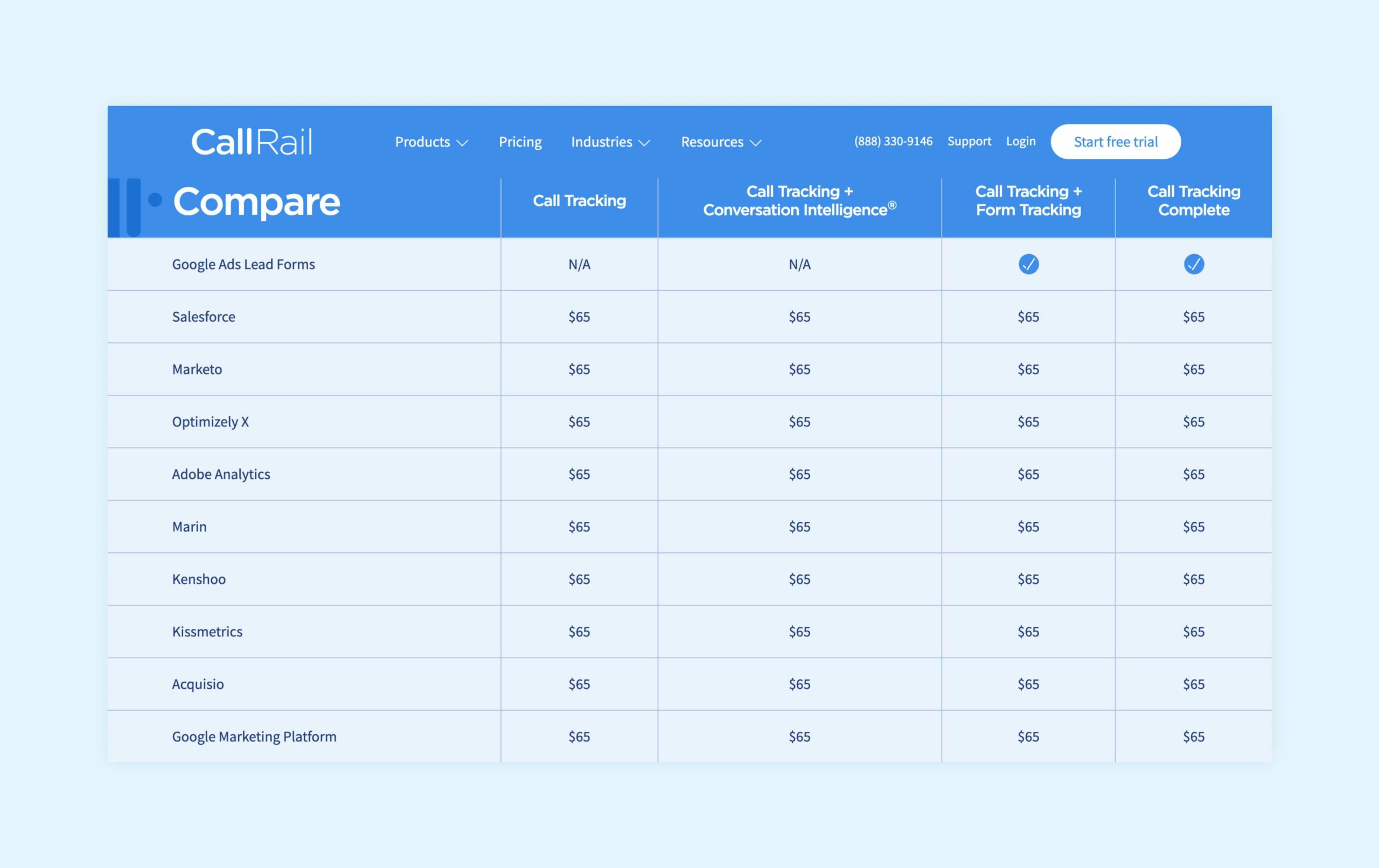
For instance, integrations that are supported on any plan include:
- Google Analytics
- Google Ads
- Bing Ads
- HubSpot
- ActiveCampaign
However, you need to pay an extra $65 per month to integrate with platforms like:
- Salesforce
- Marketo
- Kissmetrics
- Google Marketing Platform
- Adobe Analytics
There are nine integrations that must be purchased separately (see here).
CallRail Automation Intelligence (8.3/10)
CallRail offers Conversation Intelligence at an additional cost.
Like other Conversation Intelligence, it uses AI to pick out specific keywords and phrases. Then based on those keywords and phrases, it can assign tags, scores, and qualify leads.
It’s important to remember though that this information comes from a single data point: the call transcript. Whereas Lead Intelligence takes Conversation Intelligence a step further and takes into account many data points, including call transcripts.
CallRail Support and Onboarding (8.9/10)
Reviews of CallRail’s support team are mixed. However, it’s worth noting they do have a lot of help articles to guide users.
“Strong communication with troubleshooting and technical support.”– Dasar A.
"CallRail has some of the best most responsive support I have encountered... The product seems to be geared more toward small-medium businesses." – Matt. L
To read more user reviews on CallRail customer support, have a look at the G2 link below:
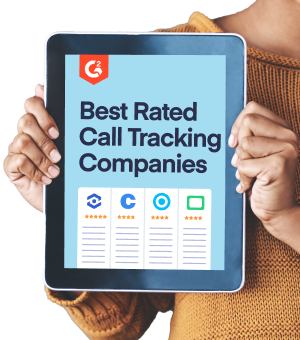
Compare the top call tracking software
Expertly ranked by 3,000+ G2 reviews
In-depth charts & feature breakdowns
4. Invoca (9/10)
Best For Enterprise-Level Call Centers and Media Buyers
Invoca is the fourth tool worth recommending, though only for a specific type of user. Its also a solid choice for outbound call tracking. For a deeper look at how Invoca compares to WhatConverts and other tools, be sure to check out our detailed guide (see here).
| Pros | Cons | Pricing |
| ✅ Customize which data is tracked | ❌ Enterprise and call center-focused features may not be right for marketing agencies | - Not available (must speak with sales) |
| ✅ Many cost-saving features | ❌ High price | |
| ✅ Various pay-per-call integrations make it a clear choice for media buyers | ❌ Lack of customization |
For an in-depth comparison from a trusted third party, be sure to check out the G2 Invoca vs. WhatConverts reviews. At the time of writing, Invoca has a total of 20 reviews and 4.5/5 stars on Capterra.
Invoca Standard and Advanced Features
Invoca offers Standard and Advanced Features for call tracking:
| Standard Features (8.9/10) | Advanced Features (8.5/10) |
| Call Recording | Advanced DNI Options |
| Call Transcription | Customer Journey |
| Keyword Level Call Tracking | Multiple Attribution Models |
| Dynamic Number Insertion (DNI) | Call Flows |
| Call Greeting | HIPAA, GDPR, and SOC2 Compliance |
| Call Whisper |
Invoca Campaign and Reporting Insights (8.6/10)
Invoca does not measure any other lead types besides callers. As such, their campaign and reporting insights are limited to calls only.
Additionally, some users have found their standard dashboard lacks customizability. As one user put it, Invoca’s dashboard “doesn't offer the flexibility to pull deep-dive insights.” However, many have found the dashboard to be quite easy to use and intuitive.
Reporting is another area that users say doesn’t offer enough customization. One user said the following:
“I wish reporting was a bit more intuitive. To get more specific results, the filters don't always play well together or yield exactly what we need. More customization would help improve the product!”
Invoca Integrations (9.1/10)
Invoca has 44 listed integrations. However, users have reported that the integrations are lacking, specifically in terms of data integrity between integrations.
That being said, Invoca does integrate with most of the big marketing tools on its basic plan. Tools like:
- Google Analytics
- Google Ads
- Bing Ads
Basic plans also integrate with HubSpot and Slack.
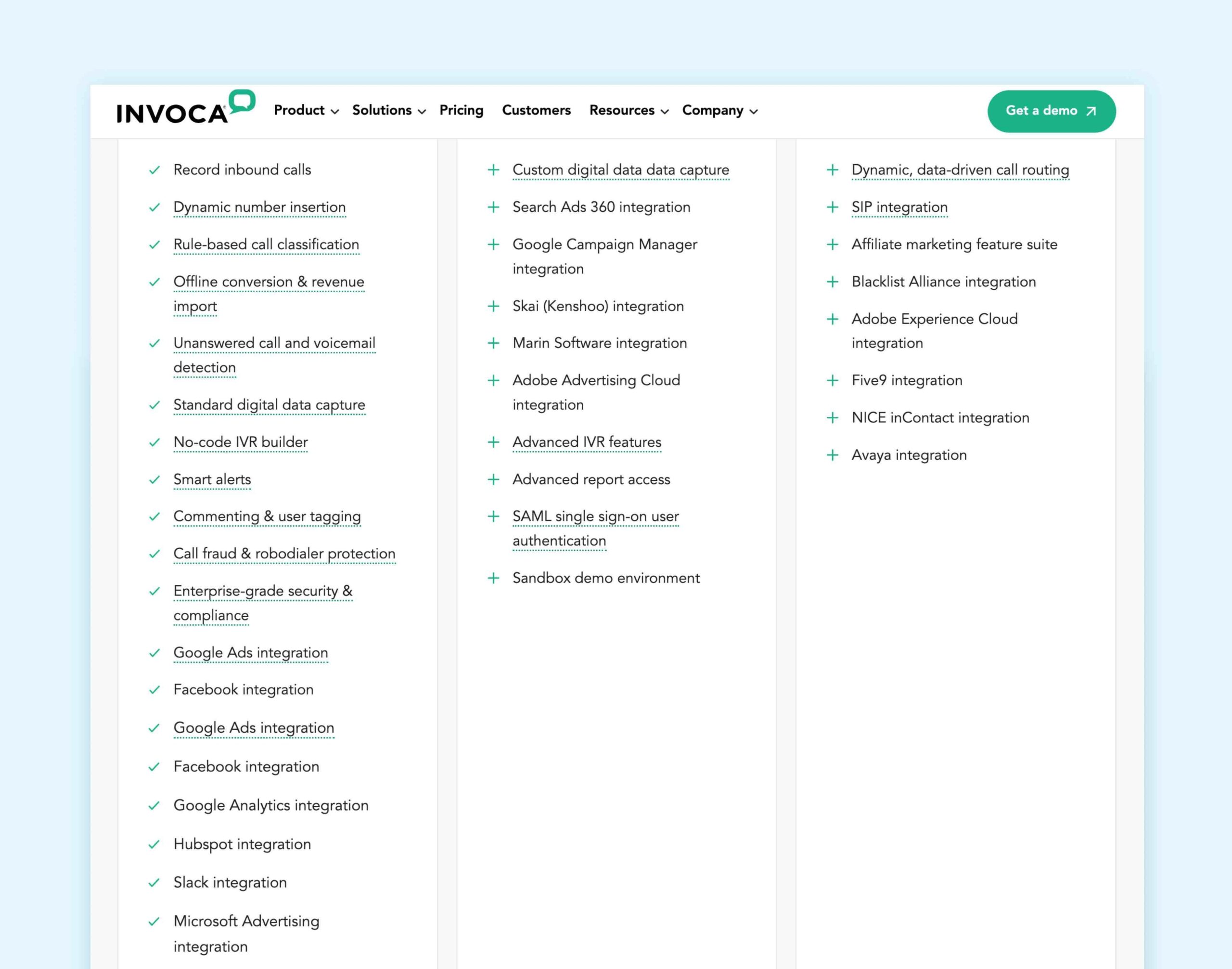
One thing Invoca does well that others don't is integrate directly with performance marketing and pay-per-call networks (13 of them), making it a strong fit for enterprise media buyers.
Invoca Automation Intelligence (8.6/10)
There are lots of Invoca automation tools.
Conversation Intelligence is one, which picks out keywords and phrases from transcripts to assess lead quality, sentiment, and more. You can track specific insights tailored to your business (called “Signals” in the software). But accounts are limited to the number of Signals based on their plan.
You can do the same thing using Lead Intelligence in WhatConverts, but without the limit.
Invoca’s AI tools also help spot sales rep coaching opportunities, automatically score rep performance, and even uncover emerging conversation trends. But again, unlike Lead Intelligence, Invoca’s Conversation Intelligence uses just one data point: a call transcript.
Invoca Support and Onboarding (8.6/10)
Standard plans at Invoca offer:
- White glove onboarding
- 24/7 support portal access
- Access to website and email support
Invoca’s support team also regularly receives high marks.
“The dedicated account manager and customer success support are excellent. You are always fully supported by people knowledgeable in the product and capable of addressing questions.”– Michele R.
“The Invoca team has provided excellent support and training along the way and are real allies to our business.”– Verified User
To read more user reviews on Invoca customer support, have a look at the G2 link below:
Read More: Invoca vs. CallRail vs. WhatConverts: In-Depth Comparison [2025]
5 Other Notable Call Tracking Software Apps
The four options above are the best call tracking tools in the industry, each with its own pros and cons.
That being said, here are five other options worth mentioning. These options lack the capabilities of the top four tools above. But they may still be worth looking into depending on your needs.
5. Phonexa (9.8/10)
Phonexa offers call tracking that's uniquely suited to businesses that handle lead distribution.
Take a look at our detailed guide on how Phonexa compares to WhatConverts and other tools for more information (see here).
They offer features including but not limited to:
For an in-depth comparison from a trusted third party, be sure to check out the G2 Phonexa vs. WhatConverts reviews. At the time of writing, Phonexa has a total of 75 reviews and 5/5 stars on Capterra.
6. Marchex (8.2/10)
If you want to learn more about how Marchex compares to WhatConverts and other tools, be sure to check out our detailed guide (see here).
They offer features including but not limited to:
- AI-Powered Call Analytics
- Pay Per Call Leads Marketplace
- Local Lead Tracking
- Intelligent Mobile Messaging
For an in-depth comparison from a trusted third party, be sure to check out the G2 Marchex vs. WhatConverts reviews. At the time of writing, Marchex has a total of 32 reviews and 4.4/5 stars on Capterra.
7. DialogTech (N/A)
Acquired by Invoca in 2021, DialogTech offers features including but not limited to::
- AI-Driven Conversation Analytics
- Call Routing
- Integrations
- Accurate Call Attribution Technology
- Enterprise-Class Security and Compliance
At the time of writing, DialogTech has a total of 14 reviews and 3.4/5 stars on Capterra.
8. Revenue.io (9.4/10)
Primarily a sales enablement platform, Revenue.io also contains features like call tracking and analytics. However, its focus on sales enablement means it lacks many of the capabilities of other lead tracking tools discussed above.
They offer features including but not limited to:
For an in-depth comparison from a trusted third party, be sure to check out the G2 Revenue.io vs. WhatConverts reviews. At the time of writing, Revenue.io has a total of 18 reviews and 4.3/5 stars on Capterra.
9. Infinity Call Tracking (9.2/10)
Specifically for call tracking, Infinity Call Tracking is a UK-based software that focuses on conversation insights.
They offer features including but not limited to:
For an in-depth comparison from a trusted third party, be sure to check out the G2 Infinity Call Tracking vs. WhatConverts reviews. At the time of writing, Infinity Call Tracking has a total of 17 reviews and 4.7/5 stars on Capterra.
What Is Call Tracking?
Call tracking bridges the gap between online marketing (keywords, ads, campaigns) and offline calls. With it, marketers can better understand which marketing is producing offline conversions like phone calls.
With the right call tracking software, you can understand:
- Which keyword, ad, campaign, etc. caused each call
- Contact information for that caller (location, name, number, etc.)
- Call information like duration, unique vs. repeat caller, call recording/transcription
- And more
And that means marketers can make smarter decisions about where to spend their budget.
Related Reading: What Is Call Tracking and Why Do Marketers Need It?
Call Tracking Software Features to Look For
To find the best call tracking software for your agency, you need to evaluate products across six categories:
- Standard Features
- Advanced Features
- Campaign and Reporting Insights
- Integrations
- Automation Intelligence
- Support and Onboarding
1. Standard Features

Some standard features in call tracking software include:
- Call Recording: Record, monitor, and download incoming calls.
- Call Transcription: Get the details you need from your calls without having to listen to the whole recording.
- Keyword Level Call Tracking: Know exactly which PPC keywords are driving calls.
- Dynamic Number Insertion (DNI): Allows you to automatically swap a telephone number(s) on your website so that you can track the marketing source. (You don’t need to buy a unique tracking number and put it on the landing page of each campaign; with DNI, you can do so automatically).
- Call Greeting: When someone calls in, you can create an automated greeting to be played (e.g., “This call may be recorded and monitored for quality purposes”).
- Call Whisper: Right before you get connected with a caller, you’ll get an automated message that tells you how the lead was generated (e.g., “Incoming call from Google Ads”).
Inbound vs. Outbound Call Tracking
Inbound call tracking lets businesses track and record calls coming into their lines from prospects. So a home plumbing company, for example, would benefit most from inbound call tracking since their customers typically call them.
Outbound call tracking is the opposite. This software tracks calls going out of the business and to prospects. Businesses with sales teams that make cold calls, for instance, are top users of outbound call tracking software.
Both quality outbound and inbound call tracking software will have the standard features listed above.
2. Advanced Features
For professional marketers who want to remain competitive, knowing a phone call’s first-click attribution no longer provides sufficient insight. You also need more advanced features.
That’s why the best call tracking software will include advanced features like:
- Advanced DNI Options: Advanced DNI options like DNI Triggers let you choose which leads to track based on where the user is coming from (e.g., specific sources/mediums, campaigns, landing pages, etc.).
- Customer Journey: Customer journey tracking lets you see each time a lead interacted with your marketing all the way from the very first touch, helping you better understand how customers move from Stranger to Customer.
- Multiple Attribution Models: Being able to sort your leads by different attribution models (first click, last click, last contact, last non-direct, last paid) lets you quickly see which marketing is bringing leads in, which is converting, and more.
- Call Flows: Also known as “IVR,” Call Flows ensure each call is properly directed to the right place by giving callers a menu of options. (e.g., “Dial 1 for Sales, Dial 2 for Support”). Look for call tracking with simple drag-and-drop call flow setup interfaces.
- Compliance: If you’re serving clients that are larger, in certain industries (medical, legal, etc.), or in certain locations (Europe), your call tracking software will likely need to follow several compliance standards like SOC2, HIPAA, or GDPR.
- Keyword Spotting: Achieved by “intelligence” features like Conversation Intelligence and Lead Intelligence (more on those later), keyword spotting picks out specific words and phrases from conversations to give insights on leads.
3. Campaign and Reporting Insights
Most call tracking solutions offer standard report templates that show which marketing channels, campaigns, keywords, and landing pages drove the most calls.
Watch out for companies that claim they offer advanced or custom reporting when what they really have is nothing but standard. For instance, filtering by marketing source and hiding/showing a data point is not considered advanced reporting.
Instead, look for tools that offer actually advanced campaign and reporting features, like:
- Individual Lead Data: Drill down to see individual lead data so you can understand lead quality, customer journey, and more on a detailed level.
- Custom Reporting: Build a report from any of the lead data collected, including any custom fields.
- Marketing Spend: How much did your campaign cost? How did that compare to the revenue it brought in?
- Report Scheduling: Automate your report building and keep your client up to date with custom scheduled reporting.
- Dimension Grouping: Combine dimensions (campaigns, keywords, etc.) to put your reporting into terms your clients will understand.
4. Integrations (Ad Platforms, CRMs, etc.)

Marketers are notorious for using a lot of tools on a daily basis (nearly 1 in 3 said they used 11-20 different tools). And when those tools can’t communicate with each other, it can quickly multiply your workload.
That’s why it’s important for call tracking software to be able to integrate with a wide variety of tools and platforms, such as:
- Ad platforms like Google Ads and Bing Ads
- Google Analytics (GA4)
- CRMs
- Legacy Ad Buying Platforms
- Social Media Platforms
- Offsite Platforms
The three most important integrations to look for are:
- Google Ads and Bing Ads: Ad platform integrations typically come standard with call tracking software, but the best tools go further, giving marketers granular control over what data is sent to platforms like Google Ads and when, so you can target only high-value leads.
- Google Analytics (GA4): Understanding website traffic and user activity is important to optimizing campaigns. When this data is combined with lead conversions, it’s able to provide even more powerful insights.
- CRMs: If your clients have a sales team that receives leads from marketing, integrating your lead tracking software with your CRM improves the sales process, eliminates lost leads, and decreases sales cycle times.
5. Automation Intelligence
With call tracking software, the most common type of automated intelligence is Conversation Intelligence. These machine learning algorithms pick out keywords and phrases (a.k.a. “keyword spotting) from call transcripts to assess lead quality, readiness to buy, and more.
Some Conversation Intelligence is powered by large language models (LLMs), giving it a boost in accuracy and capability. However, it’s worth noting that though this type of Conversation Intelligence is more powerful, it’s still making assessments based on the call transcript and only the call transcript.
While Conversation Intelligence uses just one data point, Lead Intelligence from WhatConverts uses a wide variety of data points to qualify and value leads, not just call transcripts. As a result, Lead Intelligence provides a far more accurate measure of lead quality and lead value than Conversation Intelligence.
Not Sure Which Intelligence You Need?
Use the following test to see which automation intelligence is right for you.
- Take a sample of 10 leads and read the transcripts for each. Are you able to qualify these leads yourself based on the transcript alone? If the answer is “Yes,” Conversation Intelligence alone may be right for you.
- If you weren’t sure if they were qualified and couldn’t determine the lead value, then Lead Intelligence is more your speed (takes into account the transcript AND keywords, campaign, landing page, call flow, and more).
6. Support and Onboarding
The quality of a call tracking software’s support and onboarding can make or break user experience, no matter how user-friendly a product is.
And while automated support can help point users to online guides, nothing beats a support and onboarding team that knows the product inside and out.
The best call tracking software will have a high-quality support team that’s:
- Knowledgeable: Call tracking experts with knowledge of how digital marketing works.
- Quick to Respond: When you have a problem, you don’t want to wait 24 hours for a response.
- Solution Providers: Understand the root problem and provide an effective solution.
The best support teams don't just know the product; they understand how it fits with the rest of your stack, like Google Ads, Google Analytics, and your CRM. Look for a team that combines technical depth with fast response times, not one that just points you to documentation.
Wrapping Up
To recap:
- Best Call Tracking Software for PPC Marketers, Agencies, and Google Ads Power Users: WhatConverts
- Best Call Tracking Software for Enterprise-Level Call Centers and Media Buyers: Invoca
- Best Call Tracking Software for General Call Tracking for Most Small Businesses: CallRail
- Best Call Tracking Software for Call Centers That Prioritize Sales-Focused Features: CallTrackingMetrics
Just remember, there’s plenty of call tracking software out there to choose from.
What matters most is that you find the right tool for your needs.
Start your free 14-day trial of WhatConverts today or book a demo with a product expert to see how we help prove and grow your ROI.
*Best Call Tracking Software Scoring Methodology
The six categories each call tracking tool is scored on are:
- Standard Features
- Advanced Features
- Campaign and Reporting Insights
- Integrations
- Automation Intelligence
- Support and Onboarding
Category scores are calculated by averaging the G2 reviews of features that fall under that category. For instance, the Standard Features score comes from the total average score of the following features within G2:
- Visitor and Keyword Tracking
- Dynamic Number Insertion
- Call Data
- Call Recording
- Local Phone Numbers
- Toll-Free Numbers
- Port Existing Numbers
If you'd like to see a more detailed breakdown of how each tool scored across individual features, have a look at the spreadsheet below.
Get a FREE presentation of WhatConverts
One of our marketing experts will give you a full presentation of how WhatConverts can help you grow your business.
Schedule a DemoGrow your business with WhatConverts







