















































Add a Dimension Grouping
Dimension Groupings let you consolidate granular values like landing page URLs, campaign IDs, or keywords into higher-level categories that are easier to analyze and report on.
Create a Dimension Grouping
To create a new Dimension Grouping:
- On the top bar, open the “Reports” tab.
- Click “Dimension Groupings”.
- Click “+ Add Dimension Grouping”.
- Enter a Dimension Grouping Name (e.g., “Service Line”, “Campaign Name”). This becomes the title of the new column on your Leads dashboard.
- Select the Grouped Dimension. This is the field you want to group values from (e.g., Landing Page, Campaign ID, or Keyword). The system will look at this field and apply your rules to organize its values into higher-level categories.
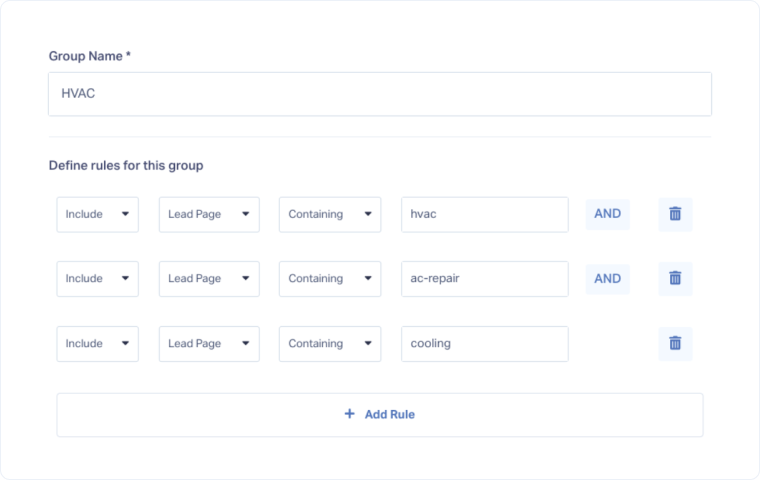
- Define the groups by adding rules.
- Add more groups if needed by clicking “Add Group”.
- Click “Finish”.
Tip : Use Dimension Groupings to replace cryptic IDs (like campaign IDs) with readable names. This makes reports easier to understand for clients and teams.
Edit a Dimension Grouping
To edit an existing Dimension Grouping:
- Go to Dimension Groupings.
- Find the grouping you want to update and click “Edit”.
- Make your changes (e.g., rename the grouping, adjust rules, add or remove groups).
- Click “Finish” to apply your changes.
Delete a Dimension Grouping
To delete an existing Dimension Grouping:
- Go to Dimension Groupings.
- Click “Delete” next to the grouping you want to remove.
- Review the confirmation prompt to ensure you’re deleting the correct grouping.
- Click “Delete Dimension Grouping” again to confirm.
Related Topics
Was this page helpful?
Get a FREE presentation of WhatConverts
One of our marketing experts will give you a full presentation of how WhatConverts can help you grow your business.
Schedule a Demo






