


Track OptinMonster Web Forms
OptinMonster is a lead generation software designed to convert abandoning visitors into subscribers and customers through pop-ups, floating bars, slide-ins, and other campaign types. WhatConverts can track OptinMonster form submissions by inspecting your form to identify its unique ID and adding a custom script, which captures lead data and attributes each submission to the marketing source that drove it.
Set Up OptinMonster Form Tracking
To track OptinMonster form submissions with WhatConverts:
- Go to the URL of the page your OptinMonster form triggers on, right click the form and click "Inspect".
- Find the ID of the div tag that contains the form. Copy and paste the ID into a notepad.
- On the site where your OptinMonster form triggers, paste the following code onto the page before your OptinMonster code:
html
<script type="text/javascript">
jQuery(".CopiedIDfromStep1").wrap("<form id='form'>");
</script>
Replace the bold portion with the ID you copied in the previous step, making sure to leave the period prior to the copied ID.
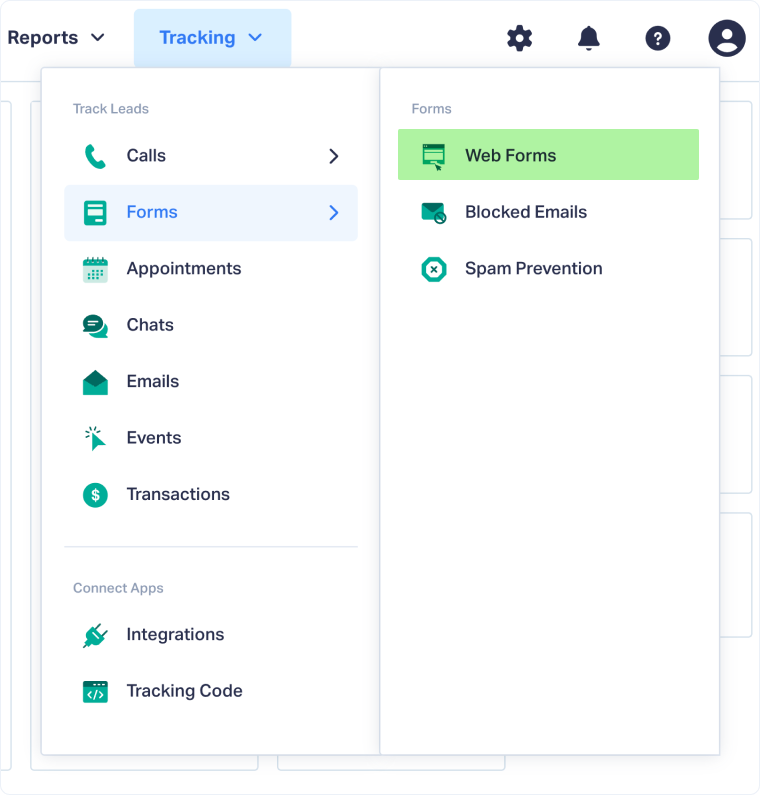
- Log in to the WhatConverts profile you want to track your OptinMonster form in. Select "Tracking" from the top menu.
- Select "Forms" and click "Web Forms".
- Click the "Add Web Form" button, and select "Manual Setup".
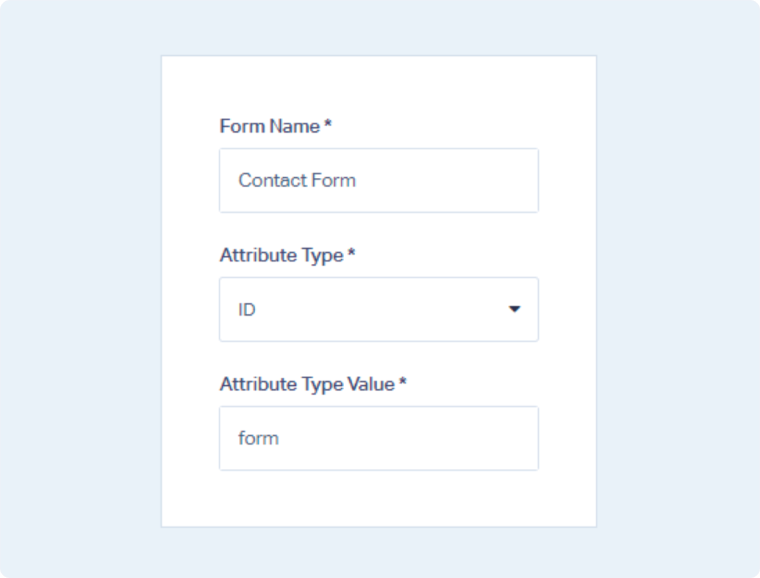
- Name your form, select Attribute Type "ID" and enter Attribute Value as form. Click the "Finish" button.

Your OptinMonster form is now being tracked. WhatConverts will capture all submissions from this form and create leads with full attribution data.
Note: The div ID that you are looking for will typically be formatted as CityName-form.
Test Your OptinMonster Form Tracking
After setting up tracking, verify that form submissions are being captured correctly:
- Go to the page your OptinMonster form is located on.
- Fill out the form with test information and submit it.
- Return to your WhatConverts profile and view your form leads.
- Find the test form submission and check its data.
If your test lead appears correctly, your OptinMonster form tracking is working properly.
Related Topics
Get a FREE presentation of WhatConverts
One of our marketing experts will give you a full presentation of how WhatConverts can help you grow your business.
Schedule a Demo






