















































Track Marketing Spend
Marketing Spend tracking captures your advertising costs from connected ad platforms and allows you to add manual expenses. This helps you measure ROI and cost per lead across all your marketing channels in one place.
Before you start, see What is The Marketing Spend? for an overview of how spend tracking works.
Connect Ad Platforms for Automatic Spend Tracking
To automatically track ad costs from platforms like Google Ads, Bing Ads, and Facebook Ads:
- Go to "Reports" and select "Marketing Spend".
- Locate the platform you want to connect (e.g., Google Ads, Facebook Ads, Bing Ads).
- Click "Connect" next to the platform.
- Log in to your advertising account when prompted.
- Select the account or ad spend data you want to sync.
- Click "Authorize" to complete the connection.
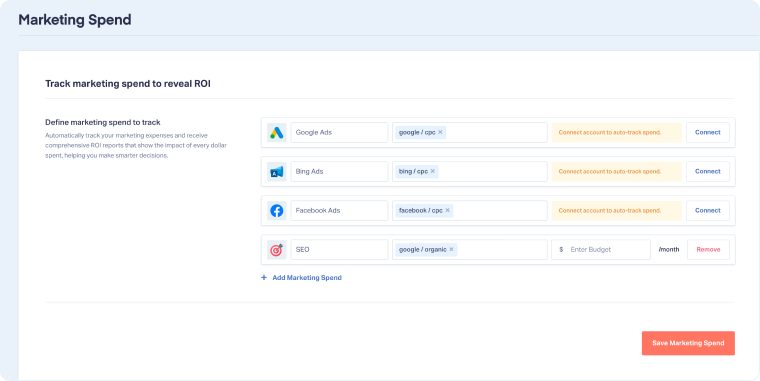
Once connected, WhatConverts will automatically import your advertising costs daily for ROI reporting and cost-per-lead calculations.
Tip: Connect your highest-spend platforms first to get immediate ROI visibility on your biggest marketing investments.
Add Manual Marketing Expenses
To track non-digital or non-integrated marketing efforts (like SEO, social media management, or offline advertising):
- Go to "Reports", then select "Marketing Spend".
- Click "Add Marketing Spend".
- Select a predefined category or create a custom one (e.g., SEO Services, Print Advertising, Trade Shows).
- Enter your monthly budget for that marketing source.
- Click "Save Marketing Spend".
Your manual spend will be included in cost-per-lead and ROI calculations alongside your connected ad platforms.
Related Topics
Get a FREE presentation of WhatConverts
One of our marketing experts will give you a full presentation of how WhatConverts can help you grow your business.
Schedule a Demo






