















































Understand the Keywords Report
The Keywords Report helps you see which search terms generate your most valuable leads, quotes, and sales. It connects marketing performance to real business outcomes so you can understand which keywords drive the best ROI and which don’t.
Note: Learn how to access and navigate Standard Reports in Use Standard Reports and discover how to turn insights into action in Analyze Performance with Standard Reports.
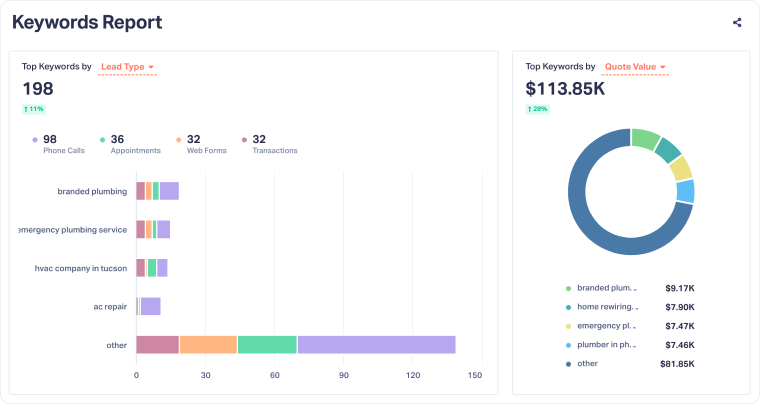
Keyword Performance Overview
This section highlights your top-performing keywords across key metrics, helping you identify which search terms bring in the most valuable leads and revenue.
- Top Keywords by Lead Type: Shows how each keyword performs by conversion type (calls, forms, chats, appointments, or other). This helps you see which search terms drive specific types of inquiries or conversions.
- Top Keywords by Quotable: Displays the breakdown of leads by qualification status (Quotable, Not Quotable, and Pending), so you can identify which keywords attract the highest-quality leads.
- Top Keywords by Quote Value: Shows the total quote value associated with each keyword, revealing which search terms drive revenue-generating opportunities.
- Top Keywords by Sales Value: Displays the total confirmed sales value tied to each keyword, allowing you to see which terms lead to closed deals.
Use these metrics together to measure both lead quantity and quality, helping you decide which keywords deserve more investment or should be paused.
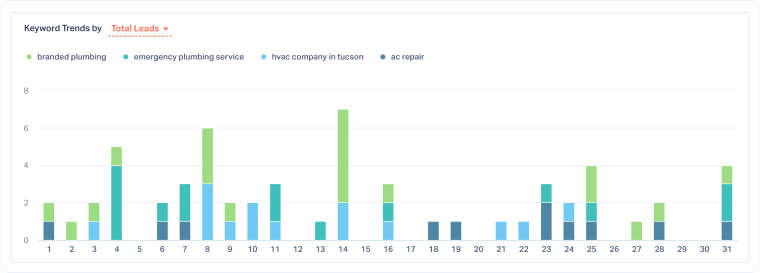
Keyword Trends Over Time
The Keyword Trends chart visualizes how performance changes over time. Each color represents a keyword, helping you spot patterns, surges, or drops in performance.
You can switch between metrics to explore trends for:
- Total Leads: Track how often each keyword drives conversions.
- Quotable Leads: Identify which terms consistently bring in high-quality inquiries.
- Quote Value and Sales Value: Measure the financial impact of each keyword.
Use this section to compare how intent, seasonality, and campaign changes affect performance and to quickly spot where ROI is increasing or declining.
Top Keywords Summary Table
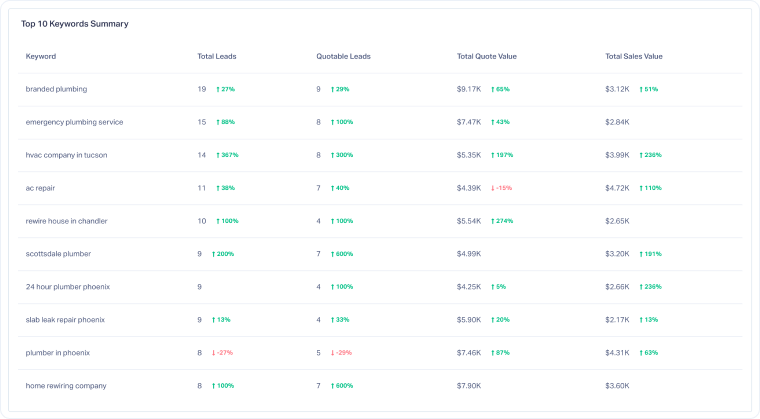
At the bottom of the report, you’ll find the Top Keywords Summary Table, which provides a complete performance overview for the top ten keywords.
For every keyword, you’ll see:
- Total Leads: The total number of leads attributed to that keyword during the selected period.
- Quotable Leads: The number of leads qualified as valuable or sales-ready.
- Total Quote Value and Sales Value: Revenue-related metrics tied to your keyword performance.
The percentage change next to each metric compares performance to the previous period, so you can easily identify improvements, drops, or stable performers.
Note: Enable keyword tracking for Google Ads and other connected platforms to ensure that all keyword data, including quote and sales attribution, appears in this report..
Related Topics
Get a FREE presentation of WhatConverts
One of our marketing experts will give you a full presentation of how WhatConverts can help you grow your business.
Schedule a Demo






