















































Manage Sales and Quote Values in the Lead Manager
The Lead Manager allows you to track and update the Sales and Quote Value of each lead. By updating these values, you can tie leads directly to revenue and optimize your performance based on revenue, not just lead volume.
The overview chart at the top of the Lead Manager shows the Total Sales Value and Total Quote Value for all leads currently displayed, based on any filters or time range applied.
You can add the Sales Value and Quote Value columns to the Lead Manager to update values directly from there, or open a lead to update them from the Lead Details page.
Note: When a Quote or Sales Value is added to a lead, it is automatically marked as Quotable.
Update Values Directly From the Lead Manager
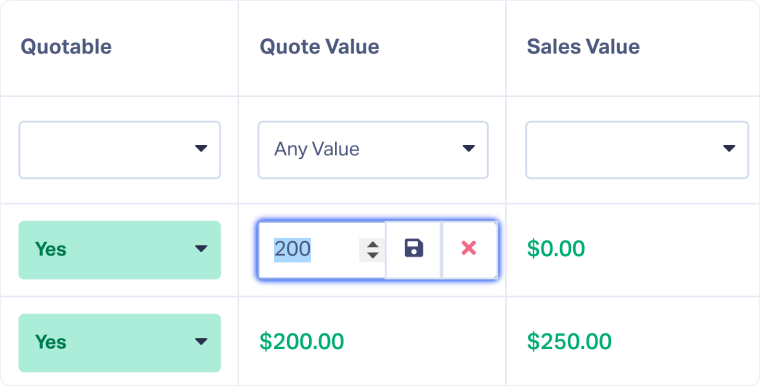
Edit values inline from the table when you want the fastest way to record revenue for multiple leads.
- Open the Lead Manager.
- Ensure the Quote Value and Sales Value columns are visible. If not, add them.
- Click the amount or pencil icon to edit the value for the selected lead.
- Enter the updated value and click the save icon.
Update Values From the Lead Details Page
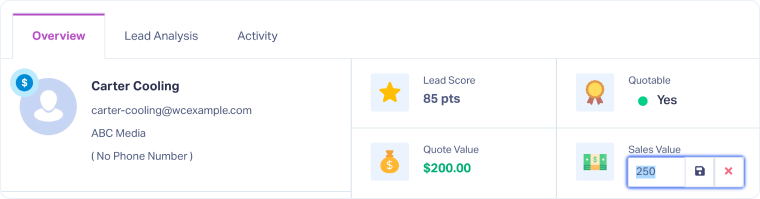
Use the Lead Details page when you want to use the rest of the lead’s information to help you identify the real Quote and Sales Value.
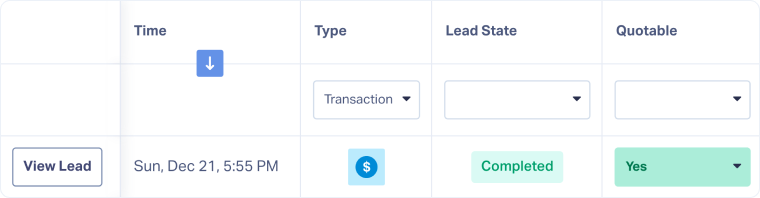
- In the Lead Manager, click “View Lead” to open the Lead Details page.
- In the top right panel, locate the Quote Value or Sales Value field.
- Click the amount, enter the updated value, and click the save icon.
Tip: Use the Lead Import tool to update Quote and Sales Value in bulk.
Related Topics
Get a FREE presentation of WhatConverts
One of our marketing experts will give you a full presentation of how WhatConverts can help you grow your business.
Schedule a Demo






