















































Build Lead Intelligence Rules with Mapped Fields
When you map a field, whether it comes from a form submission or is imported as an Additional Field, it becomes available in Lead Intelligence.
This lets you use that data to trigger conditions, enrich your lead data, or optimize campaigns using automated rules tailored to your business.
Tip: New to Lead Intelligence? Learn more in Introduction to Lead Intelligence before getting started.
How to Use Mapped Fields in Lead Intelligence
To use Mapped Fields in your Lead Intelligence:
- Set up a Lead Intelligence rule.
- Choose your Mapped Field(s) as the dimension(s) in the Conditions section (e.g., “Mapped Field: Service Area”).
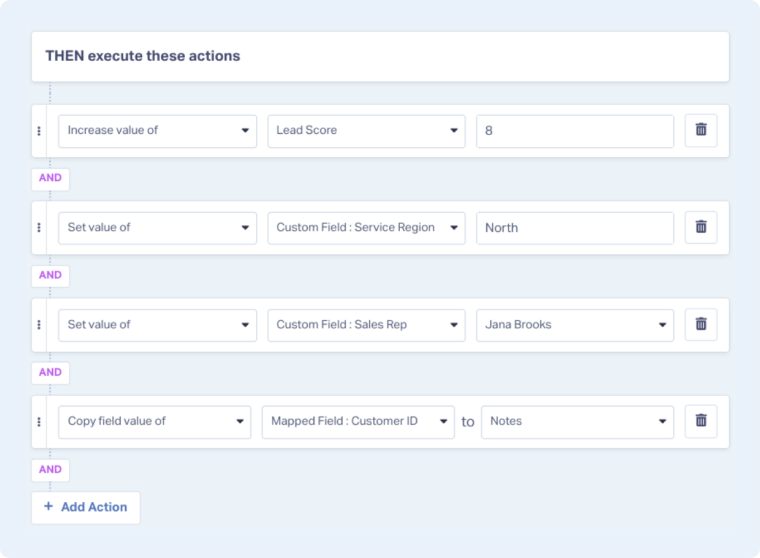
- Set up the actions that should run when those conditions are met (e.g., “Set Sales Rep when Service Area = Tempe, Phoenix”).
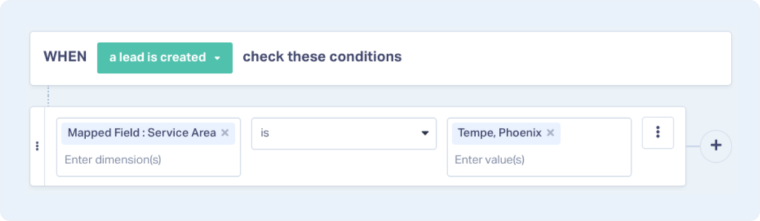
Note: Mapped Fields can only be used as dimensions for the rule conditions, or as values to copy into another field, not as targets for updates in the “THEN execute these actions” section.
Related Topics
Was this page helpful?
Get a FREE presentation of WhatConverts
One of our marketing experts will give you a full presentation of how WhatConverts can help you grow your business.
Schedule a Demo






