















































Create a Dynamic Number Pool for Organic Traffic
Track leads coming from unpaid search results by creating a Dynamic Number Pool using Organic triggers. This setup helps you measure calls generated from SEO and organic website traffic.
Tip: For an overview of number pool tracking, see What is Call Tracking?
Add an Organic Search Trigger
Follow these steps to create a dynamic number pool for organic traffic.
- In your WhatConverts profile, select “Tracking” from the top menu.
- Choose “Calls”, then “Phone Numbers”.
- Click “+ Add Dynamic Pool”.
- Select “Advanced Setup”. Then enter a swap number.
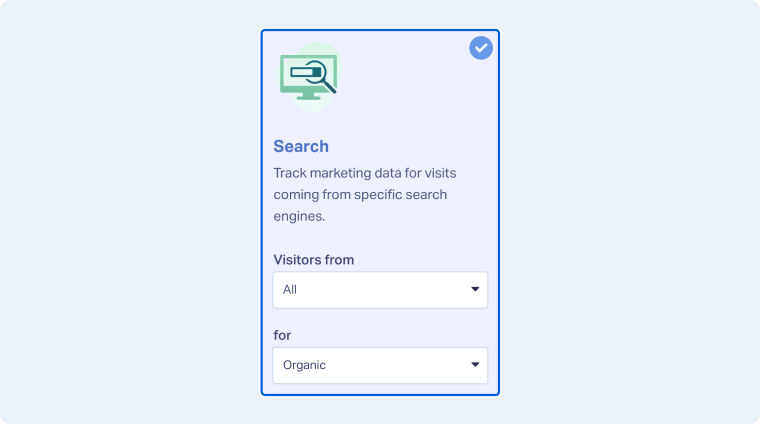
- In the Traffic Source panels, choose “Search”.
- Under the Search panel, select “All” in the first dropdown and “Organic” in the second.
- Click “Next Step” to continue. On the next page, choose whether to use Existing Numbers or Get New Numbers for your pool.
- To use existing numbers, select “Use Existing Numbers”, choose the numbers you want to include, and click “Finish”.
- To purchase new numbers, select “Get New Numbers”, then use the dropdown menus to choose your country, area code, or number type. Click “Next Step” to continue.
- Choose where to forward calls. This is the destination number that will receive calls from this pool. Click “Next Step”.
- Enable any additional features you want on your numbers, such as:
- Click “Finish” to complete your Dynamic Number Pool setup.
Related Topics
Was this page helpful?
Get a FREE presentation of WhatConverts
One of our marketing experts will give you a full presentation of how WhatConverts can help you grow your business.
Schedule a Demo






