















































Set Up a Dynamic Number Pool
Dynamic Number Pools allow WhatConverts to swap unique phone numbers for each visitor on your website. This ensures every call is accurately tied to its source, medium, and campaign, giving you complete visibility across all marketing channels.
Create Dynamic Number Pool
To create a new Dynamic Number Pool:
- In your WhatConverts profile, select “Tracking” from the top menu.
- Choose “Calls”, then “Phone Numbers”.
- Click “+ Add Dynamic Pool”.
- You have two options:
- Typical Setup: Simplified steps that allow you to create an All Traffic pool in just a few steps.
- Advanced Setup: Allows you to customize your pool and select additional information, such as traffic sources and lead data, that you want to track. With this option, you can set up Dynamic Number Pools for Search Engines, Organic Traffic, Specific Source & Medium, and Direct Visits.
Edit or Review an Existing Dynamic Number Pool
To review or modify your Dynamic Number Pool settings:
- In your WhatConverts profile, select “Tracking” from the top menu.
- Choose “Calls”, then “Phone Numbers”.
- Under the Source column, find your number pool and click “Edit Number Pool”.
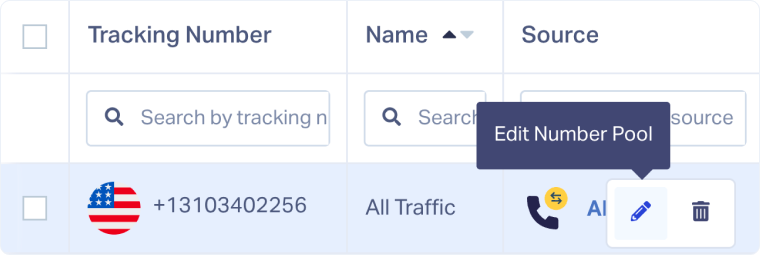
Update Pool Settings
From the Edit Number Pool page, you can modify the following details:
- Dynamic Number Pool Name: Assign a clear, descriptive name for easy identification.
- Swap Number: Enter the phone number displayed on your website that will be dynamically replaced by tracking numbers.
- Traffic Source: Choose which visitors to track:
- All Traffic: Tracks calls from all visitors, regardless of source.
- Search: Tracks calls from search engine visitors.
- Web Referral: Tracks visitors who arrive from other sites.
- Source & Medium: Tracks calls using UTM source and medium parameters.
- Direct Visit: Tracks calls from visitors entering your site directly.
- Assigned Tracking Numbers: Select which existing numbers to include in the pool.
- Trigger URLs: Define specific URLs that will trigger number swaps. Leaving this blank applies swaps across all site pages.
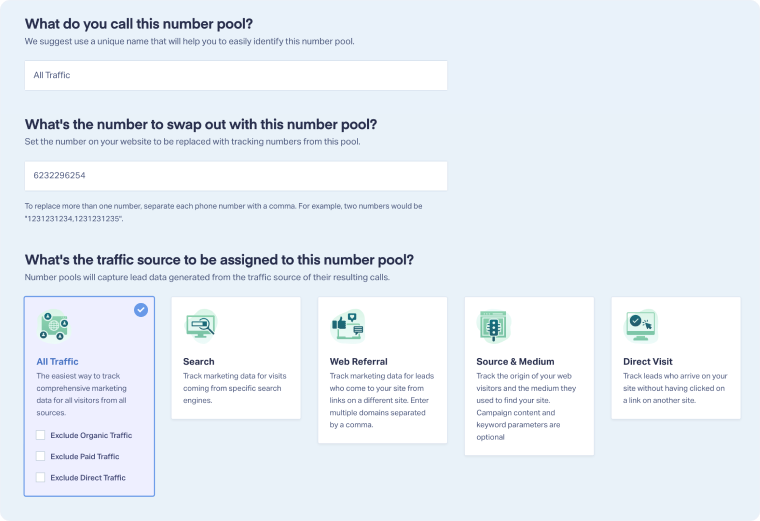
After making changes, click “Finish” to apply your updates.
Related Topics
Was this page helpful?
Get a FREE presentation of WhatConverts
One of our marketing experts will give you a full presentation of how WhatConverts can help you grow your business.
Schedule a Demo






