















































Manage Scheduled Reports
Once you’ve scheduled reports in WhatConverts, you can manage them any time to stay organized and ensure your reports continue sending correctly.
See Schedule a Report if you haven’t created one yet.
How It Works
Scheduled Reports are managed from the Scheduled Reports page. You can:
- View all scheduled reports.
- Edit delivery frequency, recipients, and attached reports.
- Pause or delete reports you no longer need.
Steps to Manage Scheduled Reports
To view and manage your scheduled reports:
- From your WhatConverts dashboard, navigate to Reports.
- Open “Scheduled Reports”.
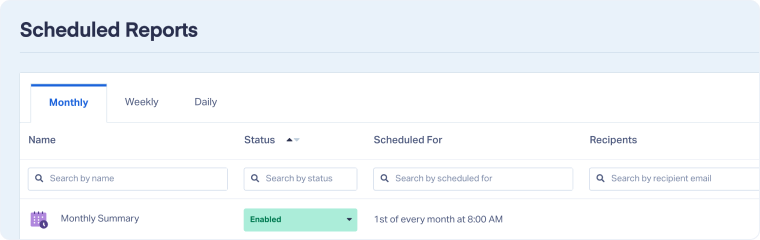
- Review your list of scheduled reports. You’ll see each report’s name, status, delivery frequency, and recipients.
- To edit a scheduled report, click the “Edit” icon next to it.
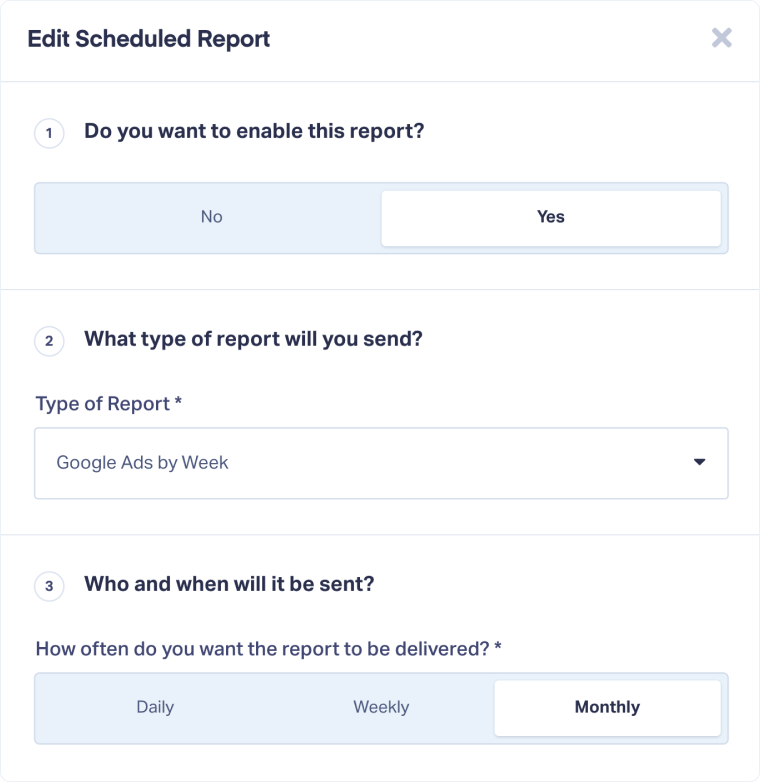
- Update the report type, delivery frequency, or recipients as needed.
- Click “Update Scheduled Report” to save your changes.
- To pause a report, return to the Scheduled Reports page and change the Status to “Disabled”.
- To delete a report, click the “Delete” icon next to it.
Related Topics
Was this page helpful?
Get a FREE presentation of WhatConverts
One of our marketing experts will give you a full presentation of how WhatConverts can help you grow your business.
Schedule a Demo






