















































Automate Lead Qualification and Valuation with Lead Intelligence
You can use Lead Intelligence to automatically update your Custom Fields, Quote and Sales Values, and Lead Qualification fields. This saves you time and keeps your lead data accurate and consistent.
Instead of updating leads manually in the Lead Details page, you can create automated rules that assign value and qualification based on any combination of lead attributes.
Create a Lead Intelligence Rule for Qualification and Valuation
To automate lead qualification and valuation:
- Create a Lead Intelligence rule.
- Under When, choose your trigger and define the conditions that identify the leads you want to qualify automatically.
- Under Then, define what the rule should update. For example:
- Set Quotable to “Yes”.
- Update a Custom Field like Lead Qualification to “Qualified - High Value”
- Set Quote Value based on the lead type or context
- Copy the value of an AI-generated field into your Custom Fields
- Save and activate the rule.
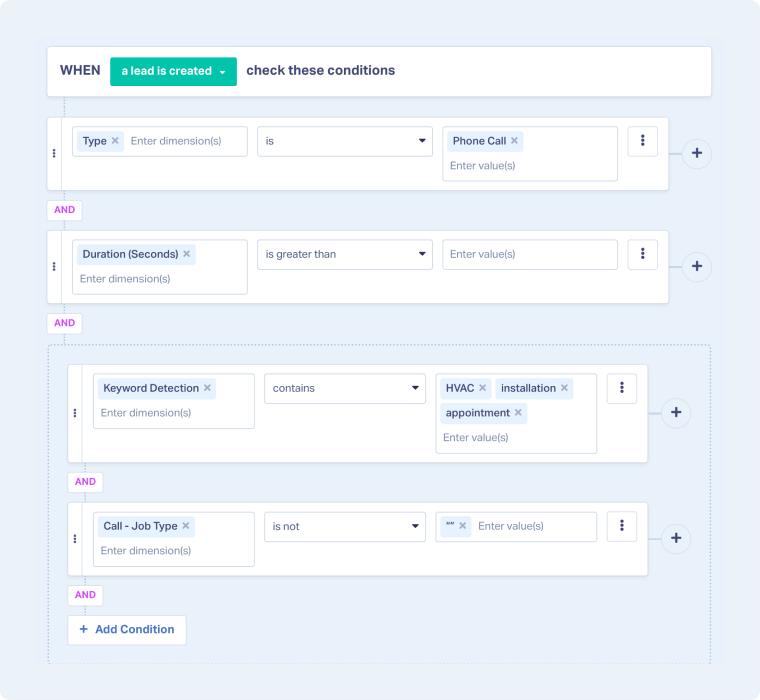
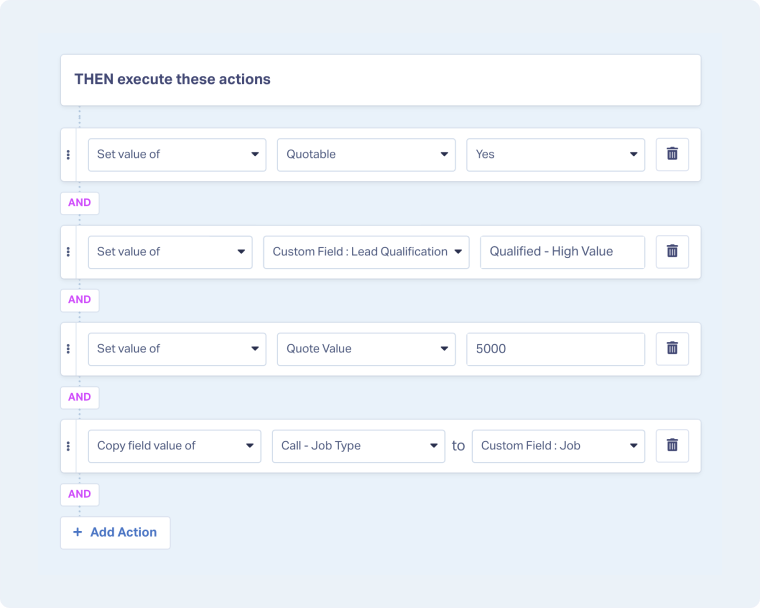
Tip: The examples above showcase different capabilities. Create rules tailored to your workflow and business goals.
Related Topics
Was this page helpful?
Get a FREE presentation of WhatConverts
One of our marketing experts will give you a full presentation of how WhatConverts can help you grow your business.
Schedule a Demo






