















































Mark Leads as Spam Using Lead Intelligence
Instead of manually marking leads as spam, you can use Lead Intelligence to automatically flag them at scale. With automation, rules detect patterns in form submissions, call transcripts, or mapped fields and apply the correct status, helping you maintain clean lead data without manual review.
Create a Rule to Mark Leads as Spam
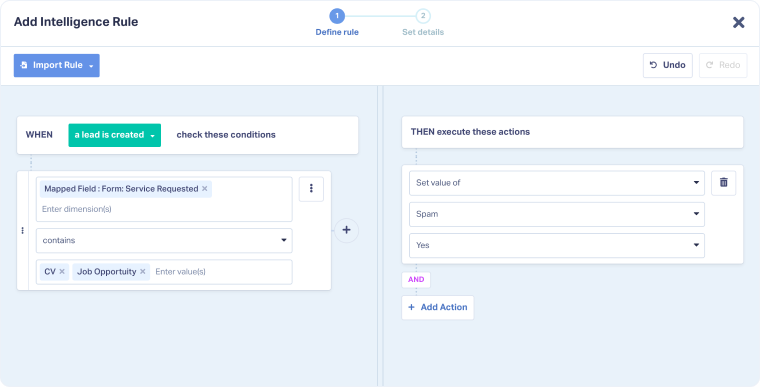
You can create a Lead Intelligence rule that identifies spammy submissions and automatically flags them.
- Create a Lead Intelligence rule.
- Set the condition: Define when the rule should trigger (e.g. Form Field: Service Requested contains “job opportunity” or “CV”).
- Set the action: Choose Set value of → Spam → Yes.
Related Topics
Was this page helpful?
Get a FREE presentation of WhatConverts
One of our marketing experts will give you a full presentation of how WhatConverts can help you grow your business.
Schedule a Demo






