















































View Spam Leads in the Lead Manager
Spam leads occur when automated bots, junk form submissions, or unwanted conversions are captured in WhatConverts. After the system or you mark leads as spam, you can easily find them in the Lead Manager to review and keep your reporting accurate.
View Spam Leads
To view spam leads in the Lead Manager:
- Open the Lead Manager.
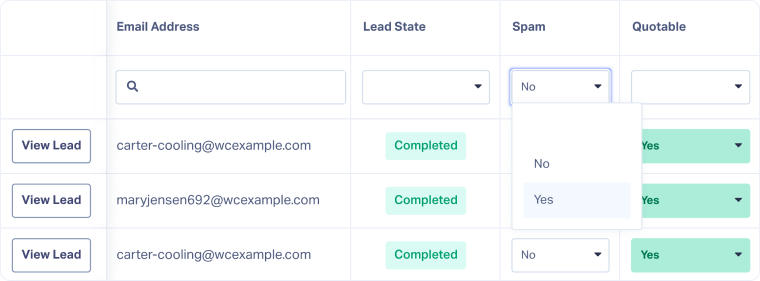
- Access or add the Spam column.
- In the Spam column, use the dropdown filter and select “Yes” to show only spam leads.
- Once you’ve finished reviewing spam leads, click the blank space above “No” in the Spam dropdown or clear the filter from the filter bar to return to viewing all leads.
Note: Spam leads are automatically removed from the Lead Manager after 30 days. To keep a spam lead, manually remove the Spam = “Yes” tag.
Related Topics
Was this page helpful?
Get a FREE presentation of WhatConverts
One of our marketing experts will give you a full presentation of how WhatConverts can help you grow your business.
Schedule a Demo






