















































Add a Phone Number to Track Calls on Third-Party Sites
When you want to capture calls initiated from places outside your own website (e.g. Facebook, Yelp, directory listings, classifieds), you use a third-party tracking number. This lets you know which external source drove that phone call.
Set Up a Tracking Number for Third-Party Sites
Before you begin, decide which third-party site or listing you want to assign a tracking number to. You’ll set up and label the number directly in your profile.
- In your WhatConverts profile, select “Tracking” from the top menu.
- Choose “Calls”, then “Phone Numbers”.
- Click “+ Add Phone Number.” Choose “Advanced Setup”.
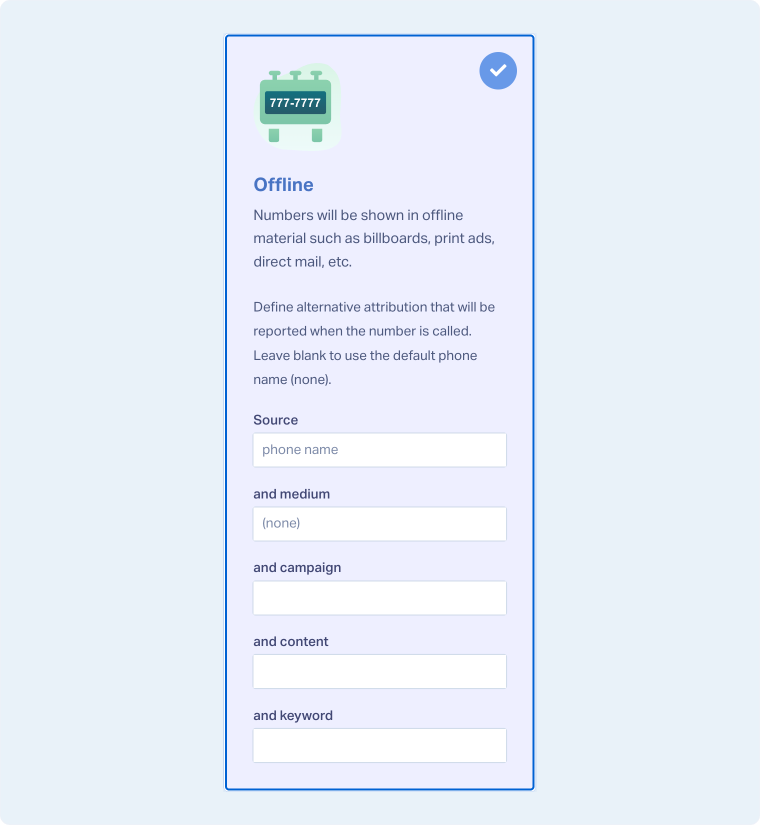
- In the setup window, select “Offline”.
- Here you can fill out the attribution that will show up on your leads. Some will have placeholders already that are semi-transparent. You can replace those with a custom value you’d prefer. You can fill in Source, Medium, Campaign, Content, and Keyword to be attributed to your leads whenever you receive a call.
- Click “Next Step”.
- Move the slider to “1”. Choose the Country, Phone Number Type (Local or Toll-Free), and Area Code.
- Click “Find Numbers”.
- Review and select your preferred number, then click “Next Step”.
- Enter the Destination Number (the line your calls will forward to) and give your tracking number a descriptive name.
- Review and adjust optional features such as Call Recording, Call Greeting, or Call Whisper as needed. Click “Finish”.
Tip: Name each third-party number based on its platform (for example, “Yelp Business Page” or “Facebook Ad”) to keep reporting clear and organized.
Where to Use Third-Party Tracking Numbers
After creating the number, include it on any external platform where potential customers may find you:
- Business listings such as Yelp
- Social media profiles like Facebook or Instagram
- Online directories or industry-specific listing sites
- Digital ads that display a phone number directly
Related Topics
Get a FREE presentation of WhatConverts
One of our marketing experts will give you a full presentation of how WhatConverts can help you grow your business.
Schedule a Demo






