















































Add a Static Phone Number to Track Calls to Your Website
You can add a static tracking number to your website to monitor incoming calls from specific sources or campaigns. Static numbers display the same number to all visitors and report consistent attribution for every call they receive.
Add a Static Phone Number
Follow these steps to create a static tracking number for your website.
- In your WhatConverts profile, select "Tracking" from the top menu.
- Choose "Calls", then "Phone Numbers".
- Click "+ Add Phone Number".
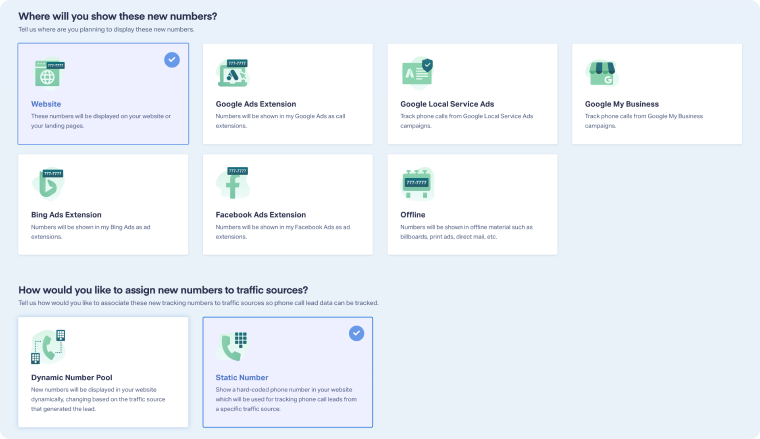
- Select "Advanced Setup", then choose Website.
- Under "How would you like to assign new numbers to traffic sources?", select "Static Number".
- Select the Traffic Source for the number. Whatever attribution you choose will always appear as the source for all calls to this number. Click "Next Step".
- Use the dropdowns to purchase or select an existing tracking number you prefer. Click "Next Step".
- Name the number, choose where calls will forward to, and select which number on your website to swap out. Click "Next Step".
- Choose any additional features you want to enable, such as call greeting, transcription, or messaging.
- Click "Finish" to complete setup.
Note: You can’t have a Static Number and a Dynamic Number Pool swapping in at the same time. If a Number Pool is available, it always takes precedence, and the Static Number will show as Not swapped.
Related Topics
Was this page helpful?
Get a FREE presentation of WhatConverts
One of our marketing experts will give you a full presentation of how WhatConverts can help you grow your business.
Schedule a Demo






