















































Enable Call Greeting
Call Greetings lets you play a short message to the caller before their call is connected. Greetings are often used to identify the business or provide brief instructions, creating a professional first impression for incoming calls.
Note: Once saved, the greeting will automatically play at the start of each call before connecting to the destination number.
Set Up a Call Greeting
Before you begin, make sure you’ve already set up a tracking number. You’ll configure the greeting directly from that number’s settings.
- In your WhatConverts profile, select “Tracking”, then “Calls”.
- Choose “Phone Numbers”.
- Locate the number you’d like to add a greeting to and select the pencil icon to edit it.
- In the “Greeting Message” section, choose one of the following options:
- Text-to-Speech (Say Message): Enter a message, and WhatConverts will generate an automated voice greeting.
- Upload an Audio File (Play Message): Use your own pre-recorded greeting in MP3 or WAV format.
- After adding your message, select “Finish”.
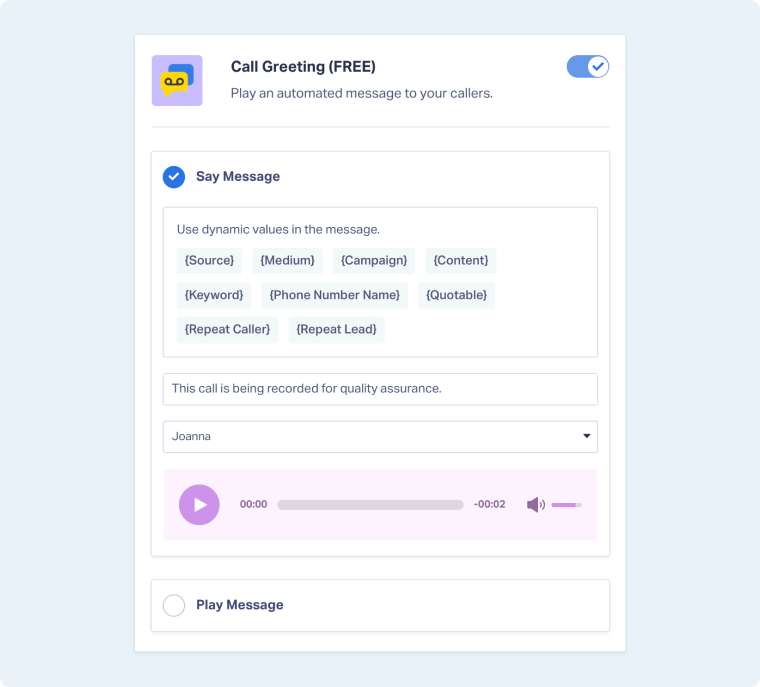
Note: When setting up text-to-speech, you can use dynamic variables like {source} and {medium} to have the message say the lead’s tracked attribution. The Call Whisper box will include a list of all dynamic variables that you can utilize.
Tip: You can edit multiple phone numbers at once by selecting the checkboxes to the left of each number in your list. Any changes you make, such as enabling features or updating call options, will apply to all selected numbers simultaneously.
Related Topics
Get a FREE presentation of WhatConverts
One of our marketing experts will give you a full presentation of how WhatConverts can help you grow your business.
Schedule a Demo






