















































Filter Spam Calls with the Spam Challenge
The Spam Challenge blocks unwanted or automated calls by requiring suspicious callers to press "1" before connecting. Since most spam calls are automated, this feature filters them out before they reach your destination number.
Before you start, see What is Call Tracking? for an overview of how call tracking works.
Enable the Spam Challenge
To activate the Spam Challenge in your profile:
- In your WhatConverts profile, select “Tracking” from the top menu.
- Choose “Calls”, then "Spam Challenge".
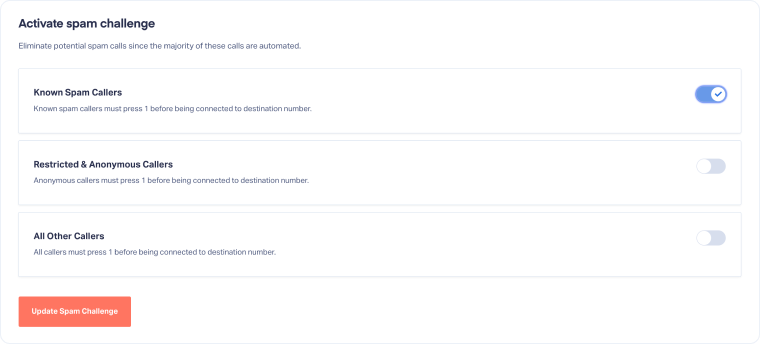
- Under Activate spam challenge, toggle on the call types you want to protect:
- Known Spam Callers: Filters numbers flagged in WhatConverts' internal database and Nomorobo's spam database.
- Restricted & Anonymous Callers: Blocks calls with hidden or unavailable caller IDs.
- All Other Callers: Requires all callers to press "1" before connecting.
- Click "Update Spam Challenge" to save your settings.
Tip: Start with Known Spam Callers only to avoid blocking legitimate callers who may have restricted caller IDs (like government agencies or hospitals).
Disable the Spam Challenge
To turn off the Spam Challenge:
- In your WhatConverts profile, select “Tracking” from the top menu.
- Choose “Calls”, then "Spam Challenge".
- Under Activate Spam Challenge, toggle off all call types.
- Click "Update Spam Challenge" to save your changes.
Mark a Lead as Spam
You can manually flag a spam lead and improve future call filtering. When you do so, WhatConverts automatically updates its spam detection database. This helps identify future spam callers across all profiles in your account.
Related Topics
Get a FREE presentation of WhatConverts
One of our marketing experts will give you a full presentation of how WhatConverts can help you grow your business.
Schedule a Demo






