















































Port US Local Numbers Out of WhatConverts
You can move your existing US local phone numbers from WhatConverts to another carrier. To complete the port-out process, you must first approve the numbers in your WhatConverts account. Your phone carrier will then submit the port-out request.
Before You Begin
- You must be a Master Account user to approve numbers for port out.
- This process only supports US local phone numbers.
- If you need to approve toll-free or international numbers, review the standard Port a Number out of WhatConverts article and contact the Support team with the requested information.
Approve Numbers for Port Out
To approve numbers from your profile:
- Log in to the profile that contains the numbers you want to port out.
- Select “Tracking”, then “Calls”, and then “Phone Numbers”.
- Click the “three-dot” button.
- Select “Request Number Port Out”.
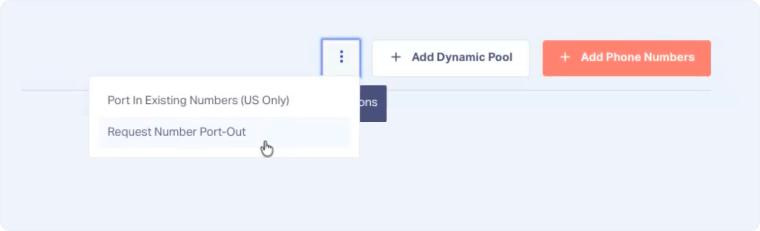
Step 1: Select Numbers
On the first page:
- Select the tracking numbers you want to approve for port out.
- Click “Continue”.
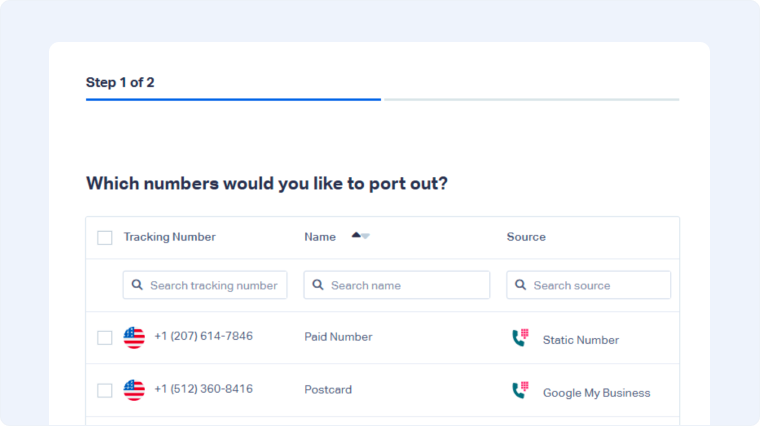
Step 2: Provide Port-Out Details
On the second page:
- Enter the reason for the port out.
- Click “Request Number Port Out”.

Step 3: Review Approved Numbers
After submitting:
- The selected numbers are approved for port out in WhatConverts.
- The numbers will appear on the Phone Numbers page with a port-out notification.
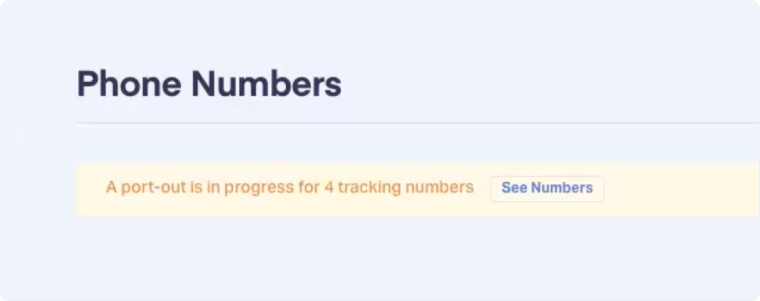
After Approving Numbers
If your carrier is unable to complete the port-out request:
- Your carrier must submit the port-out request through their standard process.
- Since the numbers have already been approved, the request can proceed without the Support team’s involvement.
Note: Approving numbers does not transfer them. Your carrier must still initiate and complete the port-out process.
If Your Port-Out Is Delayed
If your carrier is unable to complete the port-out request:
- Confirm the correct numbers were approved in WhatConverts.
- Contact your carrier to verify that their request was submitted correctly.
- If needed, contact WhatConverts Support for assistance.
Was this page helpful?
Get a FREE presentation of WhatConverts
One of our marketing experts will give you a full presentation of how WhatConverts can help you grow your business.
Schedule a Demo






