















































Analyze Performance with Quick Reports
Quick Reports are a fast, powerful way to evaluate marketing performance and uncover revenue-driving opportunities directly from the Lead Manager, so you can make confident, data-driven decisions without interrupting your workflow.
By combining Quick Reports with the Lead Manager and Report Builder analysis, you can:
- Move from overview to detail. Start with a quick snapshot, then explore deeper metrics when needed.
- Find ROI faster. Instantly identify which channels, campaigns, or services drive the most leads and revenue.
- Act with confidence. Base optimization and budget decisions on accurate lead and sales data.
To understand what Quick Reports are and how they work, see What is a Quick Report?.
Step 1. Start in the Lead Manager
Begin in the Lead Manager, where all your calls, forms, chats, and transactions are captured. Here, you can add your desired columns, filter leads by date or field, and create custom views to evaluate your data before running a Quick Report.
Once you’ve set your filters to show only the relevant data for a specific time period or segment, use Quick Reports to turn those filtered leads into clear, actionable performance insights.
Note: Filters in the Lead Manager automatically apply to Quick Reports.
Step 2. Create a Quick Report to Visualize Results
Choose one of your columns and run a Quick Report on that field to extract quick insights.
You can also add a second dimension using the “+” button. This helps you compare performance across different combinations (e.g., Source and Medium) to understand which efforts deliver more high-value leads or revenue.
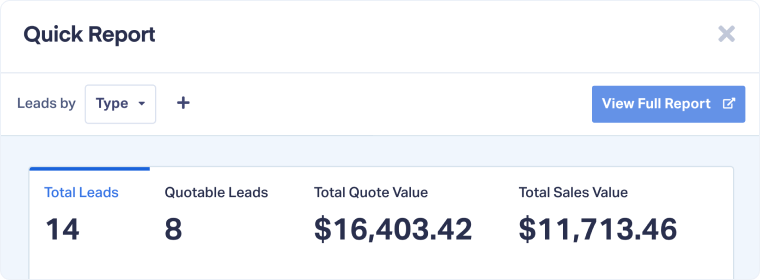
Step 3. Review Performance
Once your Quick Report loads, you can start interpreting the results. Common ways to use this view include:
- Comparing total leads, Quote Value, and Sales Value across key dimensions.
- Spotting high-performing or underperforming channels, campaigns, landing pages, agents or services.
- Drilling down into lead-level data by clicking “View Leads” on any result.
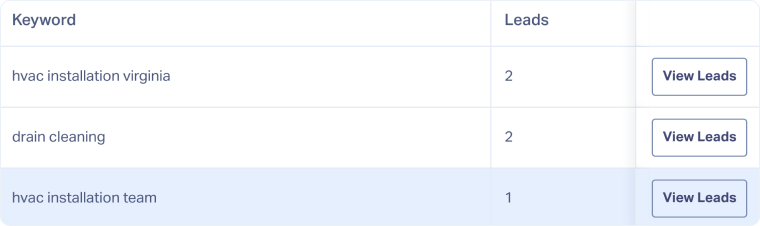
This gives you immediate clarity on which marketing efforts deliver the best return.
Step 4. Expand Analysis in the Report Builder
To go deeper, click “View Full Report” at the top of your Quick Report.
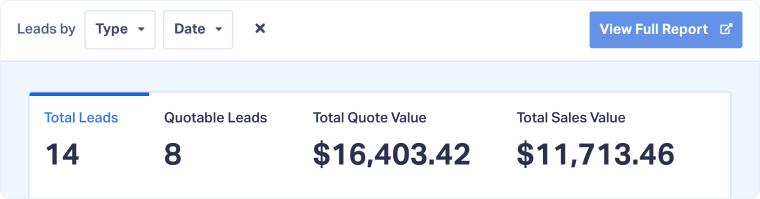
This opens the Report Builder, preloaded with your selected dimensions and filters for extended analysis.
In the Report Builder, you can:
- Add filters such as campaign, keyword, or landing page.
- Adjust chart types, filters, or additional dimensions.
- Compare current data with previous periods.
- Save or export reports for recurring performance reviews or client updates.
By using both tools together, you can move seamlessly from quick insights to full ROI analysis, all within a few clicks.
Step 5. Take Action on Insights
Once you’ve uncovered performance insights with Quick Reports and refined them in the Report Builder, you can turn data into meaningful action:
- Reallocate budget toward channels or campaigns that drive the most qualified leads, quote value, or sales revenue.
- Refine resources and content. Identify which landing pages generate more conversions or revenue, then use that data to improve or replicate top performers.
- Improve ad performance. Analyze keywords or ad groups that drive the highest-value leads to optimize bids and targeting for ROI.
- Enhance sales accountability. Review sales rep performance by comparing the number of quotable leads or total sales value per rep, and use these insights for coaching or reward structures.
- Prioritize high-value services or products. See which business areas or service types generate the most revenue to focus marketing and operational resources there.
- Uncover growth opportunities. Spot underperforming channels or campaigns and use detailed insights to troubleshoot messaging, targeting, or conversion paths.
Quick Reports give you the information you need to act with precision, helping you make smarter marketing, sales, and operational decisions that drive measurable growth.
Related Topics
Get a FREE presentation of WhatConverts
One of our marketing experts will give you a full presentation of how WhatConverts can help you grow your business.
Schedule a Demo






