















































Use an Existing Step as the Next Step in a Call Flow
The Existing Step option allows you to connect a Call Flow path to a step that already exists elsewhere in your Call Flow. This eliminates the need to duplicate steps and keeps your Call Flow organized by reusing steps that multiple paths need to reach.
Link to an Existing Step
To connect a Call Flow path to an existing step:
- Open the Call Flow and add a new step.
- Select "Existing Step" from the available step options.
- Drag the crosshairs to the target step: Click and drag the crosshairs icon to the step that should happen next in the Call Flow.
- Release the crosshairs to create the connection.
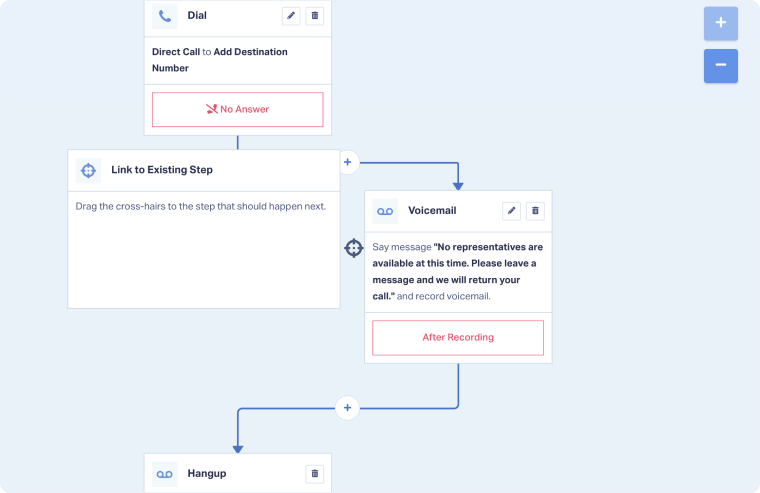
The path will now route to the existing step you selected, and callers will continue through the Call Flow from that point.
Tip: Use Existing Step to create "merge points" in your Call Flow. For example, after different Menu options or routing paths, you can direct all callers to the same Dial step or Voicemail step instead of creating duplicates.
Note: The Existing Step option creates a link, not a copy. Any changes you make to the linked step will affect all paths that connect to it.
When to Use Existing Step
Use the Existing Step option when:
- Multiple paths lead to the same destination: Different menu options, routing rules, or schedules all need to reach the same final step.
- You want to avoid duplicating steps: Instead of creating multiple identical Dial or Voicemail steps, link to one shared step.
- Creating loops or repeated actions: Connect back to an earlier step to repeat part of the Call Flow (e.g., return to a menu after an invalid selection).
- Simplifying complex Call Flows: Reduce visual clutter by consolidating paths that lead to common steps.
Related Topics
Get a FREE presentation of WhatConverts
One of our marketing experts will give you a full presentation of how WhatConverts can help you grow your business.
Schedule a Demo






