















































Manage Your Lead Manager Views
Managing your saved views allows you to organize, edit, and clean up the layouts you’ve created in the Lead Manager. You can rename views, delete ones you no longer need, or decide which views appear directly in the Lead Manager tabs for quick access.
Manage Views
To manage your Lead Manager Views:
- Open the Lead Manager.
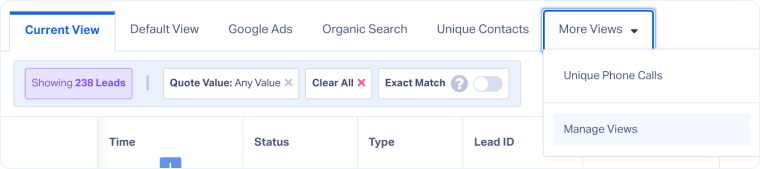
- Click “More Views” and select “Manage Views”.
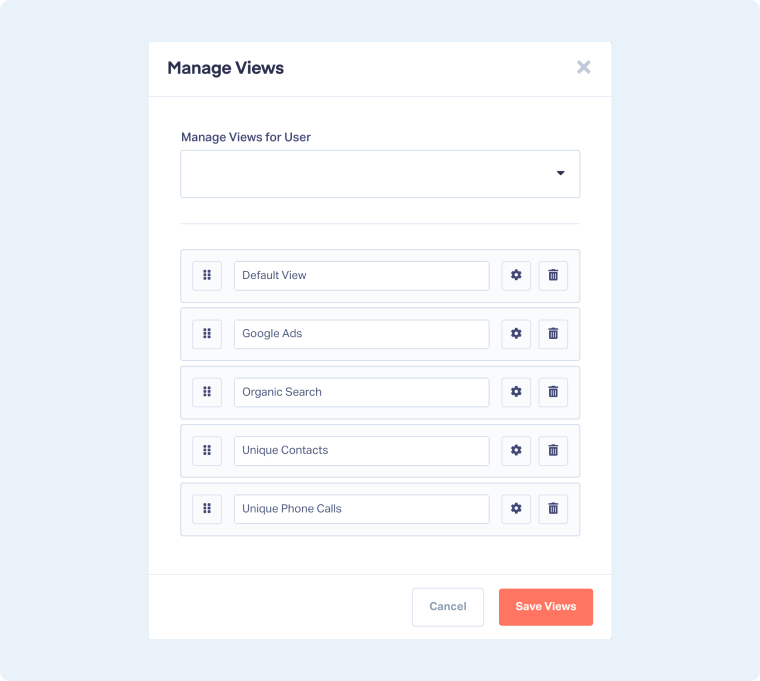
- For each view, you can:
- Rename the view by editing its name.
- Use the gear icon to Set as View, which pins the view to the main Lead Manager tabs.
- Delete the view if it’s no longer needed.
- Rearrange the views by dragging and dropping them in the correct order.
- When finished, click “Save Views”.
Note: Only Master Account Users can manage views for other users.
Tip: Only the top views will show in the Lead Manager tabs for quick access. Place the views you use most often at the top, so you don’t have to click “More Views” each time.
Related Topics
Was this page helpful?
Get a FREE presentation of WhatConverts
One of our marketing experts will give you a full presentation of how WhatConverts can help you grow your business.
Schedule a Demo






