















































Add Your Tracking Script Using the WordPress Plugin
Adding your tracking script using the WhatConverts Plugin is the easiest way to enable lead tracking on your WordPress website. The plugin automatically installs the WhatConverts tracking script on every page, so you can start capturing leads right away.
To learn more about the tracking script, see What is the WhatConverts Tracking Script.
Note: Some integrations do not work with the WhatConverts Plugin. If you need to install the tracking script using a different plugin, use the Insert Headers and Footers plugin instead.
If you do not want to use WordPress, see Add Your Tracking Script Using Google Tag Manager or Add Your Tracking Script Manually.
Step 1: Install the WhatConverts Plugin
To install the WhatConverts plugin:
- Log in to your WordPress Admin Dashboard.
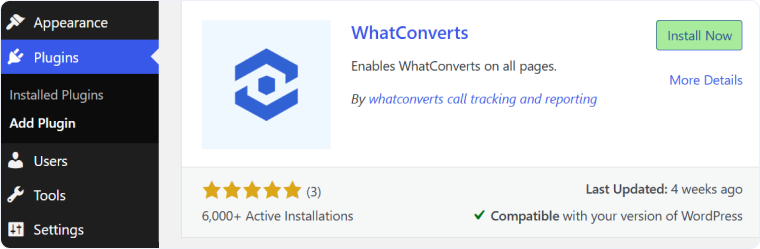
- In the left-hand menu, go to "Plugins" and then "Add Plugin".
- Search for "WhatConverts".
- Click "Install Now", then "Activate".
Step 2: Add the Tracking Script
To add your tracking script using the WhatConverts Plugin:
- Log in to your WhatConverts account.
- Go to the Tracking tab and select "Tracking Code".
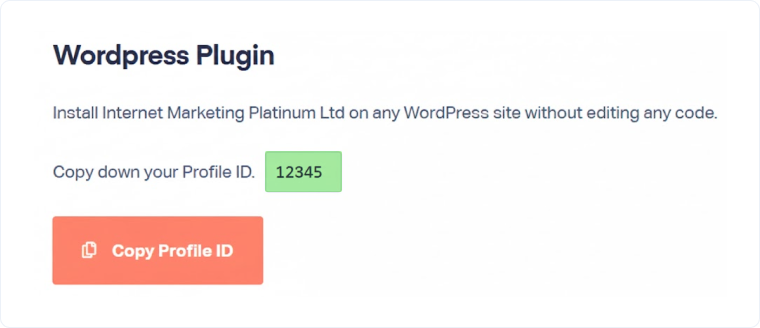
- On the Tracking Code page, find the WordPress Plugin section.
- Under WordPress Plugin, copy your Profile ID.
- Log in to your WordPress Admin Dashboard.
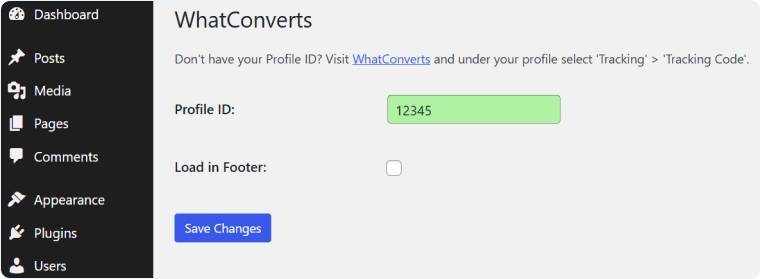
- Go to "Settings" and then "WhatConverts".
- Paste your Profile ID into the field provided.
- Click "Save Changes".
Related Topics
Get a FREE presentation of WhatConverts
One of our marketing experts will give you a full presentation of how WhatConverts can help you grow your business.
Schedule a Demo






