


What is the Lead Manager?
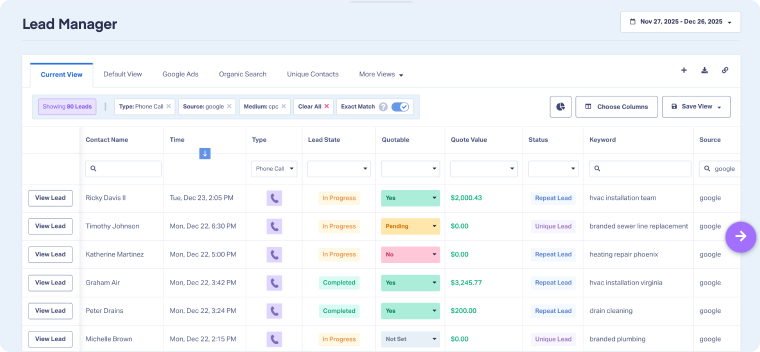
The Lead Manager is the core of WhatConverts. It’s composed of the Lead Overview Chat and the spreadsheet-like table where every lead is captured, displayed, and organized, whether it comes from a call, form, chat, or eCommerce.
Think of it as your command center for lead management: a single place to access, evaluate, categorize, qualify, and value your leads. By turning raw lead data into quality-focused, actionable records, the Lead Manager ensures your reporting is accurate and meaningful, your marketing performance optimizations are tied to real revenue, and your decisions are always based on high-quality data you can trust.
Core Capabilities of the Lead Manager
The Lead Manager table is designed to give you both big-picture clarity and granular control. From here, you can manage the entire lifecycle of a lead, from first click to revenue attribution, without switching between tools.
- Lead Table View: A sortable, filterable table showing every lead with fields like source, medium, keyword, lead type, sales/quote value, and contact details. This is the foundation of lead management in WhatConverts.
- Lead Details Access: From the table, you can open any lead record to drill deeper, reviewing the customer journey, call transcripts, form submissions, or AI-powered insights. This lets you quickly verify quality, confirm context, and tie leads directly to revenue.
- Customization Tools: Choose which fields are displayed, reorder columns, group leads by category, or save custom views. This flexibility ensures you see exactly the data you need for your business and workflow.
- Management Actions: Within the table, you can categorize leads with Custom Fields, qualify them manually or with Lead Intelligence, and assign Quote or Sales Values. This makes your data not just organized but ready for accurate reporting and performance optimization.
Why Use the Lead Manager?
Without the Lead Manager, lead data is often scattered across spreadsheets, CRMs, and disconnected ad and analytics platforms, making it hard to track performance or prove ROI. The Lead Manager solves this by bringing product and process together in one place:
- Centralize every lead: Capture all calls, forms, chats, and transactions in one unified table.
- Evaluate and manage effectively: Quickly evaluate leads from the table view or open the Lead Details directly from there to get deeper insights.
- Work smarter: Use filters, grouping, and saved views to surface insights quickly without exporting data or juggling multiple tools.
- Categorize and qualify: Add context with Custom Fields and qualify leads to filter out junk and low-value opportunities, while surfacing revenue-driving opportunities.
- Assign real value: Add Quote Value and Sales Value so every lead is tied directly to revenue.
- Enable reporting & optimization: High-quality, standardized lead data flows into your reporting, empowering you to identify top-performing campaigns. Best of all, qualified lead data is sent automatically to ad platforms, enabling you to optimize spend and performance without manual effort.
The Lead Manager doesn’t just store leads; it’s the process hub that prepares your data for ROI reporting and marketing optimization.
Examples of How Businesses Use the Lead Manager
- Marketing Agencies: Qualify and value leads to prove ROI, then reallocate budget toward the campaigns driving the highest-value opportunities.
- Sales Teams: Apply Custom Fields like Sales Rep or Region to automatically route leads, ensuring fast follow-up and accountability across the sales process.
- Business Owners: Use the Lead Manager to spot which service lines or product categories generate the most revenue and focus resources there.
Related Topics
Get a FREE presentation of WhatConverts
One of our marketing experts will give you a full presentation of how WhatConverts can help you grow your business.
Schedule a Demo






