















































Use Dimension Groupings in Reports
Who has access to this feature?
Available on: Report Builder - Pro and Elite Plans
Access level: All Users
After creating Dimension Groupings and organizing the Lead Manager with them, you can use Dimension Groupings in reports to simplify complex data. Instead of analyzing hundreds of landing pages, campaign IDs, or keywords, you’ll see grouped categories like “HVAC Services”, “Electrical Services”, or “Plumbing Services”. This makes your reports easier to read, share, and act on.
Use Dimension Groupings in Quick Reports
To create a Quick Report using a Dimension Grouping:
- Open the Lead Manager.
- Locate the Dimension Grouping column you want to report on.
- Click on “Quick Report by [Dimension Grouping]” next to the column title.
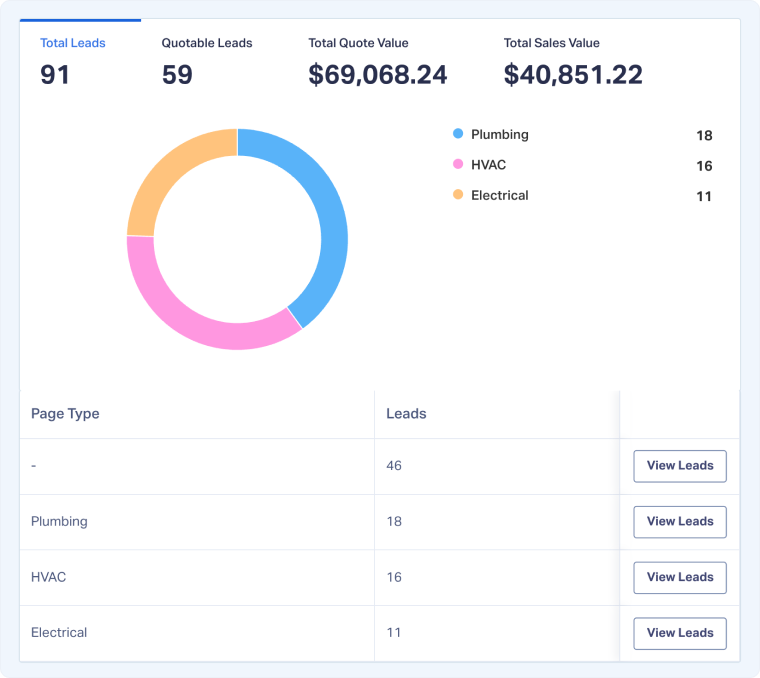
You’ll instantly see a report that compares performance across the grouped categories you defined, such as service lines, campaign names, or keyword groupings.
Use Dimension Groupings in Custom Reports
To create a Custom Report using a Dimension Grouping:
- Start with a Quick Report using the Dimension Grouping you want to analyze.
- Click “View Full Report” to open the Report Builder.
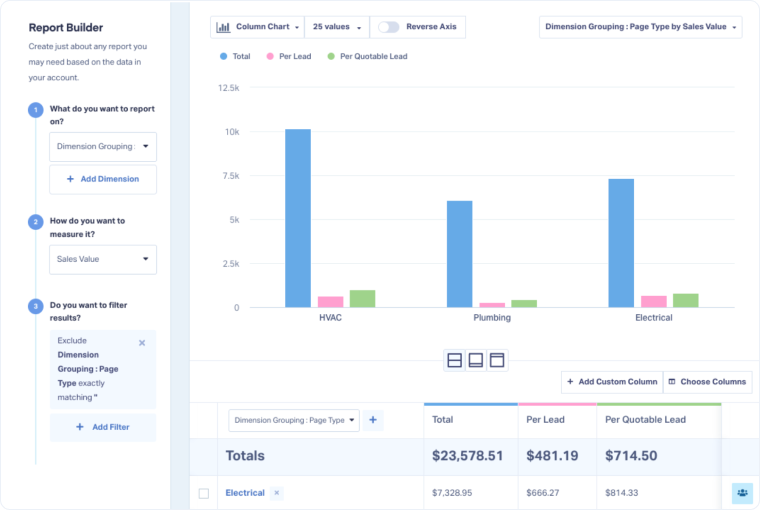
From here, you’ll see your Dimension Grouping used as the starting point in the report. You can add filters, columns, or other dimensions to refine your analysis.
Related Topics
Get a FREE presentation of WhatConverts
One of our marketing experts will give you a full presentation of how WhatConverts can help you grow your business.
Schedule a Demo






