















































Use Mapped Fields in Reports
Who has access to this feature?
Available on: Report Builder - Pro and Elite Plans
Access level: All Users
After cleaning and organizing your data with Field Mappings and evaluating leads in the Lead Manager, you can use Mapped Fields to create reports that show how different services, reps, or service areas are performing. Use them in Quick Reports and Custom Reports to get deeper insights and make informed marketing decisions.
Use Mapped Fields in Quick Reports
Quick Reports are built right into the Lead Manager. They let you quickly generate a visual report based on any Custom Field, without leaving the page.
To create a Quick Report using Mapped Fields:
- Open the Lead Manager.
- Locate the Mapped Field column you want to filter by, or add it if it is not already present.
- Generate the Quick Report using the Mapped Field.
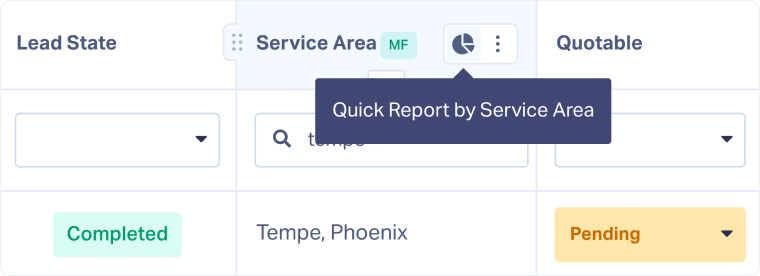
You’ll instantly get a breakdown that helps you compare results across services, reps, or any other custom field.
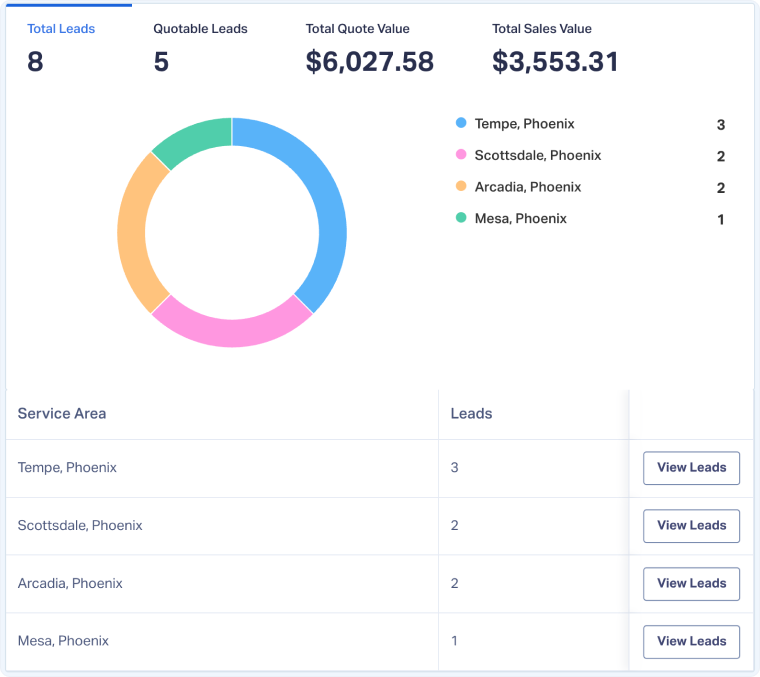
Use Mapped Fields in Custom Reports
Custom Reports give you more control and flexibility to visualize your leads using Mapped Fields.
They’re ideal when you need to filter or use multiple dimensions.
The easiest way to create a Custom Report using a Mapped Field is:
- Start with a Quick Report using the Mapped Field you want to analyze.
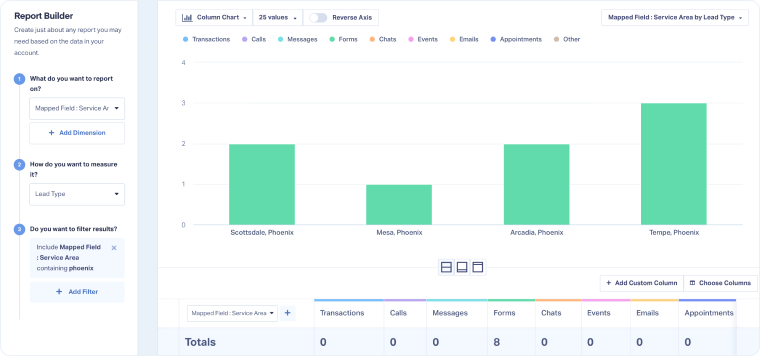
- Click “View Full Report” to open the Report Builder.
You’ll now see your Mapped Field used as the starting point in the report. From here, you can add dimensions, filters, or columns to tailor your view.
Tip: Learn more in our help article Create Custom Reports With the Report Builder.
Related Topics
Get a FREE presentation of WhatConverts
One of our marketing experts will give you a full presentation of how WhatConverts can help you grow your business.
Schedule a Demo






