















































Mark a Lead as Spam Manually
Spam leads can come from bots, junk form submissions, or unwanted conversions. To keep your data clean and your reports accurate, you can manually mark any lead as spam in the Lead Manager or inside the Lead Details page. Once marked, spam leads are excluded from the Lead Manager and all reports by default.
You can view spam leads in the Lead Manager to access and review them.
Note: Spam leads are automatically removed after 30 days. To keep a lead, switch the Spam status back to “No” before that time.
Mark a Lead as Spam from the Lead Manager
You can quickly mark a lead as spam directly from the Lead Manager table:
- Open the Lead Manager.
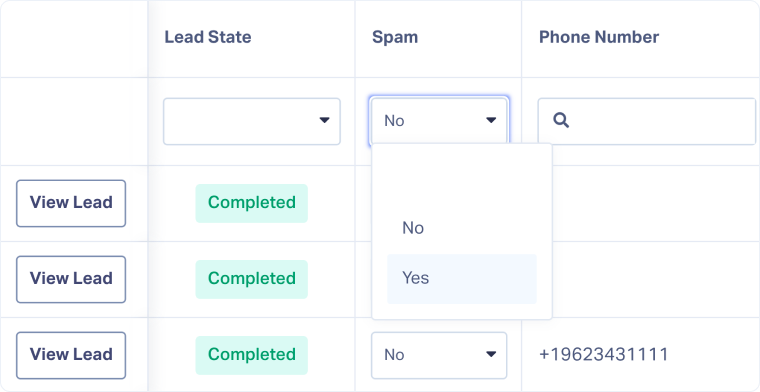
- Go to the Spam column, or add it if needed
- Locate the lead you want to mark as spam.
- In the Spam column, open the dropdown and select “Yes”.
- The lead will now be flagged as spam and excluded from the Lead Manager and Reporting by default.
Note: After a lead is marked as spam, any future leads using the same phone number will automatically trigger the Spam Challenge across all WhatConverts accounts.
Mark a Lead as Spam from the Lead Details Page
You can also mark a lead as spam inside the Lead Details page:
- Open the Lead Manager.
- Click “View Lead” for the lead you want to update.
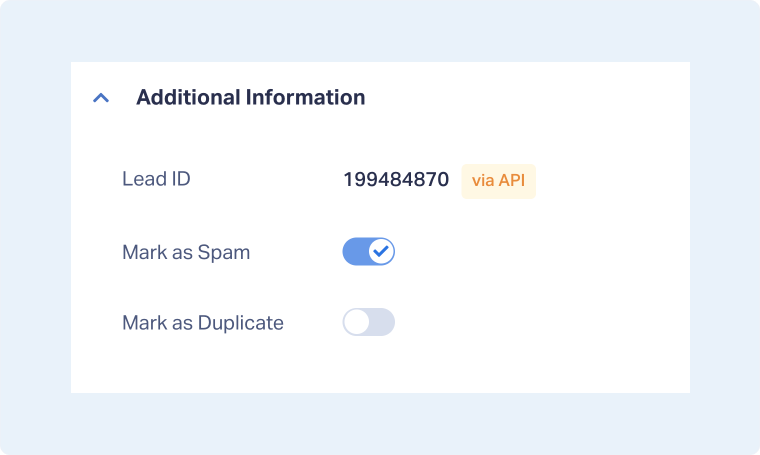
- In the Additional Information section, toggle “Mark as Spam”.
- The lead will now be flagged as spam and excluded from the Lead Manager and Reporting by default.
Related Topics
Get a FREE presentation of WhatConverts
One of our marketing experts will give you a full presentation of how WhatConverts can help you grow your business.
Schedule a Demo






